

How a 30B Model Runs on Your Laptop
Big tech builds massive GPU data centers for LLMs, yet laptops can run models like Llama or Mistral locally. How is this done?
Join the DZone community and get the full member experience.
Join For FreeBig tech companies spend tens of billions of dollars constructing data centers packed with high-end GPUs to train and serve large language models (LLMs). Yet a well-optimized laptop or ordinary PC can run many of the same models locally with usable interactive performance.
The difference is not magic; it is a combination of aggressive but carefully engineered quantization, modern memory architectures, bandwidth-aware software kernels, and model designs that prioritize efficiency for single-user inference rather than massive concurrent serving or training.
Training a frontier model still requires full-precision (or near-full-precision) arithmetic across thousands of GPUs for months, consuming enormous energy and capital. Inference, by contrast, only needs the finished weights. Those weights can be compressed dramatically while preserving most useful capabilities for everyday tasks such as coding, writing, summarization, and conversational reasoning.
1. Quantization: Reducing Precision to Shrink Memory
During training, weights are typically stored as 16-bit floating-point numbers (FP16 or BF16). Memory requirements scale linearly:
- A 7–8B model in FP16 needs roughly 14 to 16 GB just for the weights.
- A 30B class model needs ~60 GB.
- A 70B model needs ~140 GB.
Quantization converts these high-precision values into lower-bit representations. Most commonly, 4-bit or 8-bit integers for consumer hardware. The dominant format for local use is GGUF (used by llama.cpp and tools built on it).
Community defaults favor variants such as Q4_K_M (roughly 4.5–4.8 bits per weight on average, with smarter allocation of higher precision to more important tensors via K-quants and importance matrices).
Approximate file sizes for common models at Q4_K_M:
- 7–8B → ~3.8–4.8 GB
- 13–14B → ~7–9 GB
- 30–34B → ~16–22 GB
- 70B → ~35–42 GB
Techniques such as Activation-Aware Weight Quantization (AWQ) protect the small fraction of weights that matter most (those associated with large activations) by keeping them at higher precision while aggressively quantizing the rest. GPTQ uses second-order information from a calibration set to minimize error.
Importance-matrix methods in GGUF achieve similar goals. Across standard benchmarks (perplexity, MMLU, HumanEval, etc.), well-executed 4-bit quantization typically retains 92–98% of the original full-precision model’s quality for everyday use.
Larger models often degrade less relatively than smaller ones because they have more redundancy. Quality loss is more noticeable on precise numerical reasoning or multi-step math than on creative writing or general chat; the gap is frequently smaller than the variance between different sampling temperatures or prompt styles.
Higher quants (Q5_K_M, Q6_K, Q8_0) trade size for still-better fidelity when memory allows. Lower ones (Q3_K, Q2_K) enable even larger models on constrained hardware at a steeper quality cost. The practical rule is that Q4_K_M is the default “sweet spot” for most laptop and mid-range GPU users.
2. Unified Memory and Layer Offloading
Traditional discrete-GPU PCs keep system RAM and GPU VRAM separate. Moving multi-gigabyte weight tensors across the PCIe bus creates a severe bottleneck, especially for generation (which is memory-bandwidth bound).
Apple Silicon (M-series) uses a unified memory architecture: CPU, GPU, and Neural Engine share one high-bandwidth pool. A 32 GB or 64 GB Mac can therefore load models far larger than a similarly priced discrete GPU would allow, because there is no copy overhead and the entire memory capacity is available. On Windows and Linux machines with limited VRAM, frameworks such as llama.cpp support hybrid layer offloading, place as many layers as possible on the GPU and leave the remainder on system RAM (or even mmap from disk in extreme cases). This lets a machine with only 8–12 GB VRAM still run 13B–30B-class models, albeit more slowly as the fraction of offloaded layers grows. Modern runtimes also quantize the KV cache (the conversation history that grows with context length), further reducing peak memory.
In practice, this means a mid-range laptop with 16–32 GB total memory can comfortably host a 7–13B model at interactive speeds, while a high-end Mac or workstation with 64–128 GB can handle 70B-class models (or large MoEs) at usable rates.
3. Memory-Bandwidth Optimizations
During auto-regressive text generation, the model must read its entire set of weights from memory for every new token, essentially. On a laptop, the limiting factor is usually memory bandwidth, not raw FLOPS. Modern runtimes (llama.cpp, Ollama, LM Studio, MLX on Apple Silicon, and higher-throughput servers such as vLLM) apply several layers of optimization:
- FlashAttention-style (or equivalent) kernels that keep intermediate attention results in fast on-chip cache rather than writing them back to main memory.
- Quantized KV cache so long contexts consume far less RAM and bandwidth.
- Highly tuned SIMD (AVX, NEON, Metal) or GPU kernels specialized for the de-quantization + matrix-vector multiplies that dominate quantized inference.
- Speculative decoding (a small draft model proposes several tokens that the main model verifies in parallel) can multiply effective throughput, sometimes by 2–3× or more on suitable hardware and workloads.
- mmap-based loading, so models start almost instantly without fully paging everything into RAM upfront.
Real-world generation speeds for well-quantized models on contemporary hardware typically fall in these ranges (single-stream, interactive use):
- 7–8B Q4: 40–150+ tokens/second depending on chip (high-end discrete GPU or recent Apple Silicon at the upper end; mid-range laptop CPU/GPU lower).
- 30B-class dense: roughly 10–50 tokens/second.
- 70B Q4: a few to ~30 tokens/second on high-memory unified systems or with heavy offloading.
Prefill (processing a long prompt) is usually much faster than decode because it can be more compute-parallel. These numbers make local chat, coding assistants, and RAG workflows practical on hardware most developers already own.
4. Architectural Improvements in the Models Themselves
Newer model designs already bake in efficiency.
- Grouped-Query Attention (GQA) and Multi-Query Attention reduce the size of the key-value cache that otherwise grows linearly with conversation length and batch size. This is especially valuable for long-context use.
- Mixture-of-Experts (MoE) architectures (Mixtral 8×7B, various Qwen and DeepSeek variants, Llama 4 Scout/Maverick, etc.) contain many specialized “expert” feed-forward networks. A router activates only a small subset (e.g., 2 out of 8, or a few out of 128) for any given token. The result is that a model with 47B total parameters may activate only ~13B per token, or a much larger model may activate only 3–17B. You therefore obtain the knowledge capacity of a far larger dense model while paying roughly the compute cost of a smaller one. Memory still has to hold (or page) all the experts, so quantization and offloading remain essential, but the speed and energy advantages for single-user inference are substantial.
Other refinements like better positional encodings, more efficient attention variants, and training recipes that improve quantization robustness further close the gap between cloud-scale and local capability.
Practical Trade-Offs
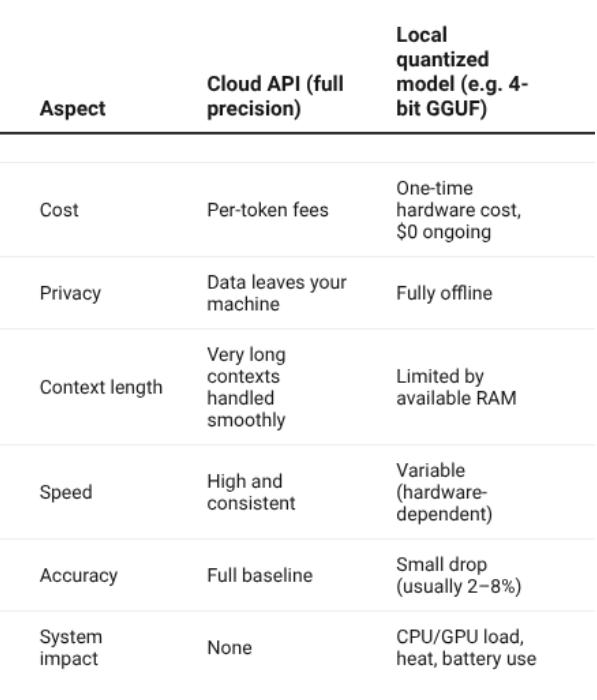
Local inference prioritizes latency and privacy for one (or a few) users. Cloud serving optimizes throughput, multi-tenancy, and the absolute largest models. Quantization introduces a small, task-dependent quality tax; longer contexts or very large models still demand more memory; and pure CPU inference is slower than GPU/accelerated paths.
Nevertheless, for the majority of developer, researcher, and power-user workloads, the quality is more than sufficient, the cost is near zero after the hardware is purchased, and data never leaves the machine.
Software You Can Use Today
- Ollama: simplest developer experience: one command to pull and run a model, plus an OpenAI-compatible local API.
- LM Studio: polished graphical interface for browsing, downloading, and chatting; excellent for non-terminal users.
- llama.cpp (and derivatives): the underlying high-performance engine powering most of the above; maximum control and best CPU / Apple Silicon results.
- vLLM / similar: higher-throughput options when you need to serve multiple concurrent users or integrate into production pipelines.
- MLX (Apple Silicon) and other backend-specific libraries for further optimization.
All of these support the GGUF format and the quantization levels described earlier; many also handle AWQ/GPTQ for GPU-centric workflows.
To Sum Up
Running a 30B-parameter (or even larger MoE) model on a laptop is the predictable outcome of quantization that shrinks weights 3–4× with limited quality loss, unified or hybrid memory that removes copy bottlenecks, bandwidth-aware kernels that make every memory transfer count, and model architectures designed from the start for sparse, efficient inference.
The same principles, like compress what you can, keep critical information precise, minimize data movement, and match architecture to workload, help software engineers build systems that are faster, cheaper, more private, and more resilient while still delivering strong results. What once required a data-center rack is now often possible on the machine already sitting on your desk.
Opinions expressed by DZone contributors are their own.
Comments