

Architectural Understanding of CPUs, GPUs, and TPUs
Learn about CPUs, GPUs, and TPUs — definitions, use cases, architectural differences, and above all, when to use CPUs, GPUs, and TPUs.
 CORE
·
CORE
·
With the announcement of antigravity, Google's new agent-first AI development platform, the focus of AI infrastructure shifted back to TPUs. Antigravity runs on the custom-designed Tensor Processing Units. What are these TPUs, and how are they different from GPUs? In this article, you will learn about CPUs, GPUs, and TPUs. When to use what.
CPUs, GPUs, and TPUs are three types of “brains” for computers, each optimized for different kinds of work: CPUs are flexible all‑rounders, GPUs are experts at doing many small calculations in parallel, and TPUs are specialized engines for modern AI and deep learning. Understanding how they evolved and where each shines helps you pick the right tool for the job, from everyday apps to large‑scale enterprise AI systems.
Imagine your computer, phone, or even a self-driving car as a bustling city. The central processing unit (CPU) is the city hall — managing tasks, making decisions, and keeping everything running. The graphics processing unit (GPU) is a massive construction crew, working on thousands of identical buildings at once. The tensor processing unit (TPU) is a hyper-specialized factory, designed to do one specific job with incredible speed and efficiency. Understanding the differences between CPUs, GPUs, and TPUs doesn't have to be complicated. Think of these processors as different types of workers, each specialized for particular jobs. Let's explore what makes each one unique and when you'd want to use them.
What Is a CPU?
CPU stands for central processing unit — essentially, it's the "brain" of your computer.
A CPU is a general-purpose processor designed to handle a wide variety of tasks. Whether you're browsing the web, editing a document, running a spreadsheet, or opening an application, your CPU is managing these operations. It's incredibly versatile and can switch between different types of tasks very quickly.
How CPUs Work
CPUs have a small number of powerful cores (typically 2 to 16 cores in consumer devices, though high-end models can have many more). Each core can work on one instruction at a time, but modern CPUs can switch between tasks so rapidly that it feels like they're doing many things simultaneously.
Think of a CPU like a master chef in a kitchen. The chef is highly skilled and can prepare any dish on the menu — appetizers, main courses, and desserts. They work quickly and efficiently, but they're still just one person (or a small team) doing one task at a time, switching between different dishes as needed.
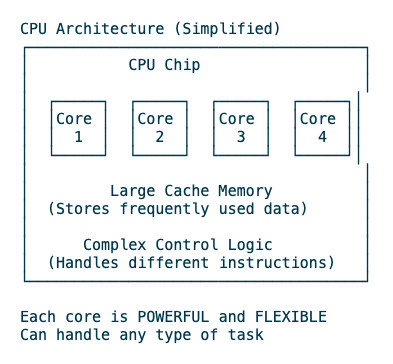
Key CPU Characteristics
- Few cores (typically 2-16)
- Each core is powerful and complex
- Excellent at sequential (one-after-another) tasks
- Fast switching between different types of operations
- Low latency (responds very quickly to new tasks)
What Is a GPU?
GPU stands for graphics processing unit — originally designed for rendering graphics and images.
While GPUs were initially created to handle the millions of calculations needed to display video games and graphics, they've evolved into powerful parallel processors. A GPU contains hundreds or thousands of smaller, simpler cores that can all work simultaneously on similar tasks.
How GPUs Work
Unlike a CPU's few powerful cores, a GPU has many simpler cores that excel at doing the same operation on lots of data at once. This is called parallel processing.
Think of a GPU like a factory assembly line with hundreds of workers. Each worker has a simple, specific task (like attaching a wheel to a car), but because there are so many workers doing the same task simultaneously, the factory can produce hundreds of cars in the time it takes a master craftsperson to build one car by hand.
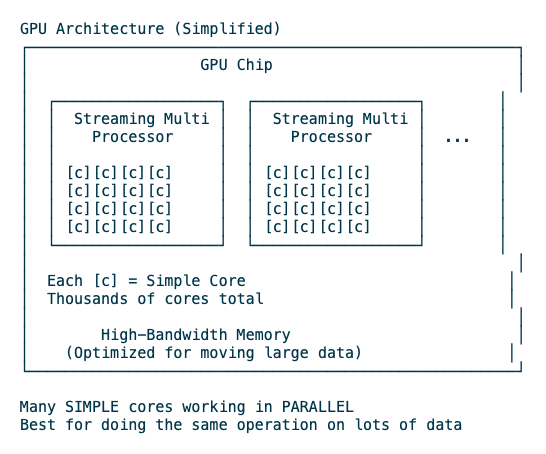
Key GPU Characteristics
- Thousands of simpler cores
- Optimized for parallel operations
- Excellent at repeating the same calculation on large datasets
- High throughput (can process massive amounts of data)
- Originally for graphics, now used for scientific computing and AI
What Is a TPU?
TPU stands for tensor processing unit — a specialized processor designed specifically for machine learning tasks.
TPUs are Google's custom-designed chips built specifically to accelerate neural network computations. They're even more specialized than GPUs, focusing on the specific mathematical operations (called tensor operations) that are fundamental to training and running AI models.
How TPUs Work
TPUs are designed around matrix multiplication and other tensor operations that dominate machine learning workloads. They sacrifice flexibility to achieve maximum efficiency for these specific calculations.
Think of a TPU like a specialized machine in a factory that does one thing extraordinarily well. While a master chef (CPU) can cook anything and assembly line workers (GPU) can handle various manufacturing tasks, this specialized machine is built to stamp out a specific part faster and more efficiently than anything else — but that's all it can do.
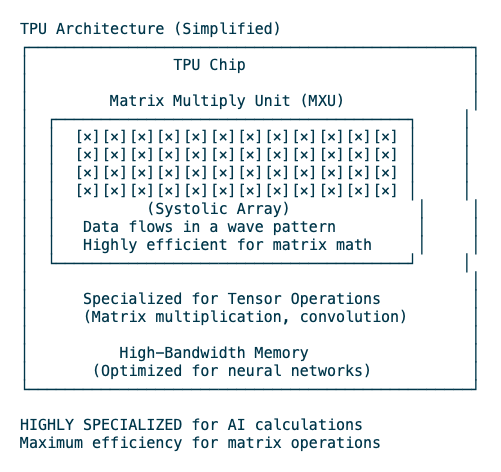
Key TPU Characteristics
- Specialized hardware for tensor/matrix operations
- Designed specifically for neural networks
- Extremely efficient at AI training and inference
- Limited to machine learning workloads
- Not available for general consumer purchase (primarily cloud-based)
Comparing Architectures
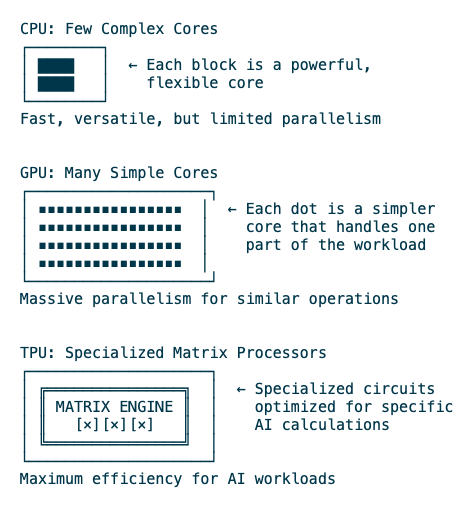
Let's visualize the fundamental difference in how these processors are structured:
The core difference lies in their design philosophy, which you can visualize below.
- CPU architecture: Focused on complex cores with large caches to handle diverse tasks quickly and minimize latency (delay) for a single task.
- GPU architecture: Packed with hundreds to thousands of simpler arithmetic logic units (ALUs) organized into groups, sharing control logic and cache to maximize throughput (total work done) on parallel tasks.
- TPU architecture: Built around a Systolic Array—a grid of Multiply-Accumulate (MAC) units that rhythmically pass data directly to their neighbors. This drastically reduces the need to access external memory, which is slow, making matrix math incredibly fast and energy-efficient.
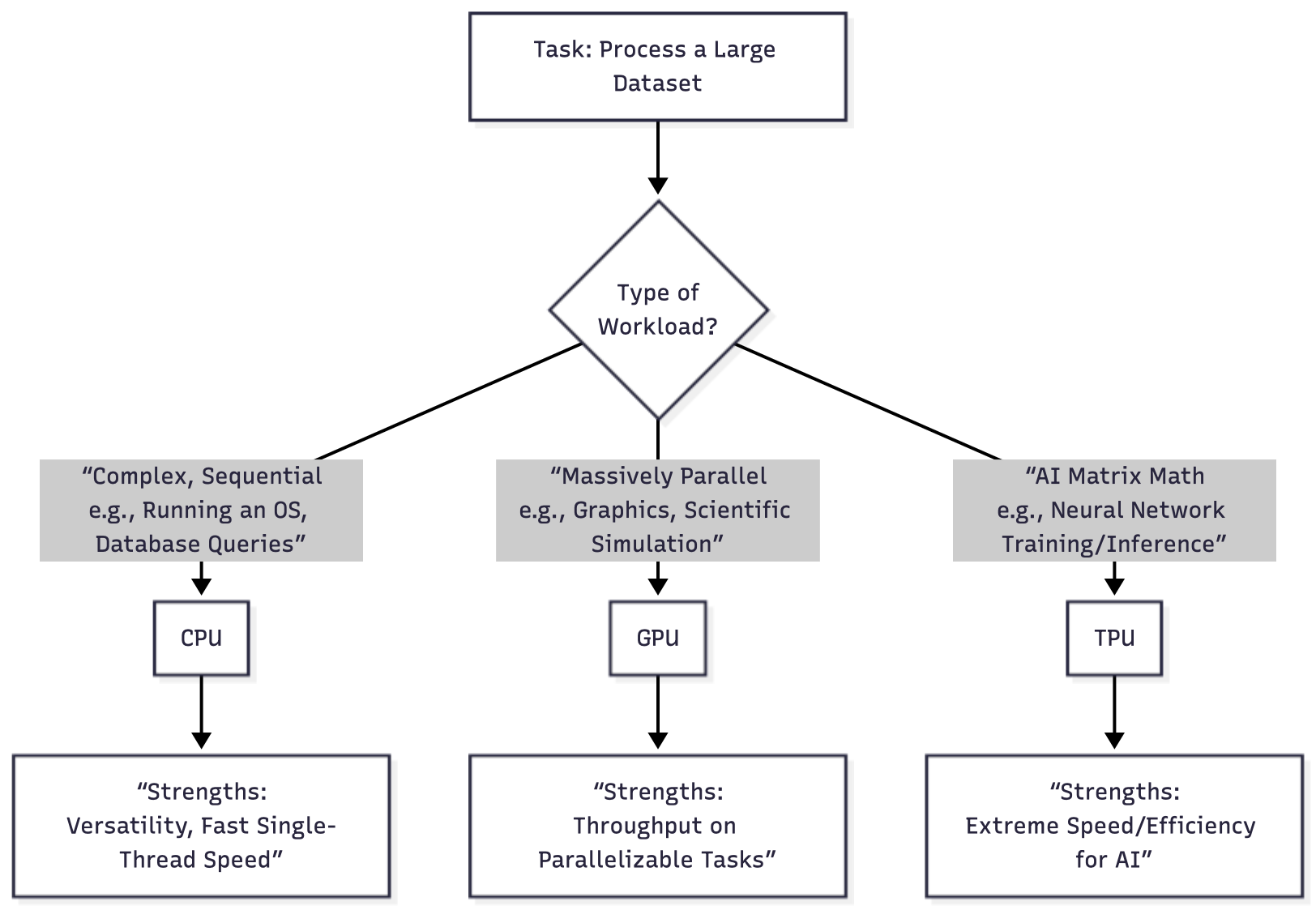
Let's visualize the fundamental difference in how these processors are structured:
When to Use What
| Task / Consideration | CPU | GPU | TPU |
|---|---|---|---|
| General Computing (OS, Office apps, web) | Excellent – The default, flexible choice. | Poor – Overkill, inefficient. | Not Usable. |
| Gaming & Real-Time Graphics | Good – Handles game logic and physics. | Excellent – Essential for rendering frames. | Not Usable. |
| Video Editing & 3D Rendering | Good – For timeline scrubbing and certain effects. | Excellent – Massively speeds up rendering/encoding. | Not Usable. |
| Data Science & ML Model Training | Okay – Only for small, non-deep learning models. | Excellent/Standard – The workhorse for most deep learning. | Excellent/Best – For large-scale TensorFlow/PyTorch models, often fastest & most efficient in cloud. |
| AI Model Inference (Running trained models) | Okay – For simple models or low-volume requests. | Excellent – For high-performance, low-latency inference. | Excellent – Often highest throughput & efficiency for cloud-scale inference. |
| High-Performance Computing (HPC) (e.g., Weather, Fluid Dynamics) |
Essential – For managing complex simulation logic. | Excellent – For the parallelizable number-crunching portions. | Limited – Only if the problem maps directly to matrix math. |
Rules of Thumb
- Use CPUs for general applications, system services, business logic, control planes, and small or moderate ML workloads that need high flexibility.
- Use GPUs when you need strong acceleration for parallel math, especially for training and serving deep learning models or running heavy simulations.
- Use TPUs when you are training or serving large, matrix-heavy deep learning models at scale in environments where TPU access is available and well supported.
Conclusion
In summary, the journey from CPU → GPU → TPU is a story of increasing specialization for the age of AI. The CPU remains the indispensable, flexible manager. The GPU evolved into a massively parallel number cruncher, democratizing AI and graphics. The TPU represents the cutting edge: a processor custom-built from the ground up to execute the fundamental math of intelligence itself. Understanding their strengths allows you to harness the right tool for the job, whether you're building the next video game or the next breakthrough in artificial intelligence.
For most people, a good CPU is essential, a GPU is valuable if you game or do creative/technical work, and a TPU is something you'd access through cloud services only if working on large-scale AI projects.
The hardware landscape continues evolving rapidly, with new innovations blurring the lines between these categories. But understanding these fundamental differences will help you make informed decisions about what hardware you need, whether you're buying a new computer, learning AI, or just curious about how modern computing works.
The best processor is the one that matches your actual needs, not necessarily the most powerful or expensive one. Start with what you have, understand your workload, and upgrade strategically when you encounter real limitations.
Happy computing!
Opinions expressed by DZone contributors are their own.