DZone
Thanks for visiting DZone today,
Edit Profile
  • Manage Email Subscriptions
  • How to Post to DZone
  • Article Submission Guidelines
Sign Out View Profile
  • Post an Article
  • Manage My Drafts
Newsletter
Log In / Join
Refcards Trend Reports
Events Video Library
Refcards
Trend Reports

Events

View Events Video Library

Related

  • Your Application Has an Unindexed Attack Surface. Do You Know What’s in It?
  • Retrieval Augmented Generation With Spring AI 2.0, Claude, and PGvector
  • Why Mocking Sucks
  • How to Enhance the Performance of .NET Core Applications for Large Responses

Trending

  • Idempotency Under Concurrency: Why Your Application Check Isn't the Last Line of Defense
  • AI Agents Need an Identity Plane: Rethinking Enterprise Authorization for Autonomous Software
  • Beyond the Wall of Charts: How Advanced Observability Displaced the Telemetry Dashboard
  • LangChainGo vs Genkit Go: Where Genkit Shines

Draft This article hasn't been published, so readers can't see it.

In moderation This article is waiting for review, so readers can't see it yet.

Deleted This article has been deleted, so readers can't see it.

  1. DZone
  2. Data Engineering
  3. Databases
  4. Health Monitoring of Mule Applications

Health Monitoring of Mule Applications

All APIs developed using Mule must be built with a health check endpoint. This template will help you maintain a uniform structure across all the APIs and their layers.

By 
Mukesh Thakur
·
Mar. 23, 21 · Tutorial
Post on X (opens in a new tab) Share on LinkedIn (opens in a new tab)
15.7K Views

Join the DZone community Save articles, join the discussion, and download Refcards and Trend Reports with a free account.

Join for free Already a member? Log in

Health check of an APIs allows near-real-time information about the state of your containers and APIs/microservices. It is critical to multiple aspects of operating APIs and is especially important when orchestrators perform partial application upgrades in phases. It also helps to determine if a running API instance is unable to handle requests.

The health check API operation performs a variety of internal metrics including:

  • the status of the connections to the dependent system(s) used by the API instance.
  • the resource utilization of the dependent system(s) (e.g., memory, CPU).
  • the performance (e.g., average response time) of the dependent system(s).
  • application-specific logic.

An API monitoring tool periodically invokes the endpoint to check the overall status of the API.

  • Rules can be added at the monitoring layer to proactively identify potential errors:
    • Resource exhaustion (e.g., memory, thread, connections, compute).
    • Increasing dependent system response times or response payload sizes.

Logical View
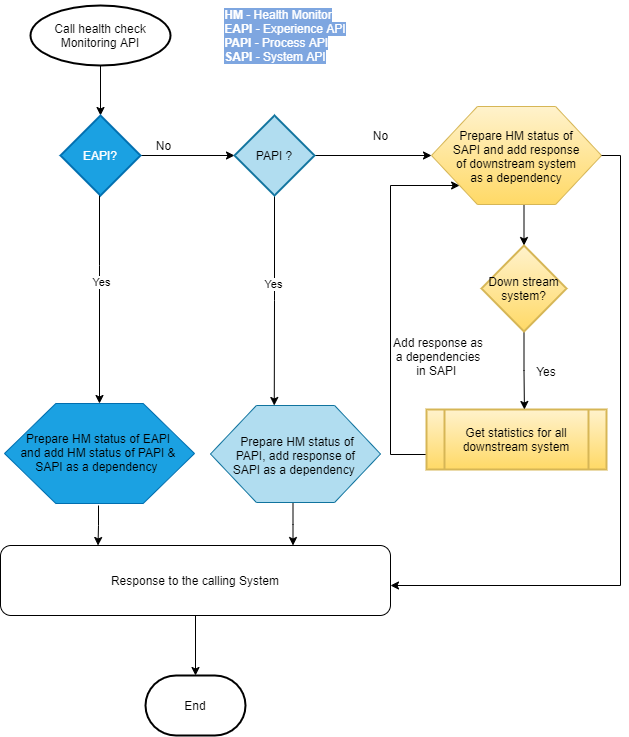
Logical View of Health Monitoring

Development View

Health check endpoint developed for each experience, process, and system API.  Endpoint prepares the status of an API and also include the status of all the calling APIs and downstream system.   
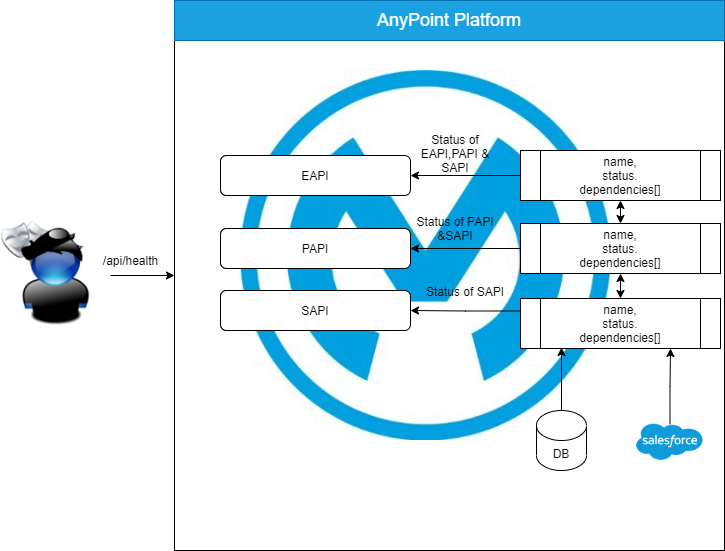
API Definition (RAML) 

API

JSON


x
14


1
#%RAML 1.0
2
title: health-check-api
3
description: This API is used to check system's health
4
types:
5
  HealthCheck: !include DataType/healthCheckDataType.raml
6
/healthCheck:
7
  get:
8
    description: get system health check data
9
    responses:
10
      200:
11
        body:
12
          application/json:
13
            type: HealthCheck
14
            example: !include Examples/healthCheckMultipleDependencyExample.raml


Data Type

JSON


xxxxxxxxxx
1


1
#%RAML 1.0 DataType
2
properties:
3
  name?: string
4
  status?:
5
    type: string
6
    enum: ['up', 'down', 'unknown']


JSON


xxxxxxxxxx
1


1
#%RAML 1.0 DataType
2
type: !include BasicHealthCheckDataType.raml
3
properties:
4
  dependency?:
5
    items: !include BasicHealthCheckDataType.raml


Example

JSON


x


1
#%RAML 1.0 NamedExample
2
    {
3
      name: "System",
4
      status: "up",
5
      dependency: [
6
        {
7
          name: "Database",
8
          status: "up",
9
          responseTimeAvg: "813",
10
          connectionPoolSize: "100",
11
          connectionInUse: "90",
12
          connectionInUseAvg: "90"
13
          
14
        }
15
      ]
16
    }


Implementation:

There are two ways to implement this health check API.

  • Add as a dependency in implementation API (System, Process, and Experience API) and build health check response by calling flow reference of health check API.
    • Build health check API as Mule project and export as a jar file:
    • Add jar file in pom.xml file of implementation project as a dependency:

      XML


      x


      1
      <dependency>
      2
         <groupId>com.healthcheck</groupId>
      3
         <artifactId>health-check-test-application</artifactId>
      4
         <version>1.0.0</version>
      5
       </dependency>


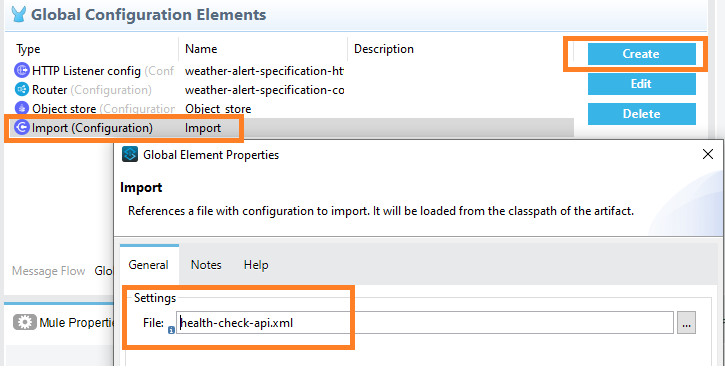
  • Import xml file:


  • Prepare health response as health check API and call flow as flow ref.
  • Implement health check API and data structure as per the above specification in each API.


Health (Apple) API application

Opinions expressed by DZone contributors are their own.

Related

  • Your Application Has an Unindexed Attack Surface. Do You Know What’s in It?
  • Retrieval Augmented Generation With Spring AI 2.0, Claude, and PGvector
  • Why Mocking Sucks
  • How to Enhance the Performance of .NET Core Applications for Large Responses

Partner Resources

×

Comments

Loading comments

The comments didn't load

Please try again in a moment.

Likes

Loading

The next likes didn't load. Please try again.

The likes didn't load

Please try again in a moment.

See who liked this

Log in or join DZone for free to see who liked this article.

Log in Join for free
  • RSS
  • X
  • Facebook

ABOUT US

  • About DZone
  • Support and feedback
  • Community research

ADVERTISE

  • Advertise with DZone

CONTRIBUTE ON DZONE

  • Article Submission Guidelines
  • Become a Contributor
  • Core Program
  • Visit the Writers' Zone

LEGAL

  • Terms of Service
  • Privacy Policy

CONTACT US

  • 3343 Perimeter Hill Drive
  • Suite 215
  • Nashville, TN 37211
  • [email protected]

Let's be friends:

  • RSS
  • X
  • Facebook