

DZone
Thanks for visiting DZone today,
Edit Profile
  • Manage Email Subscriptions
  • How to Post to DZone
  • Article Submission Guidelines
Sign Out View Profile
  • Post an Article
  • Manage My Drafts
Over 2 million developers have joined DZone.
Log In / Join
Refcards Trend Reports
Events Video Library
Refcards
Trend Reports

Events

View Events Video Library

Related

  • Build a Java Backend That Connects With Salesforce
  • My Experiences with Maven in IntelliJ IDEA and NetBeans IDE
  • Hack OpenJDK with NetBeans IDE
  • Build Even Faster Quarkus Applications With fast-jar

Trending

  • 5 Common Security Pitfalls in Serverless Architectures
  • Scaling Cloud Data Automation: A Practical Guide to Open Table Formats
  • Event-Driven Pipelines With Apache Pulsar and Go
  • Lambda-Driven API Design: Building Composable Node.js Endpoints With Functional Primitives
  1. DZone
  2. Software Design and Architecture
  3. Integration
  4. How to Build a Fat JAR using NetBeans IDE

How to Build a Fat JAR using NetBeans IDE

In this post I would like to describe how to build a fat JAR using NetBeans IDE.

By 
Aruna Karunarathna user avatar
Aruna Karunarathna
·
Feb. 04, 14 · Tutorial
Likes (1)
Comment
Save
Tweet
Share
41.2K Views

Join the DZone community and get the full member experience.

Join For Free

In this post I would like to describe how to build a fat JAR using NetBeans IDE. In NetBeans IDE you can't actually directly build a fat JAR. The JAR which is built using NetBeans IDE is not adding the libraries you've used for the project. The libraries are added to a folder called "lib" whenever you run the JAR the "lib" folder must be in the same directory.

So lets get started building a fat JAR using NetBeans. The first thing you have to do is clean and build the project.

Then go the Files view of the Project and open the build.xml file.

Then copy and paste the following code just before the " project" tag ends.
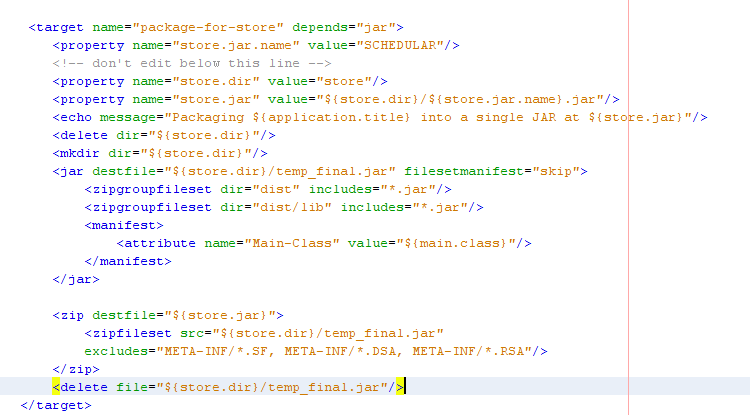
Download file from here DOWNLOAD FILE

Then it's almost done. Now in files view of the project right click build.xml file and then select Runtarget >> Other Targets >> package-for-store.

That's it now your fat JAR has been created. Go to your project folder and check the folder called store. Inside that folder you can see your fat JAR.

That's it now you know how to build a fat JAR using NetBeans IDE. If you need any help just put a comment. Cheers :)

Integrated development environment JAR (file format) NetBeans Build (game engine)

Published at DZone with permission of Aruna Karunarathna. See the original article here.

Opinions expressed by DZone contributors are their own.

Related

  • Build a Java Backend That Connects With Salesforce
  • My Experiences with Maven in IntelliJ IDEA and NetBeans IDE
  • Hack OpenJDK with NetBeans IDE
  • Build Even Faster Quarkus Applications With fast-jar

Partner Resources

×

Comments

The likes didn't load as expected. Please refresh the page and try again.

  • RSS
  • X
  • Facebook

ABOUT US

  • About DZone
  • Support and feedback
  • Community research

ADVERTISE

  • Advertise with DZone

CONTRIBUTE ON DZONE

  • Article Submission Guidelines
  • Become a Contributor
  • Core Program
  • Visit the Writers' Zone

LEGAL

  • Terms of Service
  • Privacy Policy

CONTACT US

  • 3343 Perimeter Hill Drive
  • Suite 215
  • Nashville, TN 37211
  • [email protected]

Let's be friends:

  • RSS
  • X
  • Facebook