

How to Add Undo/Redo Toolbar Buttons to Eclipse
The Undo/Redo buttons are not in the Eclipse toolbar by default, and it's not easy to find where to add them. This tutorial tells you how.
Join the DZone community and get the full member experience.
Join For FreeBy default, there are no Undo/Redo toolbar buttons in the Eclipse toolbar. With Eclipse as an open and extensible framework, how do you add them?
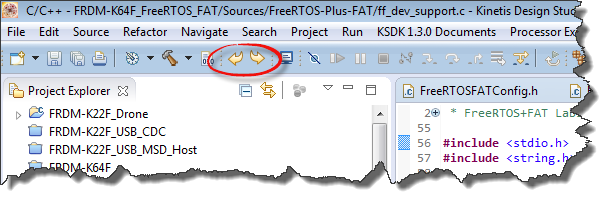
- Undo and Redo Toolbar Buttons in Eclipse
Toolbar buttons in Eclipse are configured through the menu Window > Customize Perspective. But somehow there are no buttons available for undo/redo:

- No Undo and Redo Buttons
They only exist as menu items:

- Undo and Redo Menu Items
Adding Undo/Redo Buttons
The Eclipse framework allows you to define new toolbar groups/items. No need to write code. All that is needed is a description XML file plus a manifest file (see http://stackoverflow.com/questions/819846/how-to-add-undo-redo-buttons-to-toolbar-in-eclipse/821801#821801).
plugin.xml:
<?xml version="1.0" encoding="UTF-8"?>
<?eclipse version="3.4"?>
<plugin>
   <extension point="org.eclipse.ui.menus">
      <menuContribution locationURI="toolbar:org.eclipse.ui.main.toolbar?after=additions">
            <toolbar id="undoredo.toolbar" label="Undo/Redo">
            <command commandId="org.eclipse.ui.edit.undo" id="undoredo.undo" style="push">
            </command>
            <command commandId="org.eclipse.ui.edit.redo" id="undoredo.redo" style="push">
            </command>
         </toolbar>
      </menuContribution>
   </extension>
</plugin>
MANIFEST.MF:
Manifest-Version: 1.0
Bundle-ManifestVersion: 2
Bundle-Name: Undoredo
Bundle-SymbolicName: undoredo;singleton:=true
Bundle-Version: 1.0.0
Bundle-RequiredExecutionEnvironment: J2SE-1.5
Require-Bundle: org.eclipse.ui
If you don’t want to build the .jar file, here is a link to it:
http://www.foglyn.com/misc/undoredo_1.0.0.jar
Installation of Undo/Redo Toolbar
To install undo/redo buttons, follow the steps below:
1. Close Eclipse
2. Place the file undoredo*.jar file into the eclipse\dropin folder: 
- undoredo plugin in Eclipse Dropins Folder
3. Restart Eclipse
4. This shows the undo/redo in the toolbar:
- Undo and Redo Toolbar Buttons in Eclipse
5. To configure it, use the menu Window > Customize Perspective: 
- Undo Redo Configuration
6. That’s it :-)
Summary
The undo/redo menu item can be added as toolbar button with an XML file and a manifest file. I have not tried it for other functions, but that should work for anything else available too. It worked fine in Eclipse Luna-based Freescale (now NXP) Kinetis Design Studio v3.0.0 and Eclipse MARS. Another case where the Eclipse framework shows its extensibility :-).
LINKS
- StackOverflow article: http://stackoverflow.com/questions/819846/how-to-add-undo-redo-buttons-to-toolbar-in-eclipse/821801#821801
- Link to the plugin used: http://www.foglyn.com/misc/undoredo_1.0.0.jar
Published at DZone with permission of Erich Styger. See the original article here.
Opinions expressed by DZone contributors are their own.
Comments