

How to Architect a Compliant Cloud for Healthcare Clients (Azure Edition)
We share how we built a secure, compliant cloud on Azure for healthcare clients using native services like RBAC, CMK encryption, and policy enforcement.
Designing cloud infrastructure for healthcare isn’t just about uptime and cost; it’s about protecting sensitive patient data and satisfying regulatory requirements like HIPAA and HITRUST. When we were tasked with migrating a healthcare client's legacy workloads into Azure, we knew every decision had to be auditable, encrypted, and policy-controlled.
This guide walks through how we built a compliant Azure environment for healthcare clients using Microsoft-native tools, shared responsibility awareness, and practical implementation techniques that held up under third-party audits.
Understanding What “Compliant” Means
Before touching Azure, we aligned on what compliance meant in the context of our project:
- Encrypting ePHI in transit and at rest
- Restricting access to the minimum necessary
- Logging every user and system interaction
- Maintaining audit trails and alerting
- Ensuring that configuration drift could be detected and corrected
We used HIPAA and HITRUST CSF as our primary guardrails. In addition to those frameworks, we had to remain conscious of business associate agreements (BAAs), client-specific audit expectations, and the high stakes of handling personal health information.
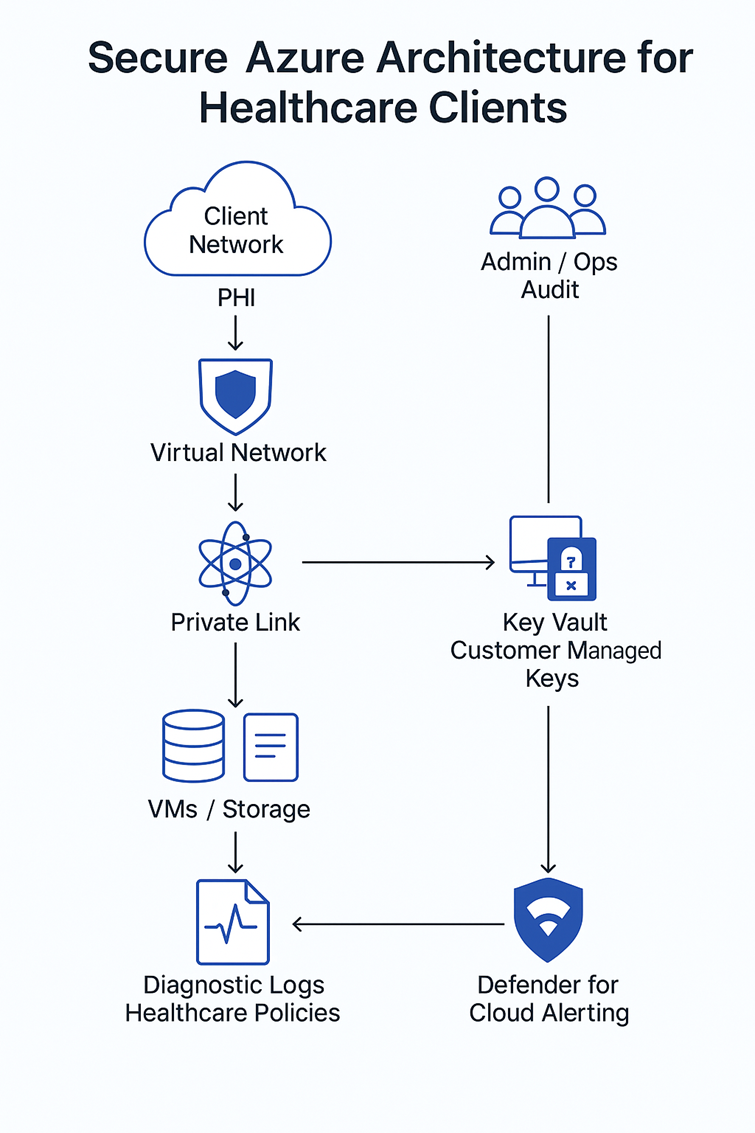
High-Level Azure Architecture for Compliance
Here’s what our compliant baseline looked like:
- Resource Groups per workload type (isolation)
- Virtual Networks (VNets) with subnet segmentation
- Network Security Groups (NSGs) tightly scoped
- Private Endpoints for all storage and databases
- Azure Key Vault for secrets and encryption keys
- Azure Monitor + Log Analytics for auditing
- Azure Policy for governance and drift detection
- Azure Defender for Cloud for posture management
We documented everything in a Bicep template and used DevOps pipelines for reproducible deployments. This ensured consistency, version control, and the ability to redeploy the environment on demand for testing or recovery.
Step 1: Locking Down the Network Layer
Networking is your first line of defense:
- We created isolated VNets for App, Data, and Management tiers.
- NSGs restricted traffic to port-level granularity.
- No resources had public IPs everything routed via Private Link and Azure Bastion.
This ensured PHI never traversed the public internet, even accidentally. We also implemented flow logs on all subnets to monitor East-West traffic and verify that no bypass routes existed.
Step 2: Identity and Role Access Control
Healthcare compliance means minimum necessary access:
- Azure AD Groups defined access roles: Admin, Ops, Audit, Read-only
- PIM (Privileged Identity Management) required just-in-time elevation for sensitive roles
- RBAC applied at the resource group level, never individual resources
We also enforced MFA and conditional access for all accounts accessing any sensitive workload. Where possible, we disabled legacy authentication protocols and enforced modern auth via OAuth2.
Step 3: Storage and Data Security
- All Storage Accounts had private endpoints, firewall rules, and encryption with customer-managed keys (CMKs) via Key Vault.
- SQL databases used Always Encrypted for key fields and Transparent Data Encryption (TDE) by default.
- We disabled public access and enforced TLS 1.2+.
Even blob access for analytics pipelines required time-bound SAS tokens, scoped tightly by IP and duration. We conducted tabletop exercises simulating breaches to validate that compromised credentials couldn’t expose meaningful data.
Step 4: Monitoring, Logging, and Audit Trails
Everything that touches patient data must be logged.
- Azure Monitor sent diagnostic logs and metrics to Log Analytics
- Every read, write, and delete on storage and databases was tracked
- Defender for Cloud was used to alert on misconfigurations and threats
- Activity Logs were archived to an immutable Storage Account with daily exports
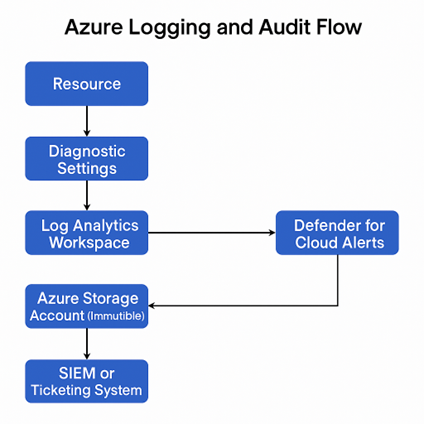
This logging setup passed both internal security reviews and an external HIPAA compliance audit. It also allowed us to investigate anomalies during penetration testing and verify access control effectiveness.
Step 5: Enforcing and Validating Compliance
Azure Policy was our compliance enforcement engine:
- We assigned built-in policies for things like:
- Secure transfer required
- No public IP on compute resources
- Deploy log analytics agent
- We added custom policies to flag missing tags, unencrypted disks, or NSGs with wide-open rules
- Azure Blueprints helped us define environment-level standards for repeat deployments
The real value came from policy effect = deny it prevented misconfigurations before they ever reached production. We even created dashboards to track policy compliance drift and notify our DevOps team in real time.
Flow Diagram
Compliant Azure Architecture Flow:
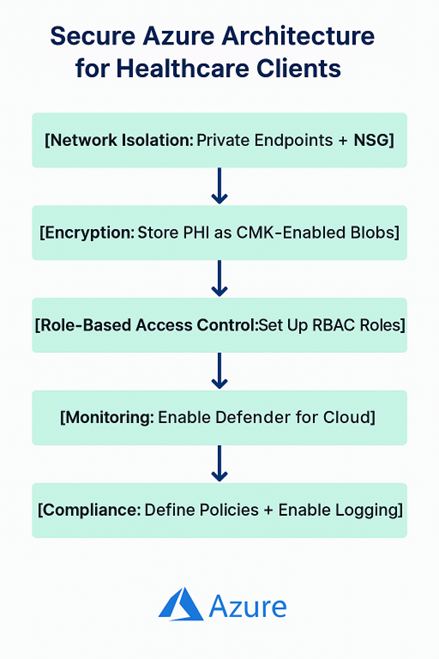
Each layer reinforces the next, forming a defense-in-depth strategy suitable for healthcare workloads.
Challenges We Faced
- Misunderstood shared responsibility: Some teams assumed Microsoft handled patching inside VMs, but we clarified OS-level and app hardening were still on us.
- Policy conflicts: Built-in and custom Azure Policies sometimes overlap, so we created exemptions to avoid unintended lockouts.
- Key vault latency: Encryption key lookups occasionally added milliseconds, so we adjusted the retry logic in our APIs.
These hiccups helped us improve documentation and build playbooks for future projects.
Final Checklist Before Go Live
- Private endpoints used for all data services
- RBAC assigned via Azure AD groups, reviewed quarterly
- PIM enforced for all elevated roles
- Diagnostic logs streamed to central Log Analytics
- Storage and DBs encrypted with CMKs
- Azure Policies deployed with deny + audit effects
- App teams trained on secure deployment patterns
Final Thoughts
Building a compliant cloud for healthcare doesn’t mean overengineering; it means intentional defaults, clear boundaries, and enforcement via code.
If you're working with healthcare clients on Azure, don't wait until the audit. Architect with compliance in mind from day one. Use Microsoft’s tools, but document your choices, test your assumptions, and treat security reviews as a design requirement, not an afterthought.
The outcome is not just audit readiness, it's a security-first foundation that helps your clients move faster with confidence.
Opinions expressed by DZone contributors are their own.