

How to Do Image Recognition With CNNs on the COCO Dataset — a Practical, Step-By-Step Guide
Learn multi-label image recognition on the COCO dataset with PyTorch ResNet50. Covers data prep, training, mAP eval, inference, and full Python script.
Join the DZone community and get the full member experience.
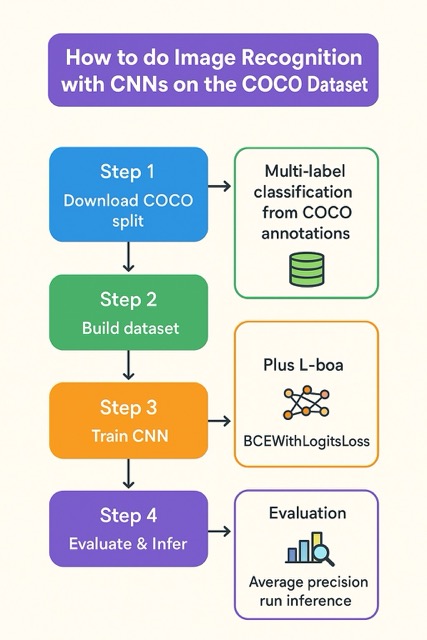
Join For FreeShort summary: This guide walks you from environment setup to a working PyTorch example that trains a Convolutional Neural Network (a pretrained ResNet) to recognize which object categories are present in a COCO image (multi-label image recognition). You’ll learn how to load COCO annotations, build a multi-label dataset, train with BCEWithLogitsLoss, evaluate average precision, and run inference. Run code snippet on a machine with Python + PyTorch.
Why COCO and What This Tutorial Does
The MS-COCO dataset is a large-scale dataset for object detection, segmentation and captioning; it contains hundreds of thousands of images and 80 common object categories (people, cars, cups, etc.). It’s a standard benchmark for object-level tasks, and we’ll reuse its annotations to turn detection-style labels into a multi-label image recognition task: for each image, predict which of the 80 categories appear. This is a practical way to use a CNN backbone (ResNet) and practice multi-label learning on a real dataset.
What You Need (Prerequisites)
- Python 3.8+
- (Recommended) GPU + CUDA and a recent PyTorch build — if you don’t have GPU, the code still runs on CPU but slower.
- A working PyTorch + torchvision install (follow the official installer if you need CUDA-specific wheels).
- pycocotools (COCO Python API) — used to read JSON annotations.
- scikit-learn for average-precision evaluation, plus standard libs (Pillow, numpy, matplotlib).
Install (basic):
pip install torch torchvision pycocotools scikit-learn pillow matplotlib
# If pip install pycocotools fails on some platforms, try conda:
# conda install -c conda-forge pycocotools
Note: PyTorch installation may require the official selector at https://pytorch.org/ for CUDA-specific wheels.
Step 1 — Download a COCO Split (Quick & Practical)
For experimenting, use val2017 (smaller ~5k images) instead of the entire train dataset. From the official COCO download page you can fetch val2017.zip and the annotations_trainval2017.zip. Example wget commands:
mkdir coco && cd coco
wget http://images.cocodataset.org/zips/val2017.zip
wget http://images.cocodataset.org/annotations/annotations_trainval2017.zip
unzip val2017.zip
unzip annotations_trainval2017.zip
Files you’ll need:
- images in
coco/val2017/ - annotations in
coco/annotations/instances_val2017.json
(Official download & dataset description: cocodataset.org).
Tip: If you want a tiny quick test, you can restrict the dataset to the first N images in the dataset (we’ll show how below).
Step 2 — The Idea: Multi-Label Classification from COCO Annotations
COCO’s annotations are per-object bounding boxes + category_ids. We turn that into a fixed-length multi-hot target vector of length num_categories where each position is 1 if that category appears anywhere in the image, else 0. We train a CNN (ResNet) to predict those multi-hot vectors. This simplifies the problem relative to full detection while letting you learn from the real COCO labels. (For real detection, use Faster R-CNN / Detectron2 / YOLO etc.)
Full Working Code
Save the script below as coco_multilabel_train.py. Edit paths COCO_ROOT and ANN_FILE to point to your val2017 images folder and instances_val2017.json file.
# coco_multilabel_train.py
import os
import numpy as np
from PIL import Image
from tqdm import tqdm

import torch
from torch import nn
from torch.utils.data import Dataset, DataLoader
import torchvision
from torchvision import transforms, models

from pycocotools.coco import COCO
from sklearn.metrics import average_precision_score

# -----------------------
# Config (======edit these======)
COCO_ROOT = "/path/to/coco/val2017"  # path to images dir (val2017)
ANN_FILE  = "/path/to/coco/annotations/instances_val2017.json"
BATCH_SIZE = 16
NUM_EPOCHS = 5
LR = 1e-4
MAX_SAMPLES = 2000   # set smaller for quick tests; or None to use all
DEVICE = torch.device("cuda" if torch.cuda.is_available() else "cpu")
# -----------------------

class CocoMultiLabelDataset(Dataset):
    """Builds a multi-label dataset from COCO 'instances' annotations."""
    def __init__(self, root, ann_file, transforms=None, max_samples=None):
        self.root = root
        self.coco = COCO(ann_file)
        self.img_ids = self.coco.getImgIds()
        if max_samples:
            self.img_ids = self.img_ids[:max_samples]
        # get list of category ids and names in a deterministic order
        self.cat_ids = self.coco.getCatIds()
        self.cat_id_to_idx = {cid: i for i, cid in enumerate(self.cat_ids)}
        self.idx_to_cat = [self.coco.loadCats([cid])[0]['name'] for cid in self.cat_ids]
        self.num_classes = len(self.cat_ids)
        self.transforms = transforms

    def __len__(self):
        return len(self.img_ids)

    def __getitem__(self, idx):
        img_id = self.img_ids[idx]
        img_info = self.coco.loadImgs([img_id])[0]
        img_path = os.path.join(self.root, img_info['file_name'])
        image = Image.open(img_path).convert("RGB")
        ann_ids = self.coco.getAnnIds(imgIds=[img_id], iscrowd=None)
        anns = self.coco.loadAnns(ann_ids)

        label = np.zeros(self.num_classes, dtype=np.float32)
        for ann in anns:
            cid = ann['category_id']
            if cid in self.cat_id_to_idx:
                label[self.cat_id_to_idx[cid]] = 1.0

        if self.transforms:
            image = self.transforms(image)

        return image, torch.from_numpy(label)

def get_transforms(train=True):
    if train:
        return transforms.Compose([
            transforms.Resize(256),
            transforms.RandomResizedCrop(224),
            transforms.RandomHorizontalFlip(),
            transforms.ToTensor(),
            transforms.Normalize(mean=[0.485,0.456,0.406], std=[0.229,0.224,0.225])
        ])
    else:
        return transforms.Compose([
            transforms.Resize(256),
            transforms.CenterCrop(224),
            transforms.ToTensor(),
            transforms.Normalize(mean=[0.485,0.456,0.406], std=[0.229,0.224,0.225])
        ])

def build_model(num_classes):
    model = models.resnet50(pretrained=True)
    in_features = model.fc.in_features
    model.fc = nn.Linear(in_features, num_classes)
    return model

def train_one_epoch(model, loader, optimizer, criterion, device):
    model.train()
    running_loss = 0.0
    for imgs, targets in tqdm(loader, desc="train"):
        imgs = imgs.to(device)
        targets = targets.to(device)
        outputs = model(imgs)
        loss = criterion(outputs, targets)
        optimizer.zero_grad()
        loss.backward()
        optimizer.step()
        running_loss += loss.item() * imgs.size(0)
    return running_loss / len(loader.dataset)

def evaluate(model, loader, device):
    model.eval()
    all_targets = []
    all_scores = []
    with torch.no_grad():
        for imgs, targets in tqdm(loader, desc="eval"):
            imgs = imgs.to(device)
            outputs = model(imgs)
            scores = torch.sigmoid(outputs).cpu().numpy()
            all_scores.append(scores)
            all_targets.append(targets.numpy())
    y_true = np.vstack(all_targets)
    y_scores = np.vstack(all_scores)
    aps = []
    for i in range(y_true.shape[1]):
        if np.sum(y_true[:, i]) == 0:
            aps.append(np.nan)  # no positives for this class in val set
        else:
            aps.append(average_precision_score(y_true[:, i], y_scores[:, i]))
    mean_ap = np.nanmean([a for a in aps if not np.isnan(a)])
    return mean_ap, aps

def predict_image(model, img_path, transform, idx_to_cat, device, topk=5):
    model.eval()
    img = Image.open(img_path).convert("RGB")
    x = transform(img).unsqueeze(0).to(device)
    with torch.no_grad():
        out = model(x)
        probs = torch.sigmoid(out).cpu().numpy()[0]
    topk_idx = probs.argsort()[-topk:][::-1]
    return [(idx_to_cat[i], float(probs[i])) for i in topk_idx]

def main():
    # builds datasets
    train_t = get_transforms(train=False)   # using val2017; no augmentation for simplicity
    val_t = get_transforms(train=False)
    dataset = CocoMultiLabelDataset(COCO_ROOT, ANN_FILE, transforms=train_t, max_samples=MAX_SAMPLES)
    # Split: simple 80/20 split for demo
    n = len(dataset)
    split = int(0.8 * n)
    train_subset, val_subset = torch.utils.data.random_split(dataset, [split, n - split])
    train_loader = DataLoader(train_subset, batch_size=BATCH_SIZE, shuffle=True, num_workers=2)
    val_loader = DataLoader(val_subset, batch_size=BATCH_SIZE, shuffle=False, num_workers=2)

    model = build_model(dataset.num_classes).to(DEVICE)
    criterion = nn.BCEWithLogitsLoss()
    optimizer = torch.optim.Adam(model.parameters(), lr=LR)

    for epoch in range(1, NUM_EPOCHS + 1):
        loss = train_one_epoch(model, train_loader, optimizer, criterion, DEVICE)
        mean_ap, aps = evaluate(model, val_loader, DEVICE)
        print(f"Epoch {epoch}: train_loss={loss:.4f}, val_mAP={mean_ap:.4f}")

    # example inference
    sample_img = os.path.join(COCO_ROOT, dataset.coco.loadImgs([dataset.img_ids[0]])[0]['file_name'])
    preds = predict_image(model, sample_img, val_t, dataset.idx_to_cat, DEVICE, topk=5)
    print("Top predictions for sample image:", preds)

if __name__ == "__main__":
    main()
Step 3 — Practical tips & next steps
- Dataset size: COCO is big. Val2017 is ~5K images; train2017 is much larger. Start small (
MAX_SAMPLES) to iterate quickly. - If you want detection instead of multi-label classification: use torchvision’s detection models (Faster R-CNN, RetinaNet) or libraries like Detectron2 / YOLO / Ultralytics. torchvision.datasets.CocoDetection can be used for detection pipelines and requires pycocotools.
- pycocotools installation caveats: on some platforms pip install pycocotools is fine; on others, use conda-forge or prebuilt wheels.
- Categories: COCO categories are a fixed set (80 thing categories in the common detection setup). Keep your
idx_to_catmapping saved with the model to interpret outputs.
Where to Go From Here (Advanced)
- Replace
ResNetbackbone with anEfficientNetor Vision Transformer for higher accuracy. - For full detection, migrate to
torchvision.models.detection.fasterrcnn_resnet50_fpnor Detectron2 — they output bounding boxes + labels and use COCO detection metrics (mAP at IoU thresholds). - Experiment with class imbalance techniques, focal loss, or reweighting, as some COCO categories are sparse.
- Use proper mAP calculation for detection (COCO evaluation toolkit) for detection tasks.
Final Thoughts / Caveats
Training on COCO to convergence is compute-heavy. This tutorial gets you a working pipeline for multi-label recognition using COCO annotations and a CNN backbone; it’s a practical stepping stone to detection and segmentation.
Opinions expressed by DZone contributors are their own.
Comments