

How To Handle 100k Rows Decision Table in Drools (Part 1)
I create a prototype to demonstrate how to handle large rows in decision tables with reasonable performance. Following this are three different solutions.
Join the DZone community and get the full member experience.
Join For FreeIntroduction
When handling large rows of decision tables, one of the biggest pains is performance. In this article, I prepared a prototype setup to a simple scenario to simulate the large decision table use case and provided three solutions to utilize drools (a rules-oriented application framework). I focus on the decision table rule execution performance.
For the sake of explanation of the core concept of problem-solving, I prepared two decision tables: 10k & 100k row data to simulate decision-making procedure usage in rules application.
I provide 3 different solutions in three git branches; for coding fans, feel free to jump directly into the following github links and check the code.
- Rule-template-solution — Use Rule Template + XLS raw format decision table
- Precompile-rule-solution — Use Kie-Maven-Plugin to precompile Formatted Drools Decision Table
- Row-as-fact-solution — Use Large row data as Fact instead of Rules as a solution;
For an overview, the performance comparison in my demonstration code is:
| Solution | Warmup time | One rule Execution Time(Run) | Rule Compile time(Package) | |
|---|---|---|---|---|
| Rule Template + XLS | 99s | 9500ms | 1.5 mins | |
| Precompile rules | 21s | 8500ms | 15 mins | |
| Row as Fact instead of Rules | ~8s | 100 ms | 9s |
| Solution | Warm up time | One rule Execution Time(Run) | Rule Compile time(Package) | |
|---|---|---|---|---|
| Rule Template + XLS | 99s | 9500ms | 1.5 mins | |
| Precompile rules | 21s | 8500ms | 15 mins | |
| Row as Fact instead of Rules | ~8s | 100 ms | 9s |
(Warm-up time includes: Load Rules & Facts, Xls, create kiesession, etc.)
The performance difference is obvious, however, each solution has its pros and cons. If you are interested in this topic, let me guide you as we dive into the details.
Scenario Briefing
Recently I helped a customer handle a very large number of decision tables in drools and provided reasonable performance. Typically in the insurance, healthcare, or bank, logistic industry, it's not a rare thing to have to maintain huge numbers, rules or keywords, or values for computing a result.
Usually, the decision table is recommended for such scenarios because it's easy to understand and maintain from a business user perspective.
A decision table is very convenient for handling large amounts of rules. However, performance is a big concern. As you can see from the previous tables—Does my rule framework (eg: drools in this article is a rule framework) satisfy my performance requirement?
Compiling Rules
It can take minutes to just compile rules, and it could also cost seconds to serve one rule request. So in my setup, I prototype a rule usage scenario that can reproduce the large decision table rule firing usage.
Assuming I have a decision table, which would match a keyword when a keyword is matched, the result is decided as true or false.
When A ClientObject description matches a keyword in my list then clientObject.result is false, otherwise clientObject.result is true (Note that I make the true value the default).
Of course, in reality, there are more complex rules when making a business decision. Drools have sophisticated solutions for complex rule handling; for example, using drl or integrate the other rules into the same decision tables. However, in this article, the problem we want to solve is handling a very big number of rows, so I hide the complex rule configurations.
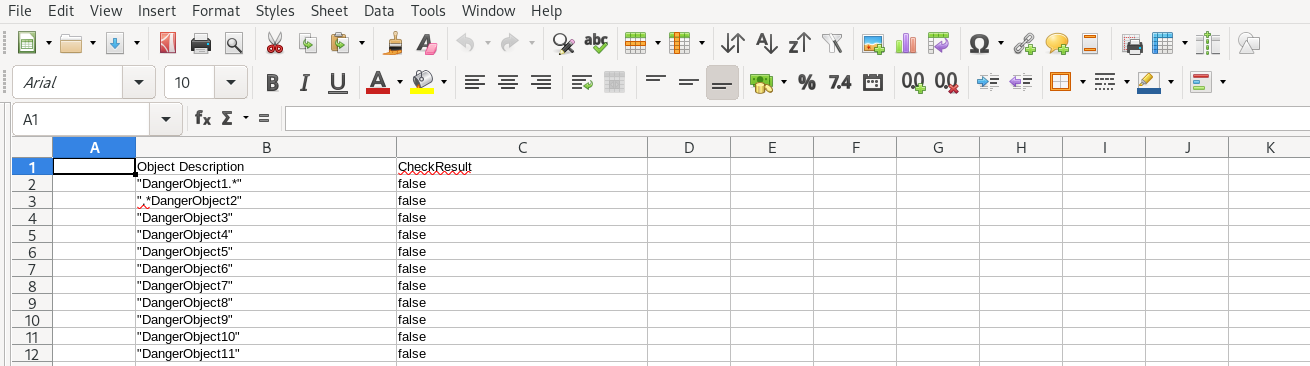
| Object Description | CheckResult | |
|---|---|---|
| "DangerObject1.*" | false | |
| ".*DangerObject2" | false | |
| "DangerObject3" | false | |
| ...hide | ..100k..rows | false |
| "DangerObject10000.*" | false |
For the purpose of comparison and efficiency, I provided two decision tables: 10kTable.xls and 100kTable.xls which contain 10k rows and 100k rows.
xxxxxxxxxx
public class ClientObject {
private int id;
private java.lang.String descr;
private boolean pass=true;
}
ClientObject
We also want to separate business rule code from application code. To do that, we have set up two separate maven projects:
- rules — Use to store and manage rules logic
- myapp — Use to maintain the generic application code
xxxxxxxxxx
├── myapp
│ ├── pom.xml
│ └── src
│ ├── main
│ │ ├── java
│ │ │ └── com
│ │ │ └── myspace
│ │ │ └── App.java
└── rules
├── pom.xml
└── src
├── main
│ ├── java
│ │ └── com
│ │ └── myspace
│ │ └── spreadsheet_decisiontable
│ │ └── ClientObject.java
│ └── resources
│ ├── com
│ │ └── myspace
│ │ └── spreadsheet_decisiontable
│ │ ├── 100kTable.xls.deactive
│ │ ├── 10kTable.xls
│ │ └── SimpleTemplate.drt
│ └── META-INF
│ ├── kmodule.xml
Project Setup
In production, we would usually run rules in a standalone process instead of embedded into the myapp. However, in our setup, we mainly focus on rules execution performance, so we simplify it to run the rule in embedded mode but we package the rules in a separate jar file(a.k.a kjar). There should be no performance difference for rules execution in embedded or standalone mode.
Also regarding my CPU and memory configuration, my laptop is 8 Core x 64G. Due to the large decision table, it would take a lot of computing resources to compile and run in some test runs. If it takes too long for you to run the 100k decision table test scenario, I suggest you just run the 10k decision table scenario. I also deactivate 100k decision tables by default. You need to follow the Readme in GitHub to active the 100k decision table test.
Solution 1: Rule Template + Xls File
In drools, we can utilize the rule template to handle Excel files.
In my example code, all you need to do is follow these 2 steps:
- Configure
kmodule.xmland package the kjar in the maven project (by utilizing the kie-maven-plugin)
xxxxxxxxxx
<kmodule xmlns:xsi="http://www.w3.org/2001/XMLSchema-instance"
xmlns="http://www.drools.org/xsd/kmodule">
<!-- <kbase name="DTableWithTemplateKB1" packages="com.myspace.spreadsheet_decisiontable">
<ruleTemplate dtable="com/myspace/spreadsheet_decisiontable/10kTable.xls"
template="com/myspace/spreadsheet_decisiontable/SimpleTemplate.drt"
row="2" col="2"/>
<ksession name="mykiesession1"/>
</kbase> -->
<kbase name="DTableWithTemplateKB2" packages="com.myspace.spreadsheet_decisiontable">
<ruleTemplate dtable="com/myspace/spreadsheet_decisiontable/100kTable.xls"
template="com/myspace/spreadsheet_decisiontable/SimpleTemplate.drt"
row="2" col="2"/>
<ksession name="mykiesession2"/>
</kbase>
</kmodule>
2. Trigger your rule in the client code like so:
xxxxxxxxxx
//Get kie container
KieContainer kieContainer = KieServices.Factory.get().getKieClasspathContainer();
//Create kie session
KieSession ksession = kieContainer.newKieSession("mykiesession2");
//insert Factor
ClientObject o1 = new ClientObject();
o1.setDescr("DangerObject99999");
ksession.insert(o1);
//Fire rules
int fired = ksession.fireAllRules();
//Get result
System.out.println("Is Object Pass:" + o1.isPass());
Decision Table is plain xls format:
Rules configuration is managed in a rule template:
xxxxxxxxxx
template header
description
result
package com.myspace.spreadsheet_decisiontable;
import com.myspace.spreadsheet_decisiontable.ClientObject;
template "classification-rules"
description
result
rule "Categorize Objects_@{row.rowNumber}"
no-loop true
when
clientObject: ClientObject(descr matches {description})
then
clientObject.setPass({result});
System.out.println("@{result}");
end
end template
SimpleRuleTemplate.drt
The syntax almost explains for itself. First, you define the variable for each column as description and result, then you reference the variable in drl as @{result}, @{description}.
As long as you are familiar with the basic syntax of drools rule language, it’s quite straightforward.
Notice that the rule template would generate 1 rule per row in the decision table. So assume that you have a 100k row table, you would have 100k rules in your runtime memory.
Pros
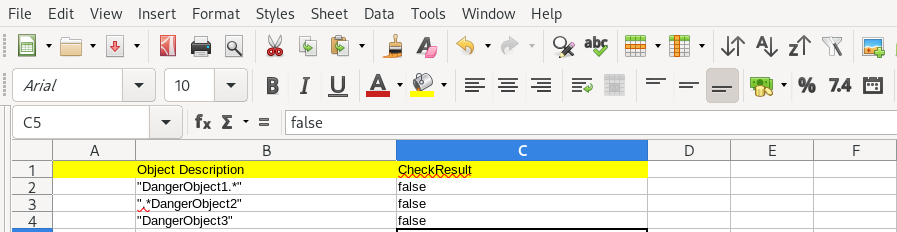
This solution does not need a special header for Excel data. The header and condition configuration is configured in the rule template.
As you might notice, our decision table is plain simple:
By contrast, let’s see what a typical drools domain header looks like for a spreadsheet decision table:
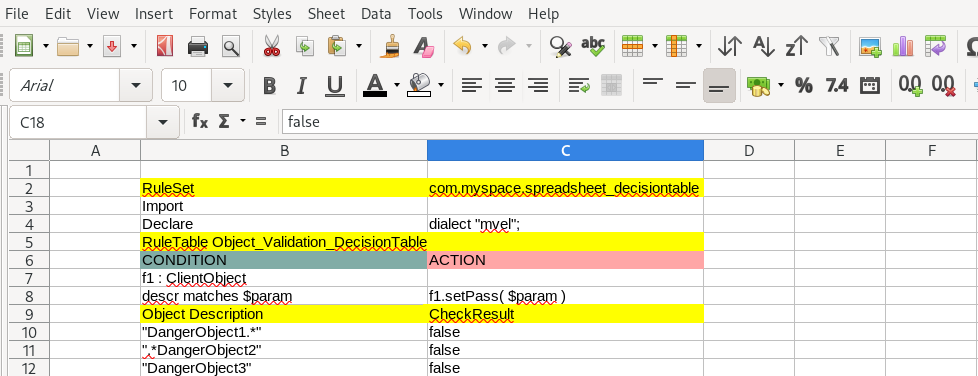
So the first good point is the rule data is easy. A plain spreadsheet is easier to understand and maintain by any user who does not yet have knowledge of drools domain syntax. You probably already maintain your business rules in such forms before you even adopt drools for rule management.
The configuration is managed in a separate rule template file which can be managed by a different person or team.
Secondly, by utilizing the rule template, it’s very flexible for rule conditions and actions since you can add multiple lines of code logic just like any coding block instead of putting them in Excel columns which would lose readability when it becomes multiple lines.
Also, you can store the rule data in DB or CSV if you like, since it’s simple row data without meta information. Drools provides an interface to handle this.
In some cases, users might want to customize the rule data governance by developing their own solution for editing, managing. Although usually, I would suggest users utilize the kie workbench, which is sophisticated and rich in functioned rules authoring and governance tools. However, if you want to develop your own portal or integrate the rule authoring experience into an existing application, then you can edit the business rules via DB row data and convert them to drools rule through rule templates.
Cons
The disadvantage is also obvious from my point of view: Raw Excel is not an easily controlled version.
Believe it or not, it’s vital to separate the business logic from application code in rules-oriented applications. Therefore rule data version control is vital and difficult. Although the drools community provides sophisticated and fully functional governance tools, like the “kie workbench,” to manage the rules authoring and version control features, etc., it can’t recognize both the “rule template” and raw Excel format.
So basically you can’t import them into the kie workbench or export them.
And the performance is not good. This can be observed by executing the client code in my demonstration code:
xxxxxxxxxx
# Run 10K rows Decision Tables
```bash
cd rules
mvn clean package
// rule package is spreadsheet-decisiontable-1.1-SNAPSHOT.jar *
cd ../myapp
mvn clean compile exec:java
Initial Kie Session elapsed time(ms): 8755
false
fired rules: 1 elapsed time(ms): 387
Is Object Pass:false
```
# Run 100K rows Decision Tables
```bash
cd rules
// It would take 1.5 mins to package the rule jar
mvn clean package
// rule package is spreadsheet-decisiontable-1.1-SNAPSHOT.jar
cd ../myapp
mvn clean compile exec:java
Initial Kie Session elapsed time(ms): 99290
false
fired rules: 1 elapsed time(ms): 9206
Is Object Pass:false
```
So obviously for a large decision table, this would not be an ideal solution, considering that one rule execution might take several seconds, although it’s quite flexible and the rules data is easy to manage by the excel file.
I think there are two reasons that cause the slow running:
- There are huge numbers of rule; in my case, there are 10K or 100k rules in my rule execution session.
- Converting row data into drools rules is slow and it would slow down the application; it could possibly cause a lot of JVM overheads.
Although this article mainly focuses on performance, I think rules governance is of at least the same importance as performance, if not more. Otherwise, I can actually handle this logic in plain java instead of involving drools.
I also see some user choosing a partial solution:
- Separate the big row data from the rules engine
- Keep other rules data in the rules engine as usual
It indeed can fix performance issues by separating the challenges outside of the drools domain.
Personally, I think it’s far from an ideal solution as well because it doesn’t keep all the business rules in one place. It would leak into or let’s say pollute your generic application code.
Conclusion
For rules-oriented application, a half barrel is like an empty barrel. It’s very hard to manage the business rules software lifecycle, such as editing, version control, and deployment if you don’t utilize the rules application framework, such as drools.
I describe solution 2: precompile rule solution in my next article; the problems I want to fix are:
- Don’t dynamically load Excel data at runtime; let’s precompile it at build time
- Use drools spreadsheet decision table so that it can be “version-controlled” by KIE workbench
Published at DZone with permission of Ryan ZhangCheng. See the original article here.
Opinions expressed by DZone contributors are their own.
Comments