

How to Program a Quantum Computer: A Beginner's Guide
Build your first quantum programs using IBM Quantum Composer. Learn how qubits work, flip states with logic gates, and harness superposition to output 2 values.
Join the DZone community and get the full member experience.
Join For FreeQuantum computing might sound familiar, but have you ever tried using it yourself? Despite the reputation for complex math, the fundamentals of quantum computing are surprisingly easy.
This guide offers a beginner-friendly walkthrough for working with qubits. You’ll learn how to build your first quantum program and see it generate numeric output, step by step.
Every Bit Counts
Let’s begin with the foundational concept behind all modern computing: the bit.
A bit is the smallest unit of information in your computer’s memory. It can be set to either 0 or 1, just like a light switch that toggles between off and on. When flipped up, the switch represents a 1. When flipped down, it's a 0. These binary values form the bedrock of every digital operation your machine performs.
0 = OFF
1 = ON
Every operation your computer performs is built on this binary foundation. The value of bits (either 0 or 1) are doing all the processing behind the scenes.
Grouping Bits for More Expressive Power
We can group bits together to form larger values.
While a bit (just a 0 or 1) is just a tiny amount of data on its own, when you begin combining them you can form much larger numeric values.
Link together four bits and you get a nibble, capable of representing any value from 0 up to 15. It’s a simple yet powerful extension of binary that helps form the building blocks for more complex data types.
0000 = 0
0001 = 1
0010 = 2
0011 = 3
…
1111 = 15
Similarly, two nibbles equals a byte.
The All Powerful Byte
Chances are, you’ve come across the term byte before, and for good reason.
A byte is one of the most common ways to store data in digital systems. A byte consists of 8 bits and is capable of representing any number from 0 to 255. This expansive range covers everything from alphabet letters to extended ASCII symbols, including the kinds found in emojis.
With just a single byte, your computer can convey an impressive variety of information.
0110 0101 = 101 => A
0110 0110 = 102 => B
0110 0111 = 103 => C
…
1111 1111 = 255 => ÿ
A Bit Evolves Into Something Far More Powerful as a Qubit
Unlike classical bits that exist strictly as 0 or 1, a qubit is the quantum computing version, but with a far more powerful purpose.
A qubit can hold both the values zero and one at once, in a phenomenon known as superposition. Traditional computers process using binary states, but quantum systems calculate outcomes using qubits that simultaneously represents zero and one.
This subtle but profound shift opens the door to exponential processing capabilities.
Ready to Build Your First Quantum Program?
Let's walk through using the IBM Quantum Composer, a free web-based platform where you can experiment with qubits and observe their behavior.
To begin, we’ll design a basic program with a single qubit that outputs the number 1.
Getting Started: A Quantum Program That Displays 1
Begin by heading over to the IBM Quantum Composer. From here, you should see the interface where all your quantum computing programs can be created. We’ll start with a single qubit and guide it to output the number 1.
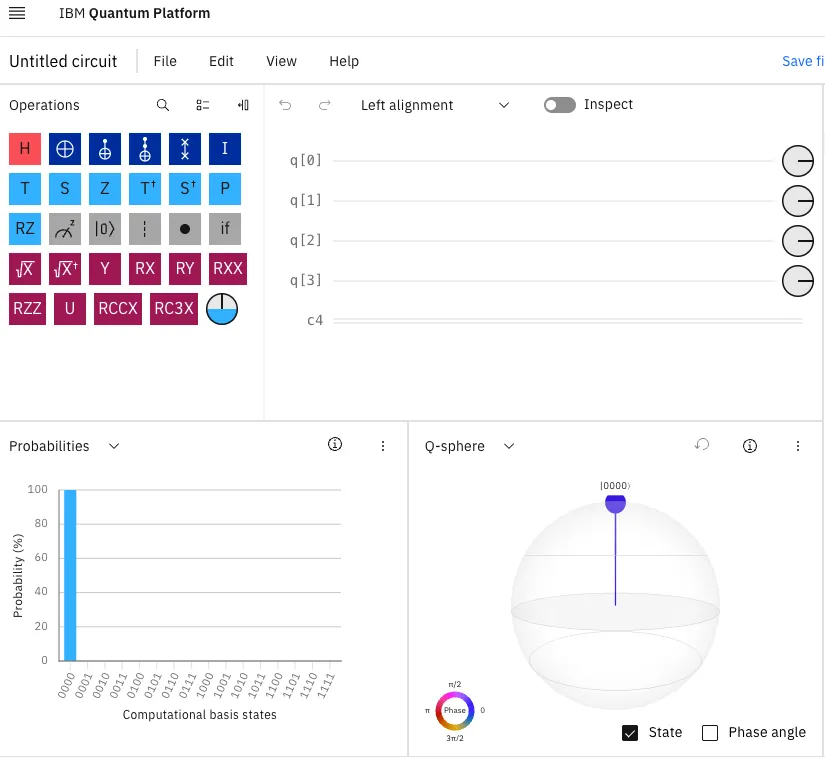
Trimming Down to One Qubit for Simplicity
To keep things focused, we’ll reduce the workspace to a single qubit.
Start by clicking on q[3] and using the trash icon to delete it. Do the same for q[2] and q[1]. After this cleanup, you’ll be working solely with q[0]
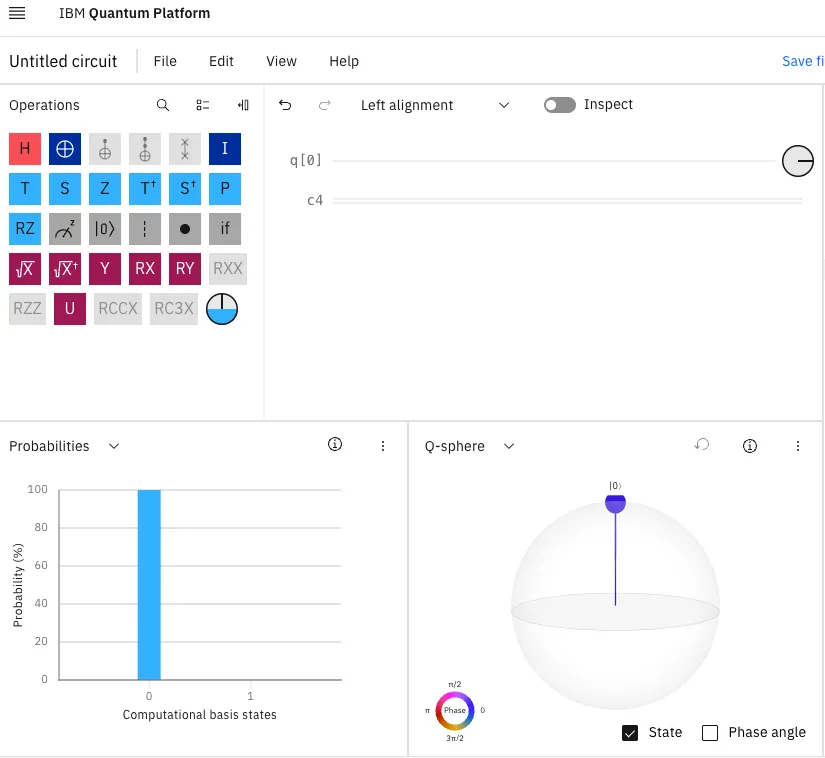
You’ll notice a line labeled c4 in the interface. Don’t worry about it for now. That line corresponds to classical registers, which we won’t be using in this example.
Reading an Initial Output of Zero
Take a look at the blue probability bar in the lower-left corner. It shows the output from your quantum program. At initialization, a qubit holds the value 0, and the program reflects this with a 100% chance of outputting zero.
But we want the program to output the value 1 instead.
Inverting the Qubit to One
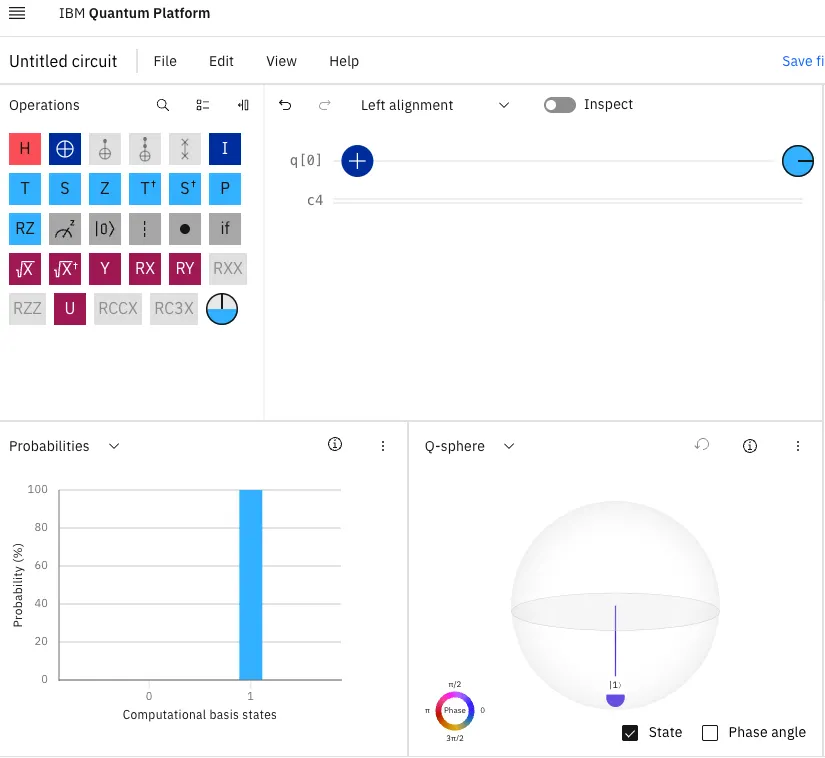
To change the qubit’s value from 0 to 1, we’ll use a quantum NOT gate, represented by a circle with a plus sign inside. This gate inverts the qubit’s current state.
Drag the NOT gate onto the q[0] line. Instantly, the probability bar updates to show a 100% chance of outputting 1.
Second Quantum Example: Outputting the Value 2
Previously, we built a quantum program that produced the number 1 using a single qubit.
Let’s now expand to two qubits in order to generate the output value 2. Click on the label q[0], then hit the plus icon to insert another qubit. Once added, you’ll notice the probability graph updates to display four states: 00, 01, 10, and 11.
That’s because with two qubits, the system can represent all four binary combinations simultaneously.
Binary Math Behind the Scenes
To produce the number 2, we’ll need a quick binary conversion.
Two bits are required to express the value 2 as 10. At the moment, your NOT gate is acting on the right-most qubit, flipping it from 0 to 1, and resulting in the binary 01, or 1 in decimal.
To shift this to a value of 2, we want the binary output to be 10.
Moving the NOT Gate
Find the NOT gate on q[0] and drag it down to q[1]. This effectively transfers the inversion from the lower-order bit to the higher-order one.
Once done, the probability bar should update, now indicating a 100% chance of outputting 10, which is 2 in decimal.
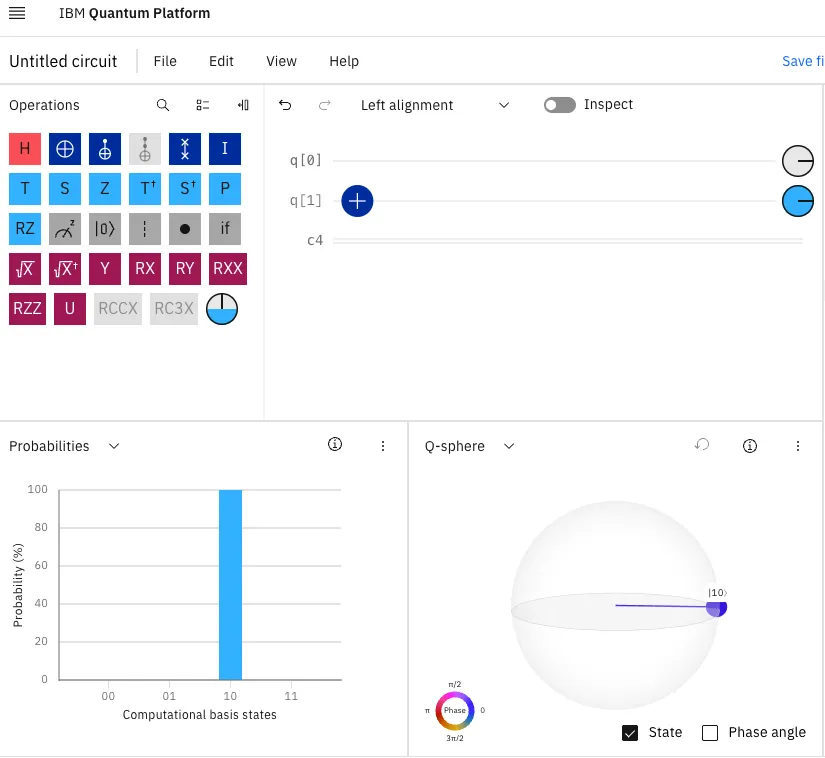
This completes the second quantum computing program for displaying the value 2.
Third Quantum Example: Simultaneously Outputting Values 2 and 3
This final example showcases the true advantage of quantum computing—outputting multiple values in a single operation.
Let’s modify our program to generate both 2 and 3 with equal probability. This technique leverages one of quantum computing’s core principles: superposition.
What Is Superposition and Why Use It Here?
Superposition allows a qubit to exist in a blend of both 0 and 1 states simultaneously. It's what gives quantum computers their edge in parallel computation.
In this case, the decimal values 2 and 3 correspond to binary 10 and 11, respectively. To represent both outcomes in one computation:
- The high-order bit (left qubit) must stay fixed at 1.
- The low-order bit (right qubit) needs to be in superposition—oscillating between 0 and 1.
10 = 2
11 = 3
^ — The right-most bit is either 0 or 1.
This setup produces a quantum state that yields either 10 or 11—or 2 and 3—each with 50% probability.
Using Superposition and the Hadamard Gate
To represent both the binary values 10 (decimal 2) and 11 (decimal 3), we’ll place one qubit into a superposition state.
The Hadamard gate (labeled with a red “H” in the toolkit) allows a qubit to simultaneously hold both 0 and 1 with equal probability. In our case, we want:
- The left-most qubit to remain fixed at 1.
- The right-most qubit to toggle between 0 and 1 through superposition.
Drag the red Hadamard gate and drop it onto the line for q[0].
Verifying the Result
Once applied, the probability chart updates to reflect two possible outcomes—10 and 11—each with a 50% likelihood. That means our quantum program now alternates between outputting the values 2 and 3.
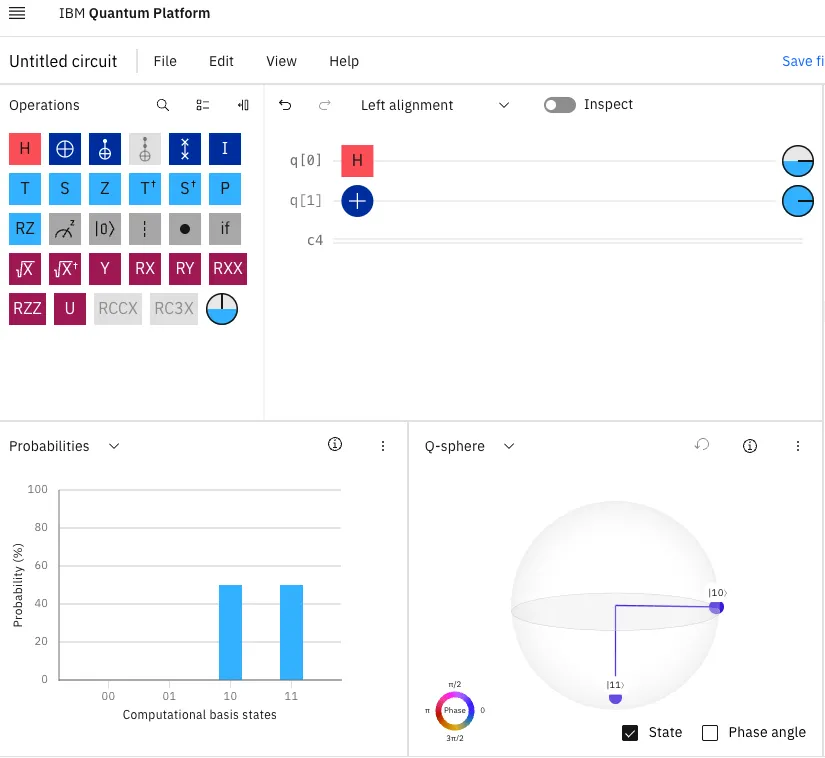
Two Qubits and Two Outcomes at Once
With our latest update, the quantum computing program now uses a pair of qubits to simultaneously produce the values 2 and 3.
This dual-output behavior showcases a key advantage of quantum computation: the ability to represent and evaluate multiple states within a single execution.
We’ve Only Just Started
In this tutorial, we explored how quantum bits (qubits) differ from classical bits, and we built several working programs using an online quantum composer.
We represented binary values with qubits, flipped states using NOT gates, and ultimately tapped into quantum superposition to output two values—2 and 3—simultaneously. With just two qubits, we demonstrated a foundational concept in quantum computation: the ability to evaluate multiple states in parallel.
But this is just the beginning.
What kind of quantum program would you build next?
Leave a comment or tag me—I'm excited to see what you can build with quantum gates!
About the Author
If you’ve enjoyed this article, please consider following me on Medium, Bluesky, LinkedIn, and my website to be notified of my future posts and research work.
Opinions expressed by DZone contributors are their own.
Comments