

How To Use GitLab for Simultaneous Execution of Jobs (Part 2)
In this part of the series, the reader will learn how to solve the bottlenecks discussed in part 1 by executing the jobs in parallel.
Join the DZone community and get the full member experience.
Join For FreeIn part one of this series — How To Use GitLab for Simultaneous Execution of Jobs — the reader was introduced to the basics of GitLab, as well as continuous integration and continuous deployment/delivery.
In this part of the series, the reader will learn how to solve the bottlenecks discussed in part 1 of this series by executing the jobs in parallel
How We Solved Bottlenecks by Running Jobs in Parallel
Follow these steps to create a matrix strategy:
- Create a GitLab folder on your local system for your configuration files, which will include web and service YAMLs, as well as before and after scripts.
- Create a .gitlab-ci.yml file that contains all the CICD tasks and their extensions.
- Separate the CD jobs from the ordinary occupations .gitlab-ci.yml and incorporate it with the other YAML files
- To have our deployments run concurrently as part of our GitLab CI/CD pipeline, we must set up GitLab to launch deploy jobs at the same time. In each of the deployment tasks, we then run a different subset of our test suite.
- To begin, we separate our projects/applications as build, test, and deploy jobs. We will not need the build and test stages for our purposes because we will be focusing on deployment activities; however, we would like to provide a complete example so you can easily construct an entire process.
- The first step in our pipeline will be the execution of the build job, which will be followed by the verification of the build and security activities and the running of numerous simultaneous deploy jobs
- We begin by establishing the stages in our CICD process to set the execution order and dependencies of our jobs named build, verify-build, deploy, and validate-deploy in YAML. We also define jobs with the same names and associate them with the appropriate stages.
- This instructs GitLab to run all the jobs in our build stage first, then our verify-build stage, deploy jobs, and finally, any jobs in the validate-deploy stage. If any of the deploy jobs fail, GitLab will halt the pipeline execution and will not conduct any following jobs.
- GitLab also makes it simple to execute more instances of the same job at the same time. Simply specifying the parallel option for our test task causes GitLab to launch the instances provided in the deploy YAML of this job at the same time. Please see the diagram below.
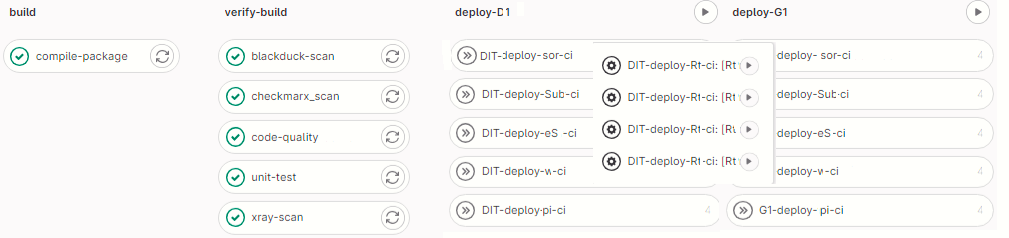
Structure and Implementation
Our primary focus is on delivering jobs that include deploying various components of your application to different regions and servers.
- Create a components YAML file that will include the configuration for the web and service components. We have three components (web, web API, and Windows)and add the servers w.r.to the environments (list of servers).
- Define the variables as follows: Begin by specifying the variables that use in your matrix deployment. If you wish to deploy your application to different areas, for example, you can define a variable for each location. We have four regions here. Asia-Pacific (APAC), Latin America (LA), North America (NA), and Europe-Middle East-Africa (EMEA)
- Now, make a .matrix extend with stage and script. Stage specifies when this matrix will execute, and Script specifies how your components to deploy to target machines.
- Define the deployment jobs that begin with the keyword extends. This keyword aids in the reduction of code block repeats in the pipeline.
- Configure the necessary variables, such as YAML FILES and ENVIRONMENT, which aid in configuring the values with respect to the environment you deploy.
- Add the term parallel to the given matrix to the components and regions defined.
- We now include the web and web API components to the same servers to deploy with multiple regions.
DIT-deploy-comp-ci:
   extends: .matrix-np
   stage: deploy-Dit1
   variables:
      YMLFILES: "sernonprd.yml"
      DEPLOY_SECRET_PATH: 'kv/VM/DIT'
      ENVIRONMENT: DIT
      configvalue: "Env. Dit1"
      environment_config: DIT
   parallel:
        matrix:
            - COMPONENTS: web, webapi
              REGIONS: [NA,LA,EMEA,APJ]
   rules:
     - if: '$CI_COMMIT_BRANCH =~ /^([fF]eature).*$/'
       when: manual
     - if: '$CI_COMMIT_BRANCH == "develop"'
       when: manual
     - if: '$CI_COMMIT_BRANCH =~ /^rel-test-.*$/'
       when: manual
   allow_failure: true
   environment:
     name: DIT
The frontend component of our application is deployed to the NA, LA, EMEA, and APJ regions on server1, and the backend component Webapi is deployed to the NA, LA, EMEA, and APJ regions on server2. We can simply deploy different components of your application to different servers and geographies utilizing GitLab's matrix capability without duplicating your deployment code. As a result, the respective deploy job is defined only once, and duplications are effectively removed. With this version of a deploy job description, a corresponding deploy job instance will be produced for each list item, i.e., two components with four regions. Because the parameterized CD task is assigned to stage deployment, all these jobs will be done concurrently.
Conclusion
This tutorial has provided a comprehensive overview of how to utilize the GitLab CI/CD matrix strategy for your deployments.
By leveraging the matrix strategy and matrix-parallel methods in GitLab CI/CD, you can optimize your deployment process, reduce duplication, and speed up your pipeline execution. This approach enables you to efficiently test and deploy your code across various configurations, platforms, or environments.
Remember to refer to the official GitLab documentation for the most up-to-date and detailed information on using the matrix strategy in your CI/CD pipelines. Happy coding!
Opinions expressed by DZone contributors are their own.
Comments