

How To Use MQTT in PHP
Use the php-mqtt/client client library in PHP projects to implement the functions of connection, subscription, unsubscribing, message receiving, and sending between MQTT client and MQTT server.
Join the DZone community and get the full member experience.
Join For FreePHP is a widely-used open source multi-purpose scripting language, which can be embedded in HTML and is especially suitable for web development.
This article mainly introduces how to use the php-mqtt/client client library in PHP projects to implement the functions of connection, subscription, unsubscribing, message receiving, and sending between the MQTT client and MQTT server.
MQTT Client Library Selection
This article chooses the client library php-mqtt/client, which has the highest downloads on the composer. For more PHP-MQTT client libraries, please view in Packagist-Search MQTT.
MQTT communication belongs to a network communication scenario outside the HTTP system. Due to the limitation of PHP characteristics, using the extensions for network communication such as Swoole/Workerman in the PHP system can bring a better experience. Its use will not be repeated in this article. The relevant MQTT client libraries are as follows:
- workerman/mqtt: Asynchronous MQTT client for PHP based on workerman.
- simps/mqtt: MQTT protocol Analysis and Coroutine Client for PHP.
Project Initialization
Confirm PHP Version
This project uses 7.4.21 for development and testing. Readers can confirm the PHP version with the following command.
php --version

PHP 7.4.21 (cli) (built: Jul 12 2021 11:52:30) ( NTS )
Copyright (c) The PHP Group
Zend Engine v3.4.0, Copyright (c) Zend Technologies
    with Zend OPcache v7.4.21, Copyright (c), by Zend Technologies
Use Composer to Install php-mqtt/client
Composer is a dependency management tool for PHP, which can manage all the dependencies your PHP project needs.
composer require php-mqtt/client
PHP MQTT Usage
Connect to MQTT Server
This article will use the Free Public MQTT Server EMQX. The server access information is as follows:
- Broker: broker.emqx.io
- TCP Port: 1883
- SSL/TLS Port: 8883
Import Composer Autoload File and php-mqtt/client
require('vendor/autoload.php');

use \PhpMqtt\Client\MqttClient;
Set MQTT Broker Connection Parameters
Set the MQTT Broker connection address, port, and topic. At the same time, we call the PHP rand function to generate the MQTT client id randomly.
$server   = 'broker.emqx.io';
$port     = 1883;
$clientId = rand(5, 15);
$username = 'emqx_user';
$password = null;
$clean_session = false;
Write MQTT Connection Function
Use the above parameters to connect, and set the connection parameters through ConnectionSettings, such as:
$connectionSettings  = new ConnectionSettings();
$connectionSettings
  ->setUsername($username)
  ->setPassword(null)
  ->setKeepAliveInterval(60)
  ->setLastWillTopic('emqx/test/last-will')
  ->setLastWillMessage('client disconnect')
  ->setLastWillQualityOfService(1);
Subscribe
Program to subscribe to the topic of emqx/test, and configure a callback function for the subscription to process the received message. Here we print out the topic and message obtained from the subscription:
$mqtt->subscribe('emqx/test', function ($topic, $message) {
    printf("Received message on topic [%s]: %s\n", $topic, $message);
}, 0);
Publish
Construct a payload and call the publish function to publish messages to the emqx/test topic. After publishing, the client needs to enter the polling status to process the incoming messages and the retransmission queue:
for ($i = 0; $i< 10; $i++) {
  $payload = array(
    'protocol' => 'tcp',
    'date' => date('Y-m-d H:i:s'),
    'url' => 'https://github.com/emqx/MQTT-Client-Examples'
  );
  $mqtt->publish(
    // topic
    'emqx/test',
    // payload
    json_encode($payload),
    // qos
    0,
    // retain
    true
  );
  printf("msg $i send\n");
  sleep(1);
}

// The client loop to process incoming messages and retransmission queues
$mqtt->loop(true);
Complete Code
Server connection, message publishing, and receiving code.
<?php

require('vendor/autoload.php');

use \PhpMqtt\Client\MqttClient;
use \PhpMqtt\Client\ConnectionSettings;

$server   = 'broker.emqx.io';
$port     = 1883;
$clientId = rand(5, 15);
$username = 'emqx_user';
$password = null;
$clean_session = false;

$connectionSettings  = new ConnectionSettings();
$connectionSettings
  ->setUsername($username)
  ->setPassword(null)
  ->setKeepAliveInterval(60)
  ->setLastWillTopic('emqx/test/last-will')
  ->setLastWillMessage('client disconnect')
  ->setLastWillQualityOfService(1);


$mqtt = new MqttClient($server, $port, $clientId);

$mqtt->connect($connectionSettings, $clean_session);
printf("client connected\n");

$mqtt->subscribe('emqx/test', function ($topic, $message) {
    printf("Received message on topic [%s]: %s\n", $topic, $message);
}, 0);

for ($i = 0; $i< 10; $i++) {
  $payload = array(
    'protocol' => 'tcp',
    'date' => date('Y-m-d H:i:s'),
    'url' => 'https://github.com/emqx/MQTT-Client-Examples'
  );
  $mqtt->publish(
    // topic
    'emqx/test',
    // payload
    json_encode($payload),
    // qos
    0,
    // retain
    true
  );
  printf("msg $i send\n");
  sleep(1);
}

$mqtt->loop(true);
Test
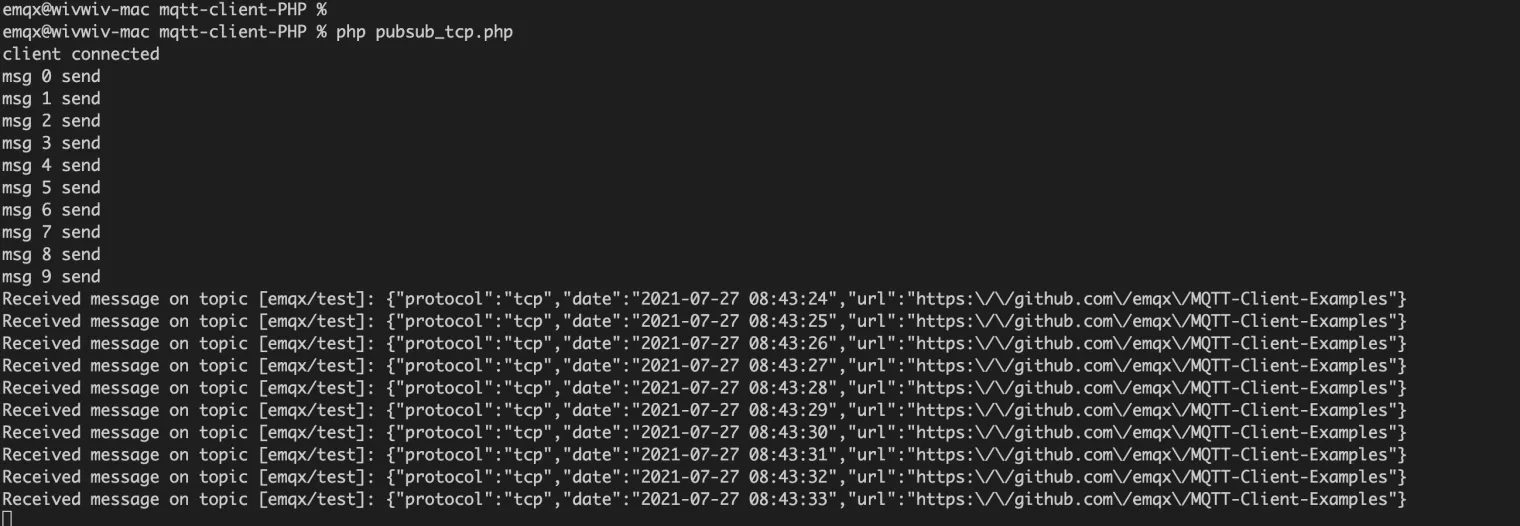
After running the MQTT message publishing code, we will see that the client has successfully connected, and the messages have been published one by one and received successfully:
php pubsub_tcp.php
Summary
We have used the php-mqtt/client to connect to the public MQTT server and implemented the connection, message publishing, and subscription between the test client and the MQTT server.
Opinions expressed by DZone contributors are their own.
Comments