

Replay, Scheduling, and Throttling: Engineering a Self-Service Kafka Streaming Tool at Scale
A Kafka recovery script grew into self-service streaming infrastructure. The hard part: guaranteeing deterministic throughput across a distributed Spark job.
What started as a recovery tool for streaming pipelines ended up as a full-fledged self-service platform, with scheduled watermark-based incremental ingestion, ad-hoc/one-time data replay, and throughput control built in along the way.
The origin was narrow: streaming pipelines fail. A downstream consumer has an outage, a schema changes, a job crashes partway through, and, let's say, Kafka partitions are already gone due to max retention; when that happens, someone needs a way to re-publish a window of historical data without working with the source system to republish. We built a small tool to do exactly that: point it at a backup table (that held raw events), give it a date range, and it would replay that data back to a Kafka topic.
As more teams started using this, they began asking questions like: can this be scheduled for a regular stream? Can we configure the TPS (Events Published/Sec)? Those questions are what turned a one-off recovery script into shared infrastructure. This article covers that evolution: the two design problems that mattered most in getting there — turning replay into a first-class, self-service capability, and making throughput control work correctly across a distributed Spark job, the harder of the two — plus the operational lessons that came from running it as infrastructure other teams now depend on.
High-Level Architecture
At its core, a user calls the Replay Service with a source table, a target Kafka topic, required TPS, and other optional parameters. The Replay Service kicks off a Spark job on serverless EMR through a Scheduler Service (Internal), which hands back a pipeline ID. The user uses that for a status request from the Replay Service, which parses the underlying job's logs and returns status - running, completed with a record count, or failed with a reason.
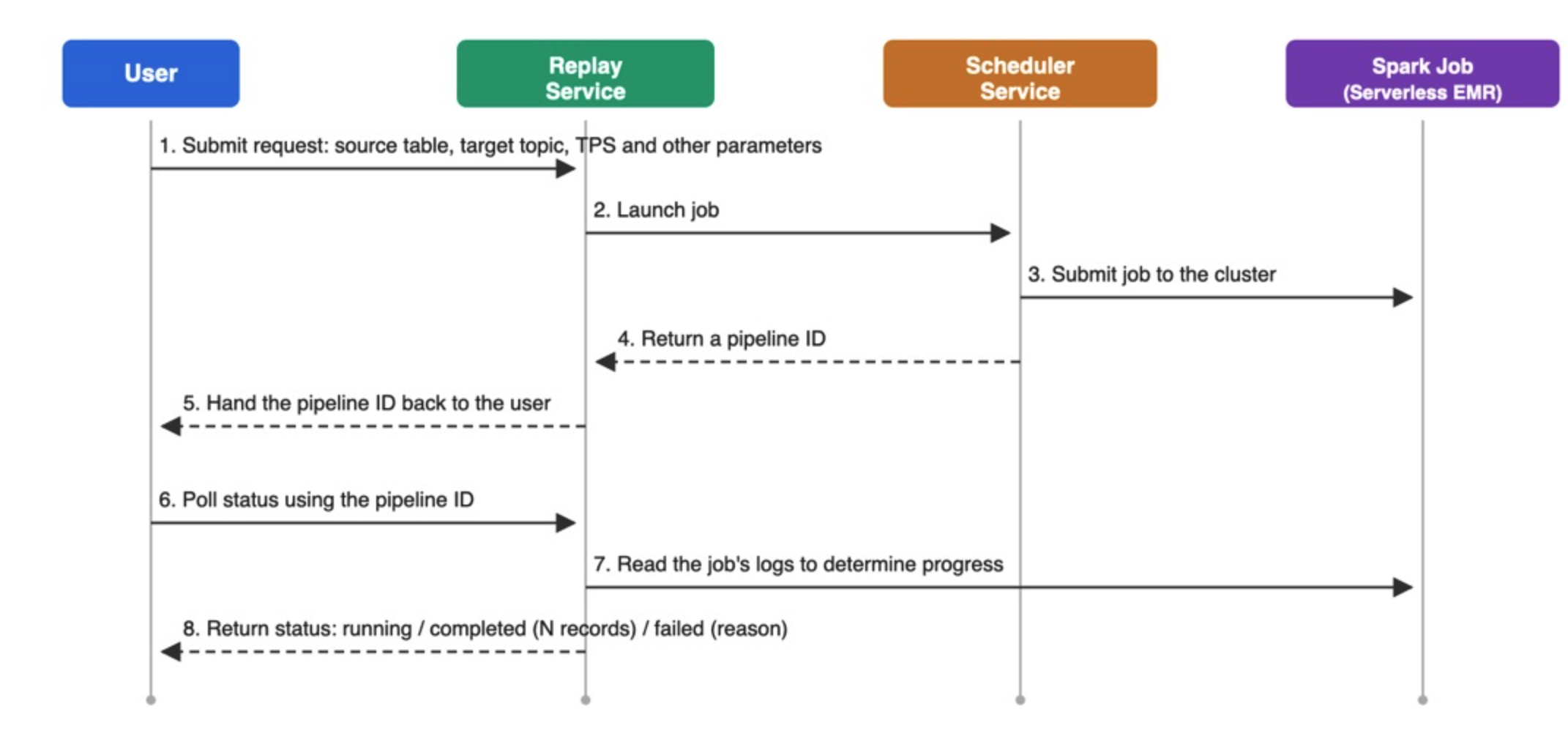
Once the job is running, it reads from the source table and streams records to the target Kafka topic, where any number of downstream consumers can subscribe.
The Spark job runs under its own AWS IAM role, separate from any team's own credentials, so onboarding a new table or topic is a matter of granting that role read access to the source table and write access to the target topic, not provisioning per-team infrastructure.
Replay as a Self-Service Capability
Replay ended up covering a few distinct shapes of the same underlying need:
- One-time replay: An ad hoc, manually triggered backfill for a specific date range, used for onboarding, backfill, or incident recovery.
- Scheduled replay: A recurring stream from a data lake table that's typically populated in batch, where the data needs to be shared with other systems, customer support, marketing, etc. The capability also allows customers to define a watermark (CDC) column, so subsequent pushes send only incremental data to the topic, improving performance and reducing cost.
- Auto topic management: Replay can provision its own topic to avoid colliding with the live feed, or, if needed, publish into the same live feed (a user-provided topic) so the data flows through the usual downstream setup.
Keeping Throughput Steady Across a Distributed Job
Often teams want to dictate TPS (Events Published/Sec) because the downstream system may or may not handle the volume the replay pipeline produces. Also, TPS needs to be deterministic to reliably estimate how long the backfill will take, or simply how long the job will run.
The core challenge: a distributed job, a single target rate. A Spark job doesn't execute as one process. It runs as many parallel tasks spread across executor cores, each independently reading and publishing its own slice of data. If you want the whole job to publish at, say, 10,000 events per second in aggregate, you can't just tell every task "publish as fast as you can"; you have to divide that target across however many parallel task slots are actually running, and get every one of them pacing independently toward its share of the total.
Here's the shape of the approach:
// NOTE:
// sourceDataFrame is repartitioned to a multiple of available workers. For e.g. if total
// number of table partition is 100 and available workers are 56, the data will be repartitioned
// to 112 (RoundingWithCeil(100/56) ) so that every node gets fair share of records to publish

val totalExecutorCount = spark.sparkContext.getExecutorMemoryStatus.size - 1
val coresPerExecutorCount = spark.conf.get("spark.executor.cores", "1").toInt
val totalWorkers = totalExecutorCount * coresPerExecutorCount
val tps = jobConfig.argumentConfig.tps
val batchSize = math.max(1, tps / totalWorkers)

val eventsPublished: LongAccumulator = spark.sparkContext.longAccumulator("eventsPublished")

sourceDataFrame.foreachPartition((partition: Iterator[Row]) => {
  var partitionCount = 0L

  partition.grouped(batchSize).foreach { batch =>
    val startTime = System.currentTimeMillis()

    batch.foreach { record =>
      kafkaSink.value.send(targetTopic, headers, value)
      partitionCount += 1
    }

    // Pace each batch to a 1-second window: if sending the batch took less
    // than a second, sleep out the remainder before starting the next one.
    val elapsed = System.currentTimeMillis() - startTime
    val sleepTime = 1000 - elapsed
    if (sleepTime > 0) Thread.sleep(sleepTime)
  }

  // flush() blocks until Kafka acknowledges all buffered records for this partition.
  // Only count after confirmed delivery, so the metric reflects events that
  // actually landed on the topic, not events that were merely handed to the producer.
  kafkaSink.value.flush()
  eventsPublished.add(partitionCount)
})
A few things worth unpacking here:
totalWorkerscounts task slots, not executors. In Spark terms, it's executor count multiplied byspark.executor.cores(set atspark-submittime), the actual number of parallel task slots available, since each core runs its own independent task. Dividingtpsby executor count alone would under-throttle any executor running more than one core.- The rate limiter is per-task, not global. There's no central coordinator throttling the job as a whole. Each partition's task independently batches its records and sleeps out the remainder of each second. The aggregate rate emerges from every task pacing itself to the same per-slot target simultaneously.
- This only holds on a stable, dedicated cluster.
totalWorkersis calculated once at the start of the job, so the whole scheme assumes the cluster isn't dynamically scaling mid-run. If executors are added or removed while the job is running, the fixedbatchSizeno longer matches the actual number of active task slots, and the real aggregate rate drifts from the configured target. It also assumes the job has the cluster's resources to itself: running on a shared, transient cluster where other jobs are competing for the same executors introduces exactly the kind of resource contention this mechanism is trying to prevent in the first place. In practice, this means running on a dedicated, statically-sized cluster per job rather than a shared or autoscaling one. - This only produces a uniform aggregate rate if the data is repartitioned into a multiple of
totalWorkersfirst. If partitions aren't evenly distributed across the available slots, some cores end up handling more partitions than others. Every task still paces to the samebatchSize, but a core doing more partition-passes ends up contributing more to the real aggregate throughput than a core doing fewer. The per-task math is correct, but the cluster-wide result skews unless the upstream repartitioning step guarantees an even split. Getting this repartitioning right was the actual key to making the aggregate number line up with the configured target. The batching-and-sleep loop is straightforward once the data is distributed evenly going in. - The count only advances on confirmed delivery.
flush()blocks until Kafka acknowledges every buffered record in that partition, and only then does the accumulator increment. Without this, a job that crashes mid-run could report a published count higher than what Kafka actually has, which quietly breaks trust in the metric during incident investigations. - Low TPS with many workers hits a floor.
math.max(1, tps / totalWorkers)guarantees at least one message per task per second, so a target of, say, 10 TPS spread across 56 task slots still lets every task send 1 msg/sec, overshooting the aggregate target by up to 5.6x. This scheme is tuned for the large-backfill case it was built for; it under-throttles at very low target rates.
At a high level: each partition publishes only its allocated number of events per second, then sleeps for the rest of the second. A fixed cluster size, repartitioning data to a multiple of total workers, and a batch size derived from the TPS target are what guarantee the aggregate throughput. Each streaming job also runs on its own dedicated serverless EMR instance, so there's no contention with other jobs for the same resources.
A Few Supporting Capabilities
A couple of other features round out the platform, worth a brief mention even though they weren't the hardest problems to solve:
- Custom headers on published messages, letting downstream consumers route or filter messages without inspecting payloads.
- On-the-fly decryption of encrypted (PII) columns, so sensitive source data can be safely streamed without requiring every downstream consumer to independently implement decryption.
Running It as Shared Infrastructure
Building the capability was one problem. Running it as infrastructure other teams depend on surfaced a couple of costs that don't show up until the platform has real usage.
Dedicated clusters aren't free. The TPS guarantee described above only holds because every job gets its own statically-sized, serverless EMR cluster, with no sharing and no autoscaling mid-run. That isolation is what makes the throughput math work, but it also means the platform's infrastructure cost scales roughly linearly with the number of concurrent jobs, not with total data volume. A dozen small scheduled jobs cost as much in cluster overhead as a few large ones. It's the direct tradeoff for the guarantee: correctness under load, in exchange for giving up the efficiency of a shared pool.
Self-service cuts both ways at off-boarding. Making it easy for a team to schedule a recurring replay made it just as easy to forget it exists. A scheduled pipeline is driven by its upstream dependency, so when the upstream stops running, the pipeline stops too. It doesn't keep quietly publishing after a team moves on. But the pipeline's configuration doesn't go away on its own: teams that deprecated the downstream consumer rarely came back to tell us, so the definition just sits there, cluttering inventory and skewing usage metrics even though nothing was actually running. This demands auto de-provisioning based on its last run check (i.e., this pipeline didn't run in the last X days) and clean up periodically.
Summary
A recovery tool and a self-service streaming platform look similar on the surface: both move data from a table to Kafka. What separates them is whether replay works as a capability that teams can self-serve rather than something an engineer has to trigger by hand, whether throughput holds steady when a dozen teams are running jobs against the same infrastructure at once, and whether the platform can be operated (onboarded, monitored, and off-boarded) without someone having to remember every job by hand.
Opinions expressed by DZone contributors are their own.