

Chaos Engineering and Kafka In Action: Topic Level Idempotence and Retry Check
Learn how to use Spring Boot, Kafka, and Toxiproxy to simulate network failures, test producer idempotence, and troubleshoot duplicate messages.
Everyone is rushing to build AI agents right now, but GenAI integration really just puts a stronger spotlight on solid system design and backend reliability. An AI agent relies entirely on the APIs and data pipelines underneath it. If your backend drops events or double-processes payments during a network blip, even the best agent will just execute a broken workflow faster.
To build resilient systems, you need to see how they break. Reading Kafka documentation on fault tolerance helps, but intentionally introducing network chaos shows how the underlying mechanics actually behave.
In this post, we will set up a local testing environment using Spring Boot, Kafka, and Toxiproxy. We'll configure producer properties for topic-level idempotence and walk through common network simulation pitfalls that lead to duplicate data.
1. Setting Up the Chaos Test Architecture
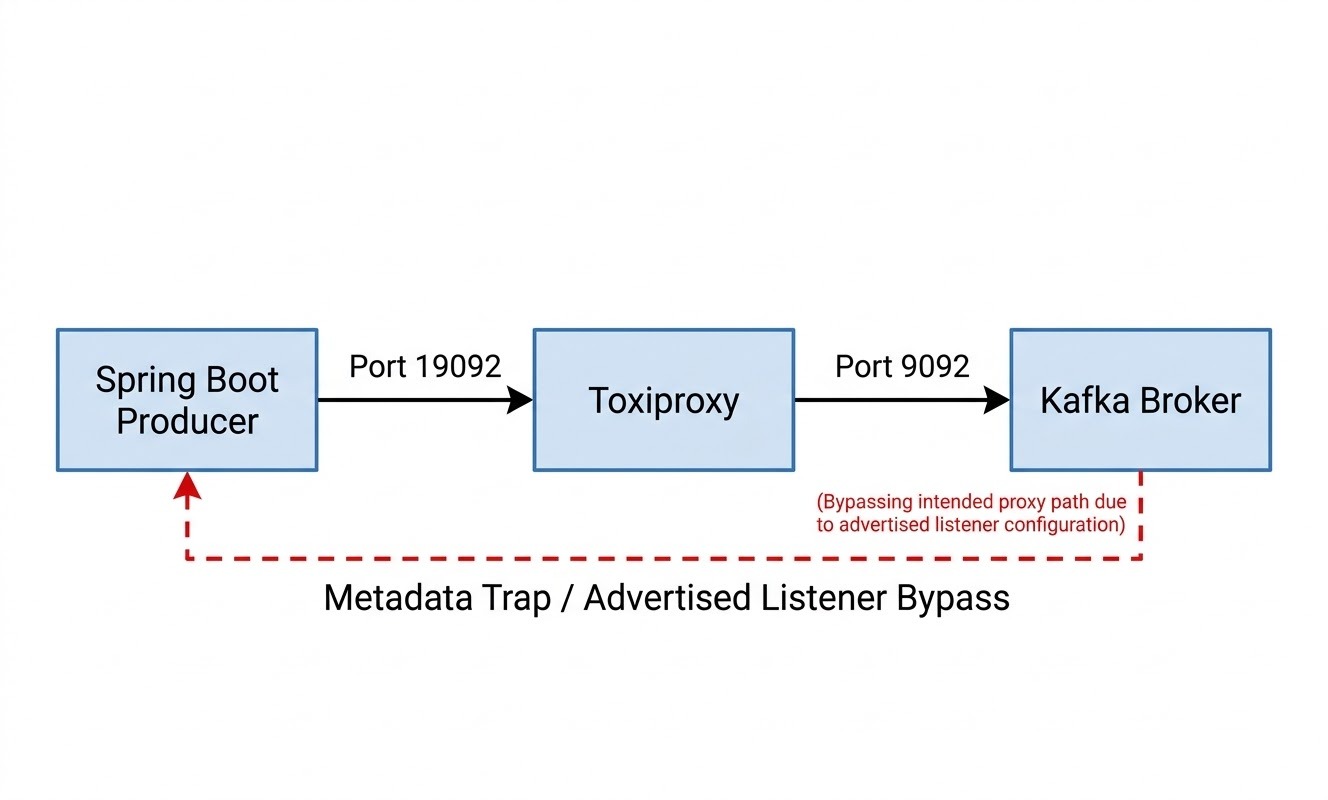
To test network issues accurately, stopping the Kafka broker isn't enough. We need to simulate realistic network conditions like latency spikes, packet drops, and bandwidth throttling. Toxiproxy acts as a proxy between our producer and broker to simulate these conditions.
Creating a Local/Dev Kafka Cluster
We start by spinning up the Kafka cluster and Kafka UI using Docker.
# docker-compose-kafka.yml
version: "3.8" #avoid this

services:
  kafka:
    image: apache/kafka:latest
    container_name: kafka
    ports:
      - "9092:9092"
    environment:
      CLUSTER_ID: "4L62xdwCQKWvZs96A39vGA"
      KAFKA_NODE_ID: 1
      KAFKA_PROCESS_ROLES: "broker,controller"
      KAFKA_CONTROLLER_QUORUM_VOTERS: "1@kafka:9093"
      KAFKA_INTER_BROKER_LISTENER_NAME: "INTERNAL"

      # Configure distinct internal/external routing ports
      KAFKA_LISTENERS: "INTERNAL://0.0.0.0:29092,EXTERNAL://0.0.0.0:9092,CONTROLLER://0.0.0.0:9093"

      # We will bookmark this line, dear reader!
      KAFKA_ADVERTISED_LISTENERS: "INTERNAL://kafka:29092,EXTERNAL://localhost:19092"

      KAFKA_CONTROLLER_LISTENER_NAMES: "CONTROLLER"
      KAFKA_LISTENER_SECURITY_PROTOCOL_MAP: "INTERNAL:PLAINTEXT,EXTERNAL:PLAINTEXT,CONTROLLER:PLAINTEXT"
      KAFKA_OFFSETS_TOPIC_REPLICATION_FACTOR: 1
      KAFKA_LOG_DIRS: "/var/lib/kafka/data"
    volumes:
      - kafka_data:/var/lib/kafka/data

  kafka-ui:
    image: provectuslabs/kafka-ui:latest
    container_name: kafka-ui
    ports:
      - "9080:8080"
    depends_on:
      - kafka
    environment:
      DYNAMIC_CONFIG_ENABLED: "true"
      KAFKA_CLUSTERS_0_NAME: "local-cluster"
      KAFKA_CLUSTERS_0_BOOTSTRAPSERVERS: "kafka:29092"

volumes:
kafka_data:
To spin it up, we use Docker Compose:
docker compose -f "docker-compose -kafka.yml" up
Both your local Kafka cluster and the kafka-ui should spin up. Note that KAFKA_ADVERTISED_LISTENERS includes the external port localhost:19092; we'll see why.
A Local Proxy to Sit Between Kafka Broker and Producer
We use Docker for this, too!
# docker-compose-toxiproxy.yml
version: "3.8" # Don’t use this version - it’s deprecated

services:
  toxiproxy:
    image: shopify/toxiproxy:latest
    container_name: toxiproxy
    ports:
      - "8474:8474" # Toxiproxy Management API
      - "8000:8000" # Example port exposed for a proxied application service
      - "19092:19092"
    networks:
      - toxiproxy-net

  toxiproxy-ui:
    image: buckle/toxiproxy-frontend:latest
    container_name: toxiproxy-ui
    ports:
      - "8080:8080" # We don’t use UI in this article
    environment:
      - TOXIPROXY_URL=http://toxiproxy:8474
    depends_on:
      - toxiproxy
    networks:
      - toxiproxy-net

networks:
  toxiproxy-net:
driver: bridge
docker compose -f docker-compose-toxiproxy.yml up
Once running, create a proxy tunnel via the Toxiproxy CLI to listen on port 19092 and forward traffic to Kafka on port 9092:
./toxiproxy-cli create -l 0.0.0.0:19092 -u host.docker.internal:9092 kafka-proxy
Note: We use the above CLI inside the toxiproxy container. So, you must use docker exec. In some versions, the CLI tool might not be included in the $PATH, and you might need to switch the current directory:
/go/bin # ls

toxiproxy      toxiproxy-cli
If you're using this toxiproxy tool for the first time, you can refer to the official Toxiproxy documentation or this starter guide we created.
2. The Kafka Client Producer Code
We create a basic application using Spring Boot 4.1 (though we do not have any version restriction until now) and use the following dependency:
<dependency>
    <groupId>org.springframework.boot</groupId>
    <artifactId>spring-boot-starter-kafka</artifactId>
</dependency>
We'll keep the Spring Boot service simple. We define a basic payload configuration and direct messages to topic T3 via KafkaConfig.java.
Config:
 // KafkaConfig.java
package com.soham.selfteaching.kafka.kafkadeepdive.config;

import lombok.Data;
import org.springframework.beans.factory.annotation.Value;
import org.springframework.context.annotation.Configuration;

@Configuration
@Data
public class KafkaConfig {
    @Value("${app.topic.name:T3}")
    private String topic;
}
Our application.yml is minimal, accepting defaults provided by the Kafka library.
# application.yml
server:
  port: 8082
spring:
  application:
    name: kafka-deep-dive
  kafka:
    bootstrap-servers: "localhost:19092"
    producer:
      acks: "1" # Required to bypass idempotence shield
      key-serializer: org.apache.kafka.common.serialization.StringSerializer
      value-serializer: org.springframework.kafka.support.serializer.JsonSerializer
      properties:
        request.timeout.ms: 3000
        delivery.timeout.ms: 120000
        enable.idempotence: false # We disable it first before we explore producer level idempotence
The domain event is defined as a Java record.
// EventDto.java
package com.soham.selfteaching.kafka.kafkadeepdive.dto;

public record EventDto(String id,String payload) {
}
Producer Code
The core logic sits in ProducerService.java. We use CompletableFuture to handle delivery timeouts asynchronously without blocking thread execution. If the broker is unreachable initially, max.block.ms handles the immediate block on the main thread while background retries handle transient issues.
// ProducerService.java
package com.soham.selfteaching.kafka.kafkadeepdive.service;

import lombok.RequiredArgsConstructor;
import lombok.extern.slf4j.Slf4j;
import org.springframework.kafka.core.KafkaTemplate;
import org.springframework.kafka.support.SendResult;
import org.springframework.stereotype.Service;
import java.util.concurrent.CompletableFuture;

@Service
@Slf4j
@RequiredArgsConstructor
public class ProducerService {
    private final KafkaTemplate<String, Object> kafkaTemplate;

    public void sendMessage(String topic, String key, Object payload) {
        log.info("Attempting to send message to topic: {} with key: {}", topic, key);

        CompletableFuture<SendResult<String, Object>> future = kafkaTemplate.send(topic, key, payload);

        future.whenComplete((result, exception) -> {
            if (exception == null) {
                log.info("Message successfully delivered. Topic: {}, Partition: {}, Offset: {}",
                        result.getRecordMetadata().topic(),
                        result.getRecordMetadata().partition(),
                        result.getRecordMetadata().offset());
            } else {
                log.error("Fatal delivery failure for key {}. Exhausted delivery.timeout.ms.", key, exception);
             }
        });
    }
}
3. Configuring Topic-Level Idempotence
During a network timeout, the producer cannot verify whether the message failed to reach the broker or if the acknowledgment (ACK) was lost on the return path. By default, the producer retries the request, which can produce duplicate records without proper safeguards.
Exactly-Once Semantics (EOS) and topic-level idempotence address this by assigning a producer ID (PID) and sequence number to each message batch. If the broker receives a retried batch with a sequence number it has already processed, it ignores the duplicate write.
Disabling Idempotence to Force Duplicates
To demonstrate retry behavior, we can explicitly disable these safety settings in application.yml. Since Kafka 3.0, enable.idempotence defaults to true. To allow duplicates during testing, set acks: "1" and explicitly set enable.idempotence: false.
Setting request.timeout.ms to 3000 (3 seconds) creates a tight window to trigger network retries during latency testing.
4. Running the Kafka Producer and Verify
We run the Spring Boot application:
@SpringBootApplication
public class KafkaDeepDiveApplication {

    public static void main(String[] args) {
        SpringApplication.run(KafkaDeepDiveApplication.class, args);
    }

}
And hit a REST API (Hold on! It's a simple HTTP API which may NOT quite follow REST paradigms).
curl -X GET http://localhost:8082/api/send
@RestController
@RequestMapping("/api")
@Slf4j
@RequiredArgsConstructor
public class ProducerController {
    private final ProducerService service;
    private final KafkaConfig kafkaConfig;

    @GetMapping("/send")
    public String send() {
        long ts = System.currentTimeMillis();
        Object payload = new EventDto("p1.t1." + UUID.randomUUID().toString(), ("Hello  message " + i));
        service.sendMessage(kafkaConfig.getTopic(), "k1", payload);
        return "Process took :%s ms".formatted(System.currentTimeMillis() - ts);
    }
}
In the case when idempotence is disabled, it's fair to expect that duplicate messages will arrive on a topic if a producer does not receive timely ACK from the broker leaders in alignment with the ack flag. But we do not yet see any duplicate messages at all. This is fairly explainable, since you're all set up locally, and there's usually no lost acknowledgment.
Introduce Chaos to the Local Network
Add 5000ms latency to the proxy.
./toxiproxy-cli toxic add -n false_positive -t latency -a latency=5000 -d kafka-proxy
Send a message to the endpoint. After an API hit, wait for 2–3 seconds and remove the toxic
Remove the Toxic While the Retry Is in Flight
Instantly run this command to remove the toxic while the retry is in flight:
./toxiproxy-cli toxic remove -n false_positive kafka-proxy
While this should have produced duplicates due to retries by the producer following a timed-out broker ACK, we find NO DUPLICATE MESSAGES even after repeating the process above many times.
5. Let Us Debug Our Disconnect
Common Pitfalls During Network Injection
Simply starting the proxy and adding latency doesn't always trigger duplicates as expected. Below are two common issues related to how Kafka clients handle metadata and connections.
Issue 1: Advertised Listeners Bypass
If Toxiproxy is running on port 19092 and a 5000ms latency is emulated, messages sent through the proxy might still complete in milliseconds.
./toxiproxy-cli toxic add -n false_positive -t latency -a latency=5000 -d kafka-proxy
This occurs because of how Kafka advertises broker addresses during metadata discovery.
If you look closely at the internal Kafka NetworkClient logs during startup, you will find out why:
brokers=[MetadataResponseBroker(nodeId=1, host='localhost', port=9092)]
When the producer connects to port 19092 for initial cluster metadata, the broker returns its configured advertised listener (e.g., localhost:9092). The producer client caches this response and routes subsequent produce requests directly to port 9092, bypassing the proxy entirely.
We must ensure that our KAFKA_ADVERTISED_LISTENERS explicitly broadcasts EXTERNAL://localhost:19092 so the producer continues routing traffic through Toxiproxy. If updated, clear existing Docker volumes (docker-compose down -v) to avoid using cached listener configurations.
Issue 2: Initial Metadata Fetch Blocking
If high latency (e.g., 15,000ms) is applied before sending any messages, the application may time out after 60 seconds with a TimeoutException: Topic T3 not present in metadata, rather than failing on delivery.timeout.ms.
The delivery.timeout.ms timer only applies once a record enters the producer's accumulator buffer. If the client hasn't fetched topic metadata yet, the call blocks on max.block.ms (defaulting to 60 seconds) while attempting to retrieve metadata through the degraded network path.
We apply the fix: Send an initial message without active toxics to populate the local metadata cache before injecting network latency.
Finally
With latency removed, the retried request reaches the broker successfully. Because acks=1 and enable.idempotence=false, the broker writes the payload again without verifying duplicate sequence numbers. Checking Kafka UI confirms two identical records are present in the topic partition. Simulating network edge cases directly demonstrates why configurations like advertised listeners, metadata timeouts, and idempotence defaults exist in modern Kafka clients. Now we get duplicate messages across a topic partition.
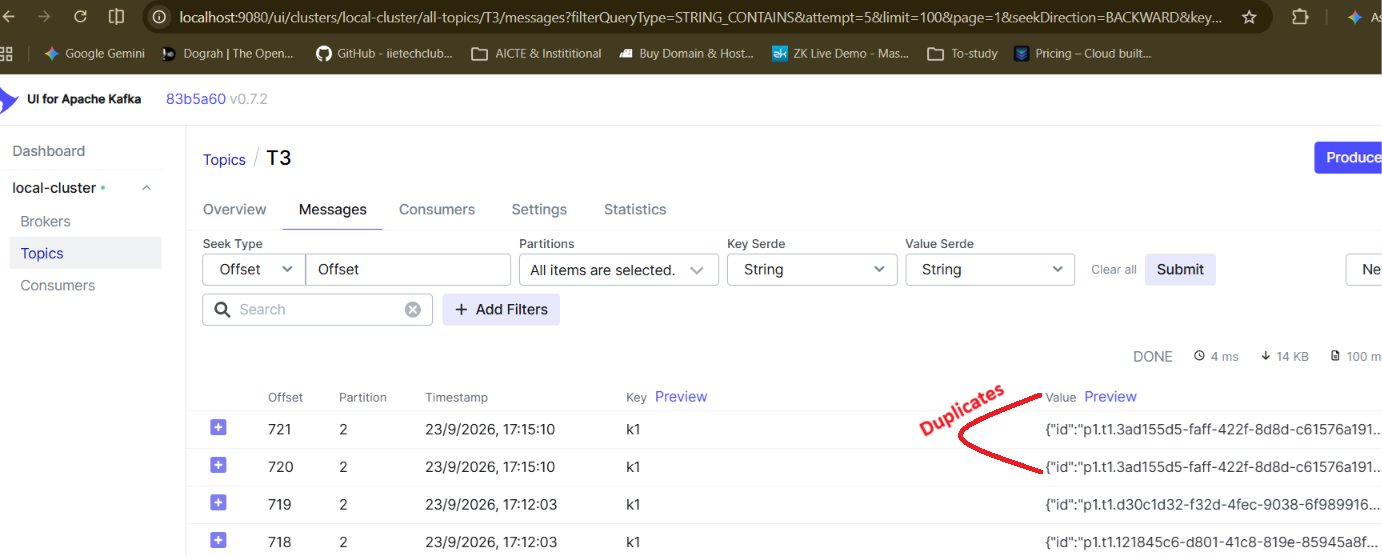
We can now enable back idempotence flag to see that no duplicate messages are created repeating the above steps with enable.idempotence:true, ensuring that idempotence is preserved
enable.idempotence= true only ensures idempotence across a partition only and not the entire topic. We shall explore it in a next article.
Opinions expressed by DZone contributors are their own.