

Voice AI Is Running on Untuned WebRTC: 20 Services To Show You Where
Engineers have spent a decade tuning voice and video meetings with WebRTC. Voice AI is shipping the default settings, but the wrong ones.
Voice AI vendors starting off with WebRTC forgot, or never knew, what best practices and optimization in WebRTC look like. It is time to fix that for a technology that has been around for roughly 15 years, catering to voice and video meetings.
Together with Philipp Hancke, I ran 20+ sessions with Voice AI services and demos, downloaded the webrtc-internals dump files, and took a look under the hood using rtcStats, a service I co-founded. You can see some of the results in the showcase. I’ll be sharing some of them here as well.
Here’s what we found out.
The Same Handful of Missteps, Over and Over
I tried looking at a variety of services: those that built everything from scratch, vendors running on third-party Voice AI or WebRTC managed infrastructure, and others using specific open source.
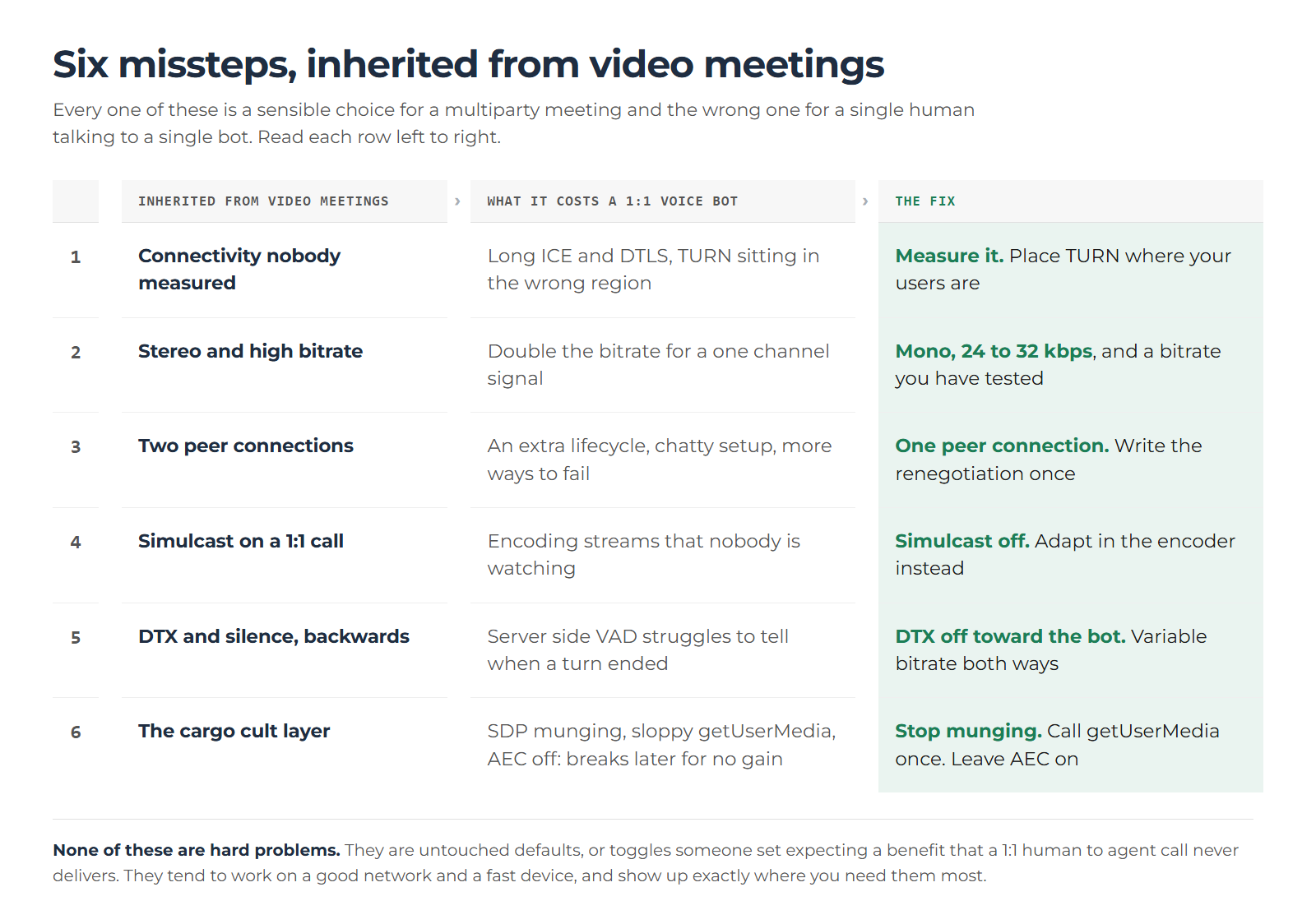
We found the same types of issues across implementations. Here are six issues we encountered over and over again:
- Connectivity that nobody measured
- Use of audio stereo and bitrates that are higher than what is needed
- Two peer connections instead of one
- Simulcast use for 1:1 bot calls
- DTX and silence handling (useful for conferencing, harmful for agents)
- Misuse of the tech: SDP munging, sloppy getUserMedia, disabling of echo cancellation
These may seem small, but they add up. They tend to work when the network is great and the device is beefy. They start showing issues exactly where you need them the most, in varying or poor network conditions, and on devices that the masses end up using.
WebRTC Is a Set of Building Blocks
Here’s the thing. WebRTC is a set of building blocks. How you use them to make up your infrastructure is going to shape the performance and media quality of your application. It includes a plethora of audio and video codecs, techniques to handle packet loss on the network (in the form of redundancy, retransmissions, and concealment), TURN media relay for varying network types, and many others.
Meeting-like applications have been picking and choosing their preferred set of tools in WebRTC for over a decade now. Cloud gaming vendors have been doing the same.
Voice AI frameworks mostly inherited the video conferencing mindset, where the tools needed for multiparty meetings take center stage, and it isn’t what you need to optimize for in 1:1 human-to-AI agent interaction. The irony of it is how WebRTC is always treated and criticized as a P2P protocol, and here, the server-heavy solution is selected when P2P is needed.
Some of the issues we found are just that: misconfiguration due to the use of multi-party infrastructure and techniques. Others are just misunderstandings of WebRTC and the human-to-AI agent scenario.
One thing to note here: I conducted most sessions from March to April of 2026. This field is moving quickly, so some of these services have likely changed since then. The thing to take from here is the need to review your WebRTC transport and not take it for granted.
Here are some of the services we looked at (the rest were quite similar, so we’ll skip them):
| Service | Category | Transport | One telling detail |
|---|---|---|---|
| ChatGPT | Voice AI | WebRTC | Clean baseline: no SDP munging, mono not stereo, single peer connection |
| ElevenLabs Conversational | Voice AI | WebRTC | TURN on the wrong side of the ocean; ~20s to connect |
| xAI Grok | Voice AI | WebRTC, 2 PCs | Two peer connections; stereo incoming on a mono path |
| Duck.ai (OpenAI Realtime) | Voice AI | WebRTC behind TURN relay | ICE 1880ms, but good server-side speech/silence bitrate bumps |
| Tencent + Cartesia | Voice AI | WebRTC | DTLS 3x ICE, TURN without TLS, AEC off, constant-bitrate |
| D-ID | Avatar | WebRTC | No-constraints getUserMedia to default VGA + simulcast on 1:1; grabs devices 4x |
| UneeQ | Avatar | WebRTC | 512 kbps stereo Opus; 1080p encoded into a 320x180 window |
| Tavus | Avatar | WebRTC, 2 PCs | 2 of 3 simulcast layers dead |
| Google Meet | Control (meeting) | WebRTC | 5ms ICE, ~0ms DTLS: the tuned baseline |
| Netflix | Control (gaming) | WebRTC | 18ms DTLS, likely off edge servers; no STUN or TURN configured at all |
| NVIDIA GeForce NOW | Control (gaming) | WebRTC | AV1 1080p60 with hardware decode and FEC |
It is worth looking at the bottom of that table for a moment. Google Meet gets ICE done in 5ms. Netflix connects with an 18ms DTLS handshake, likely off edge servers, with no STUN or TURN configured at all. The ElevenLabs Conversational demo took me around 20 seconds. This is not a WebRTC limitation. It is the difference between a stack somebody optimized and one that wasn’t.
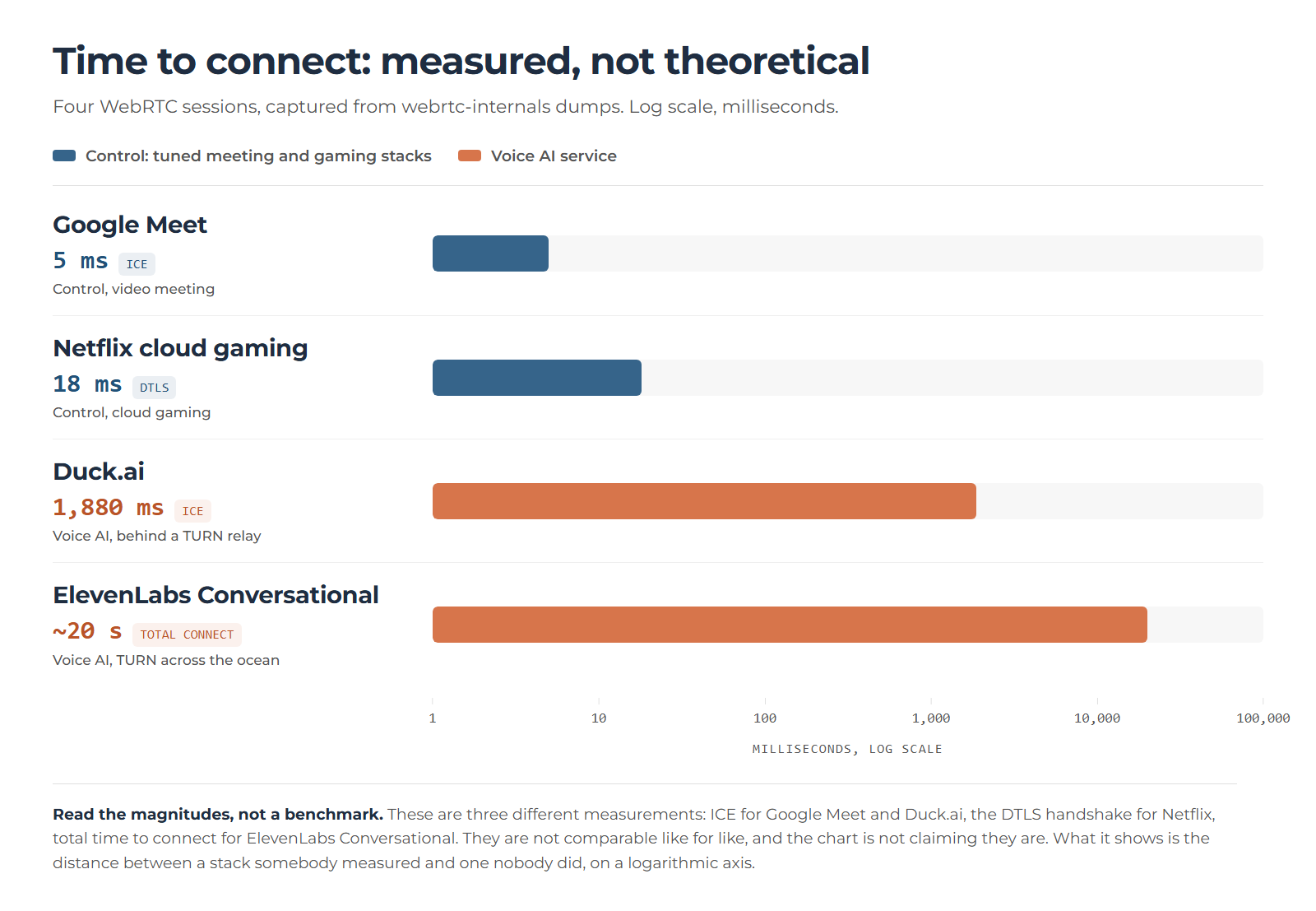
Voice AI can get this right. ChatGPT sits in that same table with no SDP munging, mono audio, and a single peer connection — which is the cleanest media configuration of its August 2026 overhaul, when optimization became a priority.
Let's dive into these issues.
Misstep 1: Connectivity That Nobody Measured
These are pure architecture mistakes.
When WebRTC connects, ICE negotiations and a DTLS handshake take place. Without going into the details, I advise you to make these as short as possible; otherwise, you will sit and wait for things to happen, especially when network conditions aren’t ideal.
ElevenLabs Conversational had their TURN server on the wrong side of the ocean, connecting me to the US. It took quite some time to connect and made for a poor experience. This issue also adds to the latency of the ongoing session. Did this occur because the GPUs were only available in the US and nowhere near me, or was it just a mishandling of how TURN needs to be deployed — closest to the user?
Tencent had a demo with Cartesia. It works (obviously), but there’s room for improvement. There are 4 TURN servers configured — 2 UDP and 2 TCP across two different server IP addresses. This causes an inflation of ICE candidates and a chatty (and lengthy) setup. It would make more sense to consolidate to a single IP address and to add TURN/TLS as well. On top of that, 3 separate outgoing video channels were negotiated and never used — on a voice bot that needed no video access. This is something to ponder and fix.
In a way, configuring STUN and TURN servers properly, and making sure they negotiate as they should, is a best practice that gets forgotten in the rush for Voice AI demos and POCs.
The fix: measure it. Open WebRTC-internals on your own service, read the ICE and DTLS timestamps, and place TURN in the regions you actually serve rather than the region your GPUs happen to sit in. While at it, it would make sense to have GPUs close to your users as well.
Misstep 2: Stereo and Bitrate for a Talking Head
For some reason, stereo configuration and bitrates that are too high are almost standard for Voice AI services.
At some point, for some unknown reason, some services started configuring audio to run stereo instead of mono. This doubles the bitrate and has zero benefit for a mono voice path (which is the vast majority of the use cases for Voice AI today). Why take this route? Who knows… and yet, we found Grok Voice Agent, ElevenLabs Conversational AI, Simli video avatar all negotiating and using stereo, with LemonSlice Voice AI negotiating it.
UneeQ digital humans and ElevenLabs Santa demo both had high audio bitrate — at values that were way above what was necessary. UneeQ used 512 Kbps for Opus, for example.
Interestingly, Duck.ai Voice AI — meant to focus on privacy — opted for variable bitrate on its incoming audio, which in a way can hint to network sniffers when something is being said versus when the model is silent. A practice that is quite common with audio solutions, but a little bit less common for privacy-bearing ones.
Services focusing on video avatars didn’t always generate the video stream at a suitable bitrate or with a meaningful bandwidth to fit the demo. LemonSlice offered an uncommon video resolution, something that looked out of place compared to its use of stereo audio. UneeQ sent high video resolutions of 1080p displayed on a 320x180 frame — not the best use of GPU resources, to say the least — at least not in the demo we used.
The fix: Mono instead of stereo audio, and a bitrate you have tested. Opus at 24 to 32 kbps mono would work great; no need for anything higher. Stereo doubles your bitrate for a signal that has one channel of information in it. The rest of the audio and video settings worth checking are in my WebRTC best practices for Voice AI.
Misstep 3: Two Connections To Dodge a Renegotiation
Something that makes little sense was the use of two separate peer connections.
In WebRTC, you can use a single peer connection to carry all incoming and outgoing traffic. You can also sometimes use two other common architectures:
- A peer connection per participant, which breaks with large groups (not our case)
- Using one peer connection on the upstream and another on the downstream (done almost exclusively for large groups)
Because Voice AI vendors adopted video meeting infrastructure, the result is sometimes a solution with two peer connections: one for sending audio to the LLM, and one to receive audio from the LLM. It makes little sense if you don’t trace back its origins. Here, xAI Grok, HeyGen, Simli, ElevenLabs avatar, and Tavus all went for two peer connections.
Why do I prefer a single peer connection?
- Fewer moving parts. With a few peer connections, some might not connect while others do, leaving you in an undefined state.
- Negotiating two connections instead of one makes for a chatty solution — one that breaks more, especially on poor network connections.
The fix: One peer connection. If the reason for the second one is a renegotiation nobody wanted to write, write the renegotiation once instead of carrying two connection lifecycles forever.
Misstep 4: Simulcast on a Call With One Viewer
Simulcast has nothing to do with Voice AI. It also has nothing to do with today’s video avatars.
The reason simulcast exists is so that in a large video meeting, a person encodes and sends 2-3 video streams of the same content in different bitrates and resolutions. This in turn enables the media server to choose which of the streams to route to which of the other participants. It adds flexibility to the application and reduces load from the media server.
Why would a 1:1 bot need simulcast? I still haven’t found the answer. Aside from this being an artifact of using WebRTC infrastructure that was designed for video meetings to solve a Voice AI problem.
D-ID and Tavus do that.
For the avatar vendors, the challenge is how to dynamically change and fit the generated video stream to the available bitrate. The solution needs to be on the video encoder end and probably in the video generator itself as well.
The fix: Turn simulcast off for 1:1. Then move the adaptation problem where it belongs — into the encoder and the avatar generator, so the stream fits the bandwidth you actually have.
Misstep 5: DTX and Silence, Backwards
WebRTC has a rich set of tools. Like the simulcast in the previous point, there are quite a few more tools we can use for audio. The thing is, using them isn’t always the correct approach.
Here are the three that most caught our eyes:
- Enabling DTX for the outgoing audio in Opus. When a person isn’t speaking, DTX is great at alleviating pressure from media servers by sending them packets only every 200-400ms. For a voice bot, using DTX means the server-side VAD used as part of its turn detection may have a hard time figuring out when a turn is over. Just make sure you’re not using DTX when sending audio to a voice bot
- Constant bitrates in Opus are wasteful. Silence can take up less bitrate. In a 1:1 call, that means one side is speaking while the other is listening most of the time — this is true with Voice AI as well. Using variable bitrate for Opus audio should be the desired outcome in most scenarios — on both ends, from the human and from the bot
- Often, we noticed Voice AI services generate their own Opus audio at bitrates that are higher than what is common in video meeting services. If you think this improves audio quality, that’s great, but test and validate it before you ship. I have a feeling a lower bitrate would serve you just as well
All these worsen at scale. Take care of them sooner rather than later.
The fix: Turn DTX off on the audio you send to the bot, send variable bitrate in both directions, and use a bitrate you have A/B tested rather than assumed.
Misstep 6: The Cargo-Cult Layer
There are some additional miscellaneous areas where we noticed issues that may affect quality or may just break at some random point in the future.
- SDP munging is a practice where the SDP messages are modified after WebRTC creates them and before they get sent. This is how stereo gets added, for example. In many cases we noticed lines got reordered in the SDP, which is not harmful, but useless. If at some point in the future a browser becomes sensitive to the ordering it generated, it won’t end well. Better avoid doing things that are not needed at all.
- getUserMedia is sometimes called more than it should. Reaching out to grab devices when there’s no need, or calling multiple times, isn’t what you should be striving for
- Turning off echo cancellation. This is the wrong approach. We’ve seen Tencent+Cartesia do that. It may help the STT algorithm a bit, but for a user with a separate microphone and speaker, it can be detrimental
The fix: Stop munging SDP unless you can name what breaks without it, call getUserMedia() once, and leave echo cancellation on.
How To Catch These Yourself
WebRTC is what powers Voice AI services today. It was meant for web meetings and then grew in popularity and coverage to many other use cases and scenarios, including Voice AI. As such, it is rich in tooling and capabilities — many of which aren’t needed for Voice AI — but some can prove detrimental.
The way I looked at all these services was rather simple. I opened WebRTC-internals in the browser, then started one of these services, “lurked” in it, talked with the bot for a couple of minutes, and then downloaded the WebRTC-internals file. The file itself has everything you need. It is text-based and structured as JSON. It is a log of calls to the WebRTC APIs in the browser, along with the getStats() calls that collect all ongoing call metrics.
Not wanting to read it directly (this is the painful part), I ran the files through a getStats visualizer. Any other dump reader will do. The file is plain JSON and every metric value is already in there.
Final Thoughts
Voice AI is young, about two years old. The WebRTC layer underneath it is roughly 15 years old, fully capable and fully inspectable. The missteps here are not hard problems; they are untouched defaults or toggles someone set — thinking they would benefit their use case when what they do is the complete opposite, especially at scale. Winning the Voice AI race means offering the best experience to users, and that means knowing the right knobs to turn in the WebRTC configuration and architecture.
Opinions expressed by DZone contributors are their own.