

Implementing Multicasting With Apache Camel
Learn to use multicasting in Apache Camel to route a message to multiple endpoints or destinations, sequentially, with parallel processing, or with aggregation.
Join the DZone community and get the full member experience.
Join For Free1.0 Overview
Multicasting allows you to route the same message to multiple endpoints or destinations and process it in different ways. Multicasting can be done in sequentially in the same thread or using parallel processing.
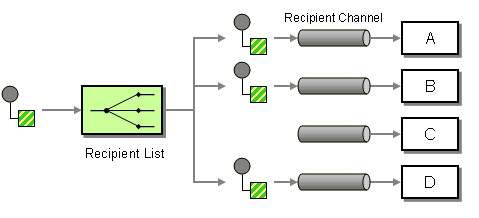 To use multicasting, call
 multicast() in the Java DSL and then pass the destinations to the to() method. Below, we consume message from direct:start and it is multicast to three different destinations direct:a, direct:b and direct:c.
from("direct:start")
 .multicast()
 .to("direct:a", "direct:b", "direct:c");
It can be achieved by multiple calls to to() methods in sequence.
from("direct:start")
 .multicast()
 .to("direct:a")
 .to("direct:b")
 .to("direct:c");
2.0 Multicasting Sequentially
A message can be sent to multiple endpoints in a single thread sequentially one by one. One drawback of using multicasting this way is that it sends the message sequentially to all the destinations, which can often be a bottleneck in a high traffic organization.
package com.camel.router;

import org.apache.camel.builder.RouteBuilder;
import org.apache.camel.CamelContext;
import org.apache.camel.impl.DefaultCamelContext;
import org.apache.camel.Processor;

public class MulticastRouter {
 public static void main(String[] args) throws Exception {
  CamelContext camelContext = new DefaultCamelContext();
  camelContext.addRoutes(new RouteBuilder() {
   @Override
   public void configure() throws Exception {
    from("file:F:\\Apache_Camel_Test\\IN")
     .multicast()
     .to("file:F:\\Apache_Camel_Test\\OUT", "file:F:\\Apache_Camel_Test\\OUT1", "file:F:\\Apache_Camel_Test\\OUT2");
   }
  });
  System.out.println("Starting Camel Context......");
  camelContext.start();
  Thread.sleep(3000);
  camelContext.stop();
 }
}
3.0 Multicasting With Parallel Processing
A message can be sent to multiple endpoints simultaneously using parallel processing.
import org.apache.camel.builder.RouteBuilder;
import org.apache.camel.CamelContext;
import org.apache.camel.impl.DefaultCamelContext;
import org.apache.camel.Processor;

public class MulticastRouter {
 public static void main(String[] args) throws Exception {
  CamelContext camelContext = new DefaultCamelContext();
  camelContext.addRoutes(new RouteBuilder() {
   @Override
   public void configure() throws Exception {
    from("file:F:\\Apache_Camel_Test\\IN")
     .multicast().parallelProcessing()
     .to("file:F:\\Apache_Camel_Test\\OUT", "file:F:\\Apache_Camel_Test\\OUT1", "file:F:\\Apache_Camel_Test\\OUT2");
   }
  });
  System.out.println("Starting Camel Context......");
  camelContext.start();
  Thread.sleep(3000);
  camelContext.stop();
 }
}
If you want to add parallel processing to the above example, simply add parallelProcessing(). By default, the thread pool size of 10 is used; you can configure your own size of the pool by adding your own ExecutorService using executorService.
ExecutorService executor = Executors.newFixedThreadPool(16);
from("file:F:\\Apache_Camel_Test\\IN")
 .multicast()
 .stopOnException()
 .parallelProcessing().executorService(executor).
to("file:F:\\Apache_Camel_Test\\OUT", "file:F:\\Apache_Camel_Test\\OUT1");
4.0 Multicasting With Aggregation Strategy
An AggregationStrategy is used for aggregating all reply messages. The default is to only use the latest reply message and discard any earlier replies.
from("direct:start")
 .multicast(new MyAggregationStrategy())
 .parallelProcessing().timeout(500).to("direct:a", "direct:b", "direct:c")
 .end()
 .to("mock:result");
5.0 Conclusion
Multicasting is an Enterprise Integration Pattern (EIP) and a widely used design pattern when it comes to sending the same message to multiple destinations. For example, an order can be sent to a fulfillment system queue and a logging queue when the order is received.
Now you know how to implement multicasting with Apache Camel.
Opinions expressed by DZone contributors are their own.
Comments