

Improving Performance at NoSQL Query With Pagination
This post will talk about how to do pagination at Jakarta EE with a new specification: Jakarta NoSQL.
 CORE
·
CORE
·
Join the DZone community and get the full member experience.
Join For Free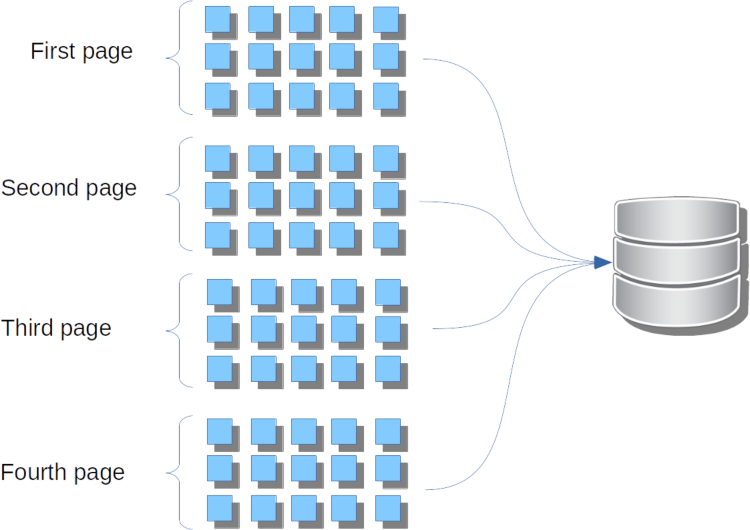
Pagination is the process of separating the contents into discrete pages. Each page has a list of entities from the database. The pagination allows retrieving a considerable number of elements from the datastore into small blocks, e.g., it returns ten pages with one hundred items instead of returning one thousand in a big shot at the storage engine. This post will talk about how to do the pagination at Jakarta EE with the new specification: Jakarta NoSQL.
This post will use MongoDB with a Car entity to demonstrate how the pagination works at Jakarta NoSQL API.
The MongoDB database must be running while the server is up, so you can either download and install it manually or use a Docker image and then run the command:
docker run -d --name mongodb-instance -p 27017:27017 mongodbThe project is a Java SE project with CDI 2.0 and Jakarta NoSQL running through maven; thus, all configurations and dependencies are the pom.xml file. The Jakarta NoSQL project has been approved, but it isn't a final version; therefore, the sample uses a SNAPSHOT version.
<project xmlns="http://maven.apache.org/POM/4.0.0" xmlns:xsi="http://www.w3.org/2001/XMLSchema-instance"
         xsi:schemaLocation="http://maven.apache.org/POM/4.0.0 http://maven.apache.org/maven-v4_0_0.xsd">
    <modelVersion>4.0.0</modelVersion>
    <name>Artemis Demo using Java SE MongoDB with pagiantion</name>
    <groupId>org.jnosql.artemis</groupId>
    <artifactId>pagination</artifactId>
    <version>0.1.0-SNAPSHOT</version>

    <properties>
        <project.build.sourceEncoding>UTF-8</project.build.sourceEncoding>
    </properties>

    <dependencies>
        <dependency>
            <groupId>org.jnosql.artemis</groupId>
            <artifactId>artemis-document</artifactId>
            <version>${project.version}</version>
        </dependency>
        <dependency>
            <groupId>org.jnosql.diana</groupId>
            <artifactId>mongodb-driver</artifactId>
            <version>${project.version}</version>
        </dependency>
        <dependency>
            <groupId>org.jboss.weld.se</groupId>
            <artifactId>weld-se-shaded</artifactId>
            <version>${weld.se.core.version}</version>
        </dependency>
        <dependency>
            <groupId>org.eclipse</groupId>
            <artifactId>yasson</artifactId>
            <version>${json.b.version}</version>
        </dependency>
    </dependencies>

    <repositories>
        <repository>
            <id>oss.sonatype.org-snapshot</id>
            <url>http://oss.sonatype.org/content/repositories/snapshots</url>
            <releases>
                <enabled>false</enabled>
            </releases>
            <snapshots>
                <enabled>true</enabled>
            </snapshots>
        </repository>
    </repositories>
</project>
The Car entity has five attributes: id, provider, model, year, and color.
import jakarta.nosql.mapping.Column;
import jakarta.nosql.mapping.Entity;
import jakarta.nosql.mapping.Id;

@Entity
public class Car {

    @Id
    private Long id;

    @Column
    private String provider;

    @Column
    private String model;

    @Column
    private Integer year;

    @Column
    private String color;


    @Override
    public String toString() {
        return "Car{" +
                "id=" + id +
                ", provider='" + provider + '\'' +
                ", model='" + model + '\'' +
                ", year=" + year +
                ", color='" + color + '\'' +
                '}';
    }
}
We'll use Mockaroo to generate car information then transform this JSON to Jakarta NoSQL insert query.
insert Car {"_id":1,"provider":"Dodge","model":"Caravan","year":2006,"color":"Teal"}
insert Car {"_id":2,"provider":"Lamborghini","model":"Aventador","year":2012,"color":"Blue"}
insert Car {"_id":3,"provider":"Mitsubishi","model":"Pajero","year":1997,"color":"Green"}
insert Car {"_id":4,"provider":"Mazda","model":"Miata MX-5","year":2005,"color":"Mauv"}
insert Car {"_id":5,"provider":"Dodge","model":"Aries","year":1981,"color":"Blue"}
insert Car {"_id":6,"provider":"Ford","model":"Windstar","year":1995,"color":"Yellow"}
insert Car {"_id":7,"provider":"Subaru","model":"Impreza","year":1999,"color":"Purple"}
insert Car {"_id":8,"provider":"Plymouth","model":"Acclaim","year":1995,"color":"Khaki"}
insert Car {"_id":9,"provider":"Audi","model":"200","year":1990,"color":"Puce"}
insert Car {"_id":10,"provider":"Kia","model":"Spectra","year":2009,"color":"Crimson"}
insert Car {"_id":11,"provider":"Volkswagen","model":"Golf","year":2001,"color":"Crimson"}
insert Car {"_id":12,"provider":"Chevrolet","model":"Silverado 1500","year":2008,"color":"Indigo"}
insert Car {"_id":13,"provider":"Studebaker","model":"Avanti","year":1961,"color":"Turquoise"}
insert Car {"_id":14,"provider":"Audi","model":"100","year":1994,"color":"Purple"}
insert Car {"_id":15,"provider":"Ford","model":"Taurus","year":2003,"color":"Maroon"}
insert Car {"_id":16,"provider":"GMC","model":"Acadia","year":2010,"color":"Indigo"}
insert Car {"_id":17,"provider":"Toyota","model":"Camry Hybrid","year":2011,"color":"Violet"}
insert Car {"_id":18,"provider":"Buick","model":"Roadmaster","year":1996,"color":"Purple"}
insert Car {"_id":19,"provider":"Mercury","model":"Monterey","year":2006,"color":"Mauv"}
insert Car {"_id":20,"provider":"GMC","model":"Sierra","year":2010,"color":"Violet"}
We'll have a query supplier that reads the NoSQL file and returns the list of queries.
import javax.annotation.PostConstruct;
import javax.enterprise.context.ApplicationScoped;
import java.io.IOException;
import java.net.URL;
import java.nio.file.Files;
import java.nio.file.Paths;
import java.util.Collections;
import java.util.List;
import java.util.function.Supplier;

@ApplicationScoped
class QuerySupplier implements Supplier<List<String>> {

    private List<String> queries;

    @PostConstruct
    void init() throws IOException {
        final URL resource = QuerySupplier.class.getClassLoader().getResource("cars.nosql");
        this.queries = Files.readAllLines(Paths.get(resource.getFile()));
    }

    @Override
    public List<String> get() {
        return Collections.unmodifiableList(queries);
    }
}
On the first sample code, we're inserting the queries and then selecting all from the database. Twenty elements is a small number, but this query is dangerous to performance. Indeed, it might return thousands with the same query. Several databases set the default limit, such as Cassandra, where it defines ten thousand elements implicitly. Ten thousand is still a massive number to either show to a user, and it returns in a REST application; thus, it is a waste of memory, database, and network.
import jakarta.nosql.mapping.document.DocumentTemplate;

import javax.enterprise.inject.se.SeContainer;
import javax.enterprise.inject.se.SeContainerInitializer;
import java.io.IOException;
import java.net.URL;
import java.nio.file.Files;
import java.nio.file.Paths;
import java.util.List;
import java.util.function.Supplier;

import static jakarta.nosql.document.DocumentDeleteQuery.delete;

public class App {


    public static void main(String[] args) throws IOException {

        try (SeContainer container = SeContainerInitializer.newInstance().initialize()) {

            DocumentTemplate template = container.select(DocumentTemplate.class).get();
            Supplier<List<String>> querySupplier = container.select(QuerySupplier.class).get();
            template.delete(delete().from("Car").build());
            final List<String> queries = querySupplier.get();
            queries.forEach(template::query);

            final List<Car> cars = template.query("select * from Car order by provider asc");
            System.out.println(cars.size());


        }
    }

    private App() {
    }
}
At Jakarta NoSQL, there is an interface that represents the pagination. There is the Paginationinterface.
Pagination pagination = Pagination.page(1).size(2);
//it creates a pagination instance where it is the first page and each page has the size of two each one.
long pageNumber = pagination.getPageNumber();
Pagination next = pagination.next();
Each NoSQL API has a specialization of the query where it allows paginations, such as DocumentQueryPagination and ColumnQueryPagination. Thus, a Java developer can define the number of values to return on each request.
import jakarta.nosql.document.DocumentQuery;
import jakarta.nosql.mapping.Page;
import jakarta.nosql.mapping.Pagination;
import jakarta.nosql.mapping.document.DocumentQueryPagination;
import jakarta.nosql.mapping.document.DocumentTemplate;

import javax.enterprise.inject.se.SeContainer;
import javax.enterprise.inject.se.SeContainerInitializer;
import java.util.List;
import java.util.function.Supplier;

import static jakarta.nosql.document.DocumentDeleteQuery.delete;

public class App2 {


    public static void main(String[] args) {

        try (SeContainer container = SeContainerInitializer.newInstance().initialize()) {

            DocumentTemplate template = container.select(DocumentTemplate.class).get();
            Supplier<List<String>> querySupplier = container.select(QuerySupplier.class).get();
            template.delete(delete().from("Car").build());
            final List<String> queries = querySupplier.get();
            queries.forEach(template::query);

            DocumentQuery query = DocumentQuery.select().from("Car").orderBy("provider").asc().build();
            Pagination pagination = Pagination.page(1).size(2);
            DocumentQueryPagination queryPagination = DocumentQueryPagination.of(query, pagination);

            final Page<Car> page = template.select(queryPagination);
            List<Car> cars = page.getContent();
            System.out.println(cars.size());
            final Page<Car> nextPage = page.next();
            cars = nextPage.getContent();
            System.out.println(cars.size());
        }
    }

    private App2() {
    }
}
The result is a Page instance where there is the method to return the next page, and therefore, the following contents. A repository interface also has the support to return the value as a Page instance.
import jakarta.nosql.mapping.Page;
import jakarta.nosql.mapping.Pagination;
import jakarta.nosql.mapping.Repository;

import java.util.List;

public interface CarRepository extends Repository<Car, Long> {

    List<Car> findByOrderByProvider(Pagination pagination);

    Page<Car> findAll(Pagination pagination);
}


import jakarta.nosql.mapping.Page;
import jakarta.nosql.mapping.Pagination;
import jakarta.nosql.mapping.document.DocumentTemplate;

import javax.enterprise.inject.se.SeContainer;
import javax.enterprise.inject.se.SeContainerInitializer;
import java.util.List;
import java.util.function.Supplier;

import static jakarta.nosql.document.DocumentDeleteQuery.delete;

public class App3 {


    public static void main(String[] args) {

        try (SeContainer container = SeContainerInitializer.newInstance().initialize()) {

            DocumentTemplate template = container.select(DocumentTemplate.class).get();
            CarRepository repository = container.select(CarRepository.class).get();
            Supplier<List<String>> querySupplier = container.select(QuerySupplier.class).get();
            template.delete(delete().from("Car").build());
            final List<String> queries = querySupplier.get();
            queries.forEach(template::query);

            Pagination pagination = Pagination.page(1).size(2);
            final Page<Car> page = repository.findAll(pagination);
            List<Car> cars = page.getContent();
            System.out.println(cars.size());
            final Page<Car> nextPage = page.next();
            cars = nextPage.getContent();
            System.out.println(cars.size());
        }
    }

    private App3() {
    }
}
One crucial thing is that the developer can combine pagination and Collection, and the result will query using that pagination.
import jakarta.nosql.mapping.Pagination;
import jakarta.nosql.mapping.document.DocumentTemplate;

import javax.enterprise.inject.se.SeContainer;
import javax.enterprise.inject.se.SeContainerInitializer;
import java.util.List;
import java.util.function.Supplier;

import static jakarta.nosql.document.DocumentDeleteQuery.delete;

public class App4 {


    public static void main(String[] args) {

        try (SeContainer container = SeContainerInitializer.newInstance().initialize()) {

            DocumentTemplate template = container.select(DocumentTemplate.class).get();
            CarRepository repository = container.select(CarRepository.class).get();
            Supplier<List<String>> querySupplier = container.select(QuerySupplier.class).get();
            template.delete(delete().from("Car").build());
            final List<String> queries = querySupplier.get();
            queries.forEach(template::query);

            Pagination pagination = Pagination.page(1).size(2);
            final List<Car> cars = repository.findByOrderByProvider(pagination);
            System.out.println(cars.size());
        }
    }
    private App4() {
    }
}
In this post, we introduced the concept of pagination and explained why it is so vital to a NoSQL database when a developer talks about performance. Jakarta NoSQL has support for pagination with a fluent API and we can see this with a small demo application.
Opinions expressed by DZone contributors are their own.
Comments