

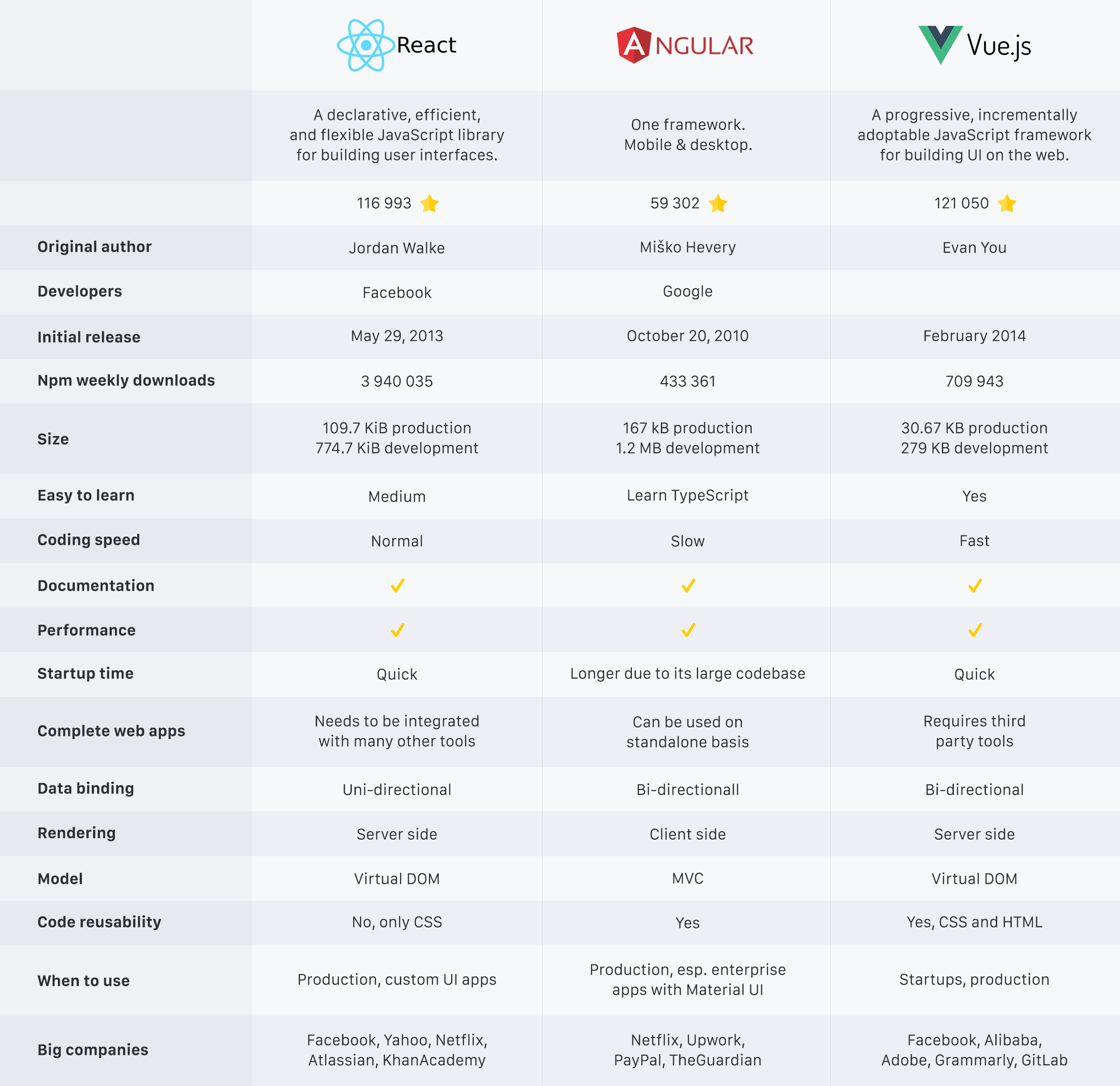
React vs. Angular vs. Vue.js [Infographic]
What to use and when.
While Angular can be used to build components, it also comes with other tools that can be used to build a complete web application. Thanks to Angular, developers can build single page applications. Unlike Angular, React is a JavaScript library, not a framework. React is used to build reusable UI elements. Vue is a framework similar to Angular. However, it doesn’t come with all of its functionalities making it lightweight. Vue can be used to build complete component driven applications.
Installation
Angular
To install Angular do the following:
git clone https://github.com/angular/quickstart.git quickstart
cd quickstart
npm install
npm start
To install the Angular CLI (Command Line Interface) use the command below:
npm install -g @angular/cliReact
React can be installed using the NPM command below:
npm install react --saveTo install the React CLI, you can use the Create-React-App as seen below:
npm install -g create-react-appVue
Vue can be installed using the NPM command below:
npm install vueThe Vue CLI can be installed with the command below:
npm install -g @vue/cliSample Code
Angular
import { enableProdMode } from '@angular/core';
import { platformBrowserDynamic } from '@angular/platform-browser-dynamic';
import { AppModule } from './app/app.module';
import { environment } from './environments/environment';
if (environment.production) {
enableProdMode();
}
const bootstrapPromise =  platformBrowserDynamic().bootstrapModule(AppModule);
// Logging bootstrap information
bootstrapPromise.then(success => console.log(`Bootstrap success`))
.catch(err => console.error(err));
Code snippet gotten from here.
React
import * as React from "react";
import { Component } from 'react';
import './App.css';
import * as logo from './logo.svg';
class App extends Component {
           render() {
            return (
            <div className="App">
                        <div className="App-header">
                       <img src={logo} className="App-logo" alt="logo" />
                      <h2>Welcome to React!</h2>
                      </div>
                      <p className="App-intro">
                     To get started, edit
                      <code>src/App.js</code>
                       and save to reload.
                      </p>
          </div>
          );
            }
}

export default App;
Code snippet gotten from here.
Vue
new Vue({
el: '#editor',
data: {
input: '# hello'
  },
  computed: {
   compiledMarkdown: function () {
   return marked(this.input, { sanitize: true })
  }
},
  methods: {
  update: _.debounce(function (e) {
    this.input = e.target.value
   }, 300)
 }
})
Code snippet gotten from here
Google Trends
Worldwide interest over time.
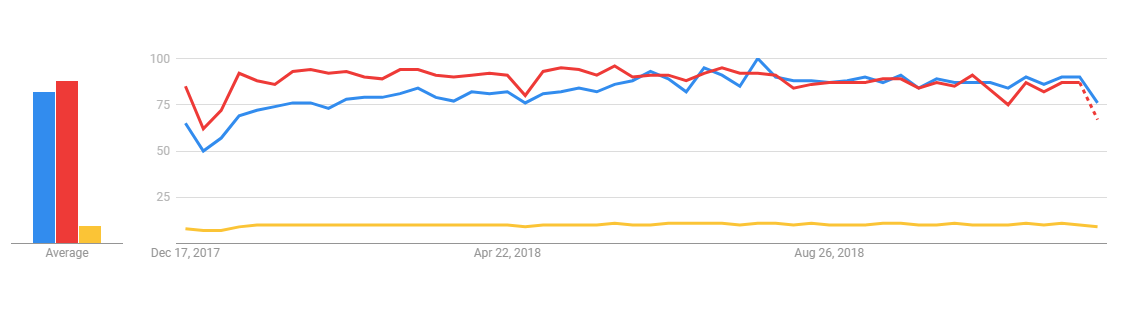
Each framework and library has its own pros and cons. So the case is choosing the right software tool for a particular product.
If you enjoyed this article and want to learn more about React, check out this collection of tutorials and articles on all things React.
Opinions expressed by DZone contributors are their own.