

An Introduction to Artificial Intelligence: Neural Networks, NLP, and Word Embeddings
From a single neuron to understanding language, this article provides a short introduction to artificial intelligence for software engineers.
Join the DZone community and get the full member experience.
Join For FreePart 1: The Very Basics
How Does It Really Work?
In recent years, artificial intelligence (AI) has become a buzzword, especially with the emergence of tools like ChatGPT. However, despite the widespread conversation about AI, not everyone fully understands what it is. AI tools today can process text, generate images and videos, write code, and automate tasks. Some enthusiasts predict a future where AI replaces programmers, creates entire products independently, and potentially leaves many of us without jobs. While these apocalyptic scenarios seem exaggerated to me, I believe AI is best viewed as a powerful tool that, when used wisely, can make us more efficient and productive.
For example, AI can generate small pieces of code, understand simple or vague questions, and provide quick answers — almost like a more advanced version of Google. It can feel like magic, but it’s not (or at least, not entirely).
In this article series, I aim to provide a brief overview of how AI and ML work. We will start with a very basic introduction to machine learning, then we will move to explaining how ML algorithms understand meaning from text.
This article series is inspired by AI and Machine Learning for Coders: A Programmer's Guide to Artificial Intelligence by Laurence Moroney. It's an excellent resource for software developers who want to dive deeper into the world of artificial intelligence.
The Basics of AI: A High-Level Overview
The field of AI is vast. To fully understand everything about it, you would need a PhD in mathematics — something I don't have. I'm a software developer, and my curiosity led me to explore how AI works without diving into the complex mathematical underpinnings. I wanted to learn how it could help me work better as a developer. In this article, I’ll share my findings in a simplified, high-level overview.
Limitations of Traditional Programming
Before diving into machine learning and AI, it’s important to understand the limitations of traditional programming. Traditional programming relies on explicit instructions written in code—a sequence of steps that tell a computer exactly what to do. For example, consider a sorting algorithm. It follows a specific set of instructions to sort a list of numbers, or a to-do list application, or even an operating system. These are all built on clearly defined rules created by developers. As programmers, we know exactly how each step functions and what outcome to expect because the problem is well-defined in our mental model.
But what happens when we face problems that we can’t easily define with rules?
For instance, imagine you have a smartwatch that tracks motion and speed. How would you write a program to determine whether the user is running or cycling, especially when their speed might be similar in both cases? What rules could you use to differentiate between these activities? This is where traditional programming falls short.
For example, based on speed, we can write a rule to detect if a person is running or walking.
if speed < 4 {
	return "walking"
} else {
	return "runnig"
}
But how can we detect the difference between running and biking if the speed is similar?

Enter Machine Learning: Solving Problems Without Clear Rules
When problems can't be solved with predefined rules, traditional programming is limited. However, with the right data, we can approach these problems differently. The smartwatch, for example, can track various metrics — speed, movement, heart rate, and more. With enough data, we might be able to find patterns that differentiate between running and cycling.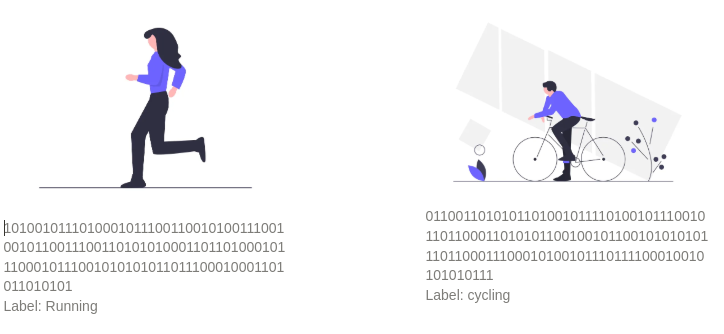
This is where machine learning (ML) comes into play. By collecting a large set of labeled data (in this case, data that indicates whether a person is running or cycling), we can train a machine learning model to recognize patterns in the data and make predictions.
Understanding Neural Networks: A Simple Example
Let’s break this down with a basic example. Imagine you have two sets of data:
- X = [0, 1, 2, 3, 4]
- Y = [1, 3, 5, 7, 9]
Looking at this data, you can observe a clear relationship: Y = 2X + 1. You’ve just identified a pattern that maps X to Y. This is, conceptually, how a machine learning algorithm works. It finds patterns in data.
To implement this with machine learning, we can use a neural network that learns this relationship. Below is a simple neural network code using Python’s TensorFlow library:
import tensorflow as tf
import numpy as np
from tensorflow.keras import Sequential
from tensorflow.keras.layers import Dense

# Define the model
model = Sequential([Dense(units=1, input_shape=[1])])
model.compile(optimizer='sgd', loss='mean_squared_error')

# Define the training data
xs = np.array([-1.0, 0.0, 1.0, 2.0, 3.0, 4.0], dtype=float)
ys = np.array([-3.0, -1.0, 1.0, 3.0, 5.0, 7.0], dtype=float)

# Train the model
model.fit(xs, ys, epochs=500)

# Make a prediction
print(model.predict([10.0]))
This simple neural network consists of one layer and one node (or neuron). The goal of the network is to learn the weight (2) and bias (1) that will map X to Y. After training, the network should be able to predict new values following the function Y = 2X + 1.
Breaking Down the Code
- Model: A neural network is made up of layers, and in this case, we’ve defined a very simple model using TensorFlow's
Sequentialclass. The model contains just one layer with a single neuron. - Dense layer: The
Denselayer is fully connected, meaning every input is connected to every output. In our example, we only need one neuron, which will learn the relationship between X and Y. - Training: When training starts, the neural network initially guesses random values for the weights and biases. The model then iteratively adjusts these guesses to minimize the error between its predictions and the actual values, using the loss function (in this case, mean squared error). The optimizer, in this case, Stochastic Gradient Descent (SGD), helps fine-tune these values to gradually get closer to the correct results.
After training for 500 epochs (iterations), the model will have learned a close approximation of Y = 2X + 1, and it should be able to make predictions for unseen data, such as predicting the Y value when X = 10.
Conclusion: The Power of Machine Learning
This simple example illustrates the core idea behind machine learning: training a model to find patterns in data. Of course, real-world machine learning models are much more complex, involving many layers and neurons, and often tackling problems for which there isn’t a simple mathematical formula like Y = 2X + 1. But the underlying principle is the same.
AI and machine learning hold incredible potential to revolutionize the way we solve problems, particularly those we can’t easily define with explicit rules. While the mathematics behind it can be complex, modern tools and libraries make it easier than ever to leverage AI in everyday applications.
The journey of AI is just beginning, and as we continue to develop more sophisticated models, the possibilities will only expand. However, rather than fear these advancements, we should focus on how to use them to augment our productivity and creativity.
Part 2: Introduction to Natural Language Processing
What Is NLP?
Natural language processing (NLP) focuses on teaching machines to understand and interact with human language. To achieve this, we use models capable of tasks like classifying content, generating new text, and understanding the meaning behind phrases. A practical example of NLP in action is a chatbot that interprets questions and responds appropriately.
In this article, we’ll explore how to train a model to process and analyze text. But before diving into training, it’s essential to address the first step: converting text into numbers, since machine learning models operate on numerical data.
A Quick Recap of AI and Neural Networks
Previously, we introduced Artificial Intelligence and discussed the basics of neural networks. We even built a simple model to predict values for the equation Y=2X+1Y = 2X + 1Y=2X+1.
A neural network is made up of layers of interconnected units called neurons. Each neuron receives input values from the previous layer, multiplies them by learned weights, adds a bias term, and applies an activation function to compute its output. During training, the model adjusts these weights and biases to minimize error and improve accuracy.
To process human language using this framework, we first need to represent text in a numerical format. Once text is encoded as numbers, we can train a neural network to analyze and even generate language.
Why Convert Text to Numbers?
Computers already represent text as numbers at the character level. For instance, standards like ASCII or Unicode assign numeric codes to letters. For example:
- EARTH has an ASCII sequence of [69, 65, 82, 84, 72],
- HEART has the sequence [72, 69, 65, 82, 84].
However, this encoding only captures the representation of individual characters—not the meaning of words or sentences. If we only use character encoding, we lose the semantic differences between "EARTH" and "HEART."
To preserve meaning, we encode words themselves as numbers. For example:
- The word EARTH could be assigned the number 21,
- The word HEART could be assigned the number 42.
Using this type of word-level encoding, a sentence like "Earth is round" can be transformed into a sequence of numbers, such as [21, 13, 33]. These numerical sequences are then fed into machine learning models.
Tokenization: Turning Text into Numbers
One common method to encode text into numbers is tokenization. Tokenization breaks a sentence into smaller units (usually words or subwords) and maps each unit to a unique numeric identifier.
In TensorFlow/Keras, the Tokenizer class provides an easy way to achieve this. Here’s an example:
python
Copy code
from tensorflow.keras.preprocessing.text import Tokenizer

sentences = [
    'Today is a sunny day',
    'Today is a rainy day',
    'Is it sunny today?'
]

# Create the tokenizer and fit it on the sentences
tokenizer = Tokenizer(num_words=100)
tokenizer.fit_on_texts(sentences)

# Generate the word index and sequences
word_index = tokenizer.word_index
sequences = tokenizer.texts_to_sequences(sentences)

print("Word Index:", word_index)
print("Sequences:", sequences)
Output
-
Word index:
{'today': 1, 'is': 2, 'a': 3, 'sunny': 4, 'day': 5, 'rainy': 6, 'it': 7} -
Sequences:
[[1, 2, 3, 4, 5], [1, 2, 3, 6, 5], [2, 7, 4, 1]]
Explanation
- Vocabulary creation: The tokenizer creates a vocabulary of all the words in the input sentences.
- Mapping words to numbers: Each word is assigned a unique number based on its frequency (more frequent words are assigned smaller numbers).
- Encoding sentences: The sentences are converted into sequences of these numbers.
For example:
- "Today is a sunny day" becomes
[1, 2, 3, 4, 5]. - "Today is a rainy day" becomes
[1, 2, 3, 6, 5].
Preprocessing Text for Training
Before feeding these sequences into a machine learning model, additional preprocessing steps are often required to make the data consistent and effective for training:
- Removing stopwords and punctuation: Words like "the," "and," or punctuation marks are often removed as they add little value for many tasks.
- Handling out-of-vocabulary (OOV) words: Words not seen during training can be replaced with a special token (e.g.,
<OOV>). - Padding sequences: Since sentences vary in length, shorter sequences are padded with zeros to ensure all inputs have the same length.
By performing these steps, we transform raw text into clean numerical data that is ready to be processed by machine learning models.
Conclusion
Through tokenization, we convert text into sequences of numbers that can be used as input for machine learning models. This process, while simple, is fundamental to NLP. In the next section, we’ll explore how machine learning techniques extract meaning from these sequences, enabling models to understand and generate text.
Part 3: Establishing Meaning for Words
In the previous article, we saw how to transform a sentence into a list of tokens. Now, with a list of tokens (numbers), we can train a machine learning model based on it. So the next step is to explore how we can extract the meaning of a sentence.
Extracting Meaning: Embeddings
In this article, we will dive into how we can give meaning to words depending on the context by introducing the concept of embeddings.
What Are Embeddings?
In TensorFlow, embeddings are a way of representing discrete objects, such as words, categories, or items, as dense vectors in a continuous vector space. These vectors are typically of lower dimensionality compared to the original space and are learned in such a way that similar objects are placed closer together in the vector space.
Embeddings are widely used in machine learning and deep learning tasks, especially when dealing with high-dimensional categorical data that needs to be efficiently processed by neural networks.
Let's start with a simple example. We will first look at two sentences: one sarcastic and another non-sarcastic. We will derive just one property from the sentence—this means we’ll use an embedding vector of size 1. Later, we will explore more complex examples with larger embedding vectors and more complex meanings.
Example of Sarcasm Detection
Let’s say the following sentence is sarcastic:
christian bale given neutered male statuette named oscar
At the beginning, all words will have a value set to 0. Then, for each word in the sentence, we will increment them:
- christian: 1
- bale: 1
- given: 1
- neutered: 1
- male: 1
- statuette: 1
- named: 1
- oscar: 1
Next, let’s look at a non-sarcastic phrase:
gareth bale scores wonder goal against germanyFor the non-sarcastic phrase, we will decrease the count for the words by 1. The result will look like this:
{
  "christian": 1, "bale": 0, "given": 1, "neutered": 1, "male": 1,
  "statuette": 1, "named": 1, "oscar": 1, "gareth": -1, "scores": -1,
  "wonder": -1, "goal": -1, "against": -1, "germany": -1
}
Now, let’s establish the sarcasm of the next phrase:
neutered male named against germany, wins statuette!By adding the corresponding values for each word, we get a total of 2, indicating that the phrase is sarcastic.
This example demonstrates a very simple embedding vector of size 1. Of course, in more complex models, the embeddings will be of higher dimensionality to represent more intricate characteristics. By using a larger embedding space, such as with a vector of 16 or more dimensions, we can capture much more nuanced meanings.
Higher-Dimensional Embeddings: Superheroes Example
Now, let's consider a more complex example with higher-dimensional embeddings. Suppose we were to look at superheroes from a fictional universe, considering dimensions like power and morality. We could plot these dimensions on the x and y axes, with the length of the vector denoting each superhero’s popularity.
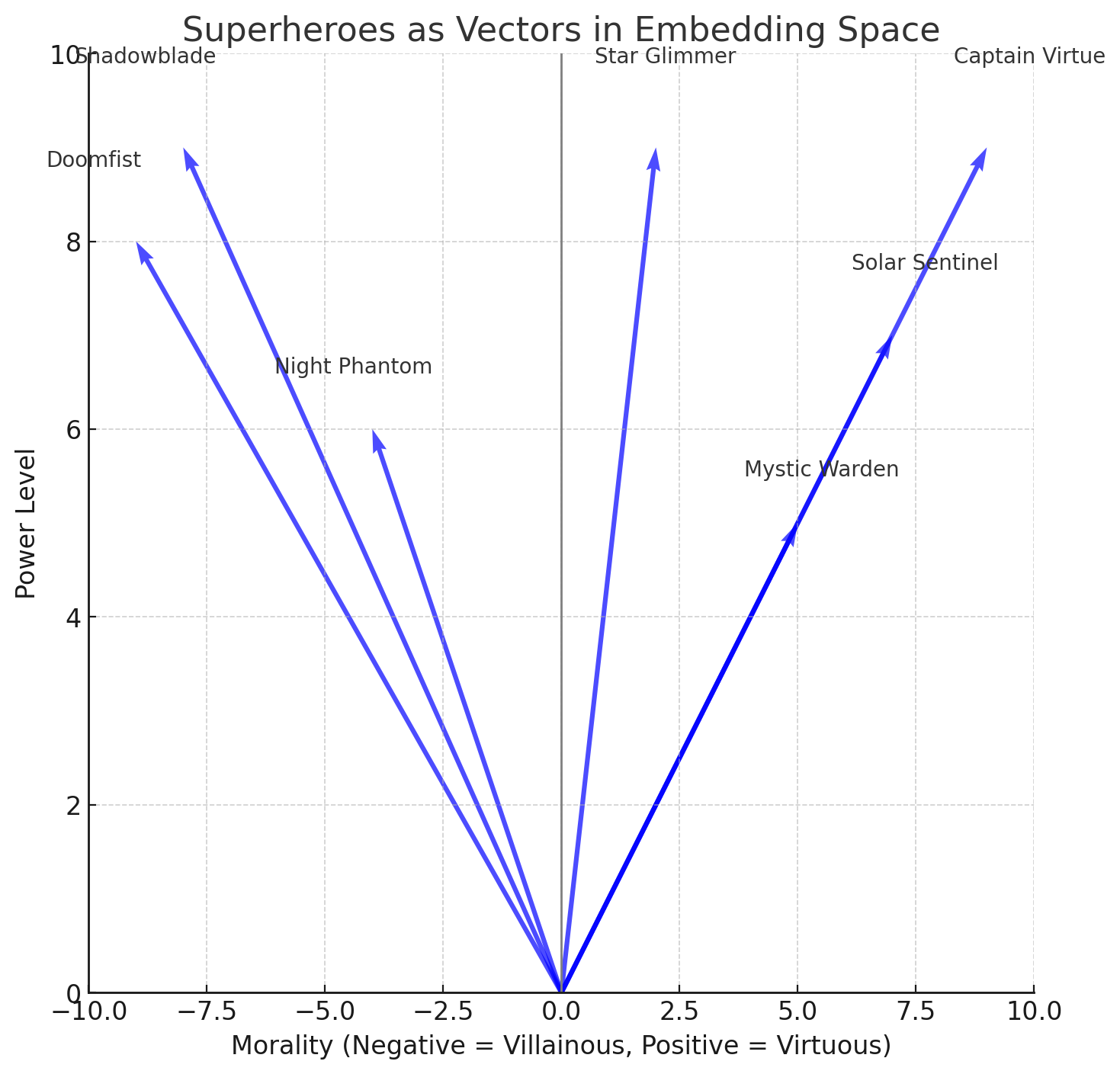
Figure 1. Superheroes as vectors
From this graph, we can infer a lot of information about each superhero. Captain Virtue, who has immense power and impeccable morality, would be in the top-right quadrant. Shadowblade, another powerful figure, resides in the bottom-right quadrant, indicating a lack of morality. Star Glimmer, while equally powerful, sits closer to neutral on the morality axis, suggesting a more ambiguous ethical code.
By considering multiple dimensions, we can begin to derive relative meanings of characters. These relationships aren’t defined explicitly, but the interactions between the vectors give us insight into how each superhero fits into the universe.
Training Embeddings in TensorFlow
Now that we understand the importance of embeddings, let’s look at how we can implement them in TensorFlow. In the previous article, we saw how to convert words into tokens, essentially a list of numbers. Each sentence can also be associated with a label (e.g., sarcastic, non-sarcastic).
With this data, we can use TensorFlow to train multi-dimensional embeddings for these tokens. Over time, the embeddings will be fine-tuned via backpropagation, as the network learns by matching the training data to the corresponding labels.
Here’s how we can define a basic model with embeddings in TensorFlow:
model = tf.keras.Sequential([
    tf.keras.layers.Embedding(10000, 16),
    tf.keras.layers.GlobalAveragePooling1D(),
    tf.keras.layers.Dense(24, activation='relu'),
    tf.keras.layers.Dense(1, activation='sigmoid')
])

model.compile(loss='binary_crossentropy', optimizer='adam', metrics=['accuracy'])
In this model:
- The embedding layer has a vocabulary size of 10,000 words (tokens) and 16-dimensional embeddings.
- The model will learn 16 properties or characteristics for each word.
- We then use GlobalAveragePooling1D, which averages the embeddings for each word in the sentence, reducing the vector to a single representation.
- The dense layers further process this information to output a prediction of the label, such as sarcasm or not.
The embedding layer alone has 160,000 parameters to learn, and the dense layers will learn additional weights.
Avoiding Overfitting and Fine-Tuning the Model
When training deep learning models, it’s crucial to avoid overfitting—when the model becomes too specialized to the training data and doesn’t generalize well to new data. Here are a few strategies to improve generalization:
- Adjusting the learning rate: The learning rate controls how much the weights are updated during each training step. A high learning rate might cause the model to overshoot, while a low learning rate could slow down the training. Use learning rate schedules or tuning to find the optimal rate.
- Vocabulary size: The size of the vocabulary directly impacts the model's performance and computational efficiency. A vocabulary that is too large could increase the model's complexity and overfitting risk. Conversely, a very small vocabulary might not capture enough information. Fine-tuning the vocabulary size helps balance these concerns.
- Embedding dimensions: The dimensionality of the embedding vector is important for capturing the richness of word meanings. Too many dimensions could lead to overfitting, while too few could make the embeddings too simplistic. Experimenting with embedding sizes (e.g., 16, 32, 64) is essential for finding the right balance.
- Dropout: Dropout is a regularization technique where, during training, random units in the neural network are "dropped" (set to zero) to prevent overfitting. This forces the model to generalize better, as it cannot rely on any single unit.
- Regularization: Techniques like L2 regularization can help penalize large weights and reduce the model's reliance on specific features, preventing it from overfitting.
Using Pretrained Embeddings
Another great approach is to leverage pretrained embeddings, which are embeddings that have been trained on large-scale datasets, such as GloVe or Word2Vec. TensorFlow provides an easy way to use pretrained embeddings. By loading these embeddings into your model, you can take advantage of the knowledge captured from massive corpora.
Here’s how you can load and use pretrained embeddings in TensorFlow:
import tensorflow as tf
import numpy as np

# Load pretrained embeddings
embedding_matrix = np.load('pretrained_embeddings.npy')  # Load your pretrained embeddings

# Define the model
model = tf.keras.Sequential([
    tf.keras.layers.Embedding(input_dim=embedding_matrix.shape[0],
                              output_dim=embedding_matrix.shape[1],
                              weights=[embedding_matrix],
                              trainable=False),  # Make embeddings non-trainable if desired
    tf.keras.layers.GlobalAveragePooling1D(),
    tf.keras.layers.Dense(24, activation='relu'),
    tf.keras.layers.Dense(1, activation='sigmoid')
])

model.compile(loss='binary_crossentropy', optimizer='adam', metrics=['accuracy'])
By using pretrained embeddings, you can bootstrap your model’s performance, especially when limited data is available.
Using the Model for Sentence Classification
Once the model is trained, you can use it to classify new sentences based on their meaning. Here's how you could predict whether a sentence is sarcastic or not:
sentence = "christian bale wins oscar"
tokens = tokenize(sentence)  # Tokenize the sentence into words/tokens
prediction = model.predict(np.array([tokens]))  # Predict using the trained model
print("Prediction:", prediction)
In this code, the sentence is tokenized and passed to the trained model for classification. The model outputs a prediction (e.g., sarcasm level).
Conclusion
Embeddings are a powerful tool for understanding the meaning of words and phrases in the context of machine learning. By using TensorFlow to train embeddings, applying techniques like dropout and regularization to avoid overfitting, and leveraging pretrained embeddings, we can build robust models capable of tasks like sentiment analysis, sarcasm detection, and more.
Opinions expressed by DZone contributors are their own.
Comments