

Java Command-Line Interfaces (Part 14): google-options
For those of you who use Guava, google-options is a straightforward CLI parsing option. For those of you who don't, the dependency might be more overhead than it's worth.
The GitHub page for google-options states that google-options is a "command line argument parsing library from the folks at Google (Java)." The page goes on to say, "This is the command-line arguments parser from the Bazel Project. The com.google.devtools.common.options package has been split out into a separate jar for general utility." This blog post demonstrates applying google-options to processing command line options from Java code.
The example used in this post to demonstrate google-options is similar to the examples used in the earlier thirteen posts in this series on processing command line options in Java. This example supports two options: a required file path/name option expecting a String argument with that path and name and a verbosity option with no argument (its existence enables verbosity). Only the most relevant portions of the code will be shown in this post, but the full code is available on GitHub.
The "definition" stage of Java-based command-line processing is accomplished in google-options via a custom class that extends google-options's class com.google.devtools.common.options.OptionsBase. The custom class should provide public fields that correspond to the expected command line options, and each of these public fields should be annotated with the @Option annotation. The @Option annotation requires two elements (name and defaultValue) and allows for optional elements such as help and abbrev. An example of this "definition" stage is provided in the next code listing for the custom Options class.
"Definition" Stage With google-options: Custom Options Class
/**
 * Represents command-line options to be processed via
 * google-options library. Fields must be annotated with
 * @Option and must be public.
 */
public class Options extends OptionsBase
{
   @Option(name="file",
           abbrev='f',
           help="Path and name of file",
           category="Startup",
           defaultValue="")
   public String filePathAndName;

   @Option(name="verbose",
           abbrev='v',
           help="Enable verbose output",
           category="Startup",
           defaultValue="false")
   public boolean verbose;
}
The required "name" element of the @Option annotation specifies the "long" option name while the optional "abbrev" element specifies the "short" (single character) option name. The optional "help" element of the @Option annotation allows one to provide a "help" string for the option and the required "defaultValue" element specifies the default value for the option to be used when the option is not explicitly specified.
The "parsing" stage is accomplished in google-options by instantiating an instance of OptionsParser associated with the custom class with Option-annotated public fields and then invoking a "parse" method on that instance of OptionsParser. The next code listing demonstrates this with invocation of the OptionsParser.parseAndExitUponError(String[]) method.
"Parsing" Stage With google-options
final OptionsParser optionsParser = OptionsParser.newOptionsParser(Options.class);
optionsParser.parseAndExitUponError(arguments);
The "interrogation" stage with google-options is as simple as accessing the Option-annotated public fields on the custom class as demonstrated in the next code listing.
"Interrogation" Stage With google-options
out.println(
     "Path/file name is '" + options.filePathAndName
   + "' and verbosity is '" + options.verbose + "'.");
The next code listing demonstrates how the OptionsParser method describeOptions can be used for displaying help details.
Using google-options's "Help"
private static void printUsage(OptionsParser parser)
{
   out.println("Usage: java Main <Options>");
   out.println(parser.describeOptions(Collections.emptyMap(),
   OptionsParser.HelpVerbosity.LONG));
}
The following screen snapshots demonstrate the above code listings. The first image depicts the "help" information provided when no arguments are provided and the second image depicts the two main command line options expressed in various long and short forms. One interesting observation that can be made from that second image is that google-options automatically supports a --noversion option for the boolean option explicitly specifying no verbosity.
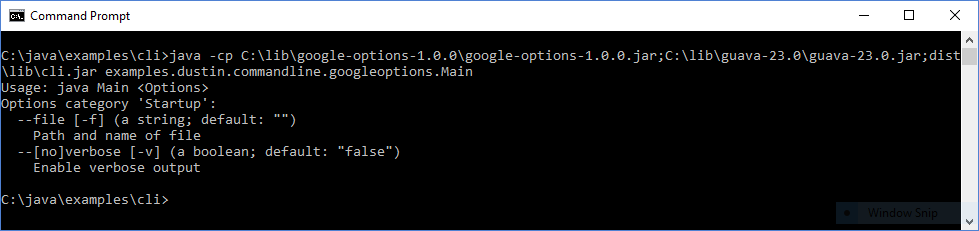
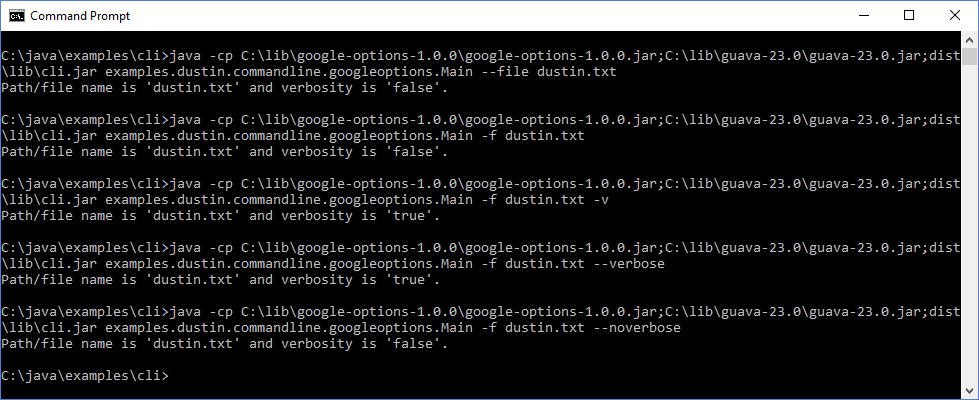
The screen snapshots also demonstrate that google-options has a dependency on Guava.
Here are characteristics of google-options to consider when selecting a framework or library to help with command-line parsing in Java.
- google-options is an open source library licensed under the Apache License 2.0.
- The google-options-1.0.0.jar is approximately 72 KB in size.
- Applications using google-options also need to include Guava on the runtime classpath because google-options has a dependency on Guava. For applications using Guava anyway, this is not a big deal. However, for small applications not already using Guava, this may be more of a dependency than the application authors would like to have for a simple command-line based application.
Several of the Java-based command line processing libraries covered in this series use annotations to define the expected options and this is the approach used by google-options. Basic processing of command line options with google-options is a relatively straightforward process, but the cost of a new Guava dependency may be too high of a cost for simple applications that don't already depend on Guava.
Additional References
Published at DZone with permission of Dustin Marx. See the original article here.
Opinions expressed by DZone contributors are their own.