

Java String Intern: Performance Impact
java.lang.String#intern() is an interesting function in Java. In this post, let’s discuss the performance impact of using this function in your application.
 CORE
·
CORE
·
Join the DZone community and get the full member experience.
Join For Freejava.lang.String#intern() is an interesting function in Java. When used in the right place, it has the potential to reduce the overall memory consumption of your application by eliminating duplicate strings in your application. To learn how the intern() function works, you may refer to this blog. In this post, let’s discuss the performance impact of using java.lang.String#intern() function in your application.
Intern() Function Demo
To study the performance behavior of the intern() method, we created these two simple programs:
public class InternDemo {

   private static List<String> datas = new ArrayList<>(10_000_000);

   public static void main(String args[]) throws Exception {

      BufferedReader reader = new BufferedReader(new FileReader("C:\\workspace\\random-data.txt"));
      String data = reader.readLine();
      while (data != null) {
         data = reader.readLine().intern();
         datas.add(data);
      }
      reader.close();
   }
}public class NoInternDemo {
private static List<String> datas = new ArrayList<>(10_000_000);
public static void main(String args[]) throws Exception {
BufferedReader reader = new BufferedReader(new FileReader("C:\\workspace\\random-data.txt"));
String data = reader.readLine();
while (data != null) {
data = reader.readLine();
datas.add(data);
}
reader.close();
}
}I request you to review the above source code, before reading further. It’s a simple program. If you notice, the ‘InternDemo‘ program reads each line at a time from the ‘random-data.txt‘ & then invokes the intern() operation on the read data. String returned by the intern() function is then added to the ‘datas’ ArrayList. ‘NoInternDemo’ program also does the exact same thing, the only difference is ‘NoInternDemo’ doesn’t invoke the ‘intern()‘ operation and ‘InternDemo‘ invokes the ‘intern()‘ operation.
You also need to understand the contents of the ‘random-data.txt‘. This file contains 10 million UUID (Universally Unique Identifiers) strings. Even though there are 10 million UUID strings in this file, there is a significant amount of duplication among them. Basically, there are only 10 unique UUIDs, which are inserted 10 million times into this file. Data is intentionally structured in such a manner that there is a heavy number of duplicate strings in this file. You can download the ‘random-data.txt’ file that we used for this experiment from this location.
Memory Impact
We executed both programs. Before the program's exit, we captured the heap dump from them. A heap dump is basically a snapshot of memory, which contains information about all the objects that are residing in the memory. We studied the heap dump through the HeapHero – a heap dump analysis tool. Here are the live reports generated by this tool:
The below table summarizes the difference between both the programs:
| InternDemo | NoInternDemo | |
| Total Size | 38.37MB | 1.08GB |
| Object Count | 4,184 | 20,004,164 |
| Class Count | 456 | 456 |
You can notice that ‘InternDemo’ has only 4k+ objects consuming 38.37MB only, whereas ‘NoInternDemo’ has 20 million+ objects consuming 1.08GB of memory. Basically ‘NoInternDemo’ consumes 28 times more memory than ‘InternDemo’. This demo clearly illustrates that memory optimization is achieved through the intern() function.
Duplicate Strings Impact
The HeapHero tool in its report indicates how much memory is wasted due to inefficient programming practices. We noticed that ‘InternDemo’ is not wasting any memory, whereas ‘NoInternDemo’ is wasting 1.04GB (i.e. 97%) of memory due to inefficient programming practices. In this 97% memory wastage, 96.5% of wastage is surfacing due to duplicate strings.
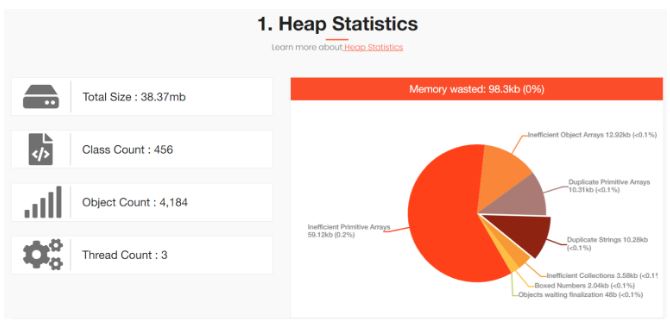
InternDemo memory wastage reported by HeapHero
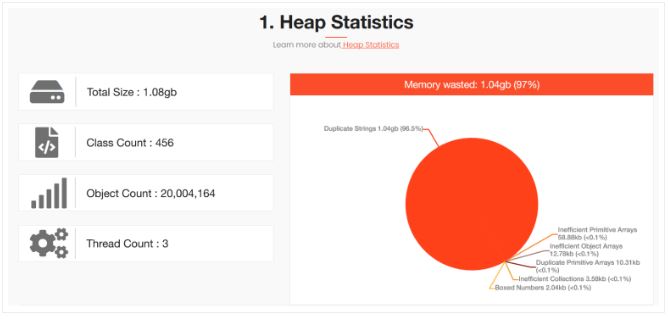 NoInternDemo memory wastage reported by HeapHero
The tool also points out that the following are the duplicate strings that are present in the memory. Basically, these 10 strings are the 10 unique UUIDs that were present in the random-data.txt file. Because of duplication, each string was wasting 106MB of memory. If the intern() operation was used, then this kind of memory wastage could have been avoided.
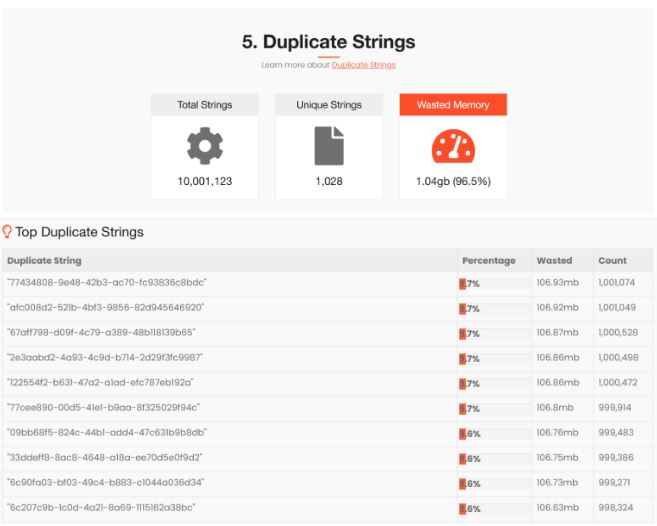
Duplicate Strings that are present in NoInternDemo reported by HeapHero
Response Time Impact
We executed both the ‘InternDemo’ and ‘NoInternDemo’ programs a few times. The Below chart shows the average response time of these two programs:
| InternDemo | NoInternDemo |
| 2042 ms | 1164 ms |
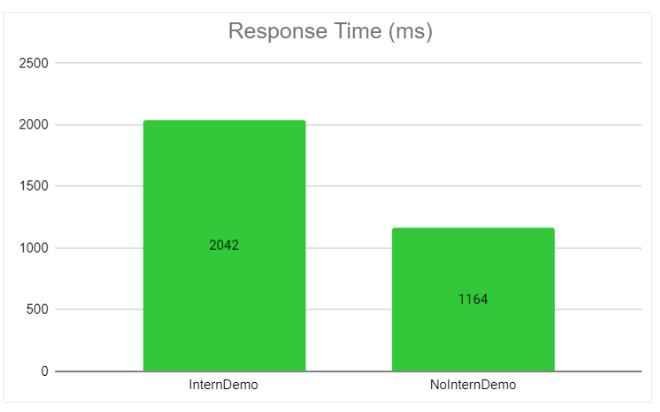
Basically ‘InternDemo’ was 75% slower than ‘NoInternDemo’. It’s just because ‘InternDemo’ must invoke string.equals() method on all the objects in the String intern pool for the 10 million records. Hence it consumes more CPU and time. Thus response time of the ‘InternDemo’ is slower than ‘NoInternDemo’. No wonder people say: "There is no free lunch." ‘InternDemo’ was highly performant from the memory perspective. ‘NoInternDemo’ was highly performant from the CPU/response time perspective.
NOTE: The performance impact of the intern() function is heavily dependent on the data that your application processes. In the above example, there was a heavy number of duplicate strings, thus you saw a great reduction in memory utilization and a spike in response time. This may not be the same behavior in all applications. You have to perform proper testing before using the intern() function in your application.
Video
Opinions expressed by DZone contributors are their own.
Comments