

Stateless JWT Auth Microservice Architecture With Spring Boot 3 and Redis Sentinel
Design a stateless JWT auth service with Spring Boot 3, Redis caching, and Sentinel for high availability, faster token validation, and reduced DB load.
In this article, I will discuss a highly available solution developed using Spring Boot 3 and Spring Security 6 to address the "centralized authentication method" problem frequently seen in modern microservice ecosystems.
We are not simply moving to an "authorization service"; we are examining the cache-first pattern, which minimizes DB usage, and the Redis Sentinel enhancement, which guarantees system persistence.
Why a Separate Authentication Service?
While embedding security into each service is an option in microservices, I have always found it more logical to proceed with a centralized Auth service and API Gateway combination.
- DRY (Don't Repeat Yourself): Using token authentication logic in many services increases extra maintenance costs.
- Isolation: Business services focus only on business logic; they don't deal with "is this token valid?" questions.
- Performance: Thanks to the Redis connection, instead of going to the database with every request, we can resolve the validation via the cache in milliseconds.
[Client] ──► [API Gateway] ──► [Auth Service: validate token]
                                         │ (valid)
                                         ▼
                              [Backend Microservices]
Cache-Focused Approach: Reducing Database Load
In the classic workflow, every login request puts a load on the DB.
With the cache-first approach, the process proceeds like this with a POST /auth/signin request:
First, Redis is checked. If there is a valid and unexpired token for the user, it is replicated directly. In case of cache deficiency, AuthManager.authenticate() is activated, a DB query is sent, and a BCrypt check is performed.
After a successful login, a token is generated with JJWT (HS256). This token is given to Redis with our changes and TTL (e.g., 24 minutes), and personal responses are converted. In this way, it protects our main database, especially in brute-force or high-intensity login password attacks.
POST /auth/signin
        │
        ▼
┌──────────────────────────────┐
│  Token exists in Redis?      │──── YES ──► Return token (0 DB queries)
└──────────────────────────────┘
        │ NO
        ▼
┌──────────────────────────────┐
│  AuthManager.authenticate()  │  (DB query + BCrypt verification)
└──────────────────────────────┘
        │
        ▼
┌──────────────────────────────┐
│  Generate JWT (JJWT HS256)   │
└──────────────────────────────┘
        │
        ▼
┌──────────────────────────────┐
│  Write to Redis (TTL: 24 min)│
└──────────────────────────────┘
        │
        ▼
   Return token
Implementation Details
User Entity and UserDetails Integration
In most projects, unnecessary mappings are performed between the User asset and the UserDetails objects expected by Spring Security. To reduce complexity, the User Entity is directly derived from the UserDetails interface. This makes the code cleaner and makes it "native," as outlined by Spring Security.
@Data
@Builder
@NoArgsConstructor
@AllArgsConstructor
@Entity
@Table(name = "T_APP_USER")
public class User implements UserDetails {

    @Id
    @GeneratedValue(strategy = GenerationType.SEQUENCE, generator = "seq_user_gen")
    @SequenceGenerator(name = "seq_user_gen", sequenceName = "SEQ_APP_USER", allocationSize = 1)
    @Column(name = "idx")
    private Long idx;

    @Column(name = "firstname")  private String firstName;
    @Column(name = "lastname")   private String lastName;
    @Column(unique = true, name = "email")   private String email;
    @Column(name = "accesskey")  private String accessKey;  // BCrypt-hashed

    @Column(name = "role")
    @Enumerated(EnumType.STRING)
    private Role role;

    @Override
    public Collection<? extends GrantedAuthority> getAuthorities() {
        return List.of(new SimpleGrantedAuthority(role.name()));
    }

    @Override public String getUsername()              { return email; }
    @Override public String getPassword()              { return accessKey; }
    @Override public boolean isAccountNonExpired()     { return true; }
    @Override public boolean isAccountNonLocked()      { return true; }
    @Override public boolean isCredentialsNonExpired() { return true; }
    @Override public boolean isEnabled()               { return true; }
}
JWT Filter: The Gateway to Security
The request to the system passes through the OncePerRequestFilter.
Here, using JwtAuthenticationFilter, we parse the token in each request and populate the SecurityContext. By using the new SecurityFilterChain bean introduced with Spring Security 6, we have disabled CSRF and made session management completely stateless.
Token Generation and Validation
public interface JwtService {
    String extractUserName(String token);
    String generateToken(UserDetails userDetails);
    boolean isTokenValid(String token, UserDetails userDetails);
}

@Service
public class JwtServiceImpl implements JwtService {

    @Value("${token.signing.key}")
    private String jwtSigningKey;  // Base64-encoded secret key

    @Override
    public String extractUserName(String token) {
        return extractClaim(token, Claims::getSubject);
    }

    @Override
    public String generateToken(UserDetails userDetails) {
        return Jwts.builder()
            .setClaims(new HashMap<>())
            .setSubject(userDetails.getUsername())
            .setIssuedAt(new Date(System.currentTimeMillis()))
            .setExpiration(new Date(System.currentTimeMillis() + 1000 * 60 * 24))
            .signWith(getSigningKey(), SignatureAlgorithm.HS256)
            .compact();
    }

    @Override
    public boolean isTokenValid(String token, UserDetails userDetails) {
        final String userName = extractUserName(token);
        return userName.equals(userDetails.getUsername()) && !isTokenExpired(token);
    }

    private <T> T extractClaim(String token, Function<Claims, T> claimsResolver) {
        return claimsResolver.apply(
            Jwts.parserBuilder()
                .setSigningKey(getSigningKey())
                .build()
                .parseClaimsJws(token)
                .getBody()
        );
    }

    private boolean isTokenExpired(String token) {
        return extractClaim(token, Claims::getExpiration).before(new Date());
    }

    private Key getSigningKey() {
        return Keys.hmacShaKeyFor(Decoders.BASE64.decode(jwtSigningKey));
    }
}
High Availability: Redis Sentinel
Using a single Redis instance means that the Auth service has a "Single Point of Failure." If Redis crashes, no one can access the system. This risk mitigation was achieved using Redis Sentinel.
Thanks to the Sentinel structure: If the master node crashes, the dependent node is automatically promoted to master via failover. On the application side, we continuously manage these transitions using the Lettuce driver.
Technical Stack and Requirements
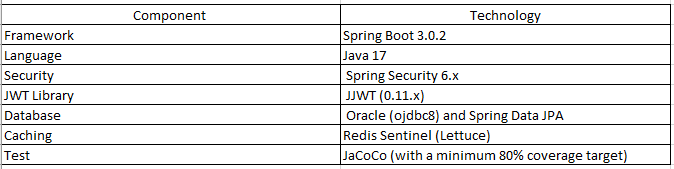
Redis Sentinel configuration:
@Configuration
public class RedisConfig {

    @Value("${spring.redis.sentinel.master}")
    private String master;

    @Value("${spring.redis.sentinel.nodes}")
    private String sentinelNodes;

    @Value("${spring.redis.password}")
    private String password;

    @Bean
    public RedisConnectionFactory redisConnectionFactory() {
        RedisSentinelConfiguration sentinelConfig = new RedisSentinelConfiguration()
                .master(master);

        for (String node : sentinelNodes.split(",")) {
            String[] hostPort = node.split(":");
            sentinelConfig.sentinel(hostPort[0], Integer.parseInt(hostPort[1]));
        }

        sentinelConfig.setPassword(RedisPassword.of(password));
        return new LettuceConnectionFactory(sentinelConfig);
    }
}yaml
env:
- name: spring.redis.sentinel.master
valueFrom:
secretKeyRef:
name: redis-user-secret
key: username
- name: spring.redis.password
valueFrom:
secretKeyRef:
name: redis-user-secret
key: passwordToken cache service:
@Service
public class TokenCacheServiceImpl {

    private final RedisTemplate<String, String> redisTemplate;

    public TokenCacheServiceImpl(RedisTemplate<String, String> redisTemplate) {
        this.redisTemplate = redisTemplate;
    }

    public void cacheToken(String username, String token, long duration, TimeUnit unit) {
        redisTemplate.opsForValue().set(username, token, duration, unit);
    }

    @Cacheable(value = "tokens", key = "#username")
    public String getToken(String username) {
        return redisTemplate.opsForValue().get(username);
    }
}
Authentication service: signup and signin:
@Service
@RequiredArgsConstructor
public class AuthenticationServiceImpl implements AuthenticationService {

    private final UserRepository userRepository;
    private final PasswordEncoder passwordEncoder;
    private final JwtService jwtService;
    private final AuthenticationManager authenticationManager;
    private final TokenCacheServiceImpl tokenCacheService;

    @Override
    public JwtAuthenticationResponse signup(SignUpRequest request) {
        var user = User.builder()
            .firstName(request.getFirstName())
            .lastName(request.getLastName())
            .email(request.getEmail())
            .accessKey(passwordEncoder.encode(request.getAccessKey())) // BCrypt
            .role(Role.USER)
            .build();

        userRepository.save(user);
        var jwt = jwtService.generateToken(user);
        return JwtAuthenticationResponse.builder().token(jwt).build();
    }

    @Override
    public JwtAuthenticationResponse signin(SigninRequest request) {
        // 1. Check Redis cache first
        String cachedToken = tokenCacheService.getToken(request.getEmail());
        if (cachedToken != null) {
            return JwtAuthenticationResponse.builder().token(cachedToken).build();
        }

        // 2. If not cached, authenticate (DB + BCrypt)
        authenticationManager.authenticate(
            new UsernamePasswordAuthenticationToken(request.getEmail(), request.getAccessKey())
        );

        var user = userRepository.findByEmail(request.getEmail())
            .orElseThrow(() -> new IllegalArgumentException("Invalid credentials."));

        // 3. Generate token and write to Redis (24 min TTL)
        var jwt = jwtService.generateToken(user);
        tokenCacheService.cacheToken(request.getEmail(), jwt, 24, TimeUnit.MINUTES);
        return JwtAuthenticationResponse.builder().token(jwt).build();
    }
}
JWT authentication filter:
@Component
@RequiredArgsConstructor
public class JwtAuthenticationFilter extends OncePerRequestFilter {

    private final JwtService jwtService;
    private final UserService userService;

    @Override
    protected void doFilterInternal(
        @NonNull HttpServletRequest request,
        @NonNull HttpServletResponse response,
        @NonNull FilterChain filterChain
    ) throws ServletException, IOException {

        final String authHeader = request.getHeader("Authorization");

        // Pass through if no Authorization header or doesn't start with Bearer
        if (StringUtils.isEmpty(authHeader) || !StringUtils.startsWith(authHeader, "Bearer ")) {
            filterChain.doFilter(request, response);
            return;
        }

        final String jwt = authHeader.substring(7);
        final String userEmail = jwtService.extractUserName(jwt);

        // Process only if SecurityContext has no authentication yet
        if (StringUtils.isNotEmpty(userEmail)
                && SecurityContextHolder.getContext().getAuthentication() == null) {

            UserDetails userDetails = userService.userDetailsService()
                    .loadUserByUsername(userEmail);

            if (jwtService.isTokenValid(jwt, userDetails)) {
                SecurityContext context = SecurityContextHolder.createEmptyContext();
                UsernamePasswordAuthenticationToken authToken =
                    new UsernamePasswordAuthenticationToken(
                        userDetails, null, userDetails.getAuthorities()
                    );
                authToken.setDetails(new WebAuthenticationDetailsSource().buildDetails(request));
                context.setAuthentication(authToken);
                SecurityContextHolder.setContext(context);
            }
        }

        filterChain.doFilter(request, response);
    }
}
Spring Security 6 configuration:
@Configuration
@EnableWebSecurity
@RequiredArgsConstructor
public class SecurityConfiguration {

    private final JwtAuthenticationFilter jwtAuthenticationFilter;
    private final UserService userService;

    @Bean
    public SecurityFilterChain securityFilterChain(HttpSecurity http) throws Exception {
        http
            .csrf(AbstractHttpConfigurer::disable)           // Stateless → no CSRF needed
            .authorizeHttpRequests(request -> request
                .requestMatchers("/auth/**").permitAll()      // Auth endpoints open to all
                .anyRequest().authenticated()
            )
            .sessionManagement(manager ->
                manager.sessionCreationPolicy(STATELESS)     // No server-side session
            )
            .authenticationProvider(authenticationProvider())
            .addFilterBefore(jwtAuthenticationFilter,        // JWT filter runs first
                UsernamePasswordAuthenticationFilter.class);

        return http.build();
    }

    @Bean
    public PasswordEncoder passwordEncoder() {
        return new BCryptPasswordEncoder();
    }

    @Bean
    public AuthenticationProvider authenticationProvider() {
        DaoAuthenticationProvider authProvider = new DaoAuthenticationProvider();
        authProvider.setUserDetailsService(userService.userDetailsService());
        authProvider.setPasswordEncoder(passwordEncoder());
        return authProvider;
    }

    @Bean
    public AuthenticationManager authenticationManager(AuthenticationConfiguration config)
            throws Exception {
        return config.getAuthenticationManager();
    }
}
Unit tests:
@Test
@DisplayName("Signin: if token is cached, should not query the DB")
void testSignInWithCachedToken() {
    when(tokenCacheService.getToken(TEST_EMAIL)).thenReturn(TEST_TOKEN);

    JwtAuthenticationResponse response = authenticationService.signin(
        SigninRequest.builder().email(TEST_EMAIL).accessKey(TEST_PASSWORD).build()
    );

    assertEquals(TEST_TOKEN, response.getToken());
    verifyNoInteractions(authenticationManager);  // No DB + BCrypt call should happen
    verifyNoInteractions(userRepository);
}

// Invalid token test — SecurityContext should remain empty
@Test
@DisplayName("With an invalid token, SecurityContext should remain empty")
void testDoFilterInternalInvalidToken() throws Exception {
    when(request.getHeader("Authorization")).thenReturn("Bearer " + INVALID_TOKEN);
    when(jwtService.extractUserName(INVALID_TOKEN)).thenReturn(TEST_EMAIL);
    when(userService.userDetailsService()).thenReturn(userDetailsService);
    when(userDetailsService.loadUserByUsername(TEST_EMAIL)).thenReturn(userDetails);
    when(jwtService.isTokenValid(INVALID_TOKEN, userDetails)).thenReturn(false);

    jwtAuthenticationFilter.doFilterInternal(request, response, filterChain);

    verify(filterChain).doFilter(request, response);
    assertNull(SecurityContextHolder.getContext().getAuthentication());
}
Summary and Conclusion
With the purchasing architecture, not only a secure login screen; It has built an architecture that is extremely scalable, overcomes database bottlenecks with caching, and meets high availability (HA) standards.
In particular, the modern architecture offered by Spring Boot 3 has made the security layer much more flexible. If you are starting a large-scale microservice project, you can design token management from the outset in this "stateless" and "cached" manner.
Opinions expressed by DZone contributors are their own.