

Kafka With Spring Boot: Introduction
An introduction to the internal architecture of Apache Kafka, covering event streaming and the end-to-end communication flow between producers and consumers.
Join the DZone community and get the full member experience.
Join For FreeKafka is a distributed event streaming platform that enables real-time data ingestion, storage, and processing of continuous event streams. To do that, Kafka has a complex internal structure. In this part, I will try to cover an overview of the full internal structure.
Overview
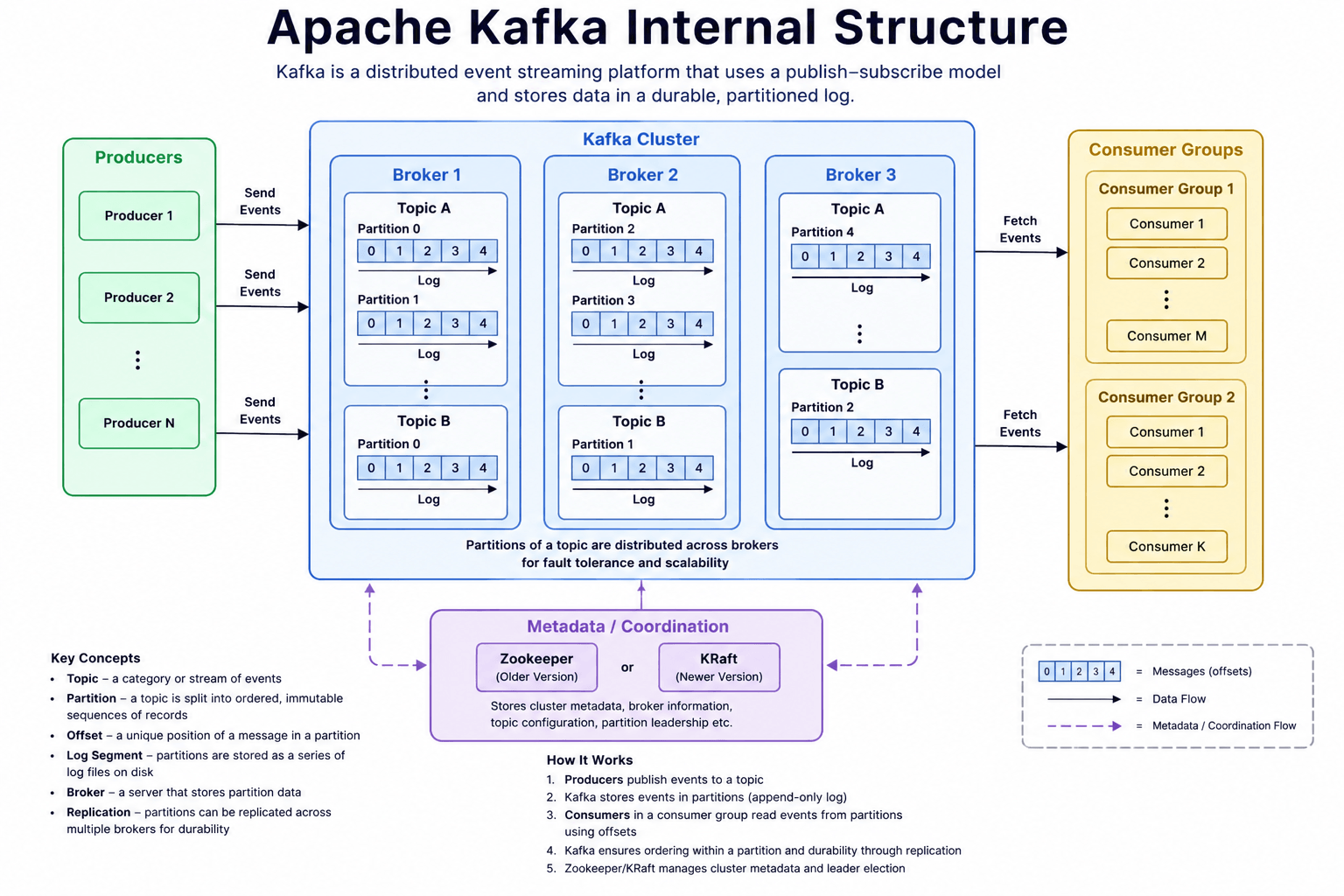
Kafka uses a publish-subscribe model where producers produce events and consumers consume messages. Kafka producers publish events to the broker, and consumers consume the events from the broker. In the meantime, the broker has a different layer of architecture that allows Kafka to be an event streaming platform. The producer, broker, and consumer-related metadata are managed by the Kafka controller, which is elected by ZooKeeper or KRaft.
Key Terms
Topic: A topic is a logical name or category where Kafka stores a stream of related events/messages. Think of a topic as a database table for events or a channel where producers publish messages and consumers subscribe to read them.
Partition: A partition is a physical subdivision of a Kafka topic that stores messages in an ordered, immutable sequence. It is the basic unit of parallelism and scalability in Kafka.
Segment: A segment is a physical file inside a Kafka partition where messages are stored on disk. A partition is not stored as one huge file. Kafka divides it into multiple smaller segment files.
Offset: An offset is a unique sequential number assigned to each message within a Kafka partition. It represents the position of a message in that partition.
Metadata: Metadata is information about the Kafka cluster, not the actual message data. It describes the structure and state of the Kafka cluster.
Controller: The Kafka Controller is a special broker responsible for managing cluster-level operations. In a Kafka cluster, one broker is elected as the controller.
ZooKeeper (OLD): ZooKeeper is an external distributed coordination system used by older Kafka versions to manage cluster metadata and controller election.
Kraft (Modern): KRaft (Kafka Raft metadata mode) is Kafka's new architecture that removes ZooKeeper and manages metadata internally using the Raft consensus algorithm.
Leader: A leader is the broker that owns the primary copy of a partition and handles all read and write operations for that partition. Only one broker can be the leader for a partition at a time.
Replica: A replica is a copy of a partition stored on another broker to provide fault tolerance.
Internal Details With the Kafka Library
At first, download Kafka from this link. After extracting, we will get the following directory structure:
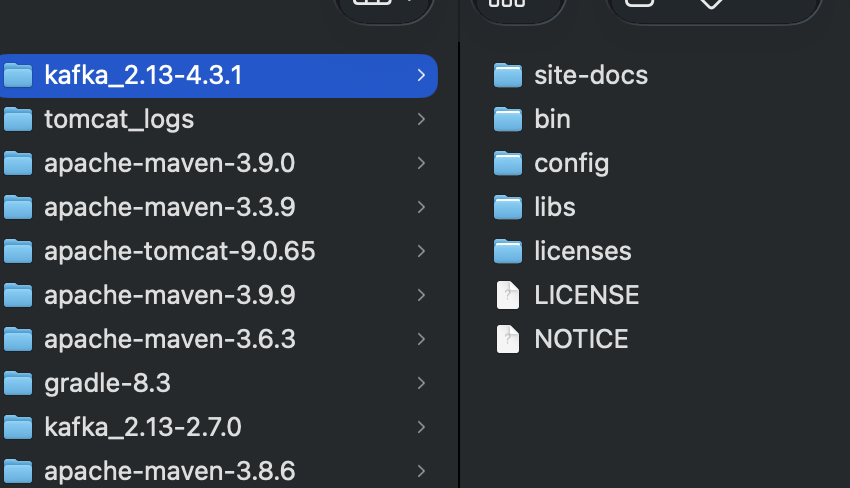
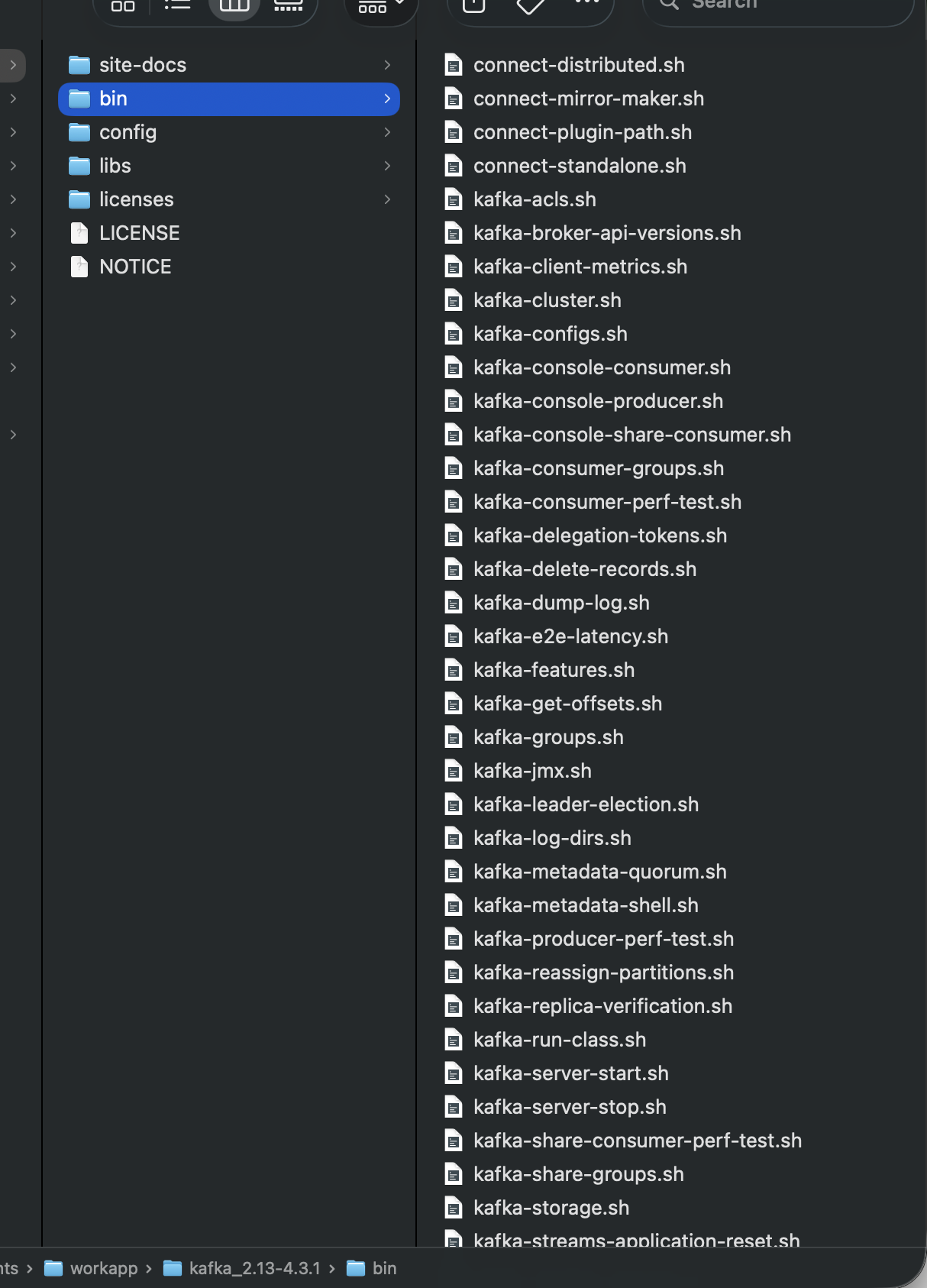
Here, each folder has its own functionality. The bin folder contains all the executable scripts. These scripts can be used from the command line to manage Kafka components and perform various tasks, including those listed below:
- Start servers
- Stop servers
- Topic management
- Cluster management
- Act as a publisher/consumer
Another important folder is the config folder, where we can configure the broker and controller nodes. Initially, this folder contains the default configuration files for the Kafka components.
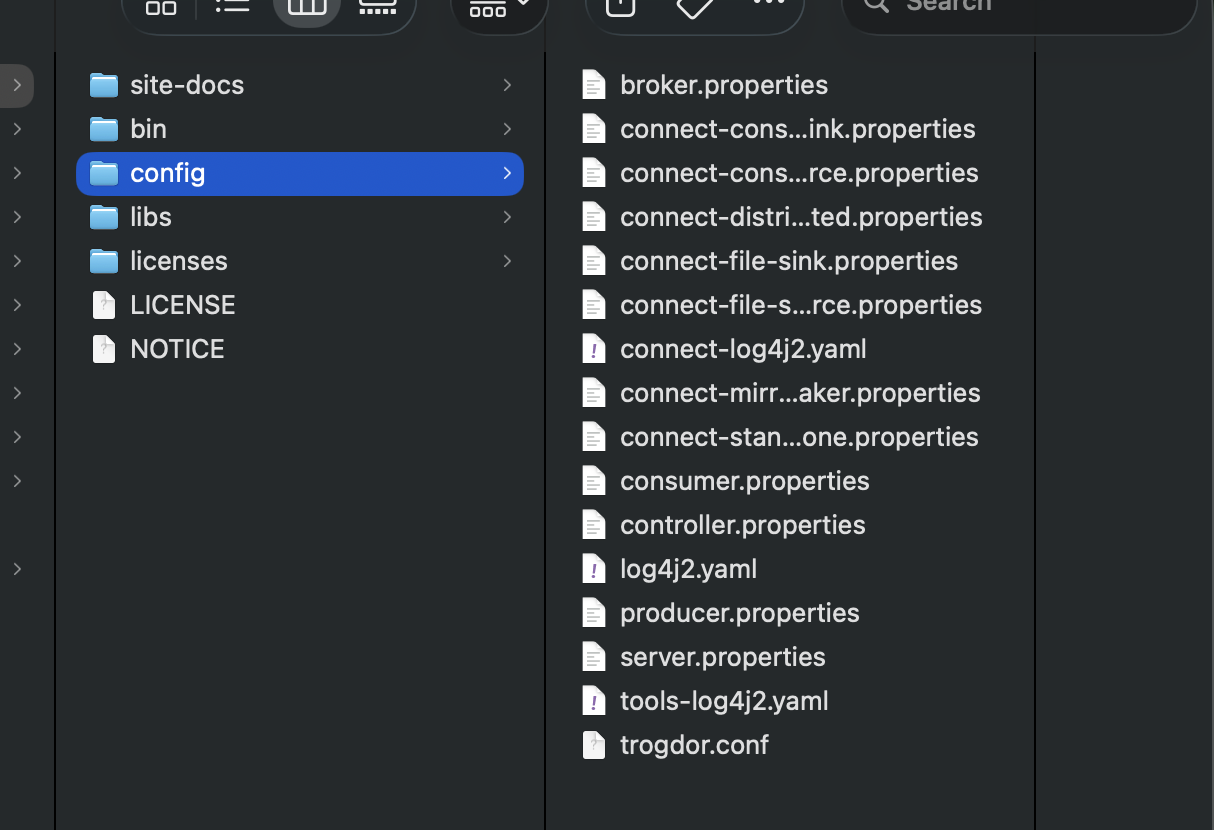
Here we find property files named controller.properties, server.properties, broker.properties, consumer.properties, producer.properties, and some other configuration files.
In a Kafka installation, these .properties files are configuration files used by different Kafka components and client applications. However, not all of them are used by the Kafka server itself.
We can think of the configuration files in three major categories:
- Servers
- server.properties
- broker.properties
- controller.properties - Clients
- producer.properties
- consumer.properties - Tools
- other properties file
1. server.properties
This is the main configuration file for a Kafka broker.
It controls how the Kafka broker runs, including:
- Broker ID/node identity
- Listener and network configuration
- Log directories
- Number of network and I/O threads
- Default number of partitions
- Replication settings
- Retention policies
- Message size limits
- Controller configuration in KRaft mode
- Cluster-related settings
For example:
node.id=1
process.roles=broker,controller

listeners=PLAINTEXT://:9092,CONTROLLER://:9093
controller.quorum.voters=1@localhost:9093

log.dirs=/tmp/kafka-logs
num.partitions=1

log.retention.hours=168
In modern Kafka using KRaft, server.properties can configure both the broker and controller when a combined node is used.
2. broker.properties
This is generally used as a separate broker configuration file when you want to maintain configuration for a broker independently.
For example, you might create:
config/
├── broker.properties
├── controller.properties
and start Kafka with a particular configuration:
kafka-server-start.sh config/broker.propertiesThe exact files supplied with Kafka can vary depending on the Kafka version/distribution. broker.properties is not a universal mandatory filename in Kafka; Kafka mainly cares about the properties file you pass to the startup command.
3. controller.properties
This is used for configuring a KRaft controller.
Kafka's modern architecture doesn't require ZooKeeper. Instead, Kafka uses the KRaft consensus mechanism.
A controller is responsible for managing cluster metadata, such as:
- Which brokers are part of the cluster
- Topic metadata
- Partition information
- Leader assignments
- Cluster configuration
- Controller elections
A dedicated controller configuration could contain things such as:
process.roles=controller
node.id=1

listeners=CONTROLLER://:9093
controller.quorum.voters=1@localhost:9093

controller.listener.names=CONTROLLER
A production Kafka cluster may use dedicated controller nodes rather than running broker and controller roles together.
4. producer.properties
This is not a broker configuration.
It contains configuration for a Kafka Producer client — the application that sends messages to Kafka.
For example:
bootstrap.servers=localhost:9092

key.serializer=org.apache.kafka.common.serialization.StringSerializer
value.serializer=org.apache.kafka.common.serialization.StringSerializer
Other producer settings can control:
- acks
- retries
- batch.size
- linger.ms
- compression.type
- buffer.memory
- enable.idempotencehghg
For example:
acks=all
retries=10
compression.type=snappy
A producer application reads these settings when connecting to Kafka.
5. consumer.properties
This is also a client configuration, not a broker configuration.
It controls how a Kafka Consumer reads messages.
Example:
bootstrap.servers=localhost:9092

group.id=my-consumer-group

key.deserializer=org.apache.kafka.common.serialization.StringDeserializer
value.deserializer=org.apache.kafka.common.serialization.StringDeserializer

auto.offset.reset=earliest
Important consumer settings include:
| bootstrap.servers | Kafka broker addresses |
| group.id | Consumer group identity |
| key.deserializer | Converts message key bytes |
| value.deserializer | Converts message value bytes |
| auto.offset.reset | What to do when no valid offset exists |
| enable.auto.commit | Controls automatic offset commits |
| max.poll.records | Maximum records returned per poll |
| fetch.min.bytes | Minimum data fetched from broker |
6. Other Configuration Files
Depending on your Kafka version, you may also find files such as:
config/
├── connect-distributed.properties
├── connect-standalone.properties
├── connect-log4j.properties
├── tools-log4j.properties
└── ...
Some are for Kafka's additional components.
For example:
Kafka Connect
connect-distributed.properties
connect-standalone.properties
These configure Kafka Connect workers.
Logging
connect-log4j.properties
tools-log4j.properties
These configure logging behavior for particular Kafka tools/components.
So, server.properties/broker.properties/controller.properties configure Kafka infrastructure, while producer.properties and consumer.properties configure applications that communicate with Kafka.
Step by Step: Test Producer and Consumer From CLI
We will discuss the Kafka cluster later, but for now we will check how to run the Kafka controller, broker, and an example producer and consumer from the CLI.
1. Initialize Kafka Storage
For a new Kafka installation running in KRaft mode, first generate a cluster ID. If we move to the Kafka bin directory, we can find a file called kafka-storage.sh
./kafka-storage.sh random-uuidCopy the generated UUID.
Then format the Kafka storage:
./kafka-storage.sh format \
  -t <CLUSTER_ID> \
  -c ../config/server.properties
For example:
./kafka-storage.sh format \
  -t abc123xyz \
  -c ../config/server.properties
You normally perform this initialization only once for a fresh Kafka storage directory. Don't repeatedly format an existing cluster unless you intentionally want to initialize/reset it.
2. Start the Kafka Server
Because we are now inside the bin, specify the configuration file relative to the parent directory:
./kafka-server-start.sh ../config/server.properties
Or we can run it in the background:
./kafka-server-start.sh -daemon ../config/server.propertiesThe important relationship is:
bin/
└── kafka-server-start.sh

config/
└── server.properties
So the command is
./kafka-server-start.sh ../config/server.properties
3. Verify That Kafka Is Running
We can also check the Kafka port:
lsof -i :9092
4. Create a Topic
Still inside the bin directory:
./kafka-topics.sh \
  --create \
  --topic test-topic \
  --bootstrap-server localhost:9092 \
  --partitions 1 \
  --replication-factor 1
List topics:
./kafka-topics.sh \
  --list \
  --bootstrap-server localhost:9092
5. Start a Consumer
Open another terminal and go to Kafka's bin directory:
./kafka-console-consumer.sh \
  --topic test-topic \
  --bootstrap-server localhost:9092
The consumer will wait for messages.
6. Start a Producer
Open another terminal:
./kafka-console-producer.sh \
  --topic test-topic \
  --bootstrap-server localhost:9092
Now type:
Hello Kafka
The message should appear in the consumer terminal.
This is the introduction to this series. We will discuss more details in the upcoming articles.
Opinions expressed by DZone contributors are their own.
Comments