

Passwordless Image Pulls in Kubernetes With ServiceAccount Tokens and a Credential Provider
The kubelet can hand a pod's ServiceAccount token to a plugin that swaps it for short-lived, read-only registry access. No imagePullSecrets.
Every new cluster brings the same chore: copy the registry password into every namespace that pulls private images, and repeat it when the password rotates. Clusters are created dynamically, so the chore never ends, and each copy is one more place where the password can expire or leak.
Kubernetes 1.34+ offers a way out: the kubelet can hand a credential provider plugin the ServiceAccount token of the pod whose image it is pulling, and the plugin swaps it at the registry for short-lived, read-only credentials.
A ServiceAccount token is issued for a specific pod for a limited time and does not sit in any manifest. The registry decides which tokens it trusts. That is closer to zero trust: the workload holds no long-lived secret that could be stolen and used from somewhere else.
The scheme works, but when it fails, the cause is hard to find. The pod goes into ImagePullBackOff, and the events show only a generic registry answer: failed to resolve reference ... unexpected status from HEAD request. The real cause is written by the kubelet and appears only in its log on the node:
ak-kubelet-provider: https://ak.test: 401 CI JWT did not match any identity mappingThat line does not appear on its own: the kubelet, the nodes' permissions, and the registry all have to be configured first. The examples use a plugin I wrote and the open-source Artifact Keeper registry, and they all come from my test cluster.
What the Registry Has to Do
The scheme needs a registry that accepts Kubernetes ServiceAccount tokens, which are OIDC tokens signed by the cluster, and issues short-lived credentials in exchange. Any registry that can verify the cluster's OIDC tokens and issue such credentials fits. The examples below use Artifact Keeper 1.11, which has this exchange built in.
How the kubelet Passes the ServiceAccount Token to the Plugin
The kubelet can obtain image credentials from an external executable, called an image credential provider. It runs on every node. The kubelet writes a JSON request with the image name to its stdin and reads a username, a password, and a cache duration from its stdout.
Kubernetes 1.34 added the ServiceAccount token of the pod being started to that request (KEP-4412, the tokenAttributes field in the config). Before that, a plugin saw only the image name and could rely only on the node's identity. Now it knows which pod asks for the image and can exchange the token for access granted to that ServiceAccount.
The config for this plugin looks like this:
apiVersion: kubelet.config.k8s.io/v1
kind: CredentialProviderConfig
providers:
  - name: ak-kubelet-provider
    matchImages: ["ak.test"]
    defaultCacheDuration: "5m"
    apiVersion: credentialprovider.kubelet.k8s.io/v1
    args:
      - --url=https://ak.test
    tokenAttributes:
      serviceAccountTokenAudience: artifact-keeper
      cacheType: ServiceAccount
      requireServiceAccount: true
serviceAccountTokenAudience says who the token is issued for. It needs a dedicated value that differs from the API server's audience. With the API server's audience, the registry would accept the token of any pod, and the token the plugin sends to the registry would also be valid against the API server. Artifact Keeper refuses to create such a provider and answers 400.
The whole exchange is shown in the diagram below.
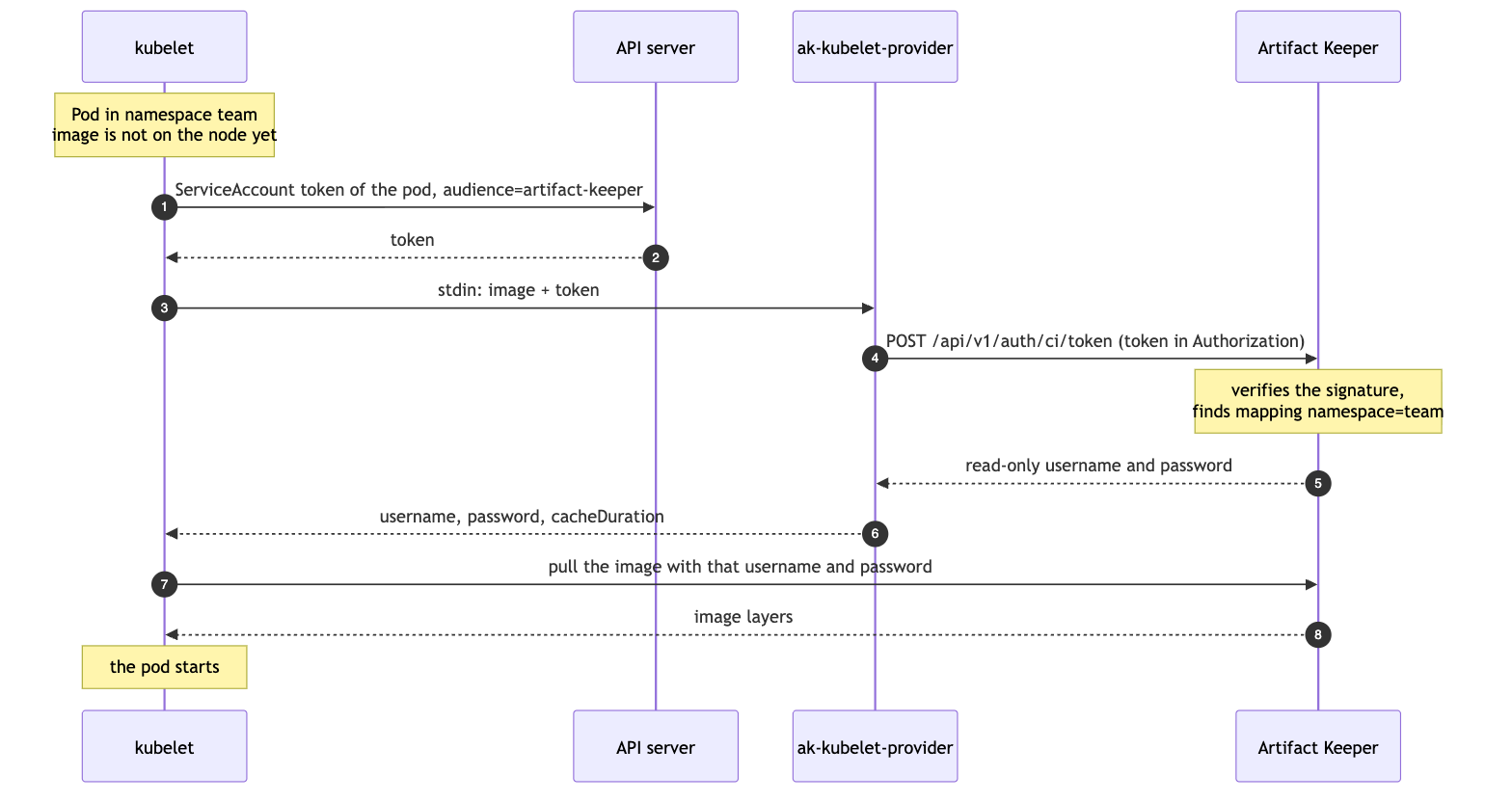
The image is not on the node yet, so the kubelet calls the plugin. The pod in team gets access because the registry has a mapping for the namespace team, a rule that admits ServiceAccounts from it.
The plugin returns a cacheDuration to the kubelet, equal to the lifetime of the issued token minus 60 seconds. With cacheType: ServiceAccount the kubelet caches credentials per ServiceAccount. A second pod of the same ServiceAccount takes them from the cache, while a pod of another ServiceAccount calls the plugin itself.
What the Cluster Needs Besides the Plugin
The plugin works only together with a few cluster settings. Without them, the image does not arrive, and the cause is hard to find.
Nodes must be allowed to request tokens for the audience. Since Kubernetes 1.33, ServiceAccountNodeAudienceRestriction is in effect. The API server does not issue a node a token with an audience that is not in the pod's projected volumes unless the node has been explicitly allowed. Without that permission, the kubelet logs is not authorized to request tokens for this audience and pulls the image without credentials. The pod gets a generic denial, as if there were no plugin at all. The permission is granted by a ClusterRole bound to the group system:nodes:
rules:
  - apiGroups: [""]
    resources: ["artifact-keeper"]
    verbs: ["request-serviceaccounts-token-audience"]
resources here is the audience itself.
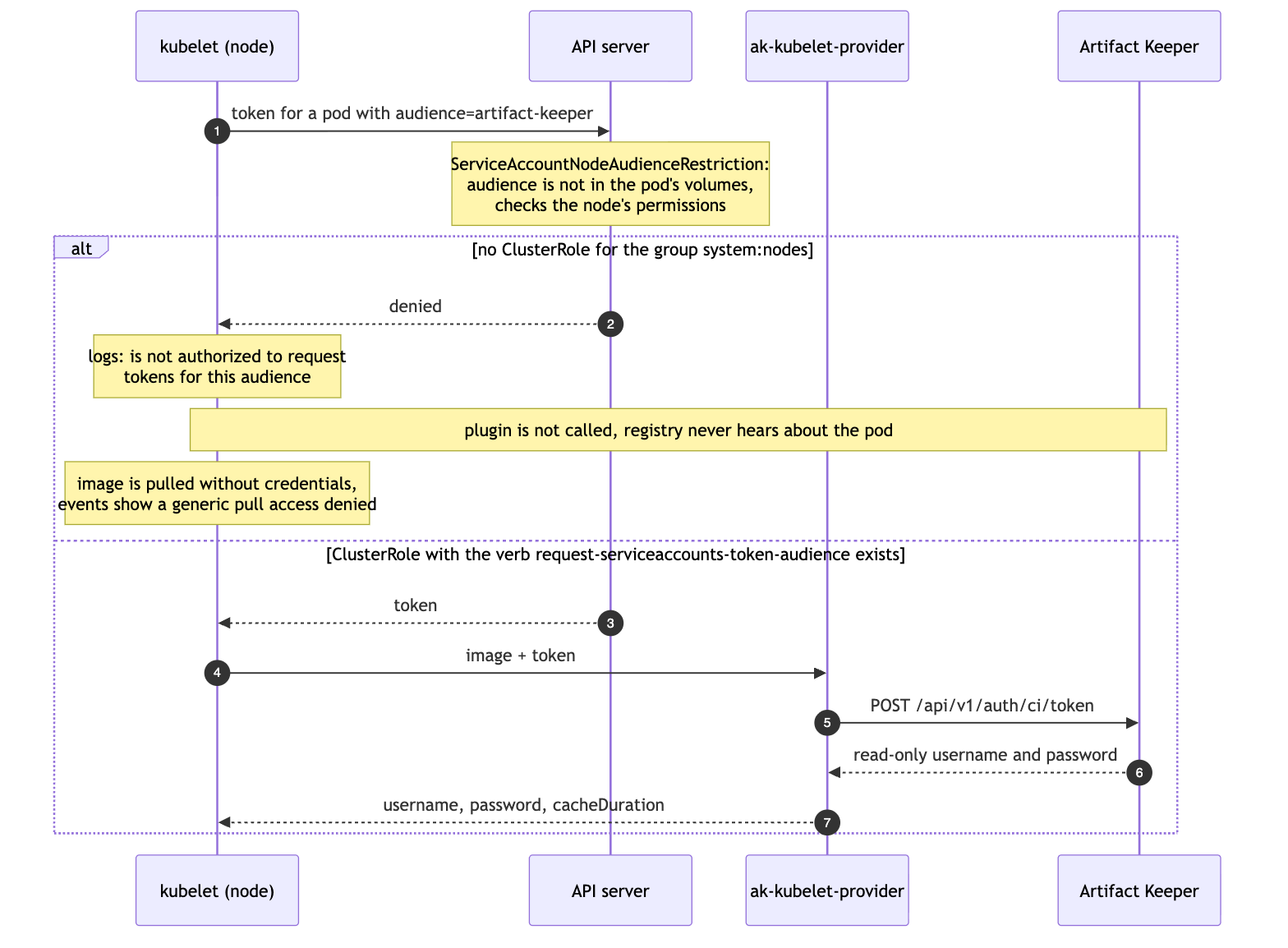
If nodes have no permission for the audience, the plugin does not run at all: the registry receives neither a request nor an error, and the events show a generic denial.
kubelet flags. You need --image-credential-provider-config and --image-credential-provider-bin-dir. My kind config with kubeadmConfigPatches did not apply them, so I appended the flags to /var/lib/kubelet/kubeadm-flags.env on the node and restarted the kubelet.
If the plugin is not called at all, the kubelet log has no line from ak-kubelet-provider. Then check matchImages (the image host must match) and the audience permission from the previous point.
The Registry Swaps the Token for Read-Only Access
To accept ServiceAccount tokens and issue credentials in exchange, Artifact Keeper 1.11 has a CI OIDC provider of type kubernetes. First I create the provider. On my test setup, the registry runs inside the same kind cluster: I give it the signing keys statically, and it does not have to reach the API server's discovery endpoint:
kubectl get --raw /openid/v1/jwks > jwks.json
jq -n --slurpfile jwks jwks.json '{
      name: "prod-cluster", provider_type: "kubernetes",
      issuer_url: "https://kubernetes.default.svc.cluster.local",
      audience: "artifact-keeper",
      key_source: "static", static_jwks: $jwks[0]}' |
  curl -X POST https://ak.test/api/v1/admin/ci-oidc \
    -H "Authorization: Bearer $ADMIN_TOKEN" -H "Content-Type: application/json" -d @-
Then I create a mapping that defines which ServiceAccounts get access and binds them to a group with read permission:
curl -X POST https://ak.test/api/v1/admin/ci-oidc/$PROVIDER_ID/mappings \
  -H "Authorization: Bearer $ADMIN_TOKEN" -H "Content-Type: application/json" \
  -d '{"name":"team-ns","priority":10,
       "claim_filters":{"/kubernetes.io/namespace":"team"},
       "group_binding_ids":["'$GROUP_ID'"]}'
A key that starts with / is a JSON Pointer into the token's claims. This single namespace filter admits every ServiceAccount in team. The match is exact: team does not admit team-sandbox.
All ServiceAccounts admitted by one mapping share one registry account, in my case ci-1007c2257aba. You can tell them apart in the registry log, which records the namespace, ServiceAccount, pod and node of every exchange.
A Foreign Namespace Is Denied, a Mapped One Pulls the Image
I started a kind 1.34.3 cluster and installed Artifact Keeper 1.11.1 inside it. I built the plugin from main for arm64 musl. Results:
|
Check
|
Result
|
|---|---|
|
Pod in team with ServiceAccount app
|
Image pulled on the first attempt, no imagePullSecrets
|
|
Second ServiceAccount other in team, same mapping
|
Pulled, the exchange returned 200
|
|
Pod in namespace outsider, which has no mapping
|
ImagePullBackOff, the kubelet log shows 401 CI JWT did not match any identity mapping, as in the introduction
|
push with the issued token
|
denied: Token does not have required scope: write:artifacts, on both blobs and the manifest
|
|
Create an API token with this token
|
403
|
|
Create a provider with the API server's audience
|
400
|
The token the plugin receives can only read. The registry limits it by provider type and does not consult the group's permissions: even if the group has write access, this token writes nothing.
An Image Already on the Node Hides the Denial
The outsider check fooled me at first. I started a pod in the foreign namespace and it came up. The reason: the image was already on the node after the first pod. The kubelet does not pull an image it already has, so the plugin is never reached.
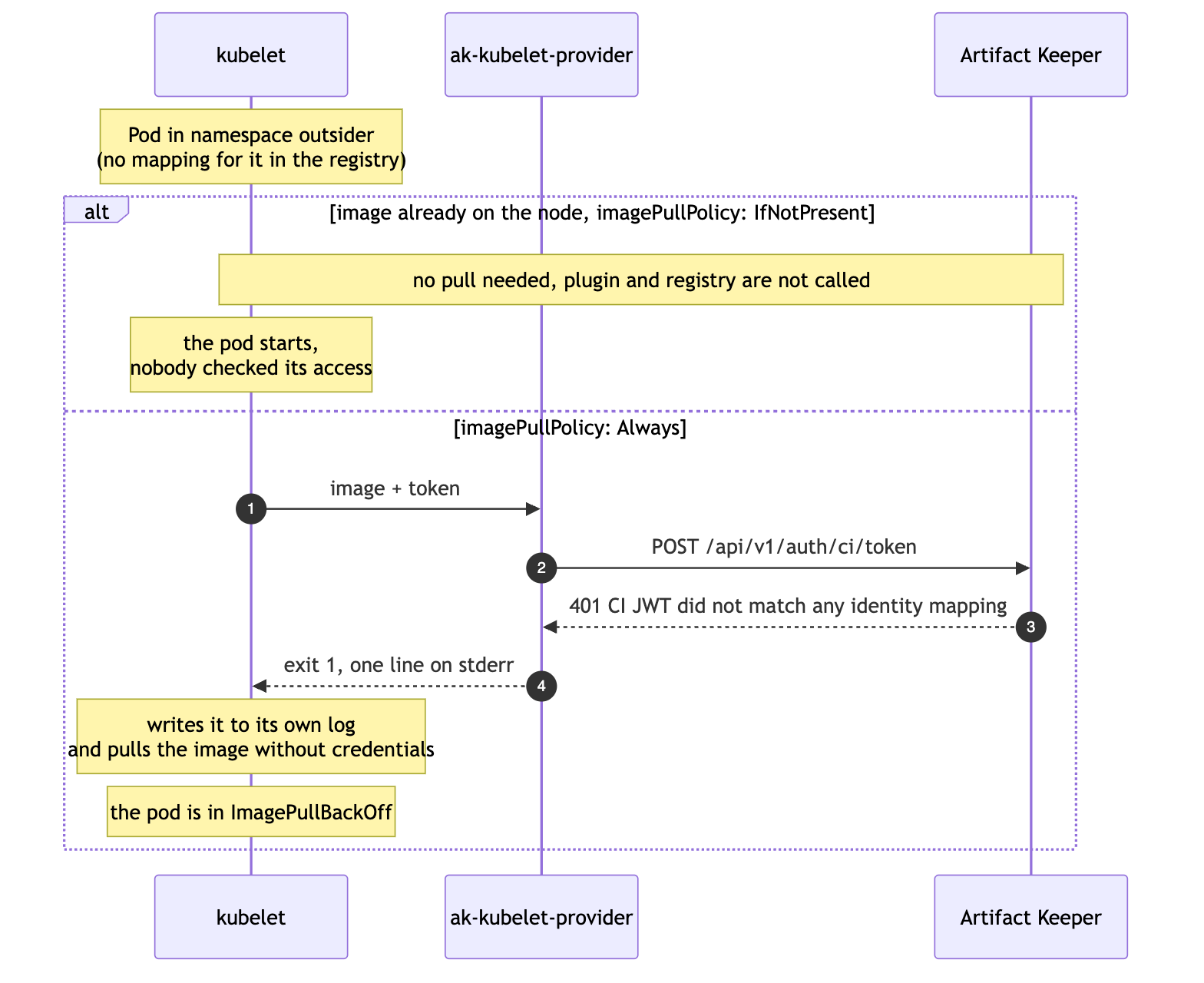
The same pod from a foreign namespace either starts or fails, depending on imagePullPolicy and on whether the image is already on the node. In the first case, the registry never hears about it.
To test a denial, you need imagePullPolicy: Always or an image that is not on the node. Until you do that, any check of the kind "a foreign ServiceAccount must not get in" passes green.
The Plugin: One Rust Binary, No Token in the Logs
It is a single static Rust binary of about 1.7 MB. The HTTP client is ureq with rustls, and there is no async runtime. It builds for x86_64 and aarch64 musl and is signed with cosign.
There is no async runtime on purpose: the process lives for tens of milliseconds and needs a single request.
The binary runs as root on every node, so it follows a few rules, each covered by a test:
- The token never reaches the logs at any level, and if the registry echoes it in an error message, the plugin replaces it with
[REDACTED]; http://is rejected before any request is sent, so the token cannot travel over an open channel;- Redirects are not followed, so the token cannot be sent to another address;
- The whole exchange runs under a single timeout, 10 seconds by default.
On failure, the plugin writes one line to stderr and exits with code 1. The kubelet records it in its own log and pulls the image without credentials. That is why pod events show only a generic denial, while the details sit on the node: journalctl -u kubelet | grep ak-kubelet-provider.
EKS, GKE and AKS: A Recipe Exists, Real Clusters Have Not Been Tried
On these platforms, you cannot set kubelet flags directly. The schemes below are tested in parts and on kind, so treat them as a working plan without guarantees.
EKS (Amazon Linux 2023). nodeadm writes a config.json with a single provider, ecr-credential-provider. A script in the user data copies that file and adds an entry for the plugin.
The script passes the file with the added entry to the kubelet as a second --image-credential-provider-config flag. Of two identical flags, the kubelet takes the last one, so it reads that file, and the ECR entry stays in it: EKS system images still come from ECR.
This does not work on Bottlerocket, EKS Auto Mode, or Fargate.
GKE Standard and AKS. Neither Google nor Microsoft lets you add a plugin through their API. For them, the repository has a privileged DaemonSet: it finds the provider config on the kubelet's command line, adds the plugin there, and restarts the kubelet. If the kubelet does not come back after the restart, the DaemonSet restores the previous config.
The vendors do not support this approach and may break it with a node image update. The DaemonSet pod runs as root on every node, so only cluster administrators should be able to change its ConfigMap.
19 ms per Call, and a Cache That Spares Repeat Exchanges
The measurements were taken on a single kind node (a laptop, with the registry in the same cluster): network latency is close to zero. The numbers show the cost of the plugin itself, not of your network.
- One plugin call takes about 19 ms including process start and the TLS handshake: 100 sequential calls took 1.9 s.
- 200 calls, 20 in parallel, finished in 1.1 s with no errors.
- The registry token's lifetime in my setup is 30 minutes. For a one-hour ServiceAccount token, the plugin returned a
cacheDurationof 1740 s: 30 minutes minus a 60-second margin. - 20 pods of one ServiceAccount that had not yet been seen on the node produced 2 exchanges instead of 20. Most likely the second exchange happened before the cache was filled.
cacheDuration follows the shorter of the two tokens: with a 10-minute ServiceAccount token, the plugin returned 539 s, with a one-hour token 1740 s.
What My Tests Do Not Cover
- Real EKS, GKE, and AKS clusters. The only real run is on kind.
- Kubernetes releases newer than 1.34.3. All tests ran on 1.34.3, the minimum version the plugin supports.
- The registry mode in which it fetches the cluster's signing keys itself (
discovery). I used static keys. - Load on the registry itself: how it copes with hundreds of nodes asking for tokens at the same time.
Code and Further Reading
The kubelet side is described in the Kubernetes documentation on kubelet credential providers and in KEP-4412. The example plugin, the installation recipes, and all configs from this article are in the artifact-keeper-kubelet-provider repository. If you try the recipes on EKS, GKE, or AKS, a note about what worked and what did not is welcome.
Opinions expressed by DZone contributors are their own.