

A Non-Expiring AKS Deployment Token Could Read Secrets Across Three Namespaces
Learn how to secure Kubernetes Secrets by replacing long-lived service account tokens, tightening RBAC permissions, and improving Azure Key Vault integration.
A security review started after connection strings were visible through a Kubernetes management tool. The first request sounded simple: remove Secrets from the cluster and move the values to Azure Key Vault.
That request focused on which system stored the values. The access review found a wider problem. Kubernetes stored a deployment service account's legacy token in a kubernetes.io/service-account-token Secret. The token had no expiry in its normal use, and RoleBindings allowed the same identity to operate in three application namespaces.
The Role used resources: ["*"] across several API groups and allowed get, list, watch, create, update, patch and delete. The Role included the core API group, so the token could read every Secret in each of those namespaces.
The review found no evidence of token misuse. It found an avoidable access path with a long lifetime and a larger scope than the pipeline needed.
Moving application passwords to Key Vault would improve their source of truth and rotation. It would not revoke this token, narrow its RBAC permissions or remove the cross-namespace bindings. Those controls needed their own fix.
Why the Kubernetes Secrets Existed
The application images carried JSON configuration files for local development. Database, cache and message-broker endpoints pointed to localhost. Those defaults were useful on a developer machine and unusable inside the cluster.
The shared Helm chart supplied the deployment values at runtime. It rendered an Opaque Secret from a secrets map, then loaded the Secret into the application container through envFrom.
The reduced chart looked like this:
{{- if .Values.secrets }}
apiVersion: v1
kind: Secret
metadata:
  name: {{ include "app.fullname" . }}-secrets
type: Opaque
stringData:
  {{- range $key, $value := .Values.secrets }}
  {{ $key }}: {{ $value | quote }}
  {{- end }}
{{- end }}
The Deployment then loaded every entry as an environment variable:
envFrom:
  - secretRef:
      name: {{ include "app.fullname" . }}-secrets
The application configuration placed environment variables after the file-based settings, so the runtime values won. That ordering made the Kubernetes Secret part of the configuration path. Removing it without replacing that path would leave the containers pointing at local services.
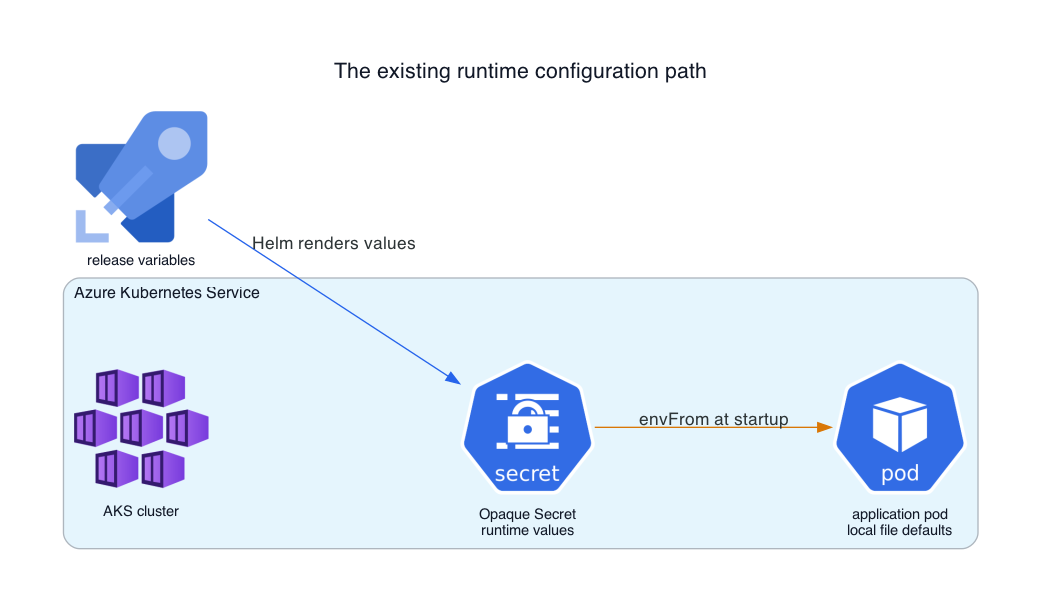
The next question was, "Which components can retrieve the value, and how long does each form of access last?"
Key Vault Does Not Always Remove the Kubernetes Secret
The Azure Key Vault provider for the Secrets Store CSI Driver supports more than one consumption model.
A pod can read mounted files directly from a CSI volume. This path can avoid creating a native Kubernetes Secret. The application still needs a configuration method that reads those files and responds safely when their contents rotate.
The driver can also copy mounted values into a native Kubernetes Secret through the secretObjects field of a SecretProviderClass. Microsoft documents this as secret synchronisation. It is useful when an application already consumes secretKeyRef or envFrom, which was the case here. It also means that moving the source value to Key Vault does not remove the Secret object from Kubernetes.
apiVersion: secrets-store.csi.x-k8s.io/v1
kind: SecretProviderClass
metadata:
  name: app-vault
spec:
  provider: azure
  secretObjects:
    - secretName: app-runtime-secrets
      type: Opaque
      data:
        - objectName: database-password
          key: Database__Password
The choice affects rotation too. Microsoft notes that an existing process does not receive updates when a container consumes a Kubernetes Secret through an environment variable. The team must restart the pod before the process receives the new value.
Key Vault remains a sound source for secrets. The important point is narrower: the storage migration and the Kubernetes access review solve different problems.
The Service Account Crossed Namespace Boundaries
The next part of the review followed the identities that could read Secrets.
Kubernetes allows a RoleBinding in one namespace to name a ServiceAccount from another namespace. That feature is useful for controlled cross-namespace work. It also means that checking only the ServiceAccount's home namespace can understate its reach.
The review found a layout equivalent to this generalized example:
apiVersion: rbac.authorization.k8s.io/v1
kind: Role
metadata:
  name: pipeline-deployer
  namespace: environment-b
rules:
  - apiGroups: ["", "apps", "batch", "autoscaling", "networking.k8s.io", "policy"]
    resources: ["*"]
    verbs: ["get", "list", "watch", "create", "update", "patch", "delete"]
---
apiVersion: rbac.authorization.k8s.io/v1
kind: RoleBinding
metadata:
  name: pipeline-deployer-from-a
  namespace: environment-b
subjects:
  - kind: ServiceAccount
    name: pipeline-deployer
    namespace: environment-a
roleRef:
  apiGroup: rbac.authorization.k8s.io
  kind: Role
  name: pipeline-deployer
Two bindings of this form extended the identity from its home namespace into two more namespaces. The same bearer token could therefore authenticate once and use the permissions that each Role granted.
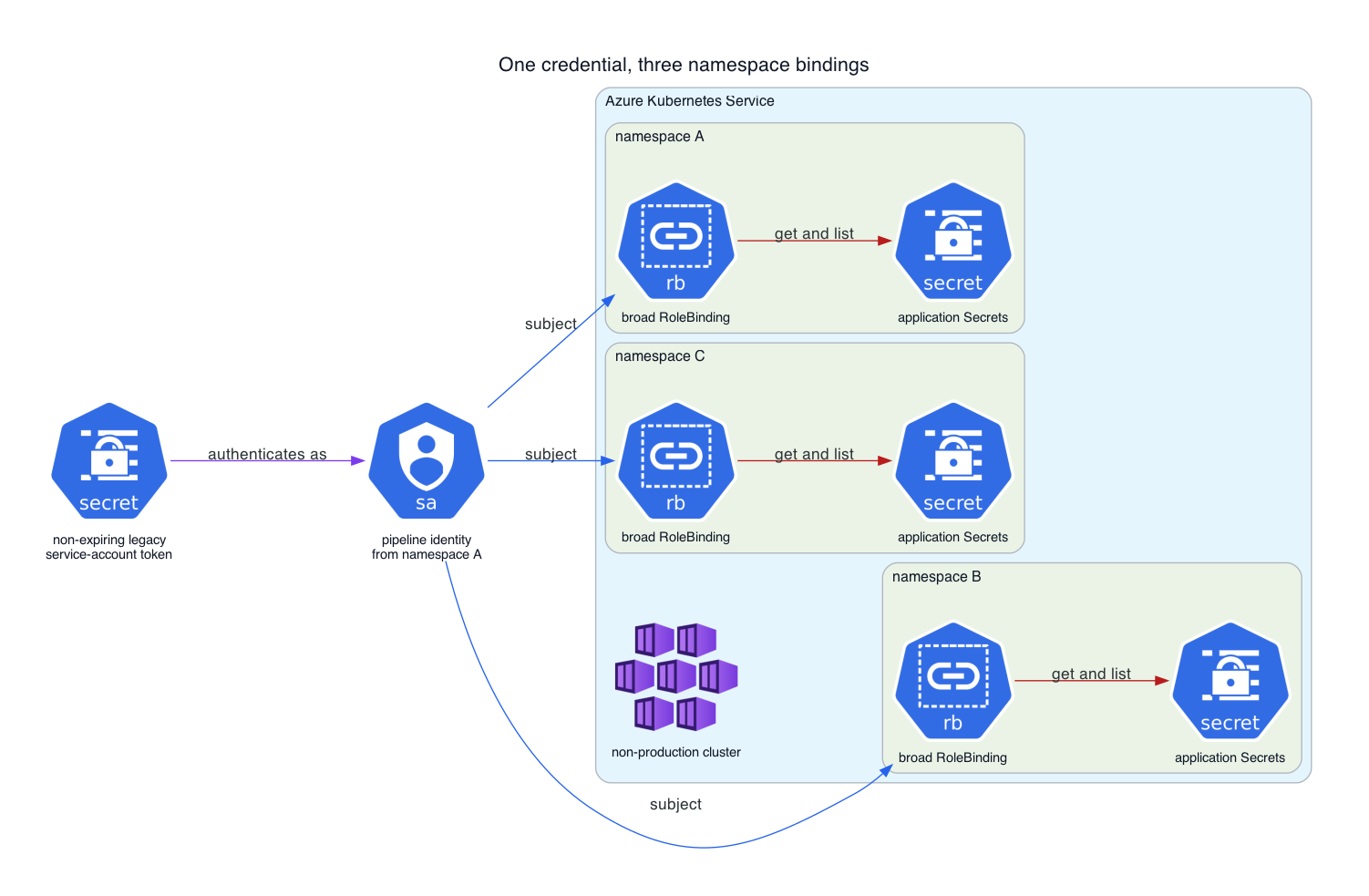
The identity was not a cluster administrator. The Role listed its API groups, and it did not include rbac.authorization.k8s.io. The token could not grant itself new RoleBindings through this Role. That limit mattered, but it did not make the existing scope acceptable. The core API group still covered Secrets, and the wildcard resource rule covered much more than the deployment needed.
The following authorization check avoids printing any secret value:
identity="system:serviceaccount:environment-a:pipeline-deployer"

for namespace in environment-a environment-b environment-c
do
  printf '%s: ' "$namespace"
  kubectl auth can-i list secrets \
    --namespace "$namespace" \
    --as "$identity"
done
For the reviewed identity, the effective result was yes in all three namespaces.
The Token Type Made the Scope Harder to Contain
The service account had one manually created Secret of type kubernetes.io/service-account-token. Kubernetes describes this as a legacy mechanism that provides a long-lived credential. The current documentation recommends the TokenRequest API for short-lived tokens instead.
The difference changes the failure window. A deployment job can request a token that expires shortly after the job finishes. If someone copies a static token into a CI/CD service connection, that credential can remain useful until somebody deletes or rotates it. An old export, agent workspace or copied configuration can preserve the same access during that period.
The cluster version already supported projected service account tokens. Another environment-specific service account had no legacy token Secret, which confirmed that the static pattern was not present in every namespace.
The First Fix Reduces the Token's Reach
The quickest containment step is to remove the two cross-namespace RoleBindings. That immediately reduces the token's potential reach from three namespaces to one without changing the applications.
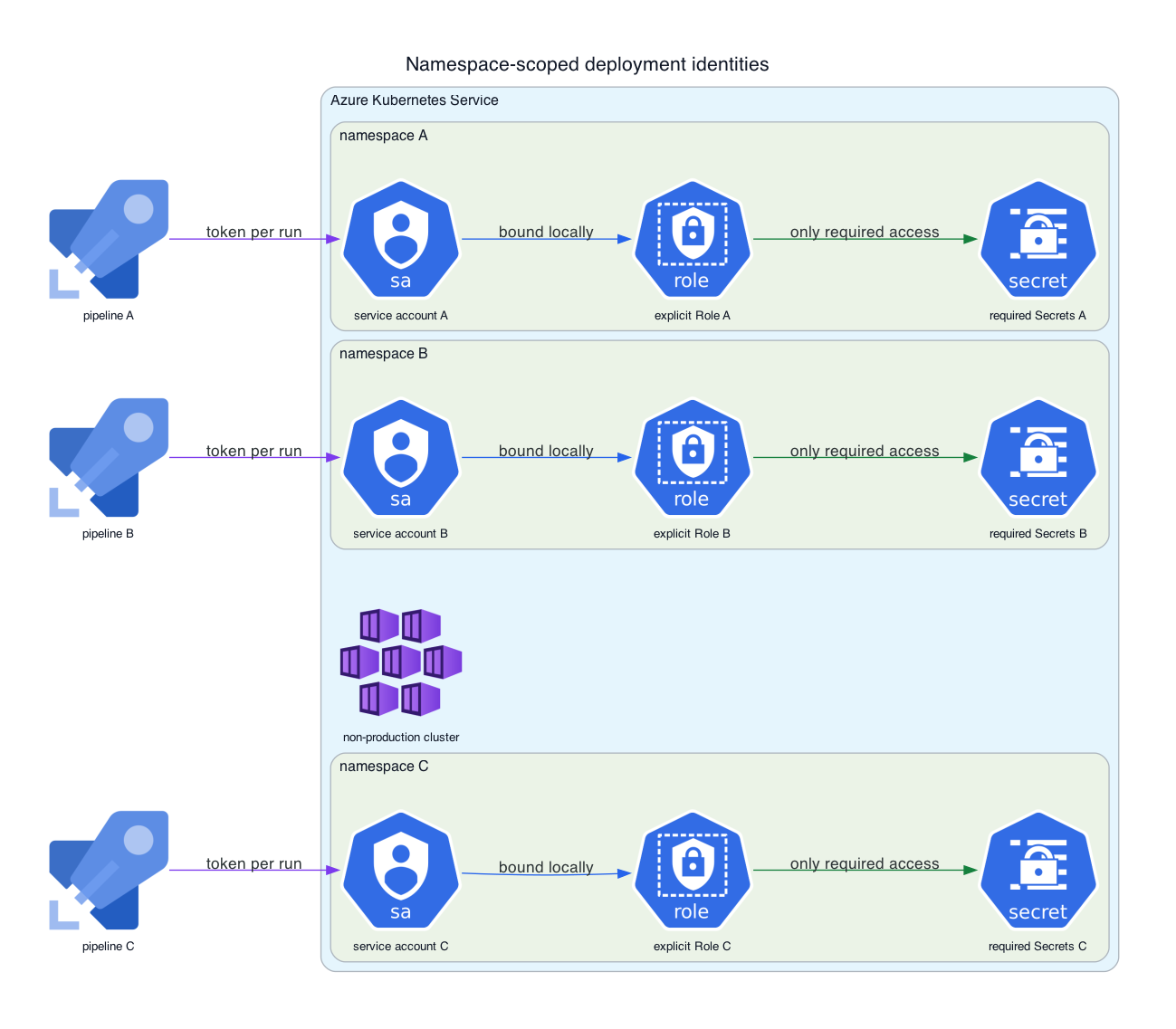
Each environment should then have its own deployment identity, Role and RoleBinding. A pipeline for one namespace should not borrow the service account from another. This keeps the credential, audit trail and revocation boundary aligned with the environment it deploys.
The desired shape is simple:
pipeline A uses a short-lived token for its Role in namespace A
pipeline B uses a short-lived token for its Role in namespace B
pipeline C uses a short-lived token for its Role in namespace C
These deployments require no cross-namespace subject.
A Short-Lived Token Replaces the Static Credential
Kubernetes can issue a bounded token with the TokenRequest API. kubectl create token is a convenient way to exercise that API:
kubectl create token pipeline-deployer \
  --namespace environment-a \
  --duration 15m
The command covers only one part of a CI/CD design. The runner still needs a trusted way to request the token. The pipeline should receive the credential at run time, the requester should limit its audience, and the token should expire soon after the deployment window.
The service connection must stop storing the old bearer token before that change has value. After the new path succeeds, delete the legacy token Secret and confirm that the API rejects the old credential.
Explicit RBAC Replaces Wildcard Access
resources: ["*"] made future chart changes part of the role automatically. Kubernetes warns that wildcard rules can grant access to resource types that future API extensions add. A deployment role should name the resource types and verbs the release actually uses.
The rendered manifests provide the initial resource list:
helm template app ./chart \
  --namespace environment-a \
  --values values.environment-a.yaml \
  > rendered.yaml
Inventory every apiVersion and kind in that output. Then compare the result with deployment calls in API audit logs or a dry run. The resulting Role may need access to Deployments, Services, ConfigMaps, Secrets, Jobs, Ingresses and autoscaling resources. It should not receive every resource merely because the chart might use one later.
If a separate controller owns runtime Secrets, the deployment identity can lose Secret write access as well. If Helm still renders those Secrets, the role needs the exact verbs required by that release process. The policy must match the delivery design instead of hiding a required permission until the next deployment fails.
The Review Found Other Paths to the Same Values
The cluster token was the widest durable access path that the review found. Several pipeline variables also stored credentials as ordinary variables. Azure DevOps treats secret variables as protected resources. It encrypts their values at rest and masks exact values in logs. A task can still send a value elsewhere, and masking does not always hide partial strings. Marking the variables as secret still removes routine plaintext visibility from the library interface and logs.
The remediation plan combined four related controls:
- Mark credential variables as secret and restrict which pipelines can use each variable group.
- Remove routine human permission to read Kubernetes Secrets through cluster tools.
- Rotate the database, cache and broker credentials that broader access paths exposed.
- Move non-sensitive settings out of the Helm
secretsmap and into a ConfigMap.
Moving non-sensitive settings to a ConfigMap makes the review surface honest. Feature flags, log levels and endpoint names do not need to sit beside credentials merely because the original release populated only one values map.
Validation Uses the Identity's Point of View
The validation must test permissions from the identity's point of view.
For each deployment identity, build an explicit matrix:
                             own namespace   other namespaces
read required objects            yes                no
apply release objects            yes                no
read application Secrets   only if required         no
modify RBAC                      no                 no
Then verify the old paths:
- the deleted legacy token fails authentication
- each identity returns
nofor Secret access outside its namespace - the pipeline can still deploy and roll back
- variable-group values appear masked in the interface and logs
- cluster users without an operational need cannot reveal Secret values
- rotated application credentials work and the previous values fail
This sequence keeps the deployment usable while shrinking the access path in measurable steps.
Secret Location and Secret Access Need Separate Reviews
The visible Kubernetes Secret started the investigation, but deleting that object first would have left the long-lived deployment credential untouched. Using CSI secret synchronization could even have recreated the same type of object from a better source.
The useful review order was identity, scope, lifetime, source and rotation. It exposed one token that crossed three namespace boundaries, wildcard permissions that exceeded the release surface, and pipeline values that lacked basic secrecy controls.
Key Vault can improve storage and rotation. Short-lived credentials and narrow RBAC control who can reach the Kubernetes API. Environment-specific identities contain the effect of a leaked token. These controls work together, and none of them can substitute for the others.
References
- Kubernetes documentation: Secrets
- Kubernetes documentation: Service Accounts
- Kubernetes documentation: Managing Service Accounts
- Kubernetes documentation: RBAC good practices
- Microsoft Learn: Azure Key Vault provider configuration options for AKS
- Microsoft Learn: Access Key Vault through the CSI Driver on AKS
- Microsoft Learn: Secrets in Azure Pipelines
- Microsoft Learn: Manage Azure Pipelines variable groups
Opinions expressed by DZone contributors are their own.