

Leveraging RuntimeFabric To Deploy Mule Runtime to AWS (EKS)
This article provides the prescriptive steps to migrating Mule Cloudhub to RTF on EKS Deployment Model. It also describes changes to the application, process, and more.
Join the DZone community and get the full member experience.
Join For FreeRuntime Fabric (RTF) is a particular deployment model based on container service where the Mule runtime can be deployed on the cloud (AWS/Azure/GKE/OpenShift) or on a data center (on-premise). It provides all cloud (PaaS) benefits, such as high availability, automatic failover, rolling updates, etc.
This article provides the prescriptive steps to migrating Mule CloudHub to RTF on EKS Deployment Model. It also describes changes to the application, process, ASM/Monitoring, or Observability required to harness the power of RTF.
What Is Runtime Fabric Deployment Model (RTF)?
A cloud deployment model defines the cloud services you are consuming and the responsibility model as to who manages them. It defines your cloud architecture, the scalability of your computing resources, what you can change, the services provided to you, and how much of the build you own.
Runtime Fabric (RTF) is a particular deployment model based on container service where the Mule runtime can be deployed on the cloud (AWS/ Azure/GKE/OpenShift) or on a data center (on-prem). It provides all cloud (PaaS) benefits, such as high availability, automatic failover, rolling updates, etc.
RTF Benefits
- Deploy applications consistently across any cloud or on-prem
- Run multiple runtime versions in the same Runtime Fabric
- Scale horizontally and redeploy with zero downtime
- By running a different Mule runtime server for each application, you may isolate them from one another
- Scaling applications across multiple replicas
- Automated application fail-over
- Application management with Anypoint Runtime Manager (control plane with MuleSoft and runtime plane with a client)
RTF on EKS (AWS)
- Each VPC will have EKS cluster(s) which will host RTF ecosystems for the client
- Each RTF installation will be mapped to a specific environment
Migration Steps for CloudHub to RTF on EKS Deployment Model
- Exchange/API Manager/RuntimeManager migration thoughts and directive
- Exchange Asset Migration/Design Center Migration: client capability of migrating assets can be re-used
- API Manager/Runtime Manager — If client CD is followed client pipeline will provide the capability
- Contract Migration — the client can provide template processes in migrating assets
Drivers for RTF Deployment Model
- Templated deployment
- Cost efficiency
- Improved monitoring
- Seamless enterprise logging system integration
What Do You Need To Have to Harness the Power of RTF?
- Application changes required
- Design changes to think about
- Process changes required
- Limitation and workarounds
Application Changes
POM Changes
Artifact echo system changes with RTF. We need to have certain standards maintained in the maven coordinate and other dependencies to support RTF.
Log4j Changes
Logging framework changes are going to affect the log4j2.xml configs that are built for CloudHub.
Property Changes
Properties managed by the application or the CloudHub runtime must be revised.
Code/Design Changes
Certain components within the CloudHub are to be changed or redesigned
Application Changes: POM Changes
Continuous Deployment changes that cause POM changes
groupId– must match with sub organizationIdartifactId– must be different from the exchange asset, artifactId.
(by convention, add-appsuffix to artifactId)
Application Changes: Dependency Changes
Add the sumologic-log4j2-appender or any other Enterprise logger appender e.g., Splunk dependency, as follows
<dependency>
<groupId>com.sumologic.plugins.log4j</groupId>
<artifactId>sumologic-log4j2-appender</artifactId>
<version>1.12</version>
</dependency>
Application Changes: Log4j Changes
Log processing changes into Log4j2.xml. The application logs will be picked up by Kubernetes as part of POD logs and forwarded to the log aggregator. Refer to the Log4j changes as follows.
    <?xml version="1.0" encoding="utf-8"?>

    <Configuration>

              <Appenders>

                            <Console name="Console" target="SYSTEM_OUT">

                                          <PatternLayout pattern="%d{yyyy-MM-dd HH:mm:ss,SSS Z} [%t] %-5p %c - %m%n" />

                            </Console>

              </Appenders>

              <Loggers>

                            <AsyncLogger name="com.gigaspaces" level="ERROR" />

                            <AsyncLogger name="com.j_spaces" level="ERROR" />

                            <AsyncLogger name="com.sun.jini" level="ERROR" />

                            <AsyncLogger name="net.jini" level="ERROR" />

                            <!-- All Warning related logs -->

                            <AsyncLogger name="org.springframework.beans.factory" level="WARN" />

                            <AsyncLogger name="org.mule.service.http.impl.service.HttpMessageLogger" level="INFO"/>

                            <AsyncLogger name="com.mulesoft.mule.transport.jdbc" level="WARN"/>

                            <AsyncLogger name="org.apache" level="WARN" />

                            <AsyncLogger name="org.apache.cxf" level="WARN" />

                            <AsyncLogger name="org.jetel" level="WARN" />

                            <AsyncLogger name="Tracking" level="WARN" />

                            <!-- All INFO related logs -->

                            <AsyncLogger name="org.mule" level="INFO" />

                            <AsyncLogger name="com.mulesoft" level="INFO" />

                            <!-- All Disabled logs -->

                            <AsyncLogger name="org.mule.runtime.core.internal" level="OFF" />

                            <AsyncLogger name="org.mule.extension.ldap" level="OFF" />

                            <AsyncLogger name="com.sun.jndi.ldap" level="OFF" />

                            <!-- Mule logger -->

                           <AsyncLogger name="org.mule.runtime.core.internal.processor.LoggerMessageProcessor" level="INFO" />

                            <AsyncRoot level="INFO">

                                          <AppenderRef ref="Console" />

                            </AsyncRoot>

              </Loggers>

    </Configuration>
Application Changes: Property Changes
Following changes are required in Properties.
https.private.port- This is changing to 8081. The best practice is to NOT to hard code this. Just refer to this in the code. From RTF infra, this will be provided.
- Certificate/file absolute path properties
- In CloudHub —
/opt/mule/mule-CURRENT/apps/<appname>/….- example:
/opt/mule/mule-CURRENT/apps/eis-application-dev/cert.jks
- example:
- In RTF —
/opt/mule/apps/<appname>/….- example:
/opt/mule/apps/eis-application-dev/cert.jks
- example:
- In CloudHub —
- Secure properties in CloudHub runtime properties
- Property masking was done using
mule-artifact.jsonsecure properties definition. — RTF does not honor as of now- Redesign with internal secure properties
- Use HashiCorp vault
- Use Cyberark
- Using RTF secrets — These are global for all applications
anypoint.platform.*configurations are secured in the RTF secrets — pipelines should not push this to Runtime configurations
- Property masking was done using
Application Changes: Design and Code Changes
Following changes are required in Design and Code.
System API Calls
RTF platform APIs are completely different from what is used for CloudHub. The resource definition to resource structure is different. There will be major revamping for APIs that uses CloudHub system APIs.
Persistence Queue Usage
Persistence queues are currently not supported in RTF.
Enable Persistence Objectstore — Operations To Enable on Cluster Level
If the application is using ObjectStore and needs cross-worker state sharing, we need to change the design accordingly.
Scheduler Start Stops
If the application is designed to start/stop/retrigger schedular using UI feature has to be redesigned to trigger from a remote Endpoint.
Enabling Debug Logs
In Runtime properties, add a property with the prefix logging.level.<package>
TLSv1.2+ is supported. No support for TLSv1 and TLSv1.1.
Process Changes: Continuous Delivery
Following changes are in the Continuous Delivery (CD) process while moving to RTF.
- Client Continuous Integration changes
- Seamless delivery of MuleSoft APIs into CloudHub/RTF from the design center
- Separating deployment configuration and application configuration for separation of concerns
- Templated mule deployment
- Integration of secure vault for sensitive properties
- Improved security controls by securing platform secrets and per-application credentials
- Improved monitoring constructs by automated alert and policy configurations
Process Changes in Operation Lifecycle
Following changes are required in the operation life cycle.
Continuous Deployment Changes:
- Using client toolstack —use upgrade documentation
- Changing to Cyberark or any other property management
- Pipeline changes required — configuration push
- Configuration service changes — read from the property source
- Client CD global configurations
- Using the Mule Maven plugin: https://docs.mulesoft.com/mule-runtime/4.4/deploy-to-rtf
CloudHub Deployment |
RTF Deployment |
<cloudHubDeployment> <uri>https://anypoint.mulesoft.com</uri> <muleVersion>4.1.2</muleVersion> <username>test-client</username> <password>Chillax123!</password> <applicationName>client-sf-insights-batch-dev</applicationName> <environment>DEV-Conn</environment> <businessGroup>XXX\Enterprise</businessGroup> </cloudHubDeployment> |
<runtimeFabricDeployment> <uri>https://anypoint.mulesoft.com</uri> <muleVersion>4.3.0</muleVersion> <username>user</username> <password>pass</password> <applicationName>newapp</applicationName> <target>rtf</target> <environment>Sandbox</environment> <provider>MC</provider> </runtimeFabricDeployment> |
Changes in ASM/Monitoring or Observability
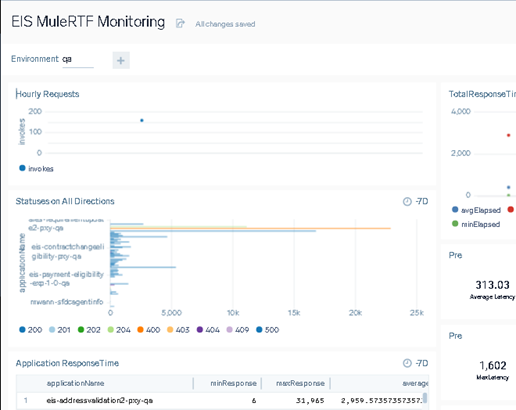
The following pictures depict Sumologic log ingestion changes and patterns.
Opinions expressed by DZone contributors are their own.
Comments