

LLM Agents and Getting Started with Them
As LLM agents take the center stage in 2026, let's discuss what are LLM agents and how to get started with creating one.
 ·
·
 ·
·
Join the DZone community and get the full member experience.
Join For FreeLLM-powered agents are gaining popularity and 2026 is set to be the year of agents just like 2025. Generative AI applications have now moved from normal chatbot applications, search and retrieve systems to building more of autonomous agents that can break bigger tasks down in smaller sub-tasks, achieving a goal while also interacting with environment. Before diving deeper into LLM powered agents and tools to create one let's start by answering the most important question
What is an Agent?
According to the gold standard definition that comes from Artificial Intelligence: A Modern Approach textbook by Stuart Russell and Peter Norvig "An agent is anything that can be viewed as perceiving its environment through sensors and acting upon that environment through actuators."
A vacuum cleaning robot is a good example of an agent. It uses sensors such as cameras, dirt detectors, bump sensors, and infrared sensors to gather information about its surroundings. To interact with and act upon its environment, it relies on actuators like wheels for movement, brushes for sweeping, and a suction motor for collecting dirt. This agent also performs a perception-action cycle to achieve its goals.
1. PERCEIVE  → Sensors detect dirty floor ahead
2. DECIDE    → Agent decides to move forward and clean
3. ACT       → Wheels move, brushes spin, motor sucks dirt
4. REPEAT    → Continue until floor is clean
The term percept refers to the input that the agent receives and perceives, percept sequence is a history of everything that the agent has received or perceived.
Broadly the agents can be divided into the following categories:
- Simple Reflex Agents: These are the most simplest kind of agents, and can be considered as following a rule-based approach. If this then that kind of logical approach to problem solving. These agents take action only considering the current input or percept ignoring everything from the percept history
- Model Based Reflex Agents: These agents are also reflex agents, however they take informed decisions by maintaining an internal state or storage that tracks the part of environment that it has visited, but cannot observe right now. If an environment changes then the agent behavior needs to be updated.
- Goal Based Agents: These agents work backwards from a desired goal, take and plan actions in accordance with this goal. This is different from simple reflex based agents, as decision making considers what will happen if an action is performed. Hence, considering the impact of their current choice on future state.
- Utility Based Agents: Utility based agents are also working backwards from a desired goal, but are also optimizing for a metric. The performance is tracked based on an utility function, the agent tries to achieve goals while maximizing the utility function. For example, an agent that is designed to find shortest path between two points, the goal is to find a path between the two points, while also considering that the length of path is shortest.
- Learning Agents: The most advanced type of agent. This has three main elements: the learning element, the performance element and the problem generator. Imagine an agent with decomposes a tasks, critics the current set of actions and finally also suggest actions that will lead to new experience.
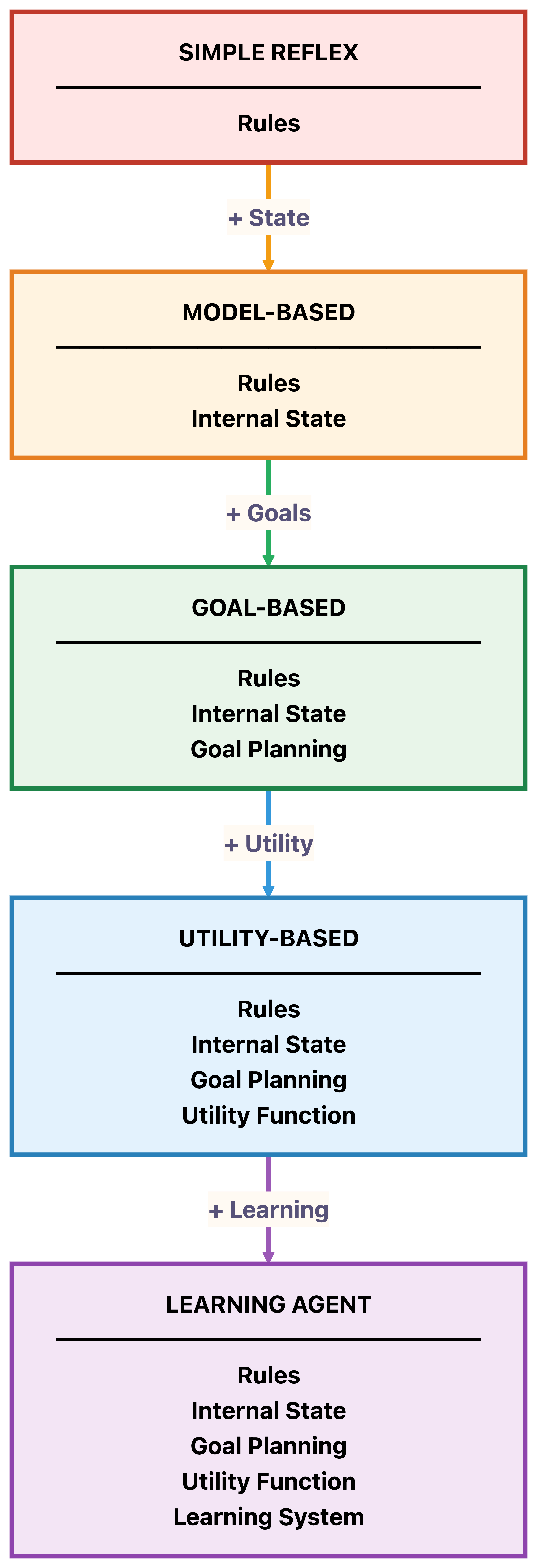
We will look at and construct simple examples of most of these agents.
While a vacuum uses physical sensors, an LLM agent 'perceives' through text inputs and API responses, and 'acts' by generating text or calling functions. Just as a vacuum can be a simple bump-and-turn robot or a sophisticated room-mapper, LLM agents vary in intelligence. We can categorize them into five levels of sophistication:, for a LLM-powered agent the "sensor" is the user input. These agents usually have four main components:
- The agent core or the agent brain
- The planning module
- Memory
- Tools
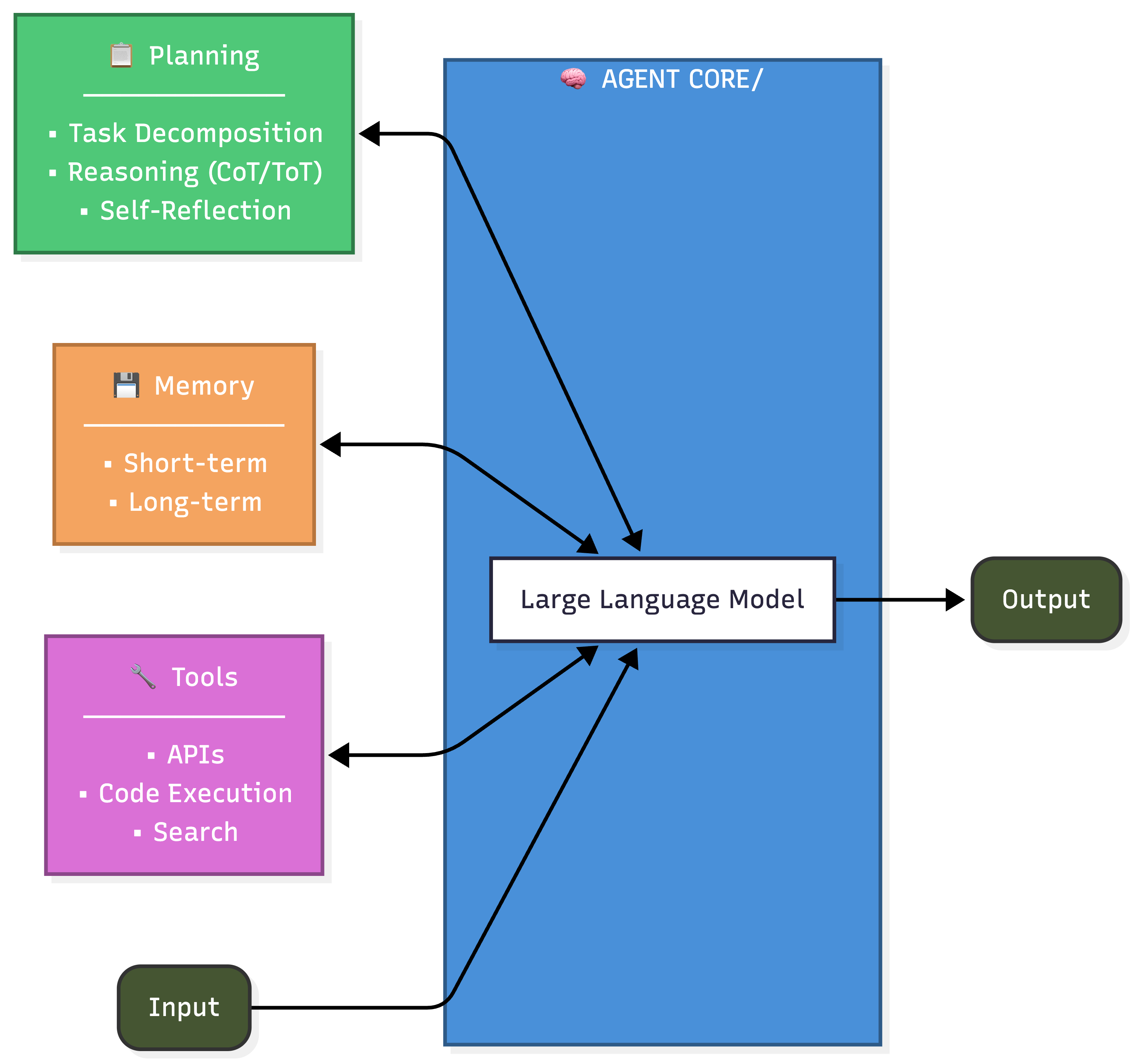
Theoretical definitions are fine, but how do we build them? We will use LangChain and LangGraph frameworks to build our first LLM powered agent. Both are open source frameworks that are used to build LLM powered applications. The choice depends on the type of agent we are building and the intended level of control we wish to have on the agentic architecture.
LangChain is an open source framework with a pre-built agent architecture and integrations for any model or tool — so you can build agents that adapt as fast as the ecosystem evolve.
LangChain is used to build on ideas of chain or a pipeline, a sequence of steps executed in a linear order. Every LangChain workflow is treated as a DAG (Direct Acyclic Graph) where tasks flow in one direction without any cycles or loops. LangGraph is great at handling complex workflows, loops, decision branches in workflows, complex decision trees etc, it also provides great flexibility and control into each component of agent setup.
In this article we will create an agent using both LangChain and LangGraph to understand the pros and cons and usage of both these frameworks. For Simple Reflex Agents, that follow a straight line (Input -> Output), LangChain is our go-to framework. However, as we move toward Model based, Goal and Utility Agents that require loops, self-correction, and state management, we need the flexibility of LangGraph.
Let’s see this evolution in action by building a 'Chef Agent' that grows smarter with every iteration.We will see how we can go from building a simple reflex agent for this task to a utility based agent, based on the complexities we add for this agent. Let's set up our environment for this task. We will be using Groq to invoke gpt-oss api. You will need to get your API access key from here, we will be using open-source models for this exercise.
We will start by installing the required libraries
pip install langchain langchain-groq langgraph langchain-core pydantic
Next we will set up few variables that we will use across all our agents, these include the API key, model name.
#config
import os
from dotenv import load_dotenv

load_dotenv()

# Set your API key
GROQ_API_KEY="YOUR_API_KEY"
os.environ["GROQ_API_KEY"] = GROQ_API_KEY
model = 'openai/gpt-oss-safeguard-20b'
Now let's start with building a simple reflex agent. A simple reflex agent is a very simple agent, that in this case if the user asks for a recipe suggests the recipe. It works with if else logic blocks. We use langchain to create this agent, the agent suggests whatever recipe the user requests.
######### llm brain #############

import os
from langchain_groq import ChatGroq

# Setup Groq LLM
llm = ChatGroq(
    temperature=0,
    model_name=model,
    api_key=os.environ.get("GROQ_API_KEY")
)

from langchain_core.prompts import ChatPromptTemplate
from langchain_core.output_parsers import StrOutputParser

# 1. Perception -> Action (Direct Chain)
reflex_prompt = ChatPromptTemplate.from_template(
    "You are a chef. Given a request: {input}, provide a single recipe immediately."
)

reflex_agent = reflex_prompt | llm | StrOutputParser()

#invoke the brain

print(reflex_agent.invoke({"input": "I want a spicy pasta."}))
Imagine you start using this agent to get a recipe for your dinner tonight, however you lack the ingredients that are needed to prepare the food. Such a bummer! Wouldn't it be nice to have an agent that has knowledge of the ingredients in your pantry or your dietary preferences before suggesting a recipe?
Our Reflex Agent is fast, but it’s 'forgetful.' It suggests a spicy pasta even if you have no pasta in your pantry or a gluten allergy. To make it a Model-Based Reflex Agent, we must give it a way to track the 'internal state' of its world specifically, your pantry inventory and dietary needs.For this, we move to LangGraph, which allows the agent to maintain a persistent memory (State) and use tools to 'sense' its environment
from langchain.tools import tool
from langchain.chat_models import init_chat_model
import operator
from langgraph.prebuilt import ToolNode, InjectedState
import operator
from typing import Annotated, List, Literal

llm = ChatGroq(
    temperature=0,
    model_name=model,
    api_key=os.environ.get("GROQ_API_KEY")
)


@tool
def get_inventory(state:Annotated[dict, InjectedState]):
  "Get cuurent user inventory"
  return state["inventory"]

@tool
def get_dietary_prefs(state:Annotated[dict, InjectedState]):
  "Get user dietary preferences"
  return state["dietary_prefs"]

@tool
def get_history(state:Annotated[dict, InjectedState]):
  "Get user history"
  return state["history"]


# Augment the LLM with tools
tools = [get_inventory, get_dietary_prefs, get_history]
tools_by_name = {tool.name: tool for tool in tools}
model_with_tools = llm.bind_tools(tools)

# Step 2: Define state

from langchain.messages import AnyMessage
from typing_extensions import TypedDict
import operator

class RecipeState(TypedDict):
    inventory: List[str]      # What's in the fridge
    dietary_prefs: List[str]  # e.g., "Vegetarian"
    suggestion: str           # The output
    messages: Annotated[List[AnyMessage], operator.add]


# Step 3: Define model node
from langchain.messages import SystemMessage


def llm_call(state: dict):
    """LLM decides whether to call a tool or not"""

    # Combine system message with user messages
    messages_to_send = [
        SystemMessage(
            content="""You are a helpful chef agent. When user asks for a recipe, look at user's current inventory, dietary prefrences to suggest the recipe.
            You can use the available tools whenever needed."""
        )
    ] + state["messages"]

    response = model_with_tools.invoke(messages_to_send)

    return {
        "messages": [response],
        "inventory": state.get("inventory", []),
        "dietary_prefs": state.get("dietary_prefs", [])
    }


# Step 4: Define tool node

from langchain.messages import ToolMessage

tool_node = ToolNode(tools)

# Step 5: Define logic to determine whether to end

from langgraph.graph import StateGraph, START, END


# Conditional edge function to route to the tool node or end based upon whether the LLM made a tool call
def should_continue(state: RecipeState) -> Literal["tool_node", END]:
    """Decide if we should continue the loop or stop based upon whether the LLM made a tool call"""

    messages = state["messages"]
    last_message = messages[-1]

    # If the LLM makes a tool call, then perform an action
    if last_message.tool_calls:
        return "tool_node"

    # Otherwise, we stop (reply to the user)
    return END

# Step 6: Build agent

# Build workflow
agent_builder = StateGraph(RecipeState)

# Add nodes
agent_builder.add_node("llm_call", llm_call)
agent_builder.add_node("tool_node", tool_node)

# Add edges to connect nodes
agent_builder.add_edge(START, "llm_call")
agent_builder.add_conditional_edges(
    "llm_call",
    should_continue,
    ["tool_node", END]
)
agent_builder.add_edge("tool_node", "llm_call")

# Compile the agent
agent = agent_builder.compile()


from IPython.display import Image, display
# Show the agent
display(Image(agent.get_graph(xray=True).draw_mermaid_png()))

# Invoke
from langchain.messages import HumanMessage
messages = [HumanMessage(content="Suggest a recipe for pasta")]
current_inventory = ["pasta", "water", "tomatoes", "salt","parmesan"]
current_dietary_prefs = ["vegetarian"]
messages = agent.invoke({"inventory":current_inventory,
                         "dietary_prefs":current_dietary_prefs,
                         "messages": messages})
for m in messages["messages"]:
    m.pretty_print()
This agent considers not just the current user request, but also takes into account the user environment, in this case the pantry and suggest recipes based on the items actually available in the pantry.
Having memory is a start, but a truly intelligent chef doesn't just look at what's in the fridge, it works toward a specific outcome. This brings us to Goal and Utility-Based Agents.
In this next evolution, the agent doesn't just suggest any recipe; it must satisfy a 'Goal': suggesting a meal that fits within a specific calorie budget. This requires a Planning/Verification loop where the agent critiques its own suggestion before presenting it to you.
# Step 1: Define tools and model

from langchain.tools import tool
from langchain.chat_models import init_chat_model
import operator
from langgraph.prebuilt import ToolNode, InjectedState

llm = ChatGroq(
    temperature=0,
    model_name=model,
    api_key=os.environ.get("GROQ_API_KEY")
)


@tool
def get_inventory(state:Annotated[dict, InjectedState]):
  "Get cuurent user inventory"
  return state["inventory"]

@tool
def get_dietary_prefs(state:Annotated[dict, InjectedState]):
  "Ger user dietary prefrences"
  return state["dietary_prefs"]

@tool
def get_remaining_calories_range(state:Annotated[dict, InjectedState]):
  "Get range of remaining calories"
  return (state["total_calories"]- state["consumed_calories"]+state["error_margin_calories"],
          state["total_calories"]- state["consumed_calories"]-state["error_margin_calories"])


# Augment the LLM with tools
tools = [get_inventory, get_dietary_prefs, get_history]
tools_by_name = {tool.name: tool for tool in tools}
model_with_tools = llm.bind_tools(tools)

# Step 2: Define state

from langchain.messages import AnyMessage,HumanMessage, SystemMessage
from typing_extensions import TypedDict, Annotated
import operator
from typing import List

class RecipeState(TypedDict):
    inventory: List[str]      # What's in the fridge
    dietary_prefs: List[str]  # e.g., "Vegetarian"
    suggestion: str           # The output
    total_calories: int       # The total number of calories to consume
    consumed_calories: int     # The number of calories already_consumed
    error_margin_calories: int  # The number of calories that can be added or deleted from total calories
    num_tries: int            # The number of tries the agent has made
    messages: Annotated[List[AnyMessage], operator.add]


# Step 3: Define Planner Node
def planner_node(state: RecipeState):
    """Suggests a recipe and estimates calories."""
    messages_to_send = [
        SystemMessage(content=(
            "You are a chef. Suggest a recipe based on inventory and dietary prefs. "
            "IMPORTANT: You MUST provide an estimated calorie count for the meal."
            "You can use the available tools whenever needed."
        ))
    ] + state["messages"]

    response = model_with_tools.invoke(messages_to_send)
    return {"messages": [response],
            "num_tries":state.get("num_tries",0)}

def verify_search_node(state: RecipeState):
    """Checks if the suggested meal fits the calorie constraints."""
    last_message = state["messages"][-1].content

    # Simple logic: Ask LLM to extract or verify,
    # or use regex/logic if you want to be strict.
    prompt = f"""
    The user's goal is {state['total_calories']} calories (margin: +/- {state['error_margin_calories']}).
    Current consumed: {state['consumed_calories']}.
    The chef suggested: {last_message}

    Does this recipe fit the remaining calorie budget?
    If yes, reply 'VALID'. If no, explain why.
    You can use the avilable tools whenever needed.
    """

    verification_response = llm.invoke([HumanMessage(content=prompt)])

    # We can add this to messages to keep track of the critique
    return {"messages": [verification_response]}


def should_verify(state: RecipeState) -> Literal["verify_node", "tool_node", END]:
    last_message = state["messages"][-1]

    if last_message.tool_calls:
        return "tool_node"

    # If no tool calls, it means the LLM has made a suggestion. Now verify it.
    return "verify_node"

def is_it_valid(state: RecipeState) -> Literal["planner_node", END]:
    last_message = state["messages"][-1].content
    if "VALID" in last_message.upper():
        return END
    # If not valid, loop back to the planner to try again
    return "planner_node"
def num_tries_exceeded(state: RecipeState) -> Literal["planner_node",END]:
    if state["num_tries"] > 5:
        return END
    return "planner_node"


# Build workflow
agent_builder = StateGraph(RecipeState)

agent_builder.add_node("planner_node", planner_node)
agent_builder.add_node("tool_node", tool_node)
agent_builder.add_node("verify_node", verify_search_node)

agent_builder.add_edge(START, "planner_node")

# Route from Planner
agent_builder.add_conditional_edges(
    "planner_node",
    should_verify,
    {"tool_node": "tool_node",
     "verify_node": "verify_node",
     END: END}
)

# Route from Tool back to Planner
agent_builder.add_edge("tool_node", "planner_node")

# Route from Verifier back to Planner OR End
agent_builder.add_conditional_edges(
    "verify_node",
    is_it_valid,
    {"planner_node":
     "planner_node",
     END: END}
)

agent = agent_builder.compile()

from IPython.display import Image, display
# Show the agent
display(Image(agent.get_graph(xray=True).draw_mermaid_png()))

# Invoke
from langchain.messages import HumanMessage
messages = [HumanMessage(content="Suggest a recipe for pasta")]
current_inventory = ["pasta", "water", "tomatoes", "salt","parmesan"]
current_dietary_prefs = ["vegetarian"]
messages = agent.invoke({"inventory":current_inventory,
                         "dietary_prefs":current_dietary_prefs,
                         "total_calories": 1000,
                         "consumed_calories": 800,
                         "error_margin_calories": 100,
                         "messages": messages})
for m in messages["messages"]:
    m.pretty_print()
We have seen how an agent evolves from a simple 'If-Then' reflex into a sophisticated system capable of maintaining state and verifying its own goals. By moving from LangChain’s linear chains to LangGraph’s cyclic workflows, we’ve bridged the gap between basic automation and autonomous reasoning. However, the true power of agents lies in their ability to optimize for complex preferences and learn from their mistakes. Because Utility-Based Agents and Learning Agents involve more intricate scoring functions and feedback loops, we will dedicate our next entire article to mastering those advanced architectures.
Published at DZone with permission of Harshita Asnani. See the original article here.
Opinions expressed by DZone contributors are their own.
Comments