

Master C# Arrays: The Basics
Master C# Arrays fast with this step-by-step article and videos containing demo code and images. C# rectangular and jagged arrays are also covered.
Join the DZone community and get the full member experience.
Join For FreeC# Arrays tutorial has related videos. Watch this C# arrays tutorial with both related videos and written material for a step-by-step explanation with code examples. Videos will reduce your learning curve and deepen your understanding where you’re uncertain.
What Is an Array?
An array is a data structure that stores multiple values of the same type in a single variable. You access each individual value through an integer index with an array name. Arrays can be of different dimensions like single-dimension, multi-dimension, or jagged array. The simplest of all is the single dimension, so you’ll start learning how to declare, initialize, and use a single-dimensional array.
What Is a Single-Dimensional Array?
The below image shows a C# Single-Dimensional Array of eight integers, which contains array elements from 0 to 7. Array’s smallest and largest indexes are called lower and upper bounds. The lower bound is always 0, and the upper bound is always one less than the length of the array (arrayLength – 1). That means if an array has eight elements, their indices are 0, 1, 2, 3, 4, 5, 6, and 7.
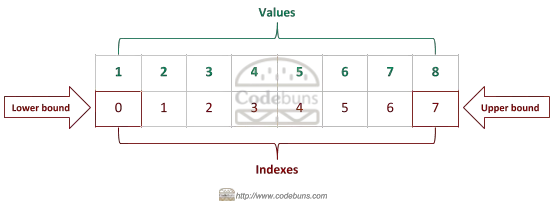
Arrays also have GetLowerBound and GetUpperBound methods that return an array's lower and upper bounds for a particular dimension.
Note: if you use an index greater than the upper bound, an IndexOutOfRangeException will be thrown.
Declare and Initialize One-Dimensional Array in C#
You can create an array using either one or two statements.
Using Two Statements
An array is declared by defining the type of elements inside the array, followed by empty square brackets [ ] and a variable name.
Syntax
type[] arrayName; // declaration: initial value is nullExample
int[] integerValues;
However, the above statement only declares the variable. It does not yet initialize an array. You do the initialization part with the new keyword, followed by the data type and a second set of square brackets containing the length or size of the array.
Syntax
arrayName = new type[arrayLength]; // initialization: Creates an array object.Example
integerValues = new int[4];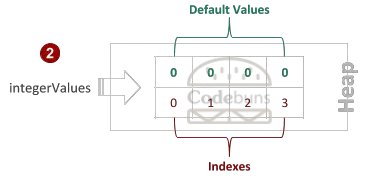
Using One Statement
Declaration and initialization of an array simultaneously on a single line.
Syntax
type[] arrayName = new type[arrayLength]; // declaration & initializationExample
int[] integerValues = new int[4];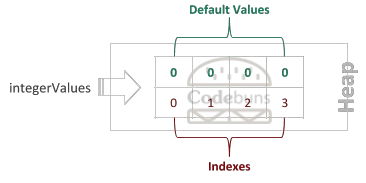
Create and Assign Values to One-Dimensional Array
You can reference array elements using an index inside square brackets, one at a time, and then assign values, as shown below. The index of the first element always starts with 0.
int[] integerValues = new int[4];
integerValues[0] = 1;
integerValues[1] = 2;
integerValues[2] = 3;
integerValues[3] = 4;
CURLY BRACKET {…} NOTATION.
int[] integerValues = { 1, 2, 3, 4 };You can also use the var keyword with an array to declare a variable that infers its type from its assigned value. Use new keyword when using this approach.
var integerValues = new[] { 1, 2, 3, 4 };Update One-Dimensional Array Value
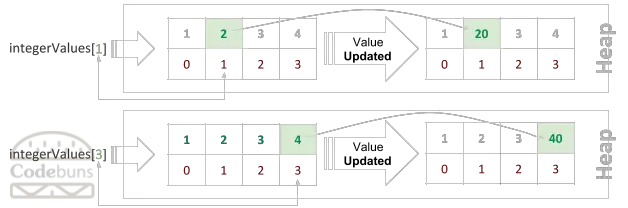
You can access a value of an indexed array element by using indexer [ ] and then assign a value to it.
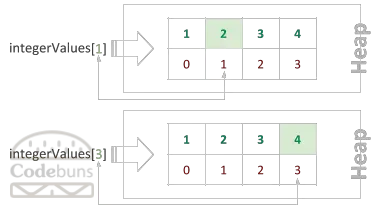
integerValues[1] = 20;The above statement assigns a value 20 to the 2nd column with an index [1], which updates the value from 2 to 20.
integerValues[3] = 40;The above statement assigns a value of 40 to the 4th column with an index [3], which updates the value from 4 to 40.
Access One-Dimensional Array Values
You can retrieve a specific value in the array using an index position inside the square brackets [ ]. Access array elements using 0, 1, 2, and 3 indexes.
Syntax
arrayName[index];Example
Console.WriteLine(integerValues[1]); // return 2The above statement gets the value 2 from the 2nd column with an index [1].
Console.WriteLine(integerValues[3]); // return 4The above statement gets the value 4 from the 4th column with an index [3].
There are two kinds of multi-dimensional arrays: Rectangular and Jagged.
What Is a Rectangular Array in C#?
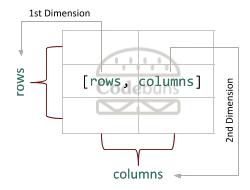
C# rectangular array is an array of two (or more) dimensions separated by a COMMA. You can think of a rectangular array as a table, where the first dimension is the number of rows, and the second dimension is the number of columns keeping in mind that every row is the same length. Due to 2 dimensions, it’s also known as a two-dimensional or 2D array.
Declare and Initialize Rectangular Array in C#
You can create an array using either one or two statements.
Using Two Statements
On the left side of the declaration, you need to have a data type, the type of values in the array like it will hold integer values, decimal, string etc. Followed by COMMA (,) within the set of BRACKETS ([ ]). The comma indicates that the array has two dimensions. Two or more commas would indicate three or more dimensions.
Syntax
type[,] arrayName;Example
int[,] intArray;
A new keyword creates an array on the right side of instantiation. You specify the number of ROWS in the array, followed by a COMMA, and then the number of COLUMNS to set the size of each dimension in the array.
Syntax
arrayName = new type[rows, columns]; // 2D array- type[,] indicates 2D array
- type[rows, columns] indicates the size of ROW and COLUMN.
Example
intArray = new int[3, 2];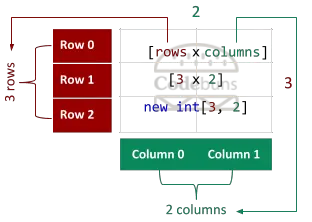
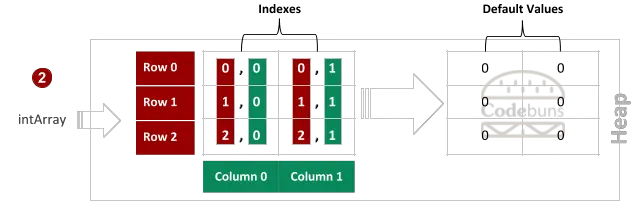
Note: Multi-dimensional array is indexed by two or more integers.
Using One Statement
Declaration and initialization of an array simultaneously on a single line.
Syntax
type[,] arrayName = new type[rows, columns];Example
int[,] intArray = new int[3, 2];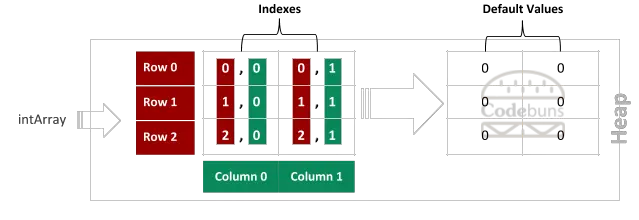
Create and Assign Values to a Rectangular Array
Array elements can be referenced using two integers with an indexer, one statement at a time to assign values to the elements of the intArray, as shown below.
int[,] intArray = new int[3, 2];
intArray[0, 0] = 1;
intArray[0, 1] = 2;
intArray[1, 0] = 3;
intArray[1, 1] = 4;
intArray[2, 0] = 5;
intArray[2, 1] = 6;
There’s a shorter form below.
int[,] intArray = { { 1, 2 }, { 3, 4 }, { 5, 6 } };Access Individual Rectangular Array Values
You refer array element using its ROW and COLUMN index because each element of the multi-dimensional array is identified with an index for each dimension.
Syntax
arrayName[rowIndex, columnIndex]You access each array element using two integers with an indexer.
Example
Console.WriteLine(intArray[1, 1]); // 0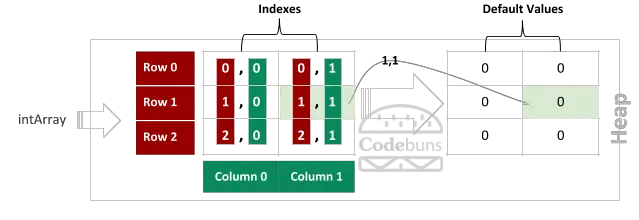
Accessing Rectangular Array Values Using Nested for Loops
Never hardcode the total number of elements when iterating through the array. Always use properties or methods such as Length and GetLength to determine the total number of iterations needed. Let’s look at the following examples.
3 by 2 Array Example
string display = string.Empty;

int[,] intArray = {
  { 1, 2 },
  { 3, 4 },
  { 5, 6 }
};

for (int row = 0; row < intArray.GetLength(0); row++)
{
    for (int column = 0; column < intArray.GetLength(1); column++)
    {
        //Console.WriteLine(intArray[row, column]);
        // OR
        display += intArray[row, column] + " ";
    }

    display += "\n";
}

Console.WriteLine(display);OUTPUT
1 2
3 4
5 6
First, declared and initialized rectangular intArray variable. On the left side of the declaration, a single COMMA (,) within square brackets indicate that the array is two-dimensional, where the dimensions are 3 × 2 (3 ROWS and 2 COLUMNS). The array is two-dimensional, so you need to use 2 separate for loops to iterate through each dimension. Outer for loop is to get the number of ROWS by calling the GetLength method and passing 0 for the 1st dimension and nested for loop, which brings the number of COLUMNS for each row by passing 1 for the length of the 2nd dimension.
The line Console.WriteLine(intArray[row, column]); prints each element to the console. When retrieving the individual value from an array element, you use variable intArray with the loop counter row for rowIndex and column for columnIndex within square brackets [ ].
What Is a Jagged Array in C#?
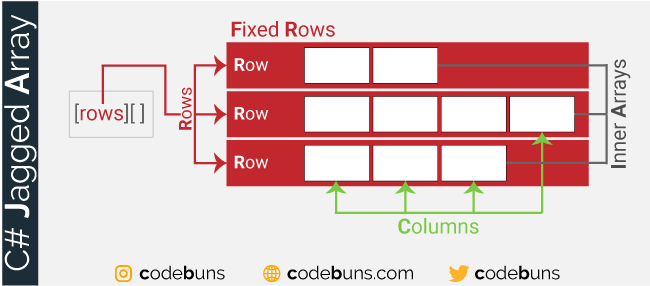
C# jagged array is an array of arrays, which means it’s an array that contains other arrays (inner arrays for clarity). Of course, such inner arrays can have different lengths or even be not initialized. Think of a table with rows of unequal lengths.
When you create a jagged array, you declare the number of fixed rows. Then, each row can have a different number of columns. Specifically, jagged is a single-dimensional array where each row holds another array of different dimensions.
If you look at the following example, you will see a jagged array with three rows/elements. ROW 0 has two columns, ROW 1 has four columns, while the last ROW 2 has three columns:
Note: The elements of the jagged array can be one-dimensional and multi-dimensional arrays.
Declare and Initialize a Jagged Array in C#
You can create an array using either one or two statements.
Using Two Statements
To declare a jagged array, we use two sets of square brackets in the array’s declaration. The notation [ ][ ] is used after the data type to represent the number of dimensions. Here is an example of a jagged array declaration:
Syntax
type[ ][ ] arrayName;
Only the size determining the number of ROWS in the first pair of brackets is used to initialize the jagged array. Also, notice that the second bracket that defines the number of elements inside the row is empty because every row has a different number of columns. The column sizes must be set individually.
Syntax
arrayName = new type[rows][ ];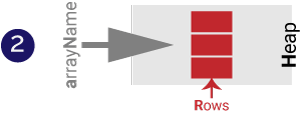
Using One Statement
Another way is to declare and initialize an array at the same time on a single line.
Syntax
type[ ][ ] arrayName = new type[rows][ ];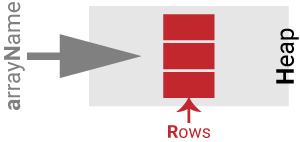
Create a Jagged Array
The line below creates fruits with two elements, each with the type string[] and an initial value of null.
string[][] fruits = new string[2][]; // correct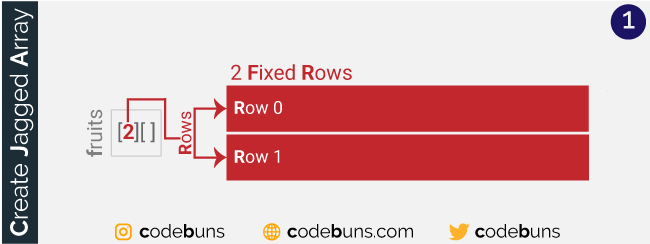
string[2][ ] indicates a jagged array has 2 rows, and the number of columns is unclear.
When you use the new keyword to create the jagged array, you specify the number of rows that the array will contain.
The following statement is a syntax error:
string[][] fruits = new string[2][2]; // errorA jagged array cannot be created entirely with a single statement. Instead, you need to initialize the elements of a jagged array separately.
Assign Values to a Jagged Array
Once the array is declared, you need to construct each row and fill it with data. There are two ways to allocate the elements—one per row or using an initialization list to assign data simultaneously.
Using the first method, you can write:
fruits[0] = new string[2];
fruits[1] = new string[3];
The above lines initialize the two elements of fruits with individual array instances of different dimensions — one statement at a time.
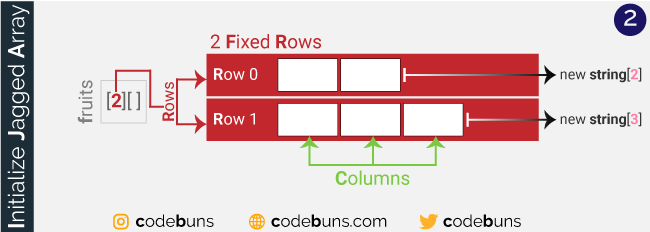
- fruits[0] = new string[2] indicates row 0 has 2 columns.
- fruits[1] = new string[3] indicates row 1 has 3 columns.
Let’s take a closer look at the index values for the above array.
You can access an indexed array element, which is part of the jagged array using two indexers [rowIndex] [columnIndex], and then assign a value to it with the assignment operator =. Look at the following statements.
fruits[0][0] = "Apple";
fruits[0][1] = "Apricot";

fruits[1][0] = "Mango";
fruits[1][1] = "Orange";
fruits[1][2] = "Melon";
fruits[0][0] = “Apple”indicates valueAppleassigned to the 1st column[0]of the 1st row[0]fruits[0][1] = “Apricot”indicates valueApricotassigned to the 2nd column[1]of the 1st row[0]fruits[1][0] = “Mango”indicates valueMangoassigned to the 1st column[0]of the 2nd row[1]fruits[1][1] = “Orange”indicates valueOrangeassigned to the 2nd column[1]of the 2nd row[1]fruits[1][2] = “Melon”indicates valueMelonassigned to the 3rd column[2]of the 2nd row[1]
Another way that allows initial values of the array elements to be assigned is with the new operator using an array initializer, a list of values written between the curly bracket { and }.
fruits[0] = new string[] { "Apple", "Apricot" };
fruits[1] = new string[] { "Mango", "Orange", "Melon" };
The above code adds three separate one-dimensional arrays — one statement at a time.
- The first element
[0]is astringarray with two columns. The columns are initialized with the valuesAppleandApricot. - The second element
[1]is astringarray with three columns. The columns are initialized with the valuesMango,OrangeandMelon.
In the second method, you can use a modified form of the above and assign values all at once using an array initializer.
string[][] fruits = { new string[] { "Apple", "Apricot" }, new string[] { "Mango", "Orange", "Melon" } }; Note: The length of the array is inferred from the number of values between the delimiters { … }.
Another approach is to use the var keyword. This keyword instructs the compiler to implicitly type a local variable:
var fruits = new[] { new string[] { "Apple", "Apricot" }, new string[] { "Mango", "Orange", "Melon" } }; Access Individual Values of a Jagged Array
You refer to each element of the array using its ROW and COLUMN index with two indexers [ ][ ].
Syntax
arrayName[rowIndex][columnIndex]Example
fruits[1][1];Let me repeat this.
You enclose the ROW and COLUMN index in their brackets to access an item stored at a particular row and column in a jagged array. For example, the above fruits[1][1] statement displays the value stored at ROW 1, COLUMN 1, of the fruits, as shown here:
Access whole row of data using the following syntax.
Syntax
arrayName[row]Example
fruits[1]Let’s display values using foreach loop.
string display = string.Empty;

foreach (string rowValue in fruits[1])
{
    display +=   rowValue + " ";

    // line break
    display += "\n";
}

Console.WriteLine(display);OUTPUT
Mango
Orange
Melon
Jagged Array vs Multidimensional Array
Both jagged and rectangular arrays are a form of multidimensional arrays, but the simplest one is a two-dimensional array.
A jagged array is like a two-dimensional array, but the “ROWS” in a jagged array can have a different number of columns. If you use [ ][ ], you are creating an array of arrays, where each array within a larger array has a different length.
Note: Inner arrays within the main array need not be equal size.
A traditional two-dimensional array has a rectangular size, where each “ROW” has the same number of columns. For this reason, a 2D array is often called a square or rectangular array where each array within a larger array has the same length.
Note: Inner arrays within the primary array are equal in size.
The jagged array shown contains three rows: the first row contains two elements, the second row has four elements, and the third row has three elements.
The following code shows how the jagged array is created and initialized.
// Create an array of 3 int arrays.
 int[][] intArray = new int[3][];

// Create each array that is an element of the jagged
intArray[0] = new int[] { 1, 2 };
intArray[1] = new int[] { 3, 4, 5, 6 };
intArray[2] = new int[] { 7, 8, 9 };
Let’s look at the following image.
Rectangular arrays are created using commas to separate each dimension. The following code declares a two-dimensional array where the dimensions are 3 × 2:
int[,] intArray = new int[3, 2];Assign values to the elements of the intArray using one statement at a time, as shown below.
intArray[0, 0] = 1;
intArray[0, 1] = 2;
intArray[1, 0] = 3;
intArray[1, 1] = 4;
intArray[2, 0] = 5;
intArray[2, 1] = 6;Published at DZone with permission of Pirzada .Rashid. See the original article here.
Opinions expressed by DZone contributors are their own.
Comments