

Mastering Audio Transcription With Gemini APIs: A Developer's Guide
This guide walks you through implementing audio transcription in your applications using Gemini models, from basic implementations to real-time streaming solutions.
Join the DZone community and get the full member experience.
Join For FreeUnderstanding Audio Transcription via Gemini APIs
Gemini models are multimodal large language models. They can process and generate various types of data, including text, code, images, audio, and video. Gemini models also offer powerful audio transcription capabilities, enabling developers to convert spoken content into text. This can help in building a transcription service, creating subtitles for videos, and developing voice-enabled applications. If you are looking to convert speech to text using Gemini's powerful AI models, this comprehensive guide will show you how to implement audio transcription using different Gemini APIs. We will go from basic implementation to advanced real-time streaming.
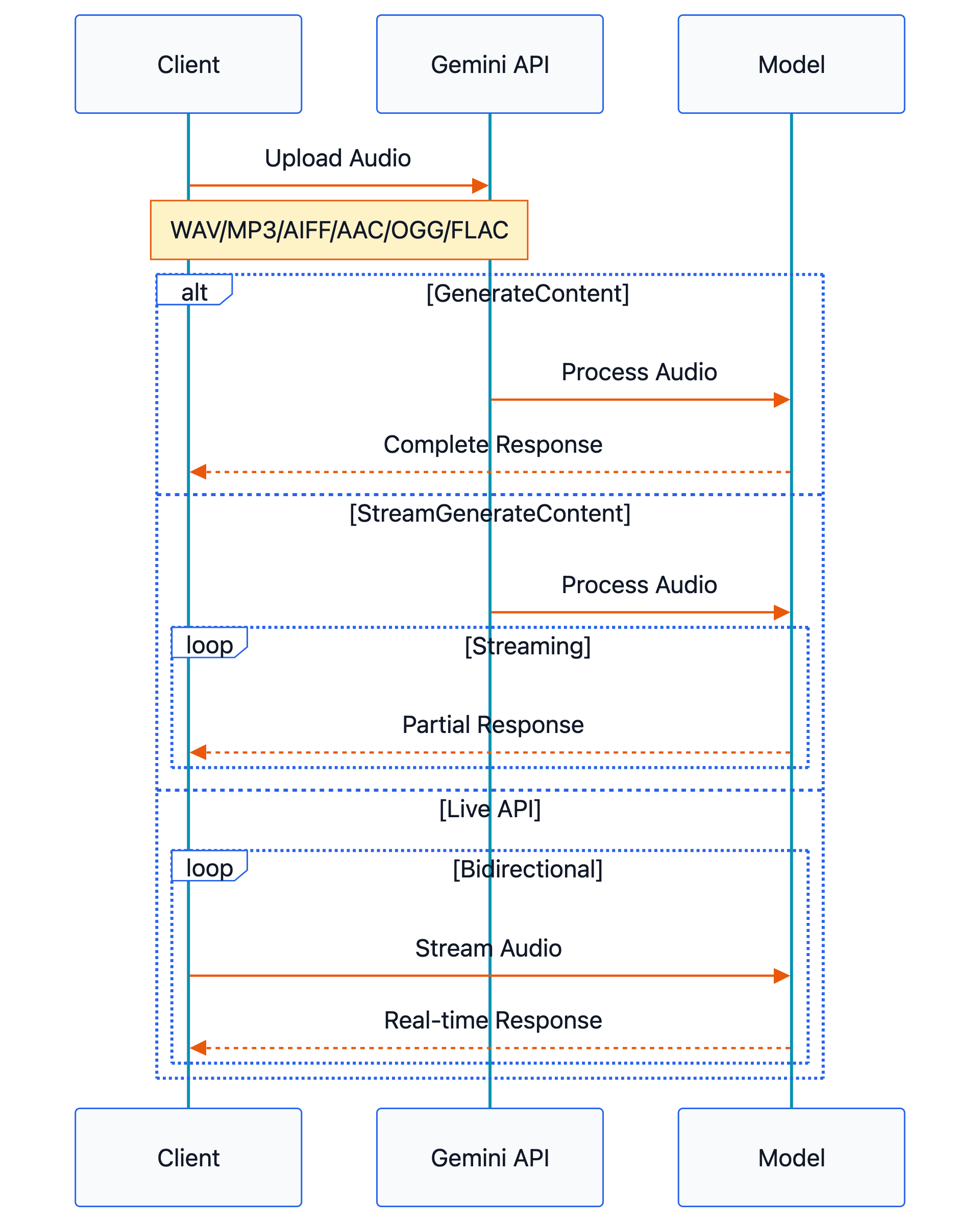
Gemini supports the following audio formats as input: WAV, MP3, AIFF, AAC, OGG, and FLAC. We will look at generateContent, streamGenerateContent, and BidiGenerateContent(LiveAPI) APIs. You can find all supported APIs at https://ai.google.dev/api. generateContent is a standard REST endpoint, which processes the request and returns a single response. streamGenerateContent uses SSE (server-sent-events) to send partial responses as they are generated. This API is a better choice for applications like chatbots, which need a faster and more interactive experience.
BidiGenerateContent or LiveAPI creates a stateful bidirectional streaming connection for real-time conversational use cases. Google provides the official Google GenAI SDK in multiple programming languages to access these APIs.
Pre-requisites
- Install Python version > 3.10
- Install pip
- Install Google GenAI SDK
pip install google-genai
Authentication and Setup
To use the Gemini API, you need an API key. You can create a new key for free at Google AI Studio. You will need to log in to your Google account or create a new one if you don’t have one. We will provide the API key explicitly while creating the GenAI client. More documentation is available at https://ai.google.dev/gemini-api/docs/api-key.
Audio Input to Gemini Model
You can provide audio data to Gemini in two ways.
1. Upload the audio file to Google Cloud using files API.
myfile = client.files.upload(file="path/to/sample.mp3")
response = client.models.generate_content(
    model="gemini-2.5-flash", contents=["Transcribe the Audio", myfile]
)
2. Send audio file contents input as inline data bytes. In this method, the maximum request size, including audio data, is limited to 20 MB. Hence, for long audio files, you should use the files' API to pass the audio input. For our sample code in this guide, we are passing audio as inline data.
with open('path/to/small-sample.wav', 'rb') as f:
    audio_bytes = f.read()

response = client.models.generate_content(
  model='gemini-2.5-flash',
  contents=[
    'Transcribe the Audio',
    types.Part.from_bytes(
      data=audio_bytes,
      mime_type='audio/wav',
    )
  ]
)
Basic Audio Transcription
To get audio transcription from generateContent and streamGenerateContent API, the user must prompt the model. Live API is slightly different and will be explained in a later section. A simple prompt to trigger audio transcription would be, “Transcribe this audio” or “Transcribe this audio in English.” You can also ask for a transcription with specific instructions in the prompt, as shown below.
Transcribe the audio following these formatting rules:
1. Currency:
- For exact dollar amounts, include "$" and ".00"
Example: "ten dollars" → "$10.00"

2. Dates:
- Use format MMDDYYYY without any separators
- Convert written months to numbers
Example: "December 20th 2020" → "12202020"
Example: "February third 2023" → "02032023"
Sample Code to Get Transcription Using GenerateContent API
from google import genai
from google.genai import types
import os
import base64

os.environ["GEMINI_API_KEY"]="GEMINI_API_KEY_VALUE"

with open('pathToAudio/audioFile.wav', 'rb') as f:
    audio_bytes = base64.b64encode(f.read()).decode('utf-8')
    client = genai.Client()
    response = client.models.generate_content(
    model='gemini-2.5-flash',
    contents=[
      'Transcribe this audio',
      types.Part.from_bytes(
        data=audio_bytes,
        mime_type='audio/wav',
      )
    ]
  )
print(response.text)
Sample Code to Get Transcription Using StreamGenerateContent API
from google import genai
from google.genai import types
import os
import base64

os.environ["GEMINI_API_KEY"]="GEMINI_API_KEY_VALUE"

with open('pathToAudio/audioFile.wav', 'rb') as f:
  audio_bytes = base64.b64encode(f.read()).decode('utf-8')
  client = genai.Client()
  response = client.models.generate_content_stream(
    model='gemini-2.5-flash',
    contents=[
      'Transcribe this audio',
      types.Part.from_bytes(
        data=audio_bytes,
        mime_type='audio/wav',
      )
    ]
  )
for chunk in response:
    print(chunk.text)
You could choose from any Gemini model that takes audio input and provides text output available here https://ai.google.dev/gemini-api/docs/models.
Advanced Usage With Live API
The Gemini Live API is still in preview and enables bidirectional real-time voice and video interaction with Gemini models. This is comparable with InvokeModelWithBidirectionalStream API for Amazon’s Nova Sonic model and Realtime API for OpenAI models. These APIs are designed for human-like interaction with the model and provides both audio and text as output. Live API can provide transcriptions for both input and output audio. To get input audio’s transcription, you need to send input_audio_transcription in setup config. Once transcription is enabled, we can access the ASR transcript from the response object as response.server_content.input_transcription. Since we only need the audio transcription , we can choose either TEXT or AUDIO for response_modalities. Response modalities indicate the type of output from the model, i.e., text or voice. The input audio for Live API must be Raw 16-bit PCM audio at 16kHz, little-endian.
The following code is an example to get input audio transcription from Gemini Live API. As a pre-requisite, install the google-genai and soundfile libraries. The google-genai library provides Gemini API access, and soundfile helps in reading audio data from file.
pip install google-genai
pip install soundfileimport asyncio
from google import genai
import soundfile as sf
import numpy as np
from google.genai.types import (
AudioTranscriptionConfig,
LiveConnectConfig,
Blob,
)
class AudioFileManager:
def __init__(self, sample_rate=16000):
self.sample_rate = sample_rate
self.chunk_size = 512 # Adjust chunk size as needed
self.sleep_duration = self.chunk_size / self.sample_rate
async def stream_audio_file(self, file_path):
"""Stream audio file in chunks."""
audio_data, file_sample_rate = sf.read(file_path)
# Convert to int16
audio_data = (audio_data * 32767).astype(np.int16)
# Stream audio in chunks
for i in range(0, len(audio_data), self.chunk_size):
chunk = audio_data[i:i + self.chunk_size]
yield chunk.tobytes()
await asyncio.sleep(self.sleep_duration)
async def process_responses(session):
"""Process responses from the model in real-time."""
while True: # Keep receiving responses
turn = session.receive()
async for message in turn:
if message.go_away is not None:
# The connection will soon be terminated
print("Received go away Message")
print(message.go_away.time_left)
continue
if message.server_content.interrupted is True:
print("The session was interrupted")
continue
if message.server_content.input_transcription:
print(f"Input Audio Transcription: {message.server_content.input_transcription.text}")
if message.text:
print(f"Model Response: {message.text}")
client = genai.Client(api_key="GEMINI_API_KEY_VALUE")
MODEL_ID = "gemini-live-2.5-flash-preview" # you could choose any live api supported models
CONFIG = LiveConnectConfig(
response_modalities=["TEXT"],
input_audio_transcription=AudioTranscriptionConfig(), # Enable Audio Input Transcription
)
async def main():
async with client.aio.live.connect(model=MODEL_ID, config=CONFIG) as session:
# Start response processing task
response_task = asyncio.create_task(process_responses(session))
audio_manager = AudioFileManager()
async for chunk in audio_manager.stream_audio_file("pathToAudio/audioFile.wav"):
await session.send_realtime_input(
media=Blob(data=chunk, mime_type="audio/pcm;rate=16000")
)
await session.send_realtime_input(audio_stream_end=True)
await response_task
if __name__ == "__main__":
asyncio.run(main())Things to Know
- In this guide, I have used an API key obtained from
Google AI Studioto access Gemini APIs. However, you can also access these APIs using vertexAI by creating Google Cloud project credentials. For Google Cloud users who develop applications at scale, vertexAI should be used. Creating GenAI client enabling vertexAI looks likeclient = genai.Client(vertexai=True, project=PROJECT_ID, location=LOCATION)During testing, I noticed Live API starting sending Gibberish text after certain point in the audio. - The generateContent and generateContentStream APIs can return empty responses.
- Gemini 2.5 Pro provides better transcription accuracy than Gemini 2.0 Flash. However, the transcription is received much faster when using Gemini 2.0 Flash.
In conclusion, Gemini APIs offer robust and flexible solutions for audio transcription needs. Through generateContent, streamGenerateContent, and the preview Live API, developers can choose the most suitable approach for their specific use cases. Whether it is simple one-off transcriptions or real-time streaming, Gemini APIs support them. With support for multiple audio formats, customizable prompts, and integration through the Google GenAI SDK, implementing audio transcription in applications has never been more accessible. As you begin implementing these APIs, remember to consider factors like file size limits, audio quality, model cost, and proper error handling to ensure optimal performance in your transcription services.
Opinions expressed by DZone contributors are their own.
Comments