

DZone
Thanks for visiting DZone today,
Edit Profile
  • Manage Email Subscriptions
  • How to Post to DZone
  • Article Submission Guidelines
Sign Out View Profile
  • Post an Article
  • Manage My Drafts
Newsletter
Log In / Join
Refcards Trend Reports
Events Video Library
Refcards
Trend Reports

Events

View Events Video Library

Related

  • Does a Bigger Context Window Mean Better Memory: Understanding Context Windows, Model Memory, and RAG
  • How Cache Invalidation Caused Memory Pressure and API Failures at Scale
  • Remember Me, Safely: Durable and Governed Memory for Enterprise AI Agents
  • Why Incident Response Needs Memory, Not Just Intelligence

Trending

  • Running a Self-Hosted WAF in Production: Practical Lessons From SafeLine
  • The SDLC After AI
  • Adding Graph Retrieval to a RAG Pipeline With Python
  • Testing Java and Spring Applications With Kotlin: Low-Risk to Adoption

Draft This article hasn't been published, so readers can't see it.

In moderation This article is waiting for review, so readers can't see it yet.

Deleted This article has been deleted, so readers can't see it.

  1. DZone
  2. Coding
  3. Java
  4. A Memory Leak Caused by Dynamic Creation of log4j Loggers

A Memory Leak Caused by Dynamic Creation of log4j Loggers

By 
Ivan Korhner
·
Mar. 25, 15 · Interview
Post on X (opens in a new tab) Share on LinkedIn (opens in a new tab)
10.5K Views

Join the DZone community Save articles, join the discussion, and download Refcards and Trend Reports with a free account.

Join for free Already a member? Log in

at the company i work for, we had a situation where a highly loaded server that was handling several thousands requests per second consumed memory increasingly, and after about 30 days, it would become unusable and required a restart. by looking at our monitoring tools, we concluded it was clearly a memory leak, and we figured it must be an easy one to detect as memory exhibited an almost perfect linear grow. first thing we did was we took a heap dump and looked at most frequent instances and to our shock over 30 gb of memory was occupied by log4j loggers!

hunting the memory leak

we started to try to isolate the problem and found a possible red flag - for every client that connected, we generated a new logger containing class name and ip address of the client. it was very easy to set up an experiment to test the hypothesis. i created a minimal piece of code that created a lot of dynamically named loggers and attached a profiler to it. for this simple case, java visualvm, which comes with java is more that enough.

for( int i = 0; i < 100000; i++) {
    logger.getlogger("logger - " + i);
}

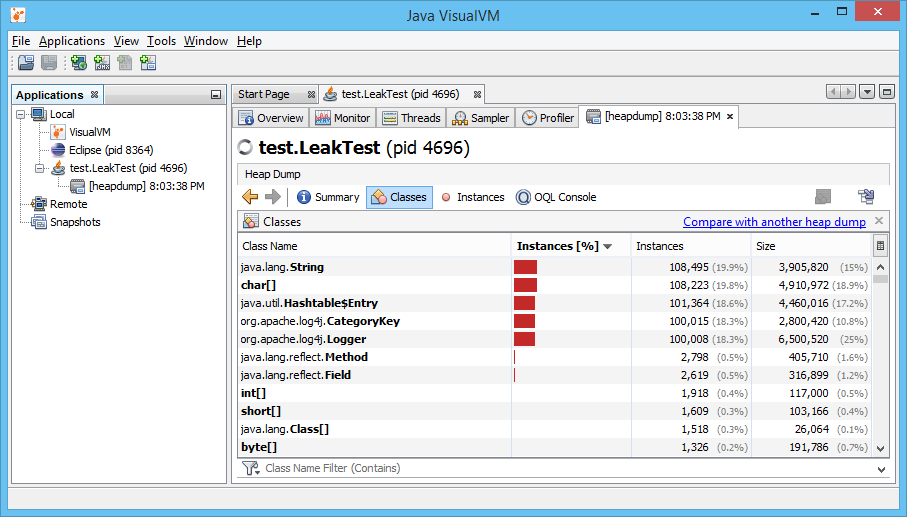
jvisualvm can be found in bin folder of your jdk. i run the test code from ide and made it stop after creating the loggers. after that, i opened jvisualvm, found my process at application list and took a heap dump (can be done by right clicking on process and selecting heap dump). after the dump is generated, i opened ‘classes’ tab. here is how it looks like:
_config.yml

we can see that there is more than 100,000 instances of log4j classes, each holding strings that can really add up to size and eat heap memory. the solution was very simple, we just replaced creating a new logger with a static one. this doesn’t mean you should be conservative and use one logger per application - it is still a good idea to create loggers named by logical parts of your application of even named by class names as soon as you don’t create new loggers uncontrollably. share your favourite tools and methods for hunting memory leaks in comments and subscribe for more interesting debugging adventures!

Memory (storage engine) Log4j

Published at DZone with permission of Ivan Korhner. See the original article here.

Opinions expressed by DZone contributors are their own.

Related

  • Does a Bigger Context Window Mean Better Memory: Understanding Context Windows, Model Memory, and RAG
  • How Cache Invalidation Caused Memory Pressure and API Failures at Scale
  • Remember Me, Safely: Durable and Governed Memory for Enterprise AI Agents
  • Why Incident Response Needs Memory, Not Just Intelligence

Partner Resources

×

Comments

Loading comments

The comments didn't load

Please try again in a moment.

Likes

Loading

The next likes didn't load. Please try again.

The likes didn't load

Please try again in a moment.

See who liked this

Log in or join DZone for free to see who liked this article.

Log in Join for free
  • RSS
  • X
  • Facebook

ABOUT US

  • About DZone
  • Support and feedback
  • Community research

ADVERTISE

  • Advertise with DZone

CONTRIBUTE ON DZONE

  • Article Submission Guidelines
  • Become a Contributor
  • Core Program
  • Visit the Writers' Zone

LEGAL

  • Terms of Service
  • Privacy Policy

CONTACT US

  • 3343 Perimeter Hill Drive
  • Suite 215
  • Nashville, TN 37211
  • [email protected]

Let's be friends:

  • RSS
  • X
  • Facebook