

Microservices With Spring Boot - Part 4 - Using Ribbon for Load Balancing
This tutorial series continues by teaching you how to use Ribbon as a load balancer in your Spring Boot microservices project.
Join the DZone community and get the full member experience.
Join For FreeLet's learn the basics of microservices and microservices architectures. We will also start looking at a basic implementation of a microservice with Spring Boot. We will create a couple of microservices and get them to talk to each other using Eureka Naming Server and Ribbon for Client Side Load Balancing.
This is part 4 of this series. In this part, we will focus on using Ribbon for load balancing.
Microservices with Spring Boot
- Part 1 - Getting Started with Microservices Architecture
- Part 2 - Creating Forex Microservice
- Part 3 - Creating Currency Conversion Microservice
- Current Part - Part 4 - Using Ribbon for Load Balancing
- Part 5 - Using Eureka Naming Server
You will learn:
- What is the need for load balancing?
- What is Ribbon?
- How do you add Ribbon to your Spring Boot project?
- How do you enable and configure Ribbon to do load balancing?
Microservices Overview
In the previous two parts, we created the microservices and established communication between them.
GET to http://localhost:8100/currency-converter-feign/from/EUR/to/INR/quantity/10000
{
  id: 10002,
  from: "EUR",
  to: "INR",
  conversionMultiple: 75,
  quantity: 10000,
  totalCalculatedAmount: 750000,
  port: 8000,
}
When we execute the above service, you would see that a request is also sent over to the forex-service. That's cool!
We have now created two microservices and established communication between them.
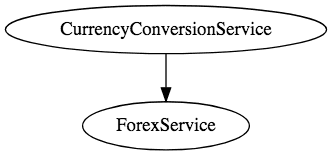
However, we are hardcoding the URL for FS in the CCS component, CurrencyExchangeServiceProxy.
@FeignClient(name="forex-service" url="localhost:8000")
public interface CurrencyExchangeServiceProxy {
  @GetMapping("/currency-exchange/from/{from}/to/{to}")
  public CurrencyConversionBean retrieveExchangeValue
    (@PathVariable("from") String from, @PathVariable("to") String to);
}
That means when new instances of Forex Service are launched, we have no way of distributing load to them.
In this part, let's now enable client-side load distribution using Ribbon.
Tools you will need:
- Maven 3.0+ is your build tool
- Your favorite IDE. We use Eclipse.
- JDK 1.8+
Complete Maven Project With Code Examples
Our GitHub repository has all the code examples.
Enabling Ribbon
Add this Ribbon Dependency to pom.xml:
    <dependency>
      <groupId>org.springframework.cloud</groupId>
      <artifactId>spring-cloud-starter-ribbon</artifactId>
    </dependency>
Enable RibbonClient in CurrencyExchangeServiceProxy:
@FeignClient(name="forex-service")
@RibbonClient(name="forex-service")
public interface CurrencyExchangeServiceProxy {
Configure the instances in application.properties:
forex-service.ribbon.listOfServers=localhost:8000,localhost:8001Launch Forex Service on 8001
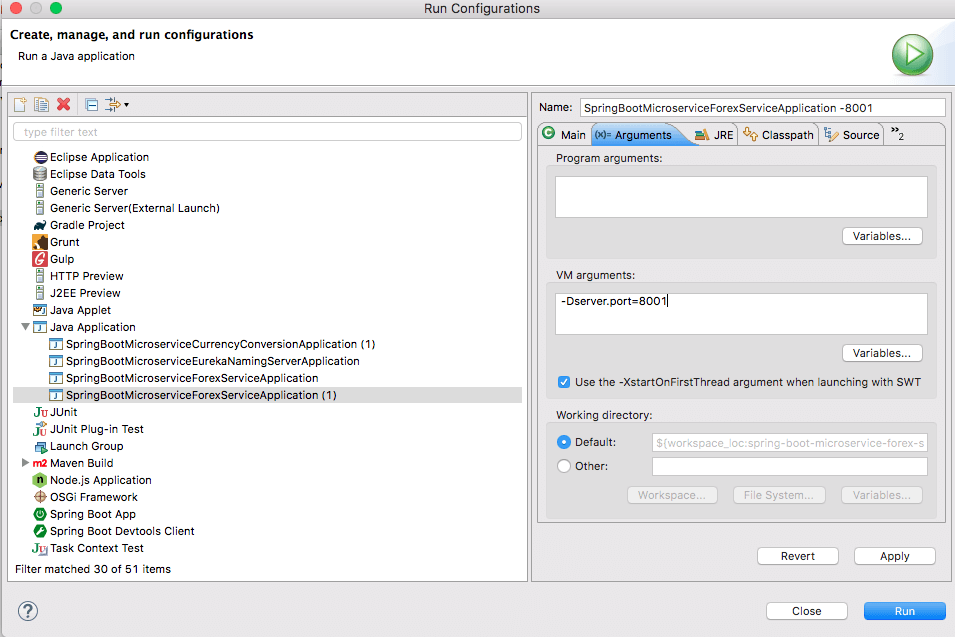
In the above step, we configured Ribbon to distribute load to instances. However, we do not have any instance of Forex Service running on 8001.
We can launch it by configuring a launch configuration, as shown in the figure below:
Ribbon in Action
Currently, we have the following services up and running:
- Currency Conversion microservice (CCS) on 8100
- Two instances of Forex microservice on 8000 and 8001
Now you will see that the requests to CCS would be distributed between the two instances of Forex microservice by Ribbon
Request 1
GET to http://localhost:8100/currency-converter-feign/from/EUR/to/INR/quantity/10000
Request 2
GET to http://localhost:8100/currency-converter-feign/from/EUR/to/INR/quantity/10000
You can see that the port numbers in the two responses are different.
Summary
We have now created two microservices and established communication between them.
We are using Ribbon to distribute load between the two instances of the Forex Service.
However, we are hardcoding the URLs of both instances of FS in CCS. That means that every time there is a new instance of FS, we would need to change the configuration of CCS. That's not cool.
In the next part, we will use Eureka Naming Server to fix this problem.
Published at DZone with permission of Ranga Karanam. See the original article here.
Opinions expressed by DZone contributors are their own.
Comments