

Mocking the Unmockable: The Mockito2 Way
Mockito2 has made improvements over its predecessor, including the ability to mock final classes. Its new opt-in feature lets you take mockery to a new level.
Join the DZone community and get the full member experience.
Join For FreeEarlier versions of Mockito had the limitations of not being able to mock final classes or static and final methods, etc. However, with Mockito2, the team has introduced an incubating, opt-in feature to take mocking a level ahead. We can now mock final classes using this incubating feature.
I have prepared a HelloWorld example to give a simple demo on how to use this opt-in feature.
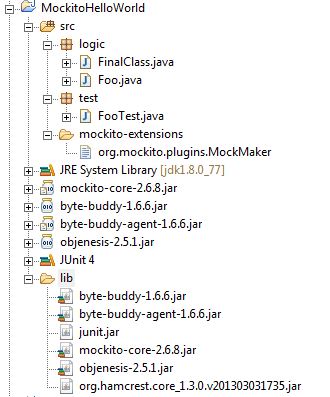
Below is the snapshot of my project structure and the JARs required for this example.
Key Points
Create a simple file with the name “org.mockito.plugins.MockMaker” and place it in a folder named “mockito-extensions”. This folder should be made available on the classpath. Here, I have added it within the “src” folder so that will also do the job.
The content of the file created above should be a single line:
mock-maker-inline.
The above two steps are required in order to activate the Mockito extension mechanism and use this opt-in feature.
The runtime environment should point to a JDK installation and not a JRE, as the native library attach.dll is available in the JDK installation. If this is not done, a runtime exception message will be thrown: “No compatible attachment provider is not available.”
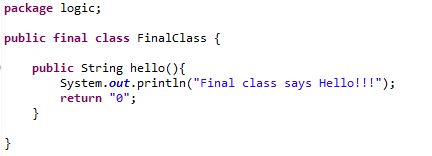
Now let's have a look at the classes shown in the logic “package.”
FinalClass.java:
Foo.java:

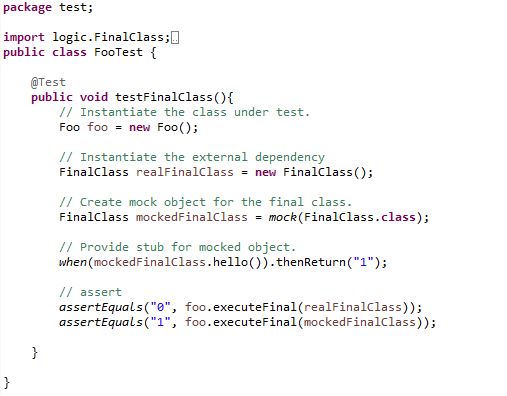
FooTest.java:
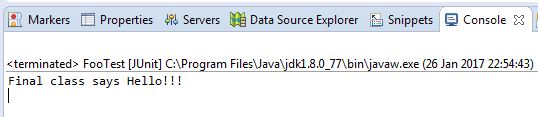
Output:
Explanation:
In the 1st assert statement, the real implementation is called hence there is one line printed on the console, and the value returned is “0” so the assertion passes.
In the 2nd assert statement, the mocked implementation is called hence there is no output on the console, and the value returned is “1” so the assertion passes.
And that is how we can use the incubating feature of Mockito2 to mock the final classes.
If you have any questions, feel free to leave a comment. Good luck with Mocking!
Published at DZone with permission of Saral Khare. See the original article here.
Opinions expressed by DZone contributors are their own.
Comments