

A Practical Guide to Modernizing Data Serving Architectures Using DBSQL
Learn how we replaced our traditional RDS serving layer with direct lakehouse querying to improve performance, reduce cost, and achieve real-time data freshness.
If you’ve ever built analytical dashboards, chances are you’ve worked with the old “batch-load-to-RDS” pattern, where we load the data into RDS from a batch process and read from that operational data store, such as AWS RDS or other databases. We certainly did in our case — and for a while, it served us well.
Our applications pulled data from a lakehouse like Snowflake or Delta Lake, transformed it in AWS Glue, and loaded it into Amazon RDS. The RDS database powered Lambda APIs that fed dashboards and front-end apps.
But as our platform scaled, the pattern started to show its age.
- Data latency: Batch updates meant dashboards were always several hours — sometimes a full day — behind the source.
- Operational overhead: ETL pipelines broke, schema changes cascaded, and recovery processes drained engineering time.
- Rising costs: We were paying for RDS clusters and ETL compute even when no one was querying data.
- Data drift: Analysts saw one version of data in Snowflake, while users saw another through the RDS API.
Eventually, it became clear that our batch-based design wasn’t sustainable. We needed something faster, leaner, and closer to real time.
Our Legacy Setup: The Batch-Driven Design
Here’s what our old data flow looked like:
UI → API (AWS Lambda) → RDS ← AWS Glue Batch Job → DataLake / SnowflakeEach night, an AWS Glue job populated RDS tables from Snowflake and Delta Lake. The API then served those tables to dashboards and analytical apps.
It worked — until a point, batch jobs stretched past six hours, RDS costs skyrocketed, and every schema tweak required multiple coordinated changes. The whole thing was rigid and costly to maintain. Yes, including the engineer's time.
The Shift: Moving to a Query-at-Source Architecture
The goal was simple: get rid of the middleman. We wanted to eliminate the persistent RDS layer and stop pushing data through nightly ETL cycles. Instead, the API would query governed data sources directly through Databricks SQL.
The new data flow looks like this:
UI → API (AWS Lambda) → Databricks SQL (JDBC) → DataLake / SnowflakeThat single change removed multiple moving parts and simplified our serving layer dramatically. We have a centralized team that handles DB SQL, so the infrastructure maintenance is also taken off of the engineering team.
Key Building Blocks
- Frontend: Interactive dashboards for data health and monitoring.
- API layer: A stateless REST API built on AWS Lambda, connecting directly to Databricks SQL via JDBC.
- Query engine: A Databricks SQL endpoint governed by Unity Catalog to handle access and security.
- Data sources: Curated Delta tables and federated data from Snowflake and the lakehouse.
Implementation details:
- Lambda uses token-based authentication to establish JDBC sessions securely.
- The API translates incoming requests into parameterized SQL queries, ensuring safe filtering and injection prevention.
- Databricks SQL executes those queries in real time against Delta and federated tables.
- Results are streamed directly back to the client — no staging, no lag.
The Results: Leaner, Faster, Cheaper
Once the migration was complete, the impact was immediate. Our dashboards started showing near real-time data, and the ETL pipelines that once ran overnight were gone.
Below is a snapshot of how our data flow evolved — from the traditional batch-driven RDS setup to a live query architecture powered by Databricks SQL:
Before vs. After: Evolution of the Data-Serving Architecture
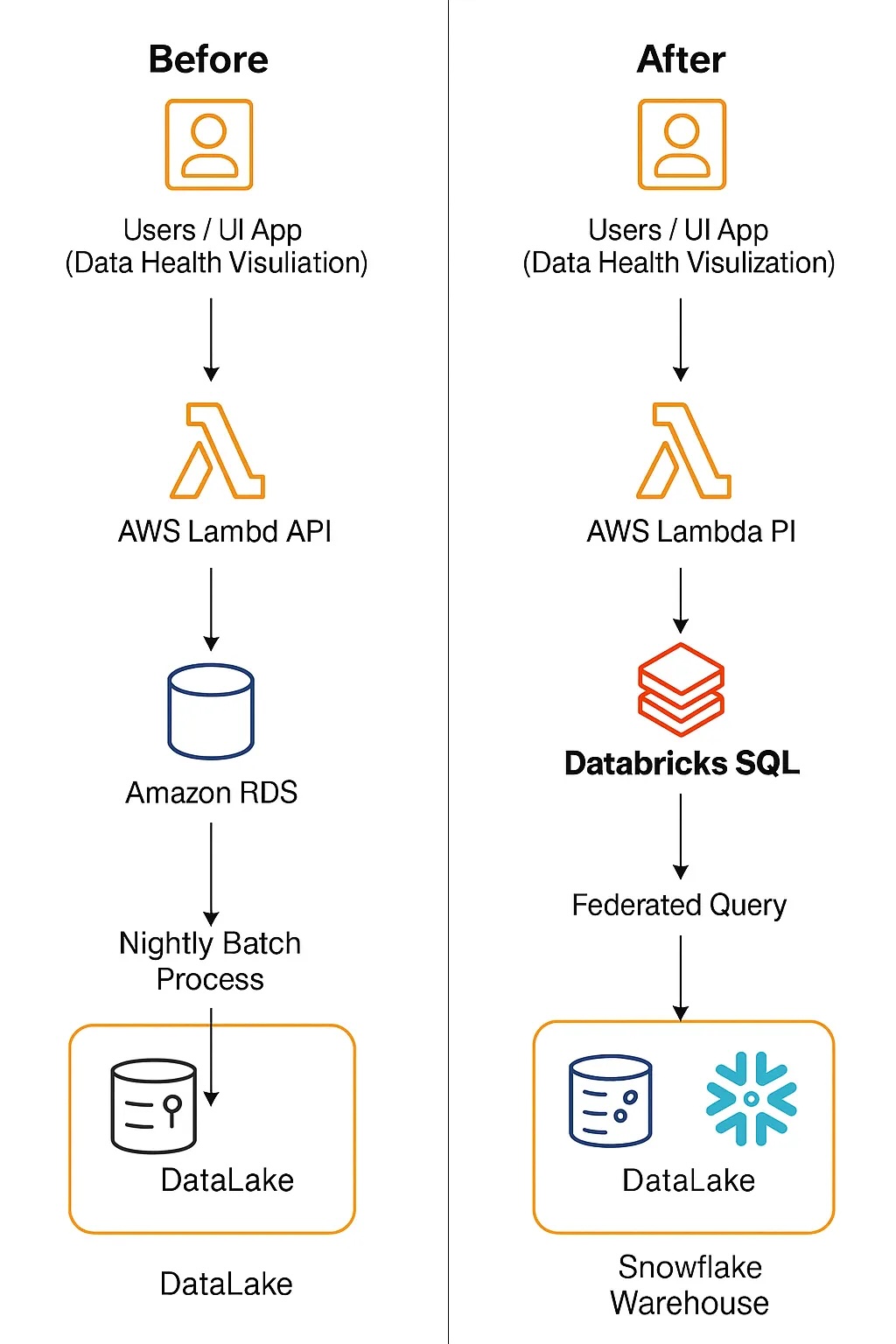
By removing the RDS layer and batch ETL jobs, we:
- Reduced infrastructure costs by nearly 70%.
- Eliminated 4–6 hours per week of maintenance and monitoring effort.
- Removed a 1–2 hour nightly batch window, improving data freshness to near real time.
- Simplified the stack to just two components: AWS Lambda and Databricks SQL.
The setup is now completely serverless — scaling on demand and removing the need for fixed infrastructure.
Lessons Learned and Optimization Tips
A Query-at-Source model isn’t plug-and-play; it needs careful optimization to perform well at scale.
Here are some things we learned along the way:
Challenges
- Queries on large, unoptimized datasets can be slower than pre-aggregated RDS tables.
- High concurrency from API-driven requests can cause queueing.
- Lambda cold starts add connection overhead for JDBC.
Optimizations That Worked
- Result caching: Databricks SQL caches repeated queries, returning results in milliseconds.
- Serverless endpoints: Automatically scale to handle varying query loads.
- Partitioning and Z-ordering: Optimize Delta tables to minimize data scanned.
- API guardrails: Pagination, projection pushdown, and
LIMITclauses ensure efficient queries. - Pre-aggregated tables: For sub-second latency dashboards, we maintain lightweight summary tables directly in the lakehouse.
The Takeaway
Moving to a Query-at-Source pattern transformed how we serve analytical data. What began as a cost-optimization exercise turned into a mindset shift — letting the lakehouse itself become the serving layer.
Modern query engines like Databricks SQL are fast, secure, and scalable enough to power live analytical APIs — if paired with the right optimizations. For teams struggling with stale dashboards, rising database bills, or brittle ETL pipelines, this architecture offers a clear path to simplicity, speed, and sustainability.
Opinions expressed by DZone contributors are their own.