

Module Pattern in JavaScript
Let's take a look at how to implement the Module Pattern in JavaScript to help aid in better encapsulation for your code.
Join the DZone community and get the full member experience.
Join For FreeIn JavaScript, code encapsulation can be achieved using Modules Patterns. In addition, it is used to create private and public properties. There are various ways a module pattern can be implemented. In this article, we will learn to create a module pattern in ES5. Before we go ahead and start looking into the implementation of the module pattern, here are some of the benefits:
- Freeze the scoping.
- Code encapsulation.
- Creating private or public scope.
- Creating a namespace.
- Creating public and private encapsulation.
We can implement a module pattern using JavaScript Object Literals and Immediately-Invoked function expressions. Just to refresh your memory, an object literal will look like the below listing:
var Product = {

    price: 600,
    setOrder: function () {
        return this.price;
    }
}

console.log(Product.setOrder());
You can add properties after the object is created. Also, an Immediately-Invoked function expression looks like the example below:
var add = function (num1, num2) {
    let res = num1 + num2;
    console.log(res);
}(7, 2);
With the combination of these two methods, we can implement Module Patterns in JavaScript. Let us start with creating the module:
(function () {
    'use strict';
    // Your code here
    // All function and variables are scoped to this function
    var price = 99;

}());

console.log(price); // undefined
It is a self-contained module or an anonymous closure. It creates the scope for the function and everything is wrapped inside that function itself. So, when we tried to access the price outside the function, it was undefined. Keep in mind that this anonymous module is present in the global scope.
We can export the module by assigning it to a variable using an expression and then creating private and public encapsulation using the return statement. Consider the below code:
var module1 = (function () {
    'use strict';

    //private

    let color = 'red';

    // public

    return {
        price: 800

    }

}());

console.log(module1.price); // 800
console.log(module1.color); // undefiend
We are doing the following in the above code snippet:
- Creating an IIFE.
- Assigning the IIFE function to a variable.
- Returning an anonymous object literal to create private and public encapsulation.
All properties of the returned object will become public and can be accessed outside the module, however, any variable that's not part of the returned object cannot be accessed outside of the module. That is why we are getting 800 as the output for the price, but, for the color, the value is undefined because it is private to module1. Let us modify module1 to have more private and public properties, as shown in the listing below:
var module1 = (function () {

    //private
    let color = 'red';
    let model;
    function setModel(m) {
        model = m;
    }
    // public

    return {
        price: 800,
        getModel: function (m) {
            setModel(m);
            return model;

        }

    }

}());

console.log(module1.price); // 800
console.log(module1.getModel('bmw')); // bmw
As you can see, we can access private encapsulated variables using the public encapsulated functions. Mainly in module pattern, every variable is private until it is part of return object.
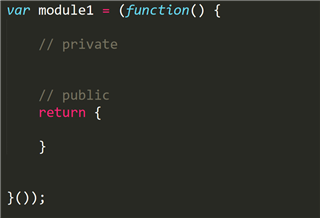
Module pattern emulates classes in JavaScript. It creates private and public encapsulated variables by returning an object. It encapsulates privacy using closures. In a diagram, we can show this:
Another variation of the module pattern is the Revealing Module Pattern. The only variation is we return the object as shown in the listing below:
var module1 = (function () {

    //private
    let color = 'red';
    let model;
    function setModel(m) {
        model = m;
    }
    let privatePrice = 800;
    let getModel = function (m) {
        setModel(m);
        return model;

    }
    // public

    return {
        price: privatePrice,
        model: getModel

    }

}());

console.log(module1.price); // 800
console.log(module1.model('audi')); // audi
The Module Revealing Pattern has more consistent naming and better readability of code. To summarize, we can achieve public and private encapsulation in JavaScript using the module pattern. I hope you found this post useful and now implement Module Patterns in your JavaScript application.
Published at DZone with permission of Dhananjay Kumar. See the original article here.
Opinions expressed by DZone contributors are their own.
Comments