

NeMo Agent Toolkit With Docker Model Runner
Agent observability is often missing in the rush to build AI agents. NeMo adds observability to AI agents, helping trace, evaluate, and debug multi-agent workflows.
 CORE
·
CORE
·
Join the DZone community and get the full member experience.
Join For FreeThe year 2025 has been widely recognized as the year of AI agents. With the launch of frameworks like Docker Cagent, Microsoft Agent Framework (MAF), and Google’s Agent Development Kit (ADK), organizations rapidly embraced agentic systems.
However, one critical area received far less attention: agent observability.
While teams moved quickly to build and deploy agent-based solutions, a fundamental question remained largely unanswered. How do we know these agents are actually working as intended?
- Are multiple agents coordinating effectively?
- Are their outputs reliable and of high quality?
- Can we diagnose failures or unexpected behaviors in complex, multi-agent workflows?
These challenges sit at the core of agent observability.
This is where Nvidia’s open-source toolkit, NeMo, comes into the picture. NeMo brings much-needed, enterprise-grade observability to LLM-powered systems, enabling teams to monitor, evaluate, and trust their agent infrastructure at scale.
At the same time, Docker Model Runner is emerging as the de facto standard for local inference from the desktop. It provides a unified, “single pane of glass” experience for experimenting with a wide range of open-source models available through the Docker Models Hub.
As part of this tutorial, we will look at how we can add observability to your AI agents when inferencing through Docker Model Runner.
Docker Model Runner Setup
First, let’s set up Docker Model Runner using a small language model. In this tutorial, we will use ai/smollm2.
The setup instructions for Docker Model Runner are available in the official documentation. Follow those steps to get your environment ready.
Make sure to enable TCP access in Docker Desktop. This step is essential; without it, your prototype will not be able to communicate with the model runner over localhost.
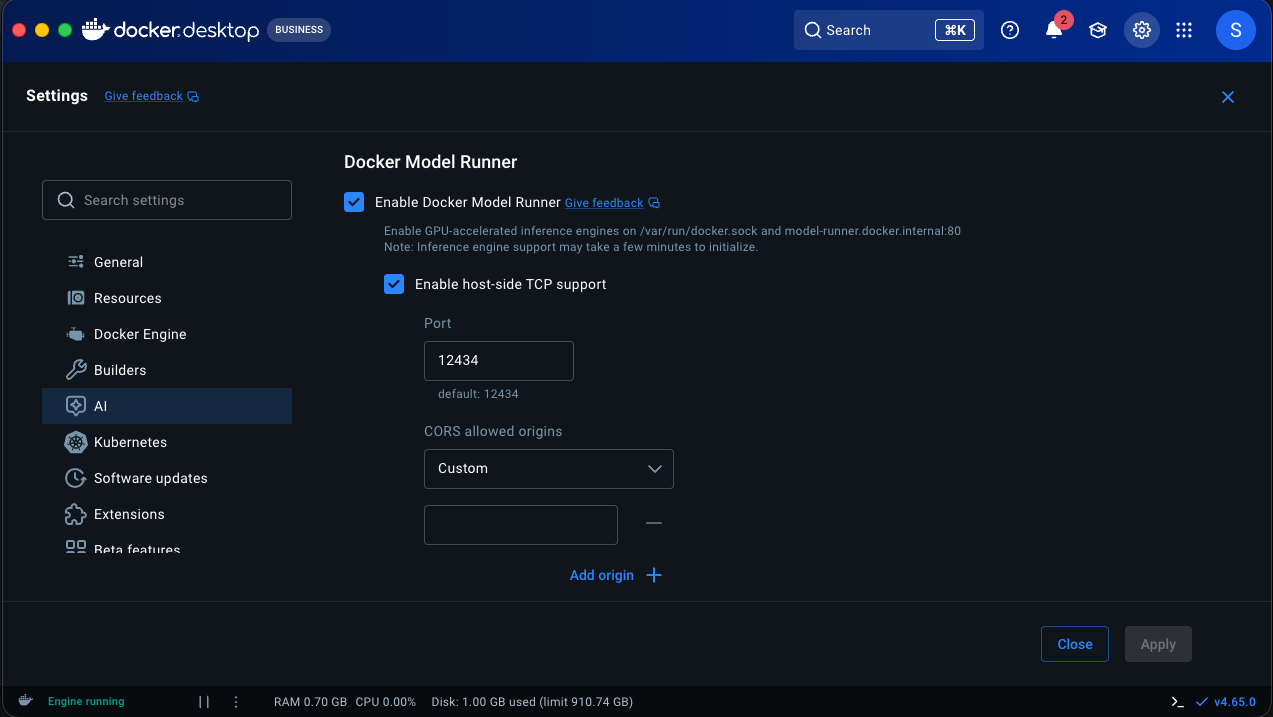
Command to pull the small language model we will use for inferencing.
docker model run ai/smollm2NeMo Agentic Toolkit Setup
The first step begins with installing the Nvidia NAT package from Python. I recommend installing uv and installing all the nat dependencies through uv because going down the plain “pip” route causes timeouts.
uv pip install nvidia-nat
NeMo's agentic setup is done through YAML. So, declare a YAML configuration for eg: agent-run.yaml
functions:
  # Add a tool to search wikipedia
  wikipedia_search:
    _type: wiki_search
    max_results: 2

llms:
  # Tell NeMo Agent Toolkit which LLM to use for the agent
  openai_llm:
    _type: openai
    model_name: ai/smollm2
    base_url: http://localhost:12434/engines/v1  # Docker model runner endpoint
    api_key: "empty" // because we are using local inference this can be empty.
    temperature: 0.7
    max_tokens: 1000
    timeout: 30

general:
  telemetry:
    tracing:
      otelcollector:
        _type: otelcollector
        # The endpoint where you have deployed the otel collector
        endpoint: http://0.0.0.0:5216/v1/traces
        project: nemo_project

workflow:
  # Use an agent that 'reasons' and 'acts'
  _type: react_agent
  # Give it access to our wikipedia search tool
  tool_names: [wikipedia_search]
  # Tell it which LLM to use (now using OpenAI with Docker endpoint)
  llm_name: openai_llm
  # Make it verbose
  verbose: true
  # Retry up to 3 times
parse_agent_response_max_retries: 3- Functions: These are simple components that perform a specific operation. In this case, built-in Wikipedia search, for example. You can define your own functions too.
- LLMs: The large language model provider we plan to use. Currently, OpenAI, Anthropic, Azure OpenAI, Bedrock, and Hugging Face are the supported providers. Since Docker Model Runner supports both OpenAI and Anthropic API formats, we can leverage it for both the LLM providers.
- Telemetry: This is where Observability comes into the picture. In this example, we have added OTel-based tracing. As a result, we will be logging spans to the OpenTelemetry configured destination.
- Workflow: This is the final piece in the puzzle, where we will end up configuring all the functions, LLMS, and tools to create a workflow.
For the current workflow, we are configuring a reasoning and act agent along with the Wikipedia search tool and Docker Model Runner inference endpoint.
Before we run the workflow, we will configure the OpenTelemetry exporter to publish spans to the otellogs/span folder.
Create a file named otel_config.yml.
receivers:
  otlp:
    protocols:
      http:
        endpoint: 0.0.0.0:5216


processors:
  batch:
    send_batch_size: 100
    timeout: 10s

exporters:
  file:
    path: /otellogs/spans.json
    format: json

service:
  pipelines:
    traces:
      receivers: [otlp]
      processors: [batch]
exporters: [file]
Run the following command in the terminal.
mkdir otel_logs

chmod 777 otel_logs

docker run -v $(pwd)/otelcollectorconfig.yaml:/etc/otelcol-contrib/config.yaml \
-p 5216:5216 \
-v $(pwd)/otel_logs:/otel_logs/ \
otel/opentelemetry-collector-contrib:0.128.0
Finally, run the NeMo workflow using the following command.
nat run --config_file ./agent-run.yml --input "What is the capital of Washington"
Output:
[AGENT]
Agent input: What is the capital of Washington
Agent's thoughts:
WikiSearch: {'annotation': 'Washington State', 'required': False}

Thought: You should always think about what to do.
Action: Wikipedia Search: {'annotation': 'Washington State', 'required': False}


------------------------------
2026-03-22 21:55:18 - INFO - nat.plugins.langchain.agent.react_agent.agent:357 - [AGENT] Retrying ReAct Agent, including output parsing Observation
2026-03-22 21:55:18 - INFO - httpx:1740 - HTTP Request: POST http://localhost:12434/engines/v1/chat/completions "HTTP/1.1 200 OK"
2026-03-22 21:55:18 - INFO - nat.plugins.langchain.agent.react_agent.agent:270 -
------------------------------
[AGENT]
Agent input: What is the capital of Washington State
Agent's thoughts:
The capital of Washington State is Olympia.
After running the above command, you will see a spans.json file under the otel_logs section, which contains the entire span, along with inputs and outputs.
In addition to what we discussed, it is also possible to set up logging and evaluations on model response that check for coherence, relevance, and groundedness.
References
- Docker Model Runner: https://docs.docker.com/ai/model-runner/
- Nvidia NeMo Agent Toolkit: https://docs.nvidia.com/nemo/agent-toolkit/latest/get-started/installation.html
Opinions expressed by DZone contributors are their own.
Comments