

New York City Taxi Trips: Putting Neo4j and DuckDB to Work
We load NYC taxi trip data into Neo4j using DuckDB for aggregation, then run five queries that combine both engines to show what each does best.
 CORE
·
CORE
·
In the previous article, we built a custom Neo4j procedure that embeds DuckDB directly into the Neo4j JVM and makes it callable from Cypher. We showed how it works and ran a few examples to prove the concept. Now it's time to put it to work on something real.
In this article, we'll use that procedure on the NYC Taxi and Limousine Commission (TLC) trip record data for January 2024. The dataset covers nearly three million yellow cab trips and more than fifty thousand green cab trips across 265 taxi zones. Our goal is to aggregate those trips into a traversable graph in Neo4j — zones as nodes, routes as relationships — and then query it in ways that neither engine could handle as naturally on its own.
The full source code is available on GitHub.
Getting the Code
Before starting, ensure that you've worked through the previous article and have the duckdb.query procedure built and installed in Neo4j. Then get this project:
cd ~
git clone --filter=blob:none --sparse https://github.com/VeryFatBoy/neo4j.git
cd neo4j
git sparse-checkout set neo4j-duckdb-taxi
mv neo4j-duckdb-taxi ../neo4j-duckdb-taxi
cd ../neo4j-duckdb-taxi
The Dataset
The NYC TLC publishes monthly trip records in Parquet format. Each row represents a single trip and includes the pickup and dropoff zone identifiers, fare amount, trip distance, and duration. Alongside the trip files, the TLC provides a zone lookup table that maps each of the 265 LocationID values to a borough and neighborhood name and a shapefile that defines the zone boundaries.
We'll download all of this programmatically in a Jupyter notebook. Once the files are in place, DuckDB can query the Parquet files directly — no import step needed.
RAW_DIR = os.path.expanduser("~/neo4j-duckdb-taxi/data/raw")

for filename in ["yellow_tripdata_2024-01.parquet", "green_tripdata_2024-01.parquet"]:
    path = os.path.join(RAW_DIR, filename)
    size_mb = os.path.getsize(path) / 1024 / 1024
    result = duckdb.sql(f"SELECT COUNT(*) AS row_count FROM read_parquet('{path}')").fetchone()
    print(f"{filename}")
    print(f"  Size:      {size_mb:.1f} MB")
    print(f"  Row count: {result[0]:,}")
    print()
DuckDB reads the Parquet file directly and returns the row count without requiring a separate import into a database. The same loop covers the green cab file. This is DuckDB in its natural habitat — fast analytical queries over columnar data without a server or a schema to maintain.
Preparing the Zone Nodes
Before loading any trips, we need the zone nodes in Neo4j. Each node represents one of the 265 taxi zones and carries the zone name, borough, and service zone.
Separately, the first notebook computes a centroid for each zone from the shapefile, which uses a projected coordinate system (NY State Plane in feet). To get latitude and longitude values suitable for a web map, we reproject each centroid and save the results to a JSON file for the dashboard.
CALL duckdb.query(
    'SELECT LocationID, Zone, Borough, service_zone
     FROM read_csv_auto("{ZONE_CSV}")
     ORDER BY LocationID'
)
YIELD row
RETURN row.LocationID   AS locationId,
       row.Zone         AS zone,
       row.Borough      AS borough,
row.service_zone AS serviceZoneMERGE (z:Zone {locationId: $locationId})
SET z.zone = $zone,
z.borough = $borough,
z.serviceZone = $serviceZoneThe first statement reads the zone lookup CSV through duckdb.query and the second merges one node per row. With all 265 zones in place, we can move on to the trips.
Aggregating Trips With DuckDB
The raw trip files are too granular for graph storage. We don't want three million individual trip nodes — we want one relationship per route that summarizes all the trips that ran that route in January. DuckDB handles the aggregation. For yellow trips, we work from a 100,000-row sample to keep the graph build fast; green trips are small enough to aggregate in full.
WITH sample AS (
    SELECT * FROM read_parquet("{YELLOW_PARQUET}")
    USING SAMPLE 100000 ROWS
)
SELECT
    PULocationID,
    DOLocationID,
    COUNT(*) AS trip_count,
    ROUND(AVG(trip_distance), 2) AS avg_distance,
    ROUND(AVG(fare_amount), 2) AS avg_fare,
    ROUND(AVG((epoch_ms(tpep_dropoff_datetime) - epoch_ms(tpep_pickup_datetime)) / 60000.0), 2) AS avg_duration_minutes,
    SUM(passenger_count) AS total_passengers
FROM sample
WHERE PULocationID IS NOT NULL
  AND DOLocationID IS NOT NULL
GROUP BY PULocationID, DOLocationID
The sample gives us one row per route with counts and averages already computed. We run the same query for green cab trips, substituting the green Parquet file and the appropriate timestamp column names, without sampling since the green dataset is much smaller.
Writing to Neo4j With duckdb.query
Now comes the part the previous article set up: using duckdb.query to run the aggregation from Cypher and write the results into Neo4j as relationships. The procedure executes a DuckDB SQL query and streams the results back as maps, which Cypher can process directly.
CALL duckdb.query(
    'WITH sample AS (
        SELECT * FROM read_parquet("{YELLOW_PARQUET}")
        USING SAMPLE 100000 ROWS
    )
    SELECT
        PULocationID,
        DOLocationID,
        COUNT(*) AS trip_count,
        ROUND(AVG(trip_distance), 2) AS avg_distance,
        ROUND(AVG(fare_amount), 2) AS avg_fare,
        ROUND(AVG((epoch_ms(tpep_dropoff_datetime) - epoch_ms(tpep_pickup_datetime)) / 60000.0), 2) AS avg_duration_minutes,
        SUM(passenger_count) AS total_passengers
    FROM sample
    WHERE PULocationID IS NOT NULL
      AND DOLocationID IS NOT NULL
    GROUP BY PULocationID, DOLocationID'
)
YIELD row
RETURN row.PULocationID         AS pu,
       row.DOLocationID         AS do,
       row.trip_count           AS tripCount,
       row.avg_distance         AS avgDistance,
       row.avg_fare             AS avgFare,
       row.avg_duration_minutes AS avgDurationMinutes,
row.total_passengers AS totalPassengersUNWIND $batch AS row
MATCH (pu:Zone {locationId: row.puId})
MATCH (do:Zone {locationId: row.doId})
MERGE (pu)-[t:YELLOW_TRIP]->(do)
SET t.count = row.count,
t.avgDistance = row.avgDistance,
t.avgFare = row.avgFare,
t.avgDurationMinutes = row.avgDurationMinutes,
t.totalPassengers = row.totalPassengersDuckDB reads the Parquet file, aggregates the rows, and returns them through a single CALL. The notebook maps the returned columns into the relationship properties, then passes the results to the second statement in batches of 500. Cypher matches the zone nodes and writes the relationships. The two engines are cooperating directly — DuckDB does what it is good at, Neo4j does what it is good at, and the boundary between them is the duckdb.query call.
We run the same pattern for green cab trips, replacing the SQL source with the green Parquet file (using the lpep timestamp columns and no sampling) and the relationship type with GREEN_TRIP.
The Graph Schema
After both loads complete, the graph looks like this:
- 265
Zonenodes, each withlocationId,zone,boroughandserviceZone YELLOW_TRIPrelationships connecting pickup zones to dropoff zones, withcount,avgDistance,avgFare,avgDurationMinutesandtotalPassengersGREEN_TRIPrelationships with the same properties
Each route represented in the yellow sample or the full green dataset is now a first-class edge in the graph. We can traverse it, filter on it, and aggregate across it using Cypher.
Querying the Graph
The following examples are orchestrated from the accompanying notebook. Where a query produces zone IDs or route pairs, the notebook passes those results into the next statement.
1. Graph Filter -> DuckDB Aggregate
Cypher first fetches all Manhattan zone IDs from the graph. DuckDB then reads the raw Parquet, filters to those zones, and aggregates trip stats.
MATCH (z:Zone {borough: 'Manhattan'})
RETURN z.locationId AS locationId
ORDER BY z.locationIdCALL duckdb.query(
'SELECT
PULocationID AS location_id,
COUNT(*) AS trip_count,
ROUND(AVG(trip_distance), 2) AS avg_distance_miles,
ROUND(AVG(fare_amount), 2) AS avg_fare_usd
FROM read_parquet("{YELLOW_PARQUET}")
WHERE PULocationID IN ({id_list})
GROUP BY PULocationID
ORDER BY trip_count DESC
LIMIT 10'
)
YIELD row
RETURN row.location_id AS locationId,
row.trip_count AS tripCount,
row.avg_distance_miles AS avgDistanceMiles,
row.avg_fare_usd AS avgFareUsd2. Graph Routing -> DuckDB Enrichment
Cypher finds the top 10 busiest routes from the aggregated relationships already in the graph. DuckDB then goes back to the complete raw Parquet to compute average trip duration for those exact zone pairs. Because the graph was built from a sample, the duration values here draw on the full dataset rather than the sampled one.
MATCH (pu:Zone)-[t:YELLOW_TRIP]->(do:Zone)
RETURN pu.locationId AS puId,
       pu.zone       AS puZone,
       do.locationId AS doId,
       do.zone       AS doZone,
       t.count       AS tripCount
ORDER BY t.count DESC
LIMIT 10CALL duckdb.query(
'WITH pairs(pu_id, do_id) AS (
VALUES {values}
)
SELECT
t.PULocationID AS pu_id,
t.DOLocationID AS do_id,
ROUND(AVG((epoch_ms(tpep_dropoff_datetime) - epoch_ms(tpep_pickup_datetime)) / 60000.0), 2) AS avg_duration_minutes
FROM read_parquet("{YELLOW_PARQUET}") t
JOIN pairs p ON t.PULocationID = p.pu_id AND t.DOLocationID = p.do_id
GROUP BY t.PULocationID, t.DOLocationID
ORDER BY avg_duration_minutes DESC'
)
YIELD row
RETURN row.pu_id AS puId,
row.do_id AS doId,
row.avg_duration_minutes AS avgDurationMinutes3. DuckDB Scan -> Graph Context
DuckDB reads the raw Parquet to find the top 5 pickup zones by volume. Cypher then pulls each zone's name, borough, and connectivity from the graph.
CALL duckdb.query(
    'SELECT
        PULocationID AS location_id,
        COUNT(*)     AS trip_count
     FROM read_parquet("{YELLOW_PARQUET}")
     WHERE PULocationID IS NOT NULL
     GROUP BY PULocationID
     ORDER BY trip_count DESC
     LIMIT 5'
)
YIELD row
RETURN row.location_id AS locationId,
row.trip_count AS tripCountUNWIND $ids AS locId
MATCH (z:Zone {locationId: locId})
OPTIONAL MATCH (z)-[:YELLOW_TRIP|GREEN_TRIP]->(neighbor:Zone)
RETURN z.locationId AS locationId,
z.zone AS zone,
z.borough AS borough,
count(DISTINCT neighbor) AS connectedZones
ORDER BY connectedZones DESCThese queries traverse the graph rather than scanning rows. The aggregation is already baked into each relationship, so the work Neo4j does here is pattern matching and property lookup — exactly what a graph engine is built for.
4. Yellow vs. Green Comparison Across Shared Routes
CALL duckdb.query(
    'WITH yellow AS (
        SELECT
            PULocationID,
            DOLocationID,
            COUNT(*)                     AS trip_count,
            ROUND(AVG(fare_amount), 2)   AS avg_fare,
            ROUND(AVG(trip_distance), 2) AS avg_distance
        FROM read_parquet("{YELLOW_PARQUET}")
        WHERE PULocationID IS NOT NULL
          AND DOLocationID IS NOT NULL
        GROUP BY PULocationID, DOLocationID
    ),
    green AS (
        SELECT
            PULocationID,
            DOLocationID,
            COUNT(*)                     AS trip_count,
            ROUND(AVG(fare_amount), 2)   AS avg_fare,
            ROUND(AVG(trip_distance), 2) AS avg_distance
        FROM read_parquet("{GREEN_PARQUET}")
        WHERE PULocationID IS NOT NULL
          AND DOLocationID IS NOT NULL
        GROUP BY PULocationID, DOLocationID
    )
    SELECT
        y.PULocationID          AS pu_id,
        y.DOLocationID          AS do_id,
        y.trip_count            AS yellow_trips,
        y.avg_fare              AS yellow_avg_fare,
        y.avg_distance          AS yellow_avg_distance,
        g.trip_count            AS green_trips,
        g.avg_fare              AS green_avg_fare,
        g.avg_distance          AS green_avg_distance
    FROM yellow y
    JOIN green g
      ON y.PULocationID = g.PULocationID
     AND y.DOLocationID = g.DOLocationID
    ORDER BY y.trip_count DESC
    LIMIT 10'
)
YIELD row
RETURN row.pu_id               AS puId,
       row.do_id               AS doId,
       row.yellow_trips        AS yellowTrips,
       row.yellow_avg_fare     AS yellowAvgFare,
       row.yellow_avg_distance AS yellowAvgDistance,
       row.green_trips         AS greenTrips,
       row.green_avg_fare      AS greenAvgFare,
       row.green_avg_distance  AS greenAvgDistance
This is the cross-file join that sets query 4 apart: a single CALL reads both Parquet files inside DuckDB, joins them on shared zone pairs, and returns a side-by-side fare and distance comparison for the top ten routes. The two files never leave DuckDB — Neo4j just receives the result rows.
5. Graph and Raw File Counts Side by Side
MATCH (z:Zone)               WITH count(z) AS zones
MATCH ()-[y:YELLOW_TRIP]->() WITH zones, count(y) AS yellow
MATCH ()-[g:GREEN_TRIP]->()  RETURN zones, yellow, count(g) AS green
Counts what's in the graph: zone nodes and aggregated route relationships.
CALL duckdb.query(
    'SELECT
        (SELECT COUNT(*) FROM read_parquet("{YELLOW_PARQUET}")) AS yellow_rows,
        (SELECT COUNT(*) FROM read_parquet("{GREEN_PARQUET}"))  AS green_rows'
)
YIELD row
RETURN row.yellow_rows AS yellowRows,
       row.green_rows  AS greenRows
This uses duckdb.query to count the raw rows in the Parquet files.
Running both of these queries together shows the relationship between the summarized graph and the source data it was built from. The graph holds 265 zones, 7,018 yellow route relationships and 5,314 green route relationships, while the underlying Parquet files contain nearly three million yellow trips and more than fifty thousand green trips.
What the Data Shows
A few things stand out from the query results.
The busiest pickup zone in the full yellow dataset is JFK Airport (zone 132) with over 145,000 departures, and it connects to 236 distinct drop-off zones — a wider reach than Midtown Center (zone 161), which connects to 120 zones despite nearly as many departures.
The Upper East Side dominates the top routes: the four busiest zone-to-zone pairs are all within or between Upper East Side North and South, with the short Upper East Side South to Upper East Side North run clocking the highest volume at 779 sampled trips.
Among the shared routes examined, green cabs generally show higher average fares than yellow cabs for comparable trip distances — the Upper East Side North to Upper East Side North intra-zone route, for example, shows a green average fare of $8.51 versus $6.86 for yellow over a nearly identical distance.
The Dashboard
We built a small interactive dashboard to explore the graph visually, as shown in Figure 1.
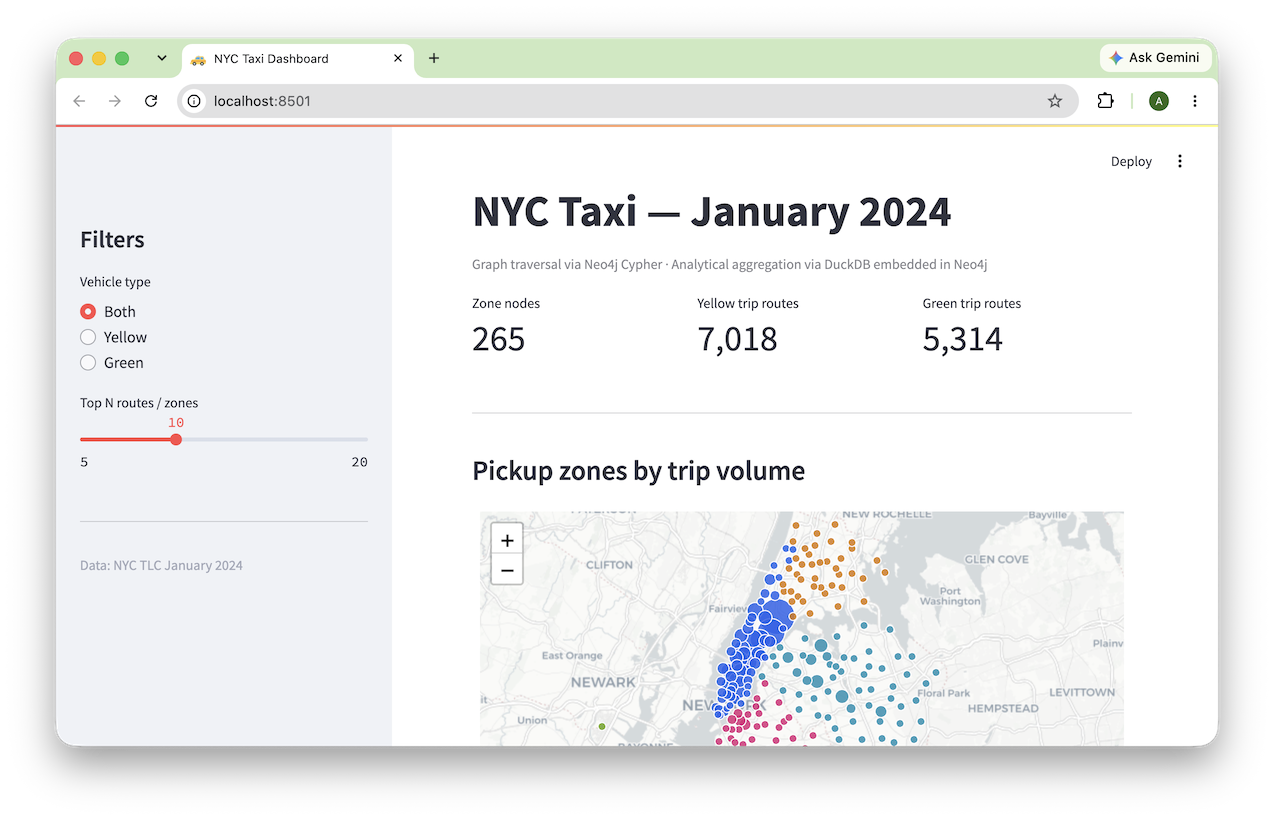
Figure 1. Dashboard
It connects to Neo4j and runs Cypher queries live against the data we loaded. The page opens with three summary tiles showing the zone, yellow route, and green route counts. Below them are a map of pickup zone activity, a bar chart of the top pickup zones, a scatter plot of average fare against average distance, a grouped bar chart comparing yellow and green average fares on shared routes, and a table of the busiest routes.
A sidebar lets us choose Yellow, Green, or Both and set how many routes and zones to show. Changing either control re-runs the relevant Cypher queries and re-renders the views in place.
The map plots each zone as a circle marker, sized by trip volume and colored by borough. Hovering a marker shows the zone name, borough, and trip count. Because the zone centroids were computed and saved during the data preparation step, no additional spatial processing is needed at query time.
The dashboard code is included in the GitHub repository alongside the notebooks.
What Each Engine Contributes
It's worth being explicit about the division of labor, because it illustrates why the two-engine approach is worth the setup cost.
| Task | Engine |
|---|---|
| Read and aggregate Parquet files | DuckDB |
| Columnar filtering and GROUP BY | DuckDB |
| Store zone nodes and route relationships | Neo4j |
| Route traversal and relationship pattern matching | Neo4j |
| Bridging the two from Cypher | duckdb.query procedure |
DuckDB never touches the graph. Neo4j never touches the Parquet files. The procedure is the seam between them, and it keeps the aggregation inside Cypher rather than in a separate ETL script.
Summary
We started with raw trip records in Parquet format and ended with a traversable graph that answers routing and fare questions in Cypher. DuckDB handled the heavy lifting on the file side — reading columnar data, filtering and aggregating millions of rows. Neo4j handled the graph side — storing zones and routes, serving pattern-match queries, feeding a live dashboard.
The duckdb.query procedure connected the two engines without a separate ETL service. One CALL aggregated the data, and Cypher wrote the relationships.
The full source code is available on GitHub.
Opinions expressed by DZone contributors are their own.
Comments