

Network Sniffing: A Critical Concept in Network Security
Learn about network sniffing: what it is, how it works, and why it forms an important defense-in-depth security strategy.
Join the DZone community and get the full member experience.
Join For FreeWhat Is Network Sniffing?
Sniffing includes the passive interception of data packets crossing a network with further analysis. Initially, sniffing was developed to help network administrators troubleshoot connectivity problems, and since then, it has evolved into an important technique of network management and security testing.
How Does Network Sniffing Work?
Basically, network sniffing is based on the fact that a network interface card is set in "promiscuous mode:" all network traffic crossing its path is captured, not just packets addressed to the device. Then sniffing software analyzes the packets captured, allowing a user to read and interpret the data crossing the network.
Popular Sniffing Tools and Example Queries
A variety of tools are available to perform network sniffing, each with its strengths. A few popular ones are listed below with example queries.
1. Wireshark
Generally considered the standard in packet analyzers, Wireshark provides a very user-friendly interface and powerful analysis. Example queries:
- To capture HTTP traffic:
http - To find packets with a specific IP address:
ip.addr == 192.168.1.13 - To filter by TCP port:
tcp.port == 80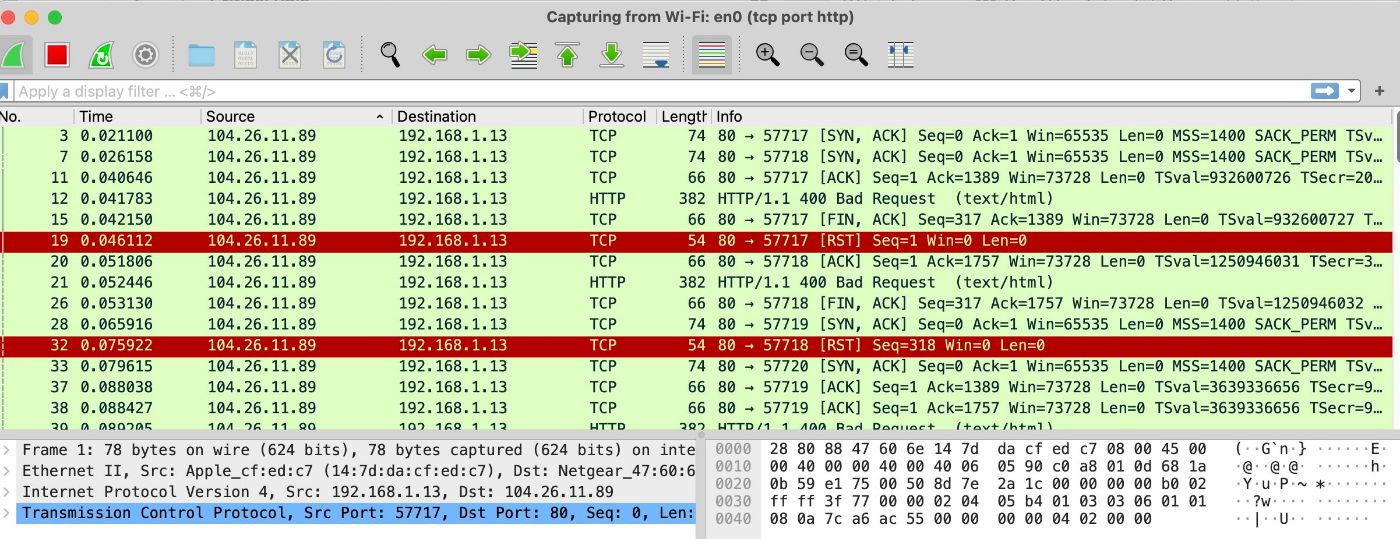 It filters the traffic, as in the above example, for HTTP and other ports and IPs, helping enhance the security, performance, and efficiency of the network. Malicious traffic identification is much simpler using Wireshark filters.
2. Tcpdump
Tcpdump is a very simple, powerful, command-line-driven utility that is widely used by Unix and Linux administrators.
Example queries include:
- To capture traffic on a specific interface:
sudo tcpdump -i en0 - To capture traffic from a specific host:
sudo tcpdump -i en0 dst host app.hackernoon.com - To capture specific protocol traffic:
sudo tcpdump tcp port 80
tcpdump is a good tool for anyone who wants to enhance their skills in network security. because of simplicity in packet analysis, tcpdump is the right tool for learning TCP/IP.
3. Dsniff
Dsniff is a suite of utilities specifically built to sniff passwords and map networks.
Examples of use include:
- To sniff passwords:
dsniff -i eth0 - To perform ARP spoofing:
arpspoof -i eth0 -t 192.168.1.100 192.168.1.
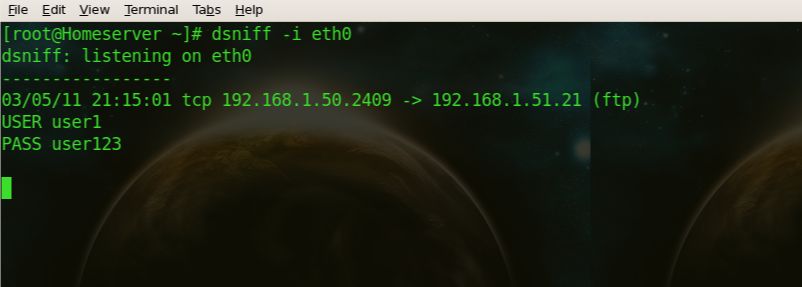
The dsniff tool is an advanced password sniffer that works for all well-known ports, including TELNET, FTP, SMTP, POP, IMAP, HTTP, CVS, Citrix, SMB, Oracle, etc. Sniffers like Wireshark and tcpdump provide a broad variety of information concerning the connection and about every single packet an interface sends and receives while dsniff will only provide usernames and passwords.
The Double-Edged Sword of Sniffing
Network sniffing is a potent technique that can serve positive and negative purposes.
Positive Uses
- Troubleshooting network problems
- Monitoring the performance of networks
- Intrusion or compromised system detection
- Traffic pattern analysis for optimization
Potential Misuses
- Sniffing sensitive data passwords, financial information
- Eavesdropping on unencrypted communications
- Mapping network structures in preparation for future attacks
Protecting Against Malicious Sniffing
The following security measures may be implemented to protect against unauthorized sniffing:
- Allow VPNs to remotely access your network.
- Encrypt all sensitive communication with SSL/TLS.
- Enable port security on the network switches.
- Monitor the network periodically for unauthorized activity.
- Use static ARP entries on critical systems.
- Consider using IPv6. IPv6 is said to have integrated security features.
Conclusion
Although it is a very powerful technique, network sniffing has several applications in network management and in the field of security testing. While it can be a very valuable tool for maintaining and securing networks, it also involves certain risks if used in malicious ways. With knowledge about the working of sniffing and enforcing appropriate security measures, individuals and organizations could use the benefits of sniffing while protecting against misuse.
Remember, knowledge is power in the cybersecurity world. Be informed, be vigilant, and keep your networks secure!
Opinions expressed by DZone contributors are their own.
Comments