

Open Model Thread Group in JMeter
JMeter 5.5 will be released in early January 2022. In this post, let us deep-dive into one of the important features: the Open Model Thread Group in JMeter 5.5.
 CORE
·
CORE
·
The Apache JMeter community has been swift in releasing the major security patches for the Log4j fiasco. I have already covered multiple posts about Log4j vulnerability, JMeter 5.4.2 and JMeter 5.4.3. JMeter 5.5 was supposed to be released in the last quarter of 2021. I have already covered what's new in JMeter 5.5. JMeter 5.5 will be released in early January 2022. In this blog post, let us deep-dive into one of the important features, which is the Open Model Thread Group in JMeter 5.5.
About Open Model Thread Group
Open Model Thread Group is available starting from JMeter 5.5 under Threads menu when you right click on the Test Plan as shown below.
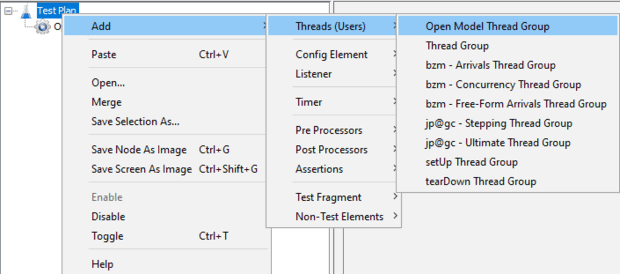
This is an experimental feature since 5.5 and might change in the future.
Typically, we define the number of threads/users in a Thread Group. There is no thumb rule to follow to utilize the optimum number of threads for a test plan. There are numerous factors that influence the number of threads that a system can spin.
Open Model Thread Group allows a defined pool of threads (users) to run without explicitly mentioning the number of threads.
How to Design Open Model Thread Group in JMeter
Open Model Thread Group in JMeter accepts a Schedule and an optional Random Seed.
By using the following expressions, we can define the schedule:
rate is nothing but a target load rate in ms, sec, min, hour, and day. e.g, rate(1/min)
random_arrivals helps to define the random arrival pattern with the given duration. e.g. random_arrivals(10 min)
To define an increasing load pattern, first define the starting load rate using rate(), then the random_arrivals(), and at last the ending load rate using rate(). e.g. rate(0/min) random_arrivals(10 min) rate(100/min)
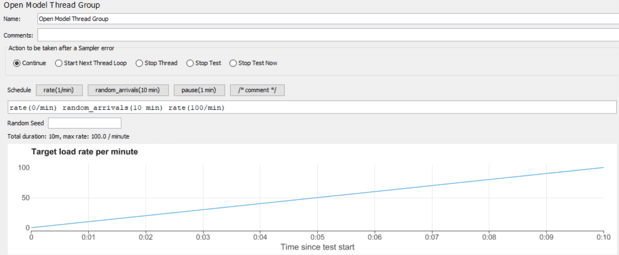
To define a steady state, use the following expression:
rate(0/min) random_arrivals(5 min) rate(100/min) random_arrivals(100 min) rate(100/min) random_arrivals(5 min) rate(0/min)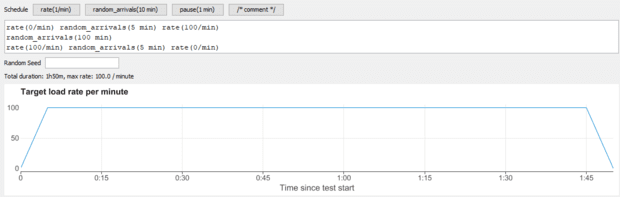
For a step by step pattern, use:
${__groovy((1..10).collect { "rate(" + it*10 + "/sec) random_arrivals(10 sec) pause(1 sec)" }.join(" "))}or:
${__groovy((1..3).collect { "rate(" + it.multiply(10) + "/sec) random_arrivals(10 sec) pause(1 sec)" }.join(" "))}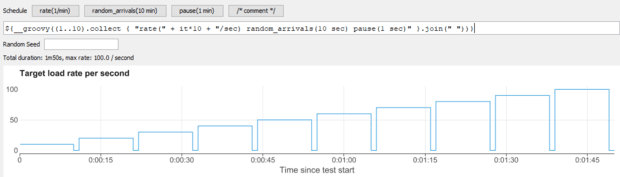
JMeter functions are also accepted in the expression.
pause(2 min) rate(${__Random(10,100,)}/min) random_arrivals(${__Random(10,100,)} min) rate(${__Random(10,100,)}/min) pause(2 min) rate(${__Random(10,100,)}/min) random_arrivals(${__Random(10,100,)} min) rate(${__Random(10,100,)}/min) pause(2 min) rate(${__Random(10,100,)}/min) random_arrivals(${__Random(10,100,)} min) rate(${__Random(10,100,)}/min)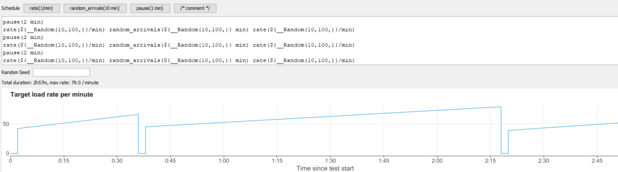
Apart from the above parameters, the expression allows single and multi-line comments.
/* multi-line comment */ // single line comment rate(1/min) random_arrivals(10 min) pause(1 min)even_arrivals() has not implemented feature in Open Model Thread Group.
Open Model Thread Group is executed at the beginning of the test, meaning any functions inside Open Model Thread Group are executed only once; their first result will be used for the execution.
How To Use This Feature Now
You can leverage nightly build to utilize this feature right now. Night build is not reliable for production purposes. To download, head to https://ci-builds.apache.org/job/JMeter/job/JMeter-trunk/lastSuccessfulBuild/artifact/src/dist/build/distributions/.
Sample Workload Model
Let us design a below workload pattern using the below expressions.
rate(0/s) random_arrivals(10 s) rate(10/s) random_arrivals(1 m) rate(10/s)The total duration of this test will be 1 min 10 secs. For the first 10 seconds, the rate is 10. Then, for 1 minute, the throughput will be maintained at 10/s.
The maximum throughput is 600/minute.
Below is the dummy sampler in the test plan which has random response times of ${__Random(2000,2000)} and ${__Random(50,500)} respectively.
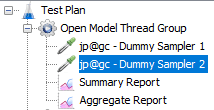
Since the throughput is 600, this test plan will try to maintain the rate for the two samplers individually, i.e. 600+600 = 1200 requests.
Since the first dummy sampler response time is 2000 ms, the test plan will create more threads to maintain the throughput.
Below is the aggregate report. Each dummy sampler throughput is 9.4/sec, reaching 1280 requests in total.

Conclusion
Open Model Thread Group will be very helpful in designing a custom load pattern without calculating the number of threads. Functions inside the expression help to generate a dynamic workload model. Using this thread group, there is no need to calculate the exact number of threads you need for the test as long as the load generators are powerful enough to generate the load pattern. Since it is a new feature, it may have issues. I am still testing this. If you face any problems, please let me know.
Published at DZone with permission of NaveenKumar Namachivayam. See the original article here.
Opinions expressed by DZone contributors are their own.