

Why GPT-OSS:20B Feels Painfully Slow (And How Quantization Can Save Your Sanity)
GPT-OSS:20B's MXFP4 quantization requires H100+ GPUs. Use GGUF quantized versions from Hugging Face for dramatically faster consumer hardware performance.
 CORE
·
CORE
·
Join the DZone community and get the full member experience.
Join For FreeIf you are into AI and specifically generative AI, you definitely did not miss the buzz about OpenAI releasing open-source models for the first time since February 2019, and this was with GPT-2.
It's like OpenAI has finally brought back the open into play.
We feel the only upside for GPT-OSS is for OpenAI. This was primarily because of the slowness observed in the GPT-OSS:20B model, which OpenAI claims can easily run on a laptop.
The Promise vs. the Experience
OpenAI promises that the model is designed for powerful reasoning, agentic tasks, and also versatile developer use cases, but the experience, especially if downloaded via Ollama (which is, by the way, the simplest and easiest way to run a model locally), is to watch it crawl at painful speeds, with simple queries taking almost 2 minutes to respond.
At this point, you might be thinking I wish someone would explain to me in detail about the performance of this model and what has actually killed my expectations from this model, This article is exactly that, and let us first look at the basics.
What Makes GPT-OSS:20B Different (And Challenging)
Traditional models: Work on a word you type using all of the parameters. For example, a 20B parameter traditional model uses all of the 20 billion parameters for every word it generates.
Mixture of Experts (MoE) models: Instead of using all of the parameters, the model decides which group of parameters should be used for each word.
With this context, now let us take a look at how the GPT-OSS:20B model works.
Config: The model has about ~21 billion parameters, 24 decoder heads (12 heads fewer than the 120B sibling) supporting a context length of 131K tokens with RoPE. With a vocab size of 200K
Active parameters: Only 3.6 billion parameters work on each token.
The benefit of this is that you get the knowledge of a 21 billion parameter model, but only the computation costs of a 3.6B parameter model for each word. The active parameters shift as per the utilization of knowledge for a downstream task.
But here is the catch: even though GPT-OSS:20B uses only 3.6B parameters per token, it still needs to store all 21B parameters in your computer's memory. This is where OpenAI's quantization strategy comes into play, and also the problems come into play. The quantization strategy we are talking about here is the MXFP4 quantization.
Understanding MXFP4
Why Does MXFP4 Exist in the First Place?
It is simply put, OpenAI's solution to the storage problem, to store all the parameters of the model, even the ones not currently active.
What Is MXFP4 Quantization?
Just like any quantization, MXFP4 quantization for models is a way to compress the model’s knowledge. Normal AI models store each piece of information using 16 bits or float16/bfloat16, whereas MXFP4 squeezes the same information into just 4 bits, thus having the model take up 75% less space.
Why MXFP4 Is Different From Regular Quantization?
Regular quantization compresses the entire model uniformly, whereas the MXFP4 quantization only compresses the expert part of the MoE models. Basically, MXFP4 is a smarter quantization technique that only compresses parts that can handle it and leaves the critical model components at high quality.
Why This Matters for GPT-OSS:20B?
Without MXFP4, the model requires about 48GB of memory, which is more than most computers have, and with MXFP4, it needs 16GB, making it runnable in most computers.
But the biggest catch in all of this is the fact that this selectivity requires special hardware support. This leads to the next section of this article.
The Performance Problem: Why GPT-OSS:20B Feels Slow
MXFP4 is good, and it solves a problem, makes a model accessible from a computer, but why is the model slow? Let us look at it in detail below.
The Compute Requirement
MXFP4 requires GPUs with compute capability 9.0 or higher, which means even the RTX version GPUs will not be able to handle the GPT-OSS model.
System Behavior
So when we try to run the GPT-OSS model on unsupported hardware, the system employs a fallback behavior by converting the 4-bit MXFP4 weights to a higher precision format, usually 16-bit BF16. This conversion causes a significant increase in the memory usage, where the model demands much more memory to hold the uncompressed weights. This substantial increase in the memory footprint, coupled with the overhead of conversion, introduces a performance penalty, thus reducing inference throughput.
How do we overcome this situation? That is what we will be looking at next.
The Quantization Solution: GGUF
What Is GGUF?
GGUF stands for GPT-Generated Unified Format. This means that it's a format specifically designed for running AI models on computers. In other words, MXFP4 is designed for high compute, whereas GGUF is designed for the hardware that most people own.
The other advantage of GGUF is the fact that it is supported by thousands of developers worldwide. That makes it a standardized and well-known framework.
How Does Hugging Face Supplement By Becoming a Solution Hub?
Hugging Face acts like a massive library for AI models, the huge advantage being that instead of storing the original MXFP4 version of the model, Hugging Face also hosts community-created translations of the models that are easy to use. For example, for GPT-OSS:20B, you will find:
- Multiple quantization levels: ranging from high-quality versions to compact ones, which are really low in memory requirements, ranging from 2-bit quantization to float32 (Full-precision).
- Different optimization approaches: Some optimized for speed and others for quality
For example, see the screenshot below for Hugging Face.
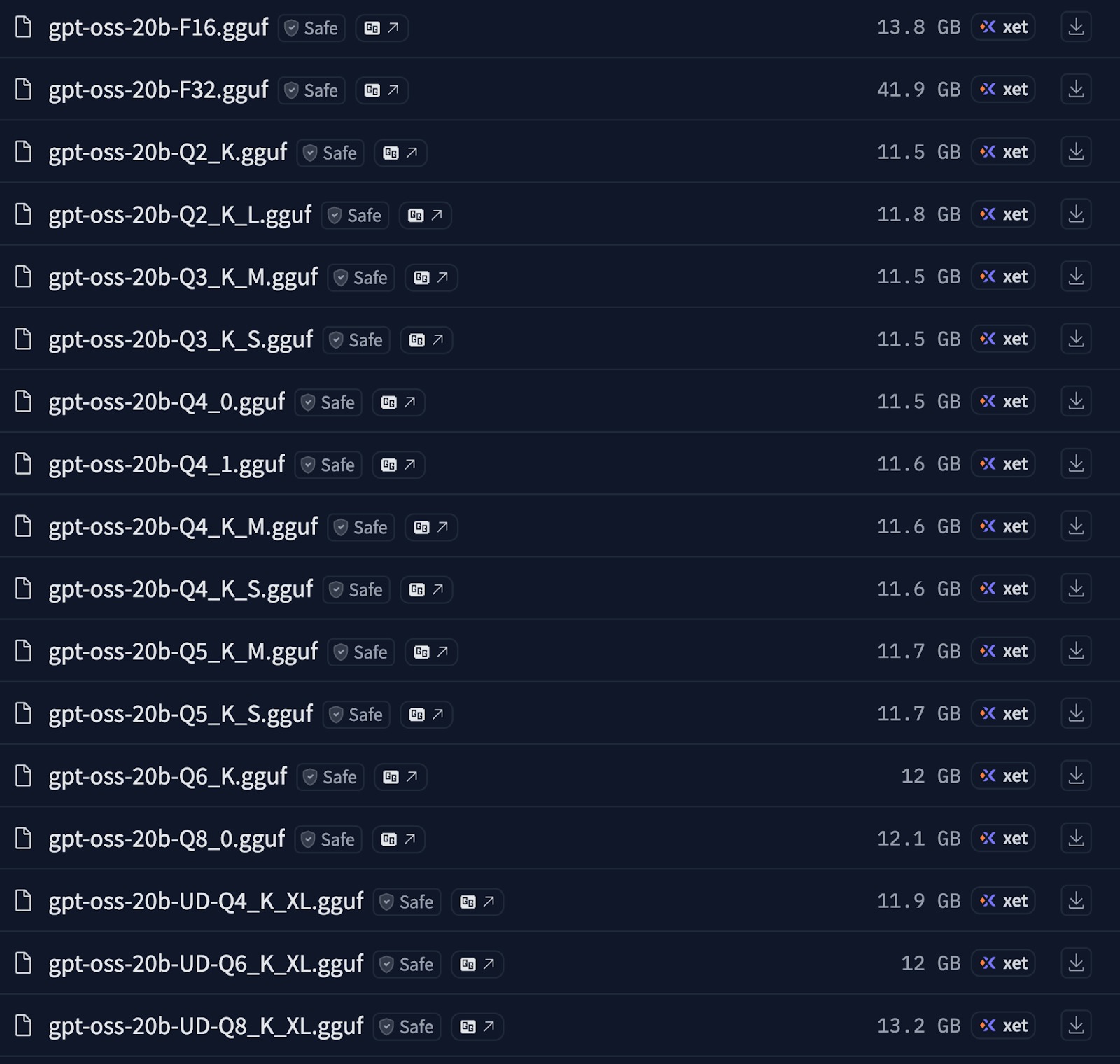
Where, for a given 4-bit quantization method, there exist three distinct approaches:
- 4Q_0, which stands for baseline block quantization, or also known as raw 4-bit. This is a fixed-sized quantization with a global scale, where all the weights are squeezed into the global range, meaning the quantization error is high during knowledge compression. Although this method provides the maximum throughput, it does dip the accuracy significantly.
- 4Q_K_S stands for group-wise quantization with a symmetric scaling factor. Having a symmetric scale during knowledge quantization helps maintain error on +ve and -ve values, giving better accuracy compared to 4Q_0. The throughput can be slightly better over 4Q_0.
- 4Q_K_M stands for groupwise quantization with mixed scaling factor, which quantizes the knowledge utilizing an adaptive scaling factor per group that helps minimize the quantization error to the maximum extent over other methods. This method provides the best balance between accuracy, speed, and memory footprint.
Running GPT-OSS:20B on Google Colab
As the precision increases Q2=>F32, so does the demand for more compute resources to accommodate the tensor operations.
To run such a speed & accuracy balanced version of gpt-oss:20B over consumer-grade hardware like an Nvidia T4 with just 16GB memory, we can leverage the custom 4-bit quantised version from Huggingface here.
The code snippets below are all you need to run the 20B model over a Google Colab Jupyter notebook instance.
Install Requirements
!pip install unsloth
!pip install --no-deps bitsandbytes accelerate xformers==0.0.29.post3 peft trl triton cut_cross_entropy unsloth_zoo
!pip install sentencepiece protobuf "datasets>=3.4.1,<4.0.0" "huggingface_hub>=0.34.0" hf_transfer
!pip install --no-deps unsloth

!pip install --upgrade -qqq uv

try:
    import numpy; install_numpy = f"numpy=={numpy.__version__}"
except:
    install_numpy = "numpy"

!uv pip install -qqq \
    "torch>=2.8.0" "triton>=3.4.0" {install_numpy} \
    "unsloth_zoo[base] @ git+https://github.com/unslothai/unsloth-zoo" \
    "unsloth[base] @ git+https://github.com/unslothai/unsloth" \
    torchvision bitsandbytes \
    git+https://github.com/huggingface/transformers \
    git+https://github.com/triton-lang/triton.git@main#subdirectory=python/triton_kernels
Restart the Jupyter notebook session and use the code below to run the model.
from unsloth import FastLanguageModel
import torch
from transformers import TextStreamer

model, tokenizer = FastLanguageModel.from_pretrained(
    model_name = "unsloth/gpt-oss-20b-unsloth-bnb-4bit",
#     token = "hf*****" Your huggingface token for gated models like llama etc.
    dtype = None,
    max_seq_length = 4096, # Max context length
    load_in_4bit = True,
    full_finetuning = False
)

messages = [
    {"role": "user", "content": "Explain the concept of Doppler Effect."},
]
inputs = tokenizer.apply_chat_template(
    messages,
    add_generation_prompt = True,
    return_tensors = "pt",
    return_dict = True,
    reasoning_effort = "low",
).to(model.device)

# Stream output
_ = model.generate(**inputs, max_new_tokens=512, streamer=TextStreamer(tokenizer))
Conclusion
We are huge fans of open-source AI and would like to emphasize the following for the future.
- Future open source AI releases: Will companies prioritize showcasing technical capabilities and not genuine usability, or will they learn to design keeping hardware constraints in mind?
- Community-driven optimization: The fact that we have a gap between corporate release of the models and the practical usage of the models suggests that successful adoption of open source models would require corporate adoption, community translation, and user implementation.
- Prioritize ecosystem maturity over model specification: Parameter counts are a good indicator to go after a model, but evaluate models and look for community support, diverse quantization options, and proven deployment pathways, and prioritize models that do well in these aspects.
- Local AI development: As more and more powerful models get released as open source, mastering the techniques you have learnt in this article, GGUF formats, quantization strategies, and cloud hybrid approaches will determine how far you will ride the wave of AI advancement in the open source realm.
Opinions expressed by DZone contributors are their own.
Comments