

From 0.68 to 10 Requests/Second: Optimizing LLM Serving With vLLM
This article demonstrates how vLLM is a game-changer for efficient GPU memory utilization and what makes it a high-throughput serving and inference engine.
GPUs are essential for running large language models (LLMs). But when companies deploy LLMs to production, having powerful GPUs alone isn't enough.
What becomes equally important is handling available GPUs efficiently, so that multiple concurrent user requests can be served within sub-second response times. This requires a software layer above GPUs that can provide request batching, memory optimization, and dynamic resource management. That's exactly what vLLM strives to provide. In this article, we will explore how vLLM achieves this and examine the performance improvements it delivers.
Before diving into vLLM, let's first understand why efficient utilization of GPUs is crucial.
LLM Inference Costs
Modern GPUs for LLM inference can be quite expensive. The best GPUs for large-scale enterprises running LLM inference, such as the NVIDIA H100, can range from $30,000-$40,000 per GPU. Large-scale companies deploy fleets of such GPUs. Inefficient memory management would lead to such a powerful and expensive fleet serving only around 5 users instead of 50 users.
Let's look into why and how memory management is crucial for high-throughput serving.
Memory Layout
Model weights are expected to take up around 70% of the memory of the GPU.
A small percentage (5-10%) of memory is allocated for temporary activations, which are intermediate computations done for the prompts.
The remaining approximately 20-25% is available for the KV cache, which is a key-value cache for tokens, allowing the model to 'remember' previous tokens without recomputing them.
Inference
LLM inference is a sequential process wherein a model generates tokens one at a time, based on the input prompt and the previously generated output tokens. This process is repeated until the model outputs an end-of-sequence token. This process utilizes the KV cache introduced in the above section. Which means the serving throughput is dependent on how efficiently this critical segment of memory is managed.
LLMs allocate contiguous chunks of memory from the KV cache for each request. Each request can generate varying outputs, leading to more memory allocation per request. Traditional approaches pre-allocate large contiguous memory blocks for each request's maximum possible sequence length. For example, if a system reserves memory for 2048 tokens per request but most conversations only use 200-500 tokens, 75% of the allocated memory sits unused. This waste severely limits how many requests can be batched together, which in turn prevents higher throughput.
PagedAttention
To address the above-described issue of KV cache management, UC Berkeley researchers introduced a new algorithm called PagedAttention, which is based on a crucial Operating System's memory management technique: paging. The main concept behind OS paging is to divide the program into fixed-sized blocks called pages, allowing non-contiguous memory allocation for the program, and more importantly, allowing loading only the currently-needed blocks into memory. This way, multiple programs can be simultaneously loaded in memory and processed.
PagedAttention applies the same principles to KV cache, and this is the core foundation of vLLM.
vLLM
vLLM is the high-throughput serving and inference engine. It is fast and efficient due to:
- PagedAttention for efficient KV cache management
- Prefix caching support to avoid recomputations
- Continuous batching of incoming requests for higher throughput
It is an easy-to-use and complete inference stack that includes:
- An HTTP server compatible with OpenAI APIs
- Integration with popular Hugging Face models
- Support for various and frequently used compute infrastructure (such as NVIDIA GPUs, AMD CPUs and GPUs, Intel CPUs and GPUs, PowerPC CPUs, and TPU)
Now that we understand the advantages of vLLM, it is time to see it in action!
Benchmarking With vLLM
Here's the configuration and setup I used for the testing:
Configuration
This is the server configuration:
Tesla V100 Tensor Core GPU (2)
10 core CPU
45 GB RAM
32 GB GPU VRAM
The model I chose for this test is "gpt2-large." I found this to be the perfect size for the server, and choosing the right model size was crucial, as we need to download and deploy the model for inference from the server.
I downloaded and used the following packages and any required dependencies for my test:
pip install transformers flask accelerate requests vllm
vLLM is an inference stack complete with its HTTP server. To demonstrate vLLM's advantages, I created a baseline comparison using a standard approach: a Flask HTTP server that accepts requests and processes them through the LLM individually. This represents how most developers would initially implement LLM serving, without any model-level optimization.
While this Flask server can receive multiple requests simultaneously, each request must wait for its own individual forward pass through the model. This creates a bottleneck at the LLM inference layer, regardless of whether HTTP concurrency can be enabled.
This is the simple Flask-based HTTP server that accepts requests on an endpoint called `/generate` on port 6000 and uses those as prompts for the model:
# custom_server.py
from transformers import AutoTokenizer, AutoModelForCausalLM
import torch
from flask import Flask, request, jsonify

app = Flask(__name__)

model_name = "gpt2-large"
tokenizer = AutoTokenizer.from_pretrained(model_name, use_fast=False)
model = AutoModelForCausalLM.from_pretrained(
    model_name,
    torch_dtype=torch.float16,
    device_map="auto"
)

@app.route('/generate', methods=['POST'])
def generate():
    data = request.json
    prompt = data['prompt']

    inputs = tokenizer(prompt, return_tensors="pt").to(model.device)
    outputs = model.generate(**inputs, max_new_tokens=50)
    response = tokenizer.decode(outputs[0], skip_special_tokens=True)

    return jsonify({'response': response})

if __name__ == '__main__':
app.run(host='0.0.0.0', port=6000, threaded=False)Note: The endpoint name and port can be changed; this is just what I chose.
I then started this sequential server on one tab of the terminal:
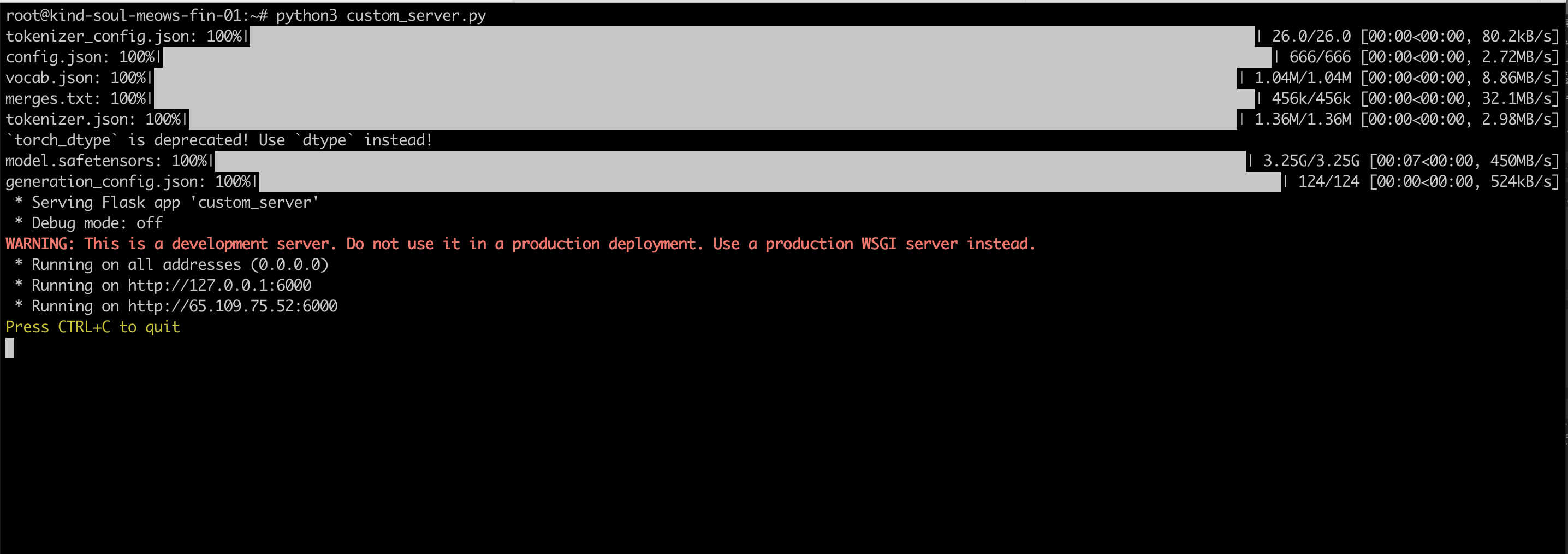
On the second tab of the terminal, I started the vLLM server by running:
python3 -m vllm.entrypoints.openai.api_server \
--model gpt2-large \
--tensor-parallel-size 2 \
--gpu-memory-utilization 0.7 \
--port 8000
For the benchmark tests, I chose to write a small Python script that sends requests to both the sequential server and vllm server:
import time
import requests
import threading

def send_request(url):
    if "6000" in url:  # Custom server
        response = requests.post(f"{url}/generate",
                               json={"prompt": "Tell me about efficient GPU utilization"})
    else:  # vLLM server
        response = requests.post(f"{url}/v1/completions",
                               json={"model": "gpt2-large",
                                    "prompt": "Tell me about efficient GPU utilization",
                                    "max_tokens": 50})
    return response.status_code

def test_server(url, name, num_requests=20):
    print(f"\nTesting {name} with {num_requests} requests...")

    start_time = time.time()

    threads = []
    for i in range(num_requests):
        thread = threading.Thread(target=send_request, args=(url,))
        threads.append(thread)
        thread.start()

    for thread in threads:
        thread.join()

    total_time = time.time() - start_time
    print(f"{name}: Completed {num_requests} requests in {total_time:.2f} seconds")
    print(f"Throughput: {num_requests/total_time:.2f} requests/second")

# Run tests
test_server("http://localhost:6000", "Custom server (No vLLM)", 50)
test_server("http://localhost:8000", "vLLM", 50)
The results speak for themselves!
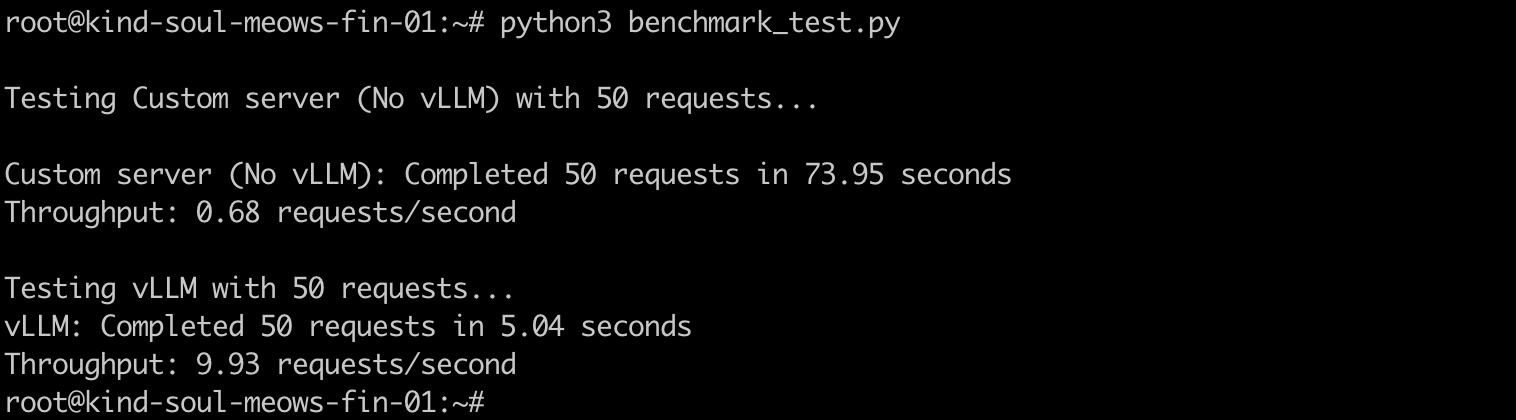
The requests to the custom sequential server took close to 74 seconds, whereas for vLLM, it took 5 seconds to process them. Showing almost 14x improvement in request processing speed and throughput.
From my testing, I've seen this improvement range anywhere from 7-15x.
Conclusion
vLLM's combination of PagedAttention, prefix caching, and continuous batching makes it a tremendously efficient LLM serving and inference engine, delivering a 14x throughput improvement in our testing: 0.68 to 10 req/sec on the same hardware. While our GPU configuration was modest compared to enterprise production deployments, these results demonstrate vLLM's potential impact at scale.
For enterprises running fleets of expensive H100 GPUs, this efficiency translates directly to ROI: instead of serving a handful of concurrent users per GPU, vLLM enables serving dozens of users on the same infrastructure. In production environments where GPU costs can exceed millions annually, vLLM's memory optimization proves to be a game-changer.
Opinions expressed by DZone contributors are their own.