

Pagination in MS SQL Server
What is pagination and how does it work in Microsoft SQL Server? In this article, we go over these questions and other important points to consider.
Pagination is the process of dividing large data into smaller data sets in discrete pages. It is widely used in web applications.
How Does Pagination Work in MS SQL Server?
In MS SQL Server, we can achieve the pagination functionality by using OFFSET and FETCH clauses with ORDER BY in a SELECT statement.
OFFSET: Represents the number of rows to be skipped from the result set. It should be 0 or greater than 0.FETCH: Represents the number of rows to be displayed in the result.
Important Points to Consider While Using OFFSET and FETCH:
ORDER BYis mandatory to the useOFFSET FETCHClause.OFFSETis mandatory andFETCHis optional.- The
TOPclause cannot be used in theSELECTstatement withOFFSET FETCH.
Let's see examples:
In the below example, OFFSET 0 and FETCH NEXT 5 ROWS means skip no rows and return the next 5 rows in the dataset, which are the first 5 rows in the dataset.
SELECT EmployeeKey,FirstName,LastName,Title,EmailAddress,
Phone,EmergencyContactName,DepartmentName
FROM dbo.DimEmployee WITH(NOLOCK)
ORDER BY EmployeeKey
OFFSET 0 ROWS
FETCH NEXT 5 ROWS ONLY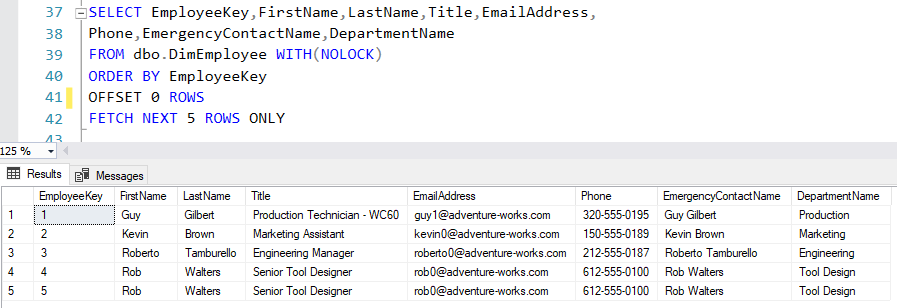
In the below example, OFFSET 3 and FETCH NEXT 5 ROWS mean skip the first 3 rows and return the next 5 rows in the dataset.
SELECT EmployeeKey,FirstName,LastName,Title,EmailAddress,
Phone,EmergencyContactName,DepartmentName
FROM dbo.DimEmployee WITH(NOLOCK)
ORDER BY EmployeeKey
OFFSET 3 ROWS
FETCH NEXT 5 ROWS ONLY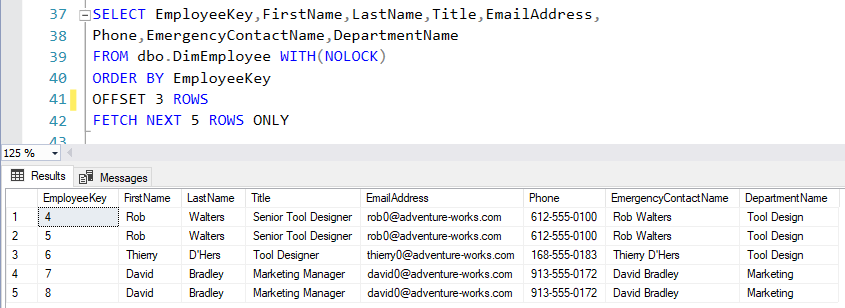
PageNumberRowsOfPage
PageNumber— Represents the page numberRowsOfPage— Represents the no of rows on a page
Now, to calculate the number of rows to be skipped when we move to the next page the (@PageNumber-1) * @RowsOfPage formula is being used in the OFFSET, and the number of rows will be returned in FETCH.
Here, PageNumber is 2 and RowsOfPage is 5, which means return the dataset for page number 2.
DECLARE @PageNumber AS INT
       ,@RowsOfPage AS INT

SET @PageNumber=2
SET @RowsOfPage=5

SELECT EmployeeKey,FirstName,LastName,Title,EmailAddress,
Phone,EmergencyContactName,DepartmentName
FROM dbo.DimEmployee WITH(NOLOCK)
ORDER BY EmployeeKey
OFFSET (@PageNumber-1) * @RowsOfPage ROWS
FETCH NEXT @RowsOfPage ROWS ONLY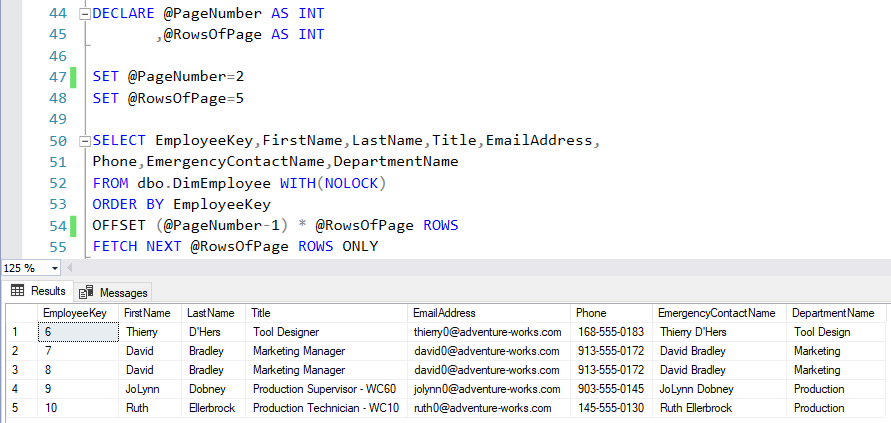
Conclusion
In the real-time application, this complete logic can be written in the stored procedure which is called by clicking the "Next" or page number button in the web application to display the set of records on the page.
Opinions expressed by DZone contributors are their own.