

Solving Parallel Writing Issues in MuleSoft With Distributed Locking
Learn how to solve parallel writing issues in MuleSoft applications running in multi-threaded or multi-worker environments using distributed locking.
Join the DZone community and get the full member experience.
Join For FreeIn MuleSoft applications running in multi-threaded or multi-worker environments, the risk of parallel writing issues arises when multiple threads or workers attempt to access or update the same shared resource simultaneously. These issues can lead to data corruption, inconsistencies, or unexpected behavior, especially in distributed systems where Mule applications are deployed across multiple workers in a cluster.
The Problem: Parallel Writing
Let me illustrate the problem first. I created a simple counter application that supports /inc and /get operations. The /inc operation increases the counter by 1, and the /get operation returns the current value.
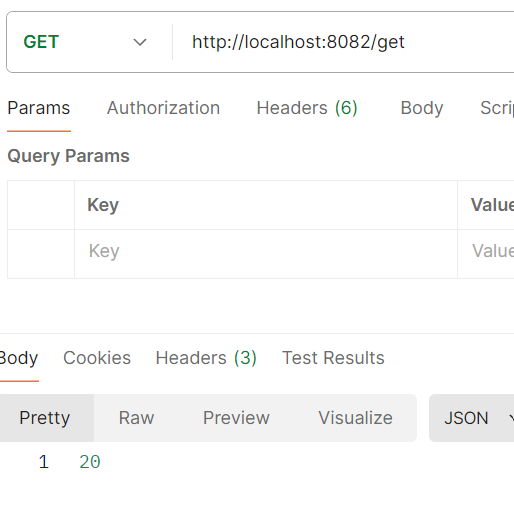
Now, if I hit /inc parallelly from JMeter 300 times, the /get should return exactly 300 if all writes are successful and no overwrite happens. However, in Mule4, we will not get 300.
Issue: Lower Count Due to Overwriting
The screenshot shows we are getting a much lower number here because of parallel threads, which results in overwriting.
The Solution: Distributed Locking in Mule 4
To solve this issue, Mule 3 provided the "retrieve-with-lock" object store operation (<objectstore:retrieve-with-lock>). However, Mule 4 does not offer this out-of-the-box solution. Instead, Mule 4 requires distributed locking via LockFactory.createLock().
The counter application version 2 uses a Groovy script and Java bean to implement distributed locking. The Groovy script is very small, and it performs only the bean lookup and method invocation:
<scripting:execute engine="Groovy">
  <scripting:code><![CDATA[registry.lookupByName("beanName").get().retrieveValue(key)]]></scripting:code>
</scripting:execute>
And the Java part is doing the actual locking:
Lock lock = muleContext.getLockFactory().createLock(objectStoreName + "Lock");


ObjectStore<CustomObject> objectStore = muleContext.getObjectStoreManager()
.getObjectStore(objectStoreName);

    lock.lock();

    try {

        List<String> keys = objectStore.allKeys();

        for(String key : keys) {
            CustomObject value = objectStore.retrieve(key);

            if (value.getClientId().equals(clientId)) {
                objectStore.remove(key);
                break;
            }
        }

        CustomObject newObject = new CustomObject(token);
        if (objectStore.contains(token)) {
            objectStore.remove(token);
        }

        objectStore.store(token, newObject);
    } finally {
    lock.unlock();
}
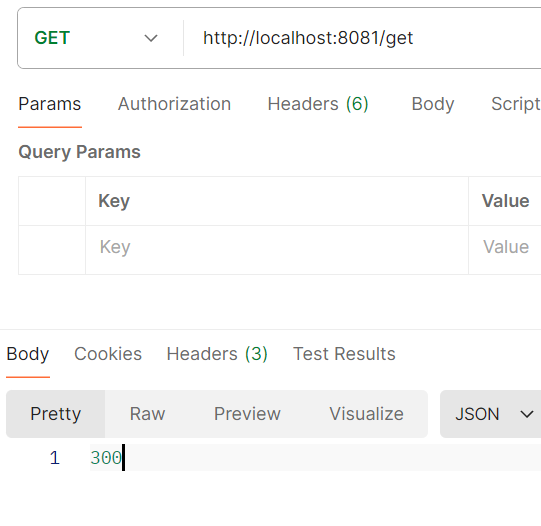
Now, the operation is slightly slower due to the locking mechanism, but the overwriting issue is resolved. The counter value now returns exactly 300, as expected:
Consideration for CloudHub Deployments
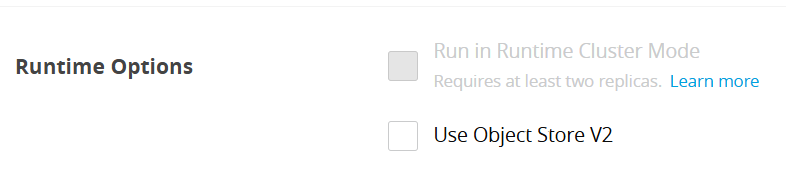
However, there is just one issue: if you have multiple workers in a Cloudhub deployment, you need to implement a cluster-wide distributed lock. Go to CloudHub settings and enable cluster mode to ensure the lock is applied across the entire cluster:
Conclusion
Distributed locking is a powerful technique to handle parallel writing issues in MuleSoft applications deployed in multi-threaded or multi-worker environments. By leveraging Object Store or similar mechanisms, you can synchronize resource access and maintain data integrity.
When implemented correctly, distributed locking ensures that your applications remain reliable and consistent, even in the most demanding distributed systems.
Opinions expressed by DZone contributors are their own.
Comments