

Parsing Complex JSON in Kafka Source Using Apache SeaTunnel
In conclusion, it is recommended to use the extension of UDF functions to parse the nested JSON data from Kafka sources.
Join the DZone community and get the full member experience.
Join For FreeVersion Information:
- SeaTunnel: apache-seatunnel-2.3.2-SNAPSHOT
- Engines: Flink 1.16.2
- Zeta: Consistent with SeaTunnel
Introduction
Recently, we took over a data integration project where the upstream data was delivered to Kafka. Initially, we chose the SpringBoot+Flink approach to process the incoming data (referred to as Solution 1 below). However, after facing efficiency issues in the production environment, we turned our attention to the open-source project SeaTunnel. We discovered that SeaTunnel supports Kafka as a source and started exploring and testing it. In our development environment, we experimented with over 5 million records and achieved an efficiency of around 10,000 records per second.
Consequently, we abandoned Solution 1 and adopted SeaTunnel for integrated data processing (Solution 2 below). During our exploration of SeaTunnel, we identified two methods. Method 2, compared to Method 1, offers a more comprehensive solution that handles various scenarios without concerns about data misalignment caused by unexpected characters within field values.
Comparison

Based on Solution 2, two derived methods were developed:
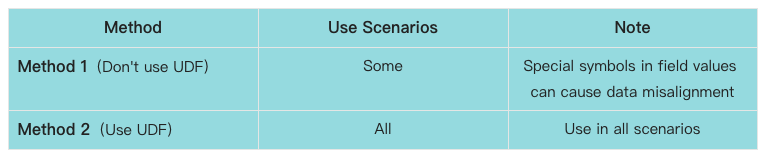
Now, let’s dive into the main content and explore the two methods in Solution 2, allowing you to experience the magic of SeaTunnel.
Solution 1: Kafka Complex JSON Parsing With Spring Boot + Flink
There are many online examples available for this approach, so we won’t go into much detail here.
Before we proceed, let’s take a look at a sample JSON data delivered to Kafka by the upstream party (part of the data has been redacted):
"type": "D***",
"headers": null,
"messageSchemaId": null,
"messageSchema": null,
"message": {
    "data": {
        "LSH": "187eb13****l0214723",
        "NSRSBH": "9134****XERG56",
        "QMYC": "01*****135468",
        "QMZ": "1Zr*****UYGy%2F5bOWtrh",
        "QM_SJ": "2023-05-05 16:42:10.000000",
        "YX_BZ": "Y",
        "ZGHQ_BZ": "Y",
        "ZGHQ_SJ": "2023-06-26 16:57:17.000000",
        "SKSSQ": 202304,
        "SWJG_DM": "",
        "SWRY_DM": "00",
        "CZSJ": "2023-05-05 16:42:10.000000",
        "YNSRSBH": "9134****XERG56",
        "SJTBSJ": "2023-06-26 19:29:59.0,00",
        "SJCZBS": "I"
    },
    "beforeData": null,
    "headers": {
        "operation": "INSERT",
        "changeSequence": "12440977",
        "timestamp": "2023-06-26T19:29:59.673000",
        "streamPosition": "00****3.16",
        "transactionId": "000***0006B0002",
        "changeMask": "0FFF***FF",
        "columnMask": "0F***FFFF",
        "transactionEventCounter": 1,
        "transactionLastEvent": false
    }
}
Method 1: Parsing Without UDF Functions
Issue: Field values may contain delimiters, such as ‘,.’ This can lead to data misalignment during storage.
This method primarily utilizes various transformation plugins available in the official transform-v2. It includes the Replace, Split, and SQL implementations.
ST Script: (ybjc_qrqm.conf)
job.mode = "STREAMING"
job.name = "kafka2mysql_ybjc"
execution.checkpoint.interval = 60000
source {
  Kafka {
    result_table_name = "DZFP_***_QRQM1"
    topic = "DZFP_***_QRQM"
    bootstrap.servers = "centos1:19092,centos2:19092,centos3:19092"
    schema = {
      fields {
        message =  {
            data = {
                LSH = "string",
                NSRSBH =  "string",
                QMYC =  "string",
                QMZ =  "string",
                QM_SJ =  "string",
                YX_BZ =  "string",
                ZGHQ_BZ =  "string",
                ZGHQ_SJ =  "string",
                SKSSQ =  "string",
                SWJG_DM = "string",
                SWRY_DM = "string",
                CZSJ = "string",
                YNSRSBH = "string",
                SJTBSJ = "string",
                SJCZBS = "string"
            }
        }
      }
    }
      start_mode = "earliest"
    kafka.config = {
      auto.offset.reset = "earliest"
      enable.auto.commit = "true"
      max.partition.fetch.bytes = "5242880"
      session.timeout.ms = "30000"
      max.poll.records = "100000"
    }
  }
}transform {
 Replace {
    source_table_name = "DZFP_***_QRQM1"
    result_table_name = "DZFP_***_QRQM2"
    replace_field = "message"
    pattern = "[["
    replacement = ""
  }
  Replace {
    source_table_name = "DZFP_***_QRQM2"
    result_table_name = "DZFP_***_QRQM3"
    replace_field = "message"
    pattern = "]]"
    replacement = ""
  }

  Split {
    source_table_name = "DZFP_***_QRQM3"
    result_table_name = "DZFP_***_QRQM4"
    separator = ","
    split_field = "message"
    output_fields = [zwf1,zwf2,zwf3,zwf4,zwf5,nsrsbh,qmyc,qmz,qm_sj,yx_bz,zghq_bz,zghq_sj,skssq,swjg_dm ,swry_dm ,czsj ,ynsrsbh ,sjtbsj ,sjczbs]
  }

  sql{
   source_table_name = "DZFP_***_QRQM4"
   query = "select replace(zwf5 ,'fields=[','') as lsh,nsrsbh,trim(qmyc) as qmyc,qmz,qm_sj,yx_bz, zghq_bz,zghq_sj,skssq,swjg_dm ,swry_dm ,czsj ,ynsrsbh ,sjtbsj ,replace(sjczbs,']}]}','') as sjczbs  from DZFP_DZDZ_QRPT_YWRZ_QRQM4 where skssq <> ' null'"
   result_table_name = "DZFP_***_QRQM5"
  }

}sink {
    Console {
        source_table_name = "DZFP_***_QRQM5"
    }

    jdbc {
        source_table_name = "DZFP_***_QRQM5"
        url = "jdbc:mysql://localhost:3306/dbname?serverTimezone=GMT%2b8"
        driver = "com.mysql.cj.jdbc.Driver"
        user = "user"
        password = "pwd"
        batch_size = 200000
        database = "dbname"
        table = "tablename"
        generate_sink_sql = true
        primary_keys = ["nsrsbh","skssq"]
    }
}
Data can be successfully written:
- Kafka Source Data:
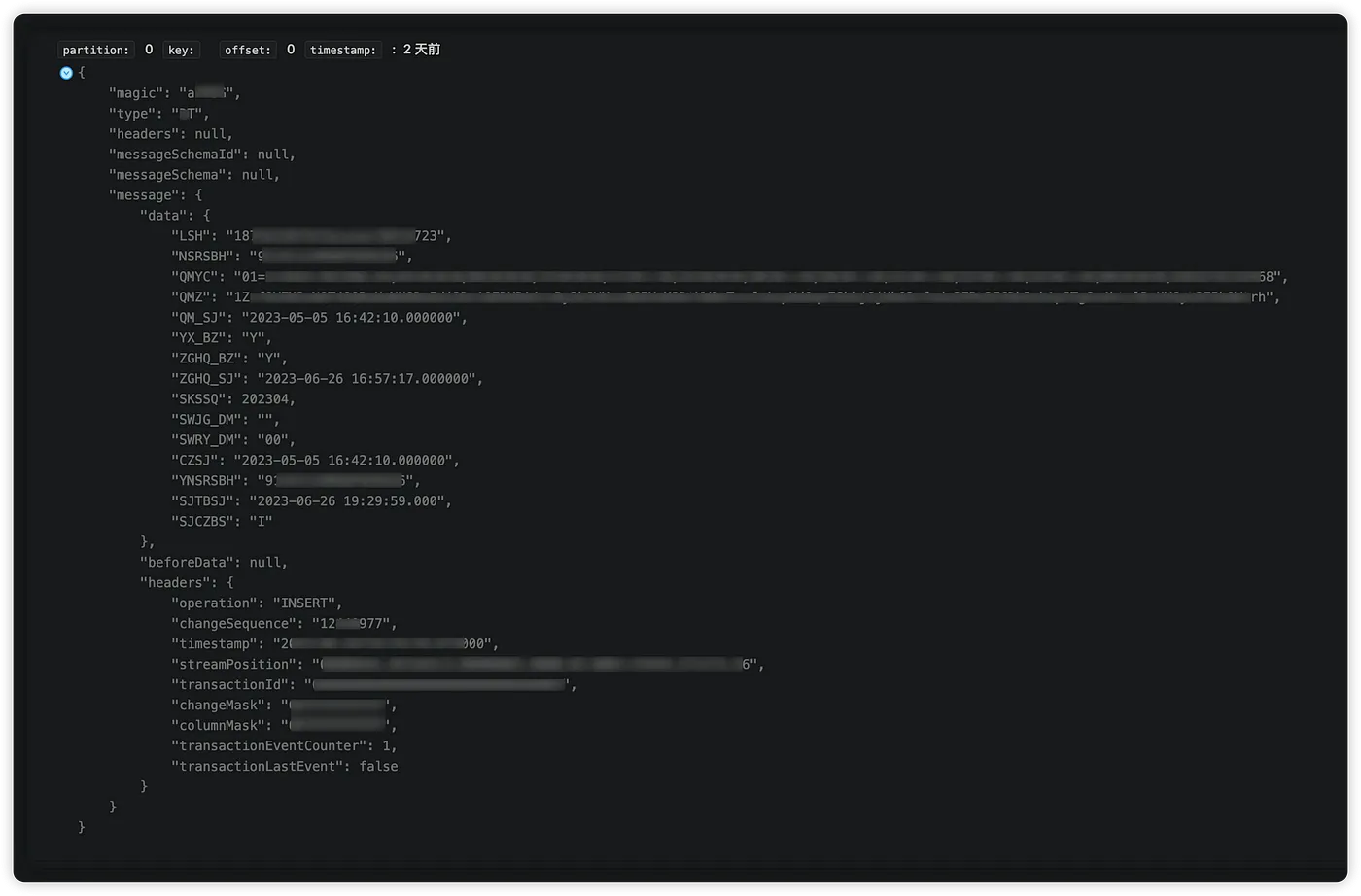
- Target Data in TiDB:

Original value: 2023-06-26 19:29:59.000
Modified value: 2023-06-26 19:29:59.0,00
Command to produce data to the topic:
kafka-console-producer.sh --topic DZFP_***_QRQM --broker-list centos1:19092,centos2:19092,centos3:19092
Data sent:
"type": "D***",
"headers": null,
"messageSchemaId": null,
"messageSchema": null,
"message": {
    "data": {
        "LSH": "187eb13****l0214723",
        "NSRSBH": "9134****XERG56",
        "QMYC": "01*****135468",
        "QMZ": "1Zr*****UYGy%2F5bOWtrh",
        "QM_SJ": "2023-05-05 16:42:10.000000",
        "YX_BZ": "Y",
        "ZGHQ_BZ": "Y",
        "ZGHQ_SJ": "2023-06-26 16:57:17.000000",
        "SKSSQ": 202304,
        "SWJG_DM": "",
        "SWRY_DM": "00",
        "CZSJ": "2023-05-05 16:42:10.000000",
        "YNSRSBH": "9134****XERG56",
        "SJTBSJ": "2023-06-26 19:29:59.0,00",
        "SJCZBS": "I"
    },
    "beforeData": null,
    "headers": {
        "operation": "INSERT",
        "changeSequence": "12440977",
        "timestamp": "2023-06-26T19:29:59.673000",
        "streamPosition": "00****3.16",
        "transactionId": "000***0006B0002",
        "changeMask": "0FFF***FF",
        "columnMask": "0F***FFFF",
        "transactionEventCounter": 1,
        "transactionLastEvent": false
    }
}
After writing the data, we notice that the data is misaligned:

Conclusion: This issue can still occur in production environments when fields contain delimiters like commas in addresses or remarks. Therefore, this approach is not recommended as it poses significant risks to the data. It can be used for handling simple data as an alternative approach.
Method 2: Parsing With UDF Functions
This method extends SeaTunnel’s capabilities using UDF functions, enabling nested JSON source data parsing from Kafka. It simplifies the ST script configuration significantly.
SSeaTunnel Script: (ybjc_qrqm_yh.conf)
execution.parallelism = 5
job.mode = "STREAMING"
job.name = "kafka2mysql_ybjc_yh"
execution.checkpoint.interval = 60000
}
source {
    Kafka {
        result_table_name = "DZFP_***_QRQM1"
        topic = "DZFP_***_QRQM"
        bootstrap.servers = "centos1:19092,centos2:19092,centos3:19092"
        schema = {
        fields {
             message =  {
                data = "map<string,string>"
             }
        }
        }
        start_mode = "earliest"
        kafka.config = {
        auto.offset.reset = "earliest"
        enable.auto.commit = "true"
        max.partition.fetch.bytes = "5242880"
        session.timeout.ms = "30000"
        max.poll.records = "100000"
        }
    }
}
transform {
    sql{
        source_table_name = "DZFP_***_QRQM1"
        result_table_name = "DZFP_***_QRQM2"
        query = "select qdmx(message,'lsh') as lsh,qdmx(message,'nsrsbh') as nsrsbh,qdmx(message,'qmyc') as qmyc,qdmx(message,'qmz') as qmz,qdmx(message,'qm_sj') as qm_sj,qdmx(message,'yx_bz') as yx_bz,qdmx(message,'zghq_bz') as zghq_bz,qdmx(message,'zghq_sj') as zghq_sj,qdmx(message,'skssq') as skssq,qdmx(message,'swjg_dm') as swjg_dm,qdmx(message,'swry_dm') as swry_dm,qdmx(message,'czsj') as czsj,qdmx(message,'ynsrsbh') as ynsrsbh, qdmx(message,'sjtbsj') as sjtbsj,qdmx(message,'sjczbs') as sjczbs  from  DZFP_DZDZ_QRPT_YWRZ_QRQM1"
    }
}
sink {
    Console {
        source_table_name = "DZFP_***_QRQM2"
    }
    jdbc {
        source_table_name = "DZFP_***_QRQM2"
        url = "jdbc:mysql://localhost:3306/dbname?serverTimezone=GMT%2b8"
        driver = "com.mysql.cj.jdbc.Driver"
        user = "user"
        password = "pwd"
        batch_size = 200000
        database = "dbname"
        table = "tablename"
        generate_sink_sql = true
        primary_keys = ["nsrsbh","skssq"]
    }
}
Executing the script and checking the results, we can see that the data is not misaligned and remains in the original field (‘sjtbsj’):
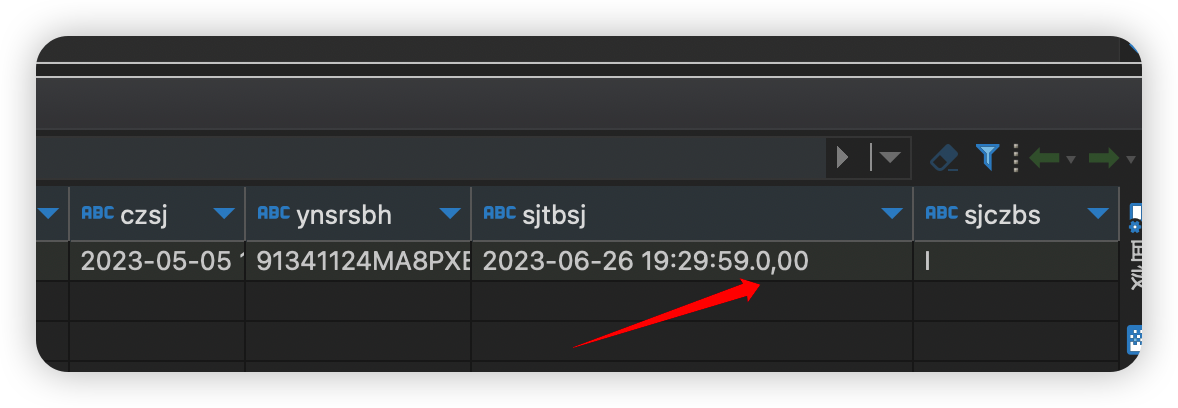
Maven dependencies are as follows:
<dependency>
    <groupId>org.apache.seatunnel</groupId>
    <artifactId>seatunnel-transforms-v2</artifactId>
    <version>2.3.2</version>
    <scope>provided</scope>
  </dependency>
 <dependency>
    <groupId>org.apache.seatunnel</groupId>
    <artifactId>seatunnel-api</artifactId>
    <version>2.3.2</version>
  </dependency>  <dependency>
    <groupId>cn.hutool</groupId>
    <artifactId>hutool-all</artifactId>
    <version>5.8.20</version>
  </dependency>  <dependency>
    <groupId>com.google.auto.service</groupId>
    <artifactId>auto-service-annotations</artifactId>
    <version>1.1.1</version>
    <optional>true</optional>
    <scope>compile</scope>
  </dependency>  <dependency>
    <groupId>com.google.auto.service</groupId>
    <artifactId>auto-service</artifactId>
    <version>1.1.1</version>
    <optional>true</optional>
    <scope>compile</scope>
  </dependency>
</dependencies>
UDF-specific implementation in Java:
import cn.hutool.core.util.StrUtil;
import cn.hutool.json.JSONObject;
import cn.hutool.json.JSONUtil;
import com.google.auto.service.AutoService;
import org.apache.seatunnel.api.table.type.BasicType;
import org.apache.seatunnel.api.table.type.SeaTunnelDataType;
import org.apache.seatunnel.transform.sql.zeta.ZetaUDF;import java.util.HashMap;
import java.util.List;
import java.util.Map;@AutoService(ZetaUDF.class)
public class QdmxUDF implements ZetaUDF { @Override
public String functionName() {
return "QDMX";
} @Override
public SeaTunnelDataType<?> resultType(List<SeaTunnelDataType<?>> list) {
return BasicType.STRING_TYPE;
}// list Example of parameters: (which is the data parsed by Kafka)
//SeaTunnelRow{tableId=, kind=+I, fields=[{key1=value1,key2=value2,.....}]}
@Override
public Object evaluate(List<Object> list) {
String str = list.get(0).toString();
//1 Remove the prefix
str = StrUtil.replace(str, "SeaTunnelRow{tableId=, kind=+I, fields=[{", "");
//2 Remove the suffix
str = StrUtil.sub(str, -3, 0);
// 3 build Map key value
Map<String, String> map = parseToMap(str);
if ("null".equals(map.get(list.get(1).toString())))
return "";
// 4 return the value of the key
return map.get(list.get(1).toString());
}public static Map<String, String> parseToMap(String input) {
Map<String, String> map = new HashMap<>();
// Remove the curly brackets and remove them during the string stage.
// input = input.replaceAll("[{}]", "");
// Split key-value pairs.
String[] pairs = input.split(", "); for (String pair : pairs) {
String[] keyValue = pair.split("=");
if (keyValue.length == 2) {
String key = keyValue[0].trim().toLowerCase();
String value = keyValue[1].trim();
map.put(key, value);
}
}
return map;
}
}Then, for packaging, use the following command:
mvn -T 8 clean install -DskipTests -Dcheckstyle.skip -Dmaven.javadoc.skip=true
Check the META-INF/services directory to see if the @AutoService annotation generates the corresponding SPI interface。
If it is as shown below, then the packaging is successful!

If not, the packaging fails, and the UDF function cannot be used.
You can refer to my packaging plugin:
<plugins>
    <plugin>
      <groupId>org.apache.maven.plugins</groupId>
      <artifactId>maven-site-plugin</artifactId>
      <version>3.7</version>
      <dependencies>
        <dependency>
          <groupId>org.apache.maven.doxia</groupId>
          <artifactId>doxia-site-renderer</artifactId>
          <version>1.8</version>
        </dependency>
      </dependencies>
    </plugin>
    <plugin>
      <groupId>org.apache.maven.plugins</groupId>
      <artifactId>maven-compiler-plugin</artifactId>
      <version>3.8.1</version>
      <configuration>
        <annotationProcessorPaths>
          <path>
            <groupId>com.google.auto.service</groupId>
            <artifactId>auto-service</artifactId>
            <version>1.1.1</version>
          </path>
        </annotationProcessorPaths>
      </configuration>
    </plugin>
  </plugins>
</build>
Finally, place the packaged JAR file in the ${SEATUNNEL_HOME}/lib directory. Since my UDF function depends on a third-party JAR, it should be uploaded together. If using the Zeta cluster, you need to restart the Zeta cluster for it to take effect. For other engines, it will take effect in real-time.
The successful upload will look like this:
Note: The “hutool-all” JAR file can be included in the java_studyproject. I uploaded two for convenience.
In conclusion, it is recommended to use the extension of UDF functions to parse the nested JSON data from Kafka sources.
Published at DZone with permission of Debra Chen. See the original article here.
Opinions expressed by DZone contributors are their own.
Comments