

Part 3: Transforming MongoDB CDC Event Messages
This post is part 3 of a series on event-driven systems with Memphis.dev. We added a transformer service to deserialize MongoDB CDC records into JSON.
Join the DZone community and get the full member experience.
Join For FreeIn our last blog post, we introduced a reference implementation for capturing change data capture (CDC) events from a MongoDB database using Debezium Server and Memphis.dev. At the end of the post, we noted that MongoDB records are serialized as strings in Debezium CDC messages like so:
{
	"schema" : ...,
        "payload" : {
        	"before" : null,
            "after" : "{\\"_id\\": {\\"$oid\\": \\"645fe9eaf4790c34c8fcc2ed\\"},\\"creation_timestamp\\": {\\"$date\\": 1684007402978},\\"due_date\\": {\\"$date\\": 1684266602978},\\"description\\": \\"buy milk\\",\\"completed\\": false}",
            ...
         }
}
We want to use the Schemaverse functionality of Memphis.dev to check messages against an expected schema. Messages that don’t match the schema are routed to a dead letter station so that they don’t impact downstream consumers. If this all sounds like ancient Greek, don’t worry! We’ll explain the details in our next blog post.
To use functionality like Schemaverse, we need to deserialize the MongoDB records as JSON documents. This blog post describes a modification to our MongoDB CDC pipeline that adds a transformer service to deserialize the MongoDB records to JSON documents.
Overview of the Solution
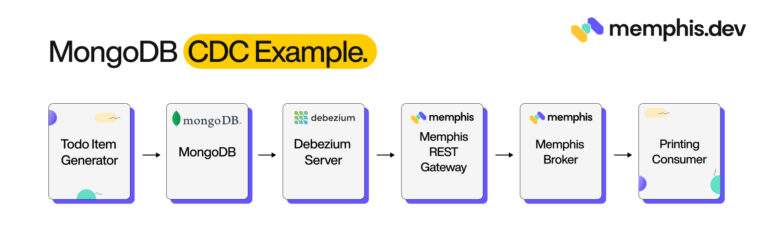
The previous solution consisted of six components:
1. Todo Item Generator: Inserts a randomly generated to-do item in the MongoDB collection every 0.5 seconds. Each to-do item contains a description, creation timestamp, optional due date, and completion status.
2. MongoDB: Configured with a single database containing a single collection (todo_items).
3. Debezium Server: Instance of Debezium Server configured with MongoDB source and HTTP Client sink connectors.
4. Memphis.dev REST Gateway: Uses the out-of-the-box configuration.
5. Memphis.dev: Configured with a single station (todo-cdc-events) and single user (todocdcservice)
6. Printing Consumer: A script that uses the Memphis.dev Python SDK to consume messages and print them to the console.
 In this iteration, we are adding two additional components:
1. Transformer Service: A transformer service that consumes messages from the todo-cdc-events station, deserializes the MongoDB records, and pushes them to the cleaned-todo-cdc-events station.
2. Cleaned Printing Consumer: A second instance of the printing consumer that prints messages pushed to the cleaned-todo-cdc-events station.
The updated architecture looks like this:
A Deep Dive Into the Transformer Service
Skeleton of the Message Transformer Service
The transformer service uses the Memphis.dev Python SDK. Let’s walk through the transformer implementation. The main() method of our transformer first connects to the Memphis.dev broker. The connection details are grabbed from environmental variables. The host, username, password, input station name, and output station name are passed using environmental variables in accordance with suggestions from the Twelve-Factor App manifesto.
async def main():
    try:
        print("Waiting on messages...")
        memphis = Memphis()
        await memphis.connect(host=os.environ[HOST_KEY],
                              username=os.environ[USERNAME_KEY],
                              password=os.environ[PASSWORD_KEY])
Once a connection is established, we create consumer and producer objects. In Memphis.dev, consumers, and producers have names. These names appear in the Memphis.dev UI, offering transparency into the system operations.
print("Creating consumer")
        consumer = await memphis.consumer(station_name=os.environ[INPUT_STATION_KEY],
                                          consumer_name="transformer",
                                          consumer_group="")

        print("Creating producer")
        producer = await memphis.producer(station_name=os.environ[OUTPUT_STATION_KEY],
                                          producer_name="transformer")
The consumer API uses the callback function design pattern. When messages are pulled from the broker, the provided function is called with a list of messages as its argument.
print("Creating handler")
        msg_handler = create_handler(producer)

        print("Setting handler")
        consumer.consume(msg_handler)
After setting up the callback, we kick off the asyncio event loop. At this point, the transformer service pauses and waits until messages are available to pull from the broker.
- Keep your main thread alive so the consumer will keep receiving data.
await asyncio.Event().wait()Creating the Message Handler Function
The create function for the message handler takes a producer object and returns a callback function. Since the callback function only takes a single argument, we use the closure pattern to implicitly pass the producer to the msg_handler function when we create it.
The msg_handler function is passed three arguments when called: a list of messages, an error (if one occurred), and a context consisting of a dictionary. Our handler loops over the messages, calls the transform function on each, sends the messages to the second station using the producer, and acknowledges that the message has been processed. In Memphis.dev, messages are not marked off as delivered until the consumer acknowledges them. This prevents messages from being dropped if an error occurs during processing.
def create_handler(producer):
    async def msg_handler(msgs, error, context):
        try:
            for msg in msgs:
                transformed_msg = deserialize_mongodb_cdc_event(msg.get_data())
                await producer.produce(message=transformed_msg)
                await msg.ack()
        except (MemphisError, MemphisConnectError, MemphisHeaderError) as e:
            print(e)
            return

    return msg_handler
The Message Transformer Function
Now, we get to the meat of the service: the message transformer function. Message payloads (returned by the get_data() method) are stored as bytearray objects. We use the Python json library to deserialize the messages into a hierarchy of Python collections (list and dict) and primitive types (int, float, str, and None).
def deserialize_mongodb_cdc_event(input_msg):
    obj = json.loads(input_msg)
We expect the object to have a payload property with an object as the value. That object then has two properties (“before” and “after”), which are either None or strings containing serialized JSON objects. We use the JSON library again to deserialize and replace the strings with the objects.
if "payload" in obj:
        payload = obj["payload"]

        if "before" in payload:
            before_payload = payload["before"]
            if before_payload is not None:
                payload["before"] = json.loads(before_payload)

        if "after" in payload:
            after_payload = payload["after"]
            if after_payload is not None:
                payload["after"] = json.loads(after_payload)
Lastly, we reserialize the entire JSON record and convert it back into a bytearray for transmission to the broker.
output_s = json.dumps(obj)
    output_msg = bytearray(output_s, "utf-8")
    return output_msg
Hooray! Our objects now look like so:
{
	"schema" : ...,
        "payload" : {
        	"before" : null,
            "after" :
"_id": { "$oid": "645fe9eaf4790c34c8fcc2ed" },
"creation_timestamp": { "$date": 1684007402978 },
"due_date": { "$date" : 1684266602978 },
"description": "buy milk",
"completed": false
},

...
}
}
Running the Transformer Service
If you followed the seven steps in the previous blog post, you only need to run three additional steps. to start the transformer service and verify that it's working:
Step 8: Start the Transformer Service
$ docker compose up -d cdc-transformer
[+] Running 3/3
 ⠿ Container mongodb-debezium-cdc-example-memphis-metadata-1  Hea...                                                             0.5s
 ⠿ Container mongodb-debezium-cdc-example-memphis-1           Healthy                                                            1.0s
 ⠿ Container cdc-transformer                                  Started                                                            1.3s
Step 9: Start the Second Printing Consumer
$ docker compose up -d cleaned-printing-consumer
[+] Running 3/3
 ⠿ Container mongodb-debezium-cdc-example-memphis-metadata-1  Hea...                                                             0.5s
 ⠿ Container mongodb-debezium-cdc-example-memphis-1           Healthy                                                            1.0s
 ⠿ Container cleaned-printing-consumer                        Started                                                            1.3s
Step 10: Check the Memphis UI
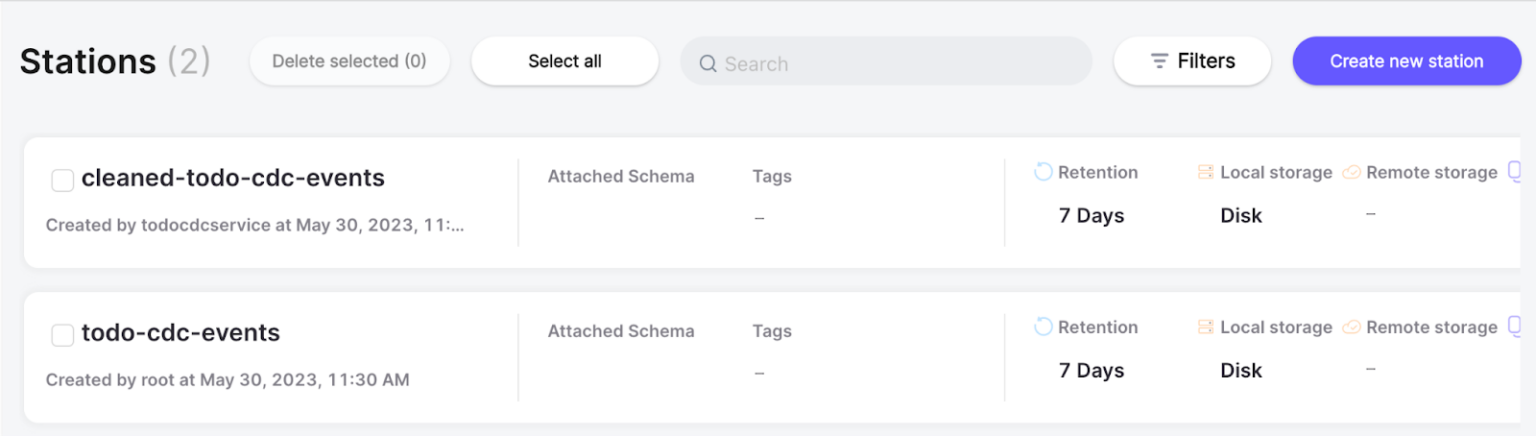
When the transformer starts producing messages to Memphis.dev, a second station named “cleaned-todo-cdc-events” will be created. You should see this new station on the Station Overview page in the Memphis.dev UI like so:
The details page for the “cleaned-todo-cdc-events” page should show the transformer attached as a producer, the printing consumer, and the transformed messages:

Congratulations! We’re now ready to tackle validating messages using Schemaverse in our next blog post. Stay tuned!
In case you missed parts 1 and 2:
Published at DZone with permission of RJ Nowling. See the original article here.
Opinions expressed by DZone contributors are their own.
Comments