

Calling GCP From AWS Without Static Keys Using Open-Source MultiCloudJ
This guide demonstrates exchanging an AWS SigV4 Request for a GCP access token to enable secure, zero-trust communication between clouds using MultiCloudJ.
Join the DZone community and get the full member experience.
Join For FreeIn Part 1, we solved one direction of the multi-cloud connectivity problem: a workload running in Google Cloud interacting with an AWS cloud resource. A GKE pod read a Google-issued OIDC token from the metadata server, handed it to AWS STS via AssumeRoleWithWebIdentity, and received short-lived AWS credentials, with no static access keys stored anywhere. MultiCloudJ wrapped the token dance behind a portable client so the application code never touched a provider SDK directly.
This article covers the return trip: a workload running in AWS calling into Google Cloud — specifically, an Amazon EKS pod reading and writing a Google Cloud Storage (GCS) bucket — again with zero long-lived credentials.
The zero-trust principle is identical. The mechanism is a bit different. And that asymmetry is the single most important thing to understand before you build it.
Authentication Flow from AWS to GCP
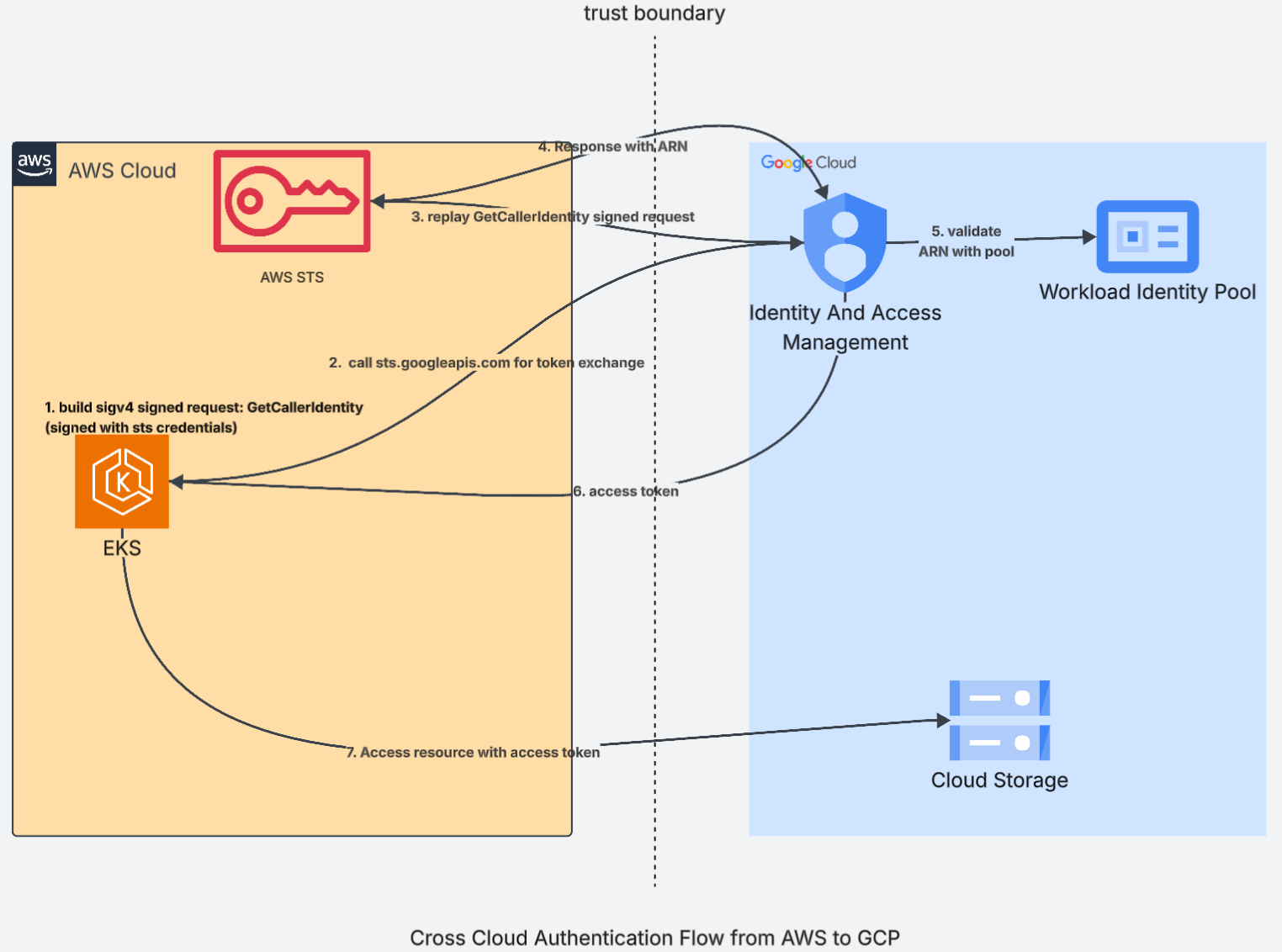
1. Build a SigV4-signed GetCallerIdentity request (signed with STS credentials): It's assumed that the EKS pod already holds temporary AWS credentials.
2. Call sts.googleapis.com for token exchange: The pod sends that signed request to Google Cloud as the input to an OAuth 2.0 token exchange. It is asking Google, "Here is proof of who I am on AWS - please give me a Google token to access cloud resources."
3. Replay the GetCallerIdentity signed request: Google does not trust the request blindly. It runs the signed request against AWS STS on the caller's behalf.
4. Response with ARN: AWS checks the signature and replies with the caller's ARN (the AWS role identity) as part of the GetCallerIdentity response. Now Google knows exactly which AWS identity is asking - proven by the signature, with no shared secret.
5. Validate the ARN with the pool: Google checks that ARN against the Workload Identity Pool rules - which AWS account and which role are allowed in, and how the ARN maps to a Google identity.
6. Access token: Once the ARN passes, Google returns a short-lived access token to the EKS pod.
7. Access the resource with the access token: The pod uses that token to read and write Cloud Storage. When the token expires (usually within an hour), the flow repeats. Nothing long-lived is ever stored.
Summary: AWS proves the pod's identity by answering Google's replayed request, and Google issues a short-lived token based on that proof. No access keys, no service-account key files - just a signed request and a temporary token crossing the trust boundary.
Please note that this authentication flow can be used for any cloud service and is not specifically for cloud storage.
Direct Pool Access vs. Service Account Impersonation
Once Google has verified the caller's AWS identity through the signed request, it still has to map that AWS identity to something that actually holds permissions on the bucket. There are two ways to do this mapping, and you should pick one before you grant any IAM role.
Option 1: Direct Pool Access
You grant the Cloud Storage role straight to the federated identity. In IAM, the member looks like this: principalSet://iam.googleapis.com/projects/123456789/locations/global/workloadIdentityPools/aws-pool/*
The permission sits on this pool principal, not on the AWS role. The AWS role never holds any GCP permission. Its only job is to prove identity: it answers Google's replayed GetCallerIdentity request so Google knows which AWS identity is asking. Google then checks that identity against the pool rules and, if it is allowed in, treats the caller as this pool principal. The bucket role, such as roles/storage.objectAdmin, is bound to that principal, so that is where the actual access comes from. No service account sits in the middle. In your code, the value you pass is the pool provider resource name (the audience), and Google issues a token that represents the pool identity directly.
Option 2: Service Account Impersonation
You create a GCP service account, grant that service account the bucket role, and then let the federated identity impersonate it. The federated identity needs roles/iam.serviceAccountTokenCreator on that service account, and the exchange gets a second hop: first a pool token, then an impersonated service-account token. In your code, the value you pass is the service account email.
Which to Choose
For a straight AWS EKS to GCS case like this one, direct pool access is the better default:
- Fewer moving parts. No service account to create, no token-creator grant to manage, and no second token hop.
- Tighter blast radius. The bucket permission is tied to identities coming through this specific pool, not to a service account that other workloads might also be able to impersonate. You can narrow it further to a single AWS role with an attribute condition on the principal.
- Less to audit. One IAM binding on the bucket tells the whole story.
Reach for impersonation only when you actually need what a service account gives you:
- You must reuse an existing service account that already carries permissions across many GCP resources.
- A downstream Google API or tool only understands service-account identities and cannot evaluate a principalSet:// member.
- Your organization standardizes on service accounts as the single unit of access, to stay consistent with other human and machine grants.
In short, direct pool access is simpler and safer, so use it unless a concrete requirement forces impersonation.
Set Up Workload Identity Pool on GCP
Before any code runs, you configure the trust relationship on Google Cloud once. Three things: a pool, an AWS provider inside it, and an IAM grant on the bucket.
- Create the Workload Identity Pool: The pool is the identity container that your AWS workloads will be represented as.
gcloud iam workload-identity-pools create aws-pool --location="global" --display-name="AWS workloads" - Create the AWS provider inside the pool: The provider is the entry gate. It tells Google to trust GetCallerIdentity results from a specific AWS account, how to map the caller's ARN into a Google attribute, and which callers are allowed in.
Two important parts here:- The attribute mapping turns the caller's raw ARN into a stable attribute.aws_role value with the session name stripped, so grants survive session rotation.
- The attribute condition is the first gate: only callers from your AWS account are admitted, before any IAM binding is even checked.
 gcloud iam workload-identity-pools providers create-aws aws-provider \
    --location="global" \
    --workload-identity-pool="aws-pool" \
    --account-id="123456789012" \
    --attribute-mapping="google.subject=assertion.arn,attribute.aws_role=assertion.arn.contains('assumed-role') ? assertion.arn.extract('{account_arn}assumed-role/') + 'assumed-role/' + assertion.arn.extract('assumed-role/{role_name}/') : assertion.arn,attribute.account=assertion.account" \
--attribute-condition="assertion.account == '123456789012'"- Grant the bucket role to the pool principal: This is the direct pool access model. The permission binds to the AWS role (via the mapped attribute), not to a service account.
gcloud storage buckets add-iam-policy-binding gs://my-archive-bucket \
    --role="roles/storage.objectAdmin" \
    --member="principalSet://iam.googleapis.com/projects/PROJECT_NUMBER/locations/global/workloadIdentityPools/aws-pool/attribute.aws_role/arn:aws:sts::123456789012:assumed-role/my-eks-role"
After this, the EKS pod's role can federate into the pool and read/write the bucket, and the application code in the next section never touches any of this setup again.
Implementation With MultiCloudJ
MultiCloudJ exposes the same BucketClient abstraction you saw in Part 1; you build it for the "gcp" provider and attach a CredentialsOverrider that carries the federated identity. The library handles the SigV4 signing, the STS token exchange, and (on the impersonation path) the generateAccessToken call internally; your code just does blob operations (full example).
private static final String REGION = "us-west-2";

// The audience is the full Workload Identity Pool provider resource name.
// We grant the bucket role directly to this pool principal (direct pool
// access), so no service account sits in the middle.
private static final String AUDIENCE = "//iam.googleapis.com/projects/123456789/locations/global/workloadIdentityPools/aws-pool/providers/aws-provider";

// The supplier runs on every GCP token refresh. Each time it signs a fresh
// GetCallerIdentity request with the pod's AWS role (IRSA, picked up from the
// ambient AWS credential chain) and returns the subject token GCP expects.
Supplier<String> webIdentityTokenSupplier = GcsFromAws::buildSubjectToken;

CredentialsOverrider overrider = new CredentialsOverrider.Builder(CredentialsType.ASSUME_ROLE_WEB_IDENTITY)
  .withRole(AUDIENCE)
  .withWebIdentityTokenSupplier(webIdentityTokenSupplier)
  .build();

// Portable client: same API as the AWS side in Part 1,
// only the provider string changes.
BucketClient bucketClient = BucketClient.builder("gcp")
  .withBucket("my-archive-bucket")
  .withCredentialsOverrider(overrider)
  .build();

ListBlobsPageResponse page = bucketClient.listPage(ListBlobsPageRequest.builder().withMaxResults(10).build());
page.getBlobs().forEach(b -> System.out.println(b.getName()));


// Signs a GetCallerIdentity request with the pod's AWS role, then shapes the
// signed request into the URL-encoded JSON envelope that Google STS expects
// as an AWS4 subject token.
private static String buildSubjectToken() {
  // Google requires the audience to travel inside the signed headers, so it is
  // bound to the signature and the request cannot be replayed against any other
  // target.
  SignOptions options = SignOptions.builder()
    .withCustomHeader("x-goog-cloud-target-resource", AUDIENCE)
    .build();

  StsUtilities stsUtil = StsUtilities.builder("aws").withRegion(REGION).build();

  // Passing null means "just sign a GetCallerIdentity request, there is no
  // service payload to hash." The library fills in Action=GetCallerIdentity.
  SignedAuthRequest signed = stsUtil.newCloudNativeAuthSignedRequest(null, options);
  JsonObject envelope = .. // construct json object from signed request uri

  return URLEncoder.encode(envelope.toString(), StandardCharsets.UTF_8);
}
Conclusion
Part 1 showed GCP calling AWS, and Part 2 completes the picture with AWS calling GCP. Both use the same idea: federation, no static keys, and only short-lived credentials. They differ only in how identity is proven. GCP to AWS presents a Google OAuth identity token, while AWS to GCP sends a signed request that GCP verifies with AWS.
This is exactly where MultiCloudJ earns its place. All of these provider-specific differences, such as the bearer token here, the signed request and replay there, the STS token exchange, the service-account impersonation, and the token refresh, are abstracted away inside the library. You build one portable client, attach a credentials overrider, and call the API. Your application code never learns which cloud it is talking to or which way the call is going, so it stays clean, portable, and free of long-lived secrets in both directions.
Opinions expressed by DZone contributors are their own.
Comments