

Pipeline of an Alexa Skill with GitHub Actions
In this article, we discuss how to implement a Devops pipeline for your Alexa Skill using GitHub Actions.
 CORE
·
CORE
·
Join the DZone community and get the full member experience.
Join For FreeAs we saw in the previous post, we have developed an entire pipeline for an Alexa Skill using CircleCI. Now we are going to build the same, but using the new continuous integration tool provided by GitHub, GitHub Actions in order to understand how it works and see the differences compared to the previous CI/CD platform used.
In turn, we are going to use the ASK CLI v2 and we will also use the file structure from an Alexa Skill provided by this new second version.
Prerequisites
Here are the technologies used in this project:
- Amazon Developer Account - How to create an account
- AWS Account - Sign up here for free
- ASK CLI - Install and configure ASK CLI
- GitHub Account - Sign up here for free
- Visual Studio Code
The Alexa Skills Kit Command Line Interface (ASK CLI) is a tool for us to manage our Alexa Skills and its related resources, such as AWS Lambda functions. With the ASK CLI, we have access to the Skill Management API, which allows us to manage Alexa Skills through the command line.
If you want to create a skill with ASK CLI v2, follow the steps described in the official Amazon Alexa documentation.
We are going to use this tool to perform some steps in our pipeline.
Let’s DevOps!
GitHub Actions
GitHub Actions helps us to automate tasks within the software development lifecycle. GitHub Actions is event-driven, which means that we can run a series of commands after a specific event has occurred. For example, whenever someone creates a pull request for a repository, we can automatically run a pipeline on GitHub Actions.
An event automatically triggers the workflow, which contains one or more jobs. Then the jobs use steps to control the order in which the actions are executed. These actions are the commands that automate certain processes.
Pipeline
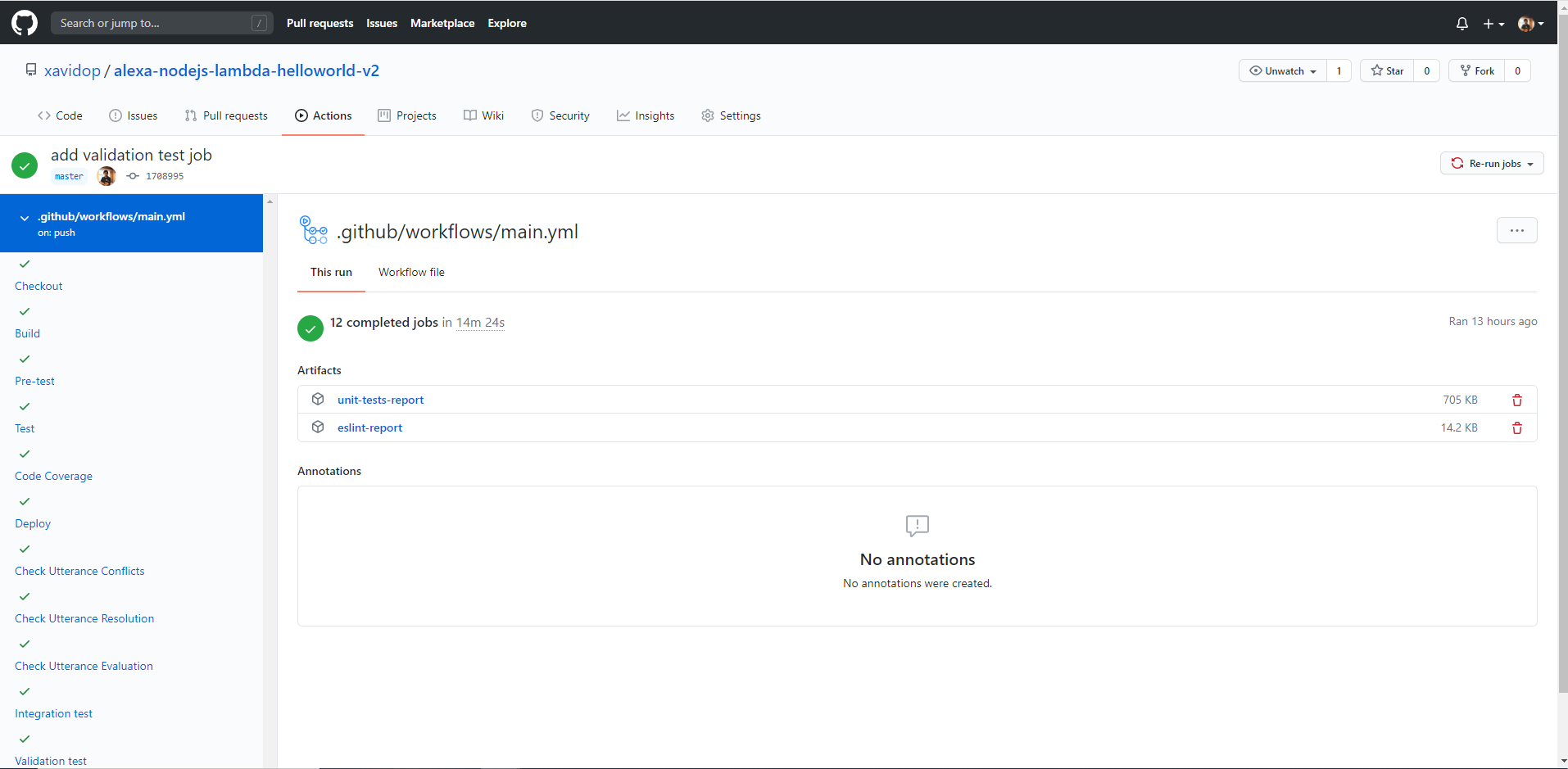
We are going to explain job by job what is happening in our pipeline. First, the workflow jobs will be defined under the jobs node in the GitHub Actions configuration file:
Checkout
The checkout job will perform the following tasks:
- Code checkout.
- Give execution permission to run all tests
checkout
runs-onubuntu-latest
nameCheckout
steps
# To use this repository's private action,
# you must check out the repository
nameCheckout
usesactions/checkout@v2
run
chmod +x -R ./test;
ls -la
Build
The build job will perform the following tasks:
- Code checkout.
- Run
npm installto download all Node.js dependencies
x
build
runs-onubuntu-latest
nameBuild
needscheckout
steps
# To use this repository's private action,
# you must check out the repository
nameCheckout
usesactions/checkout@v2
run
cd lambda;
npm install
Pretests
The pretest job runs the quality check of the static code. See the full explanation here.
Test
The test job runs the unit tests. See the full explanation here.
Code Coverage
The codecov job will run the code coverage report. See the full explanation here.
Deploy
The deploy job will deploy the Alexa skill to the Alexa cloud in the development stage. See the full explanation here.
Testing the Voice User Interface
These jobs will verify our interaction model. See the full explanation here.
Integration tests
These jobs will check the interaction model and our backend as well. See the full explanation here.
End to End Tests
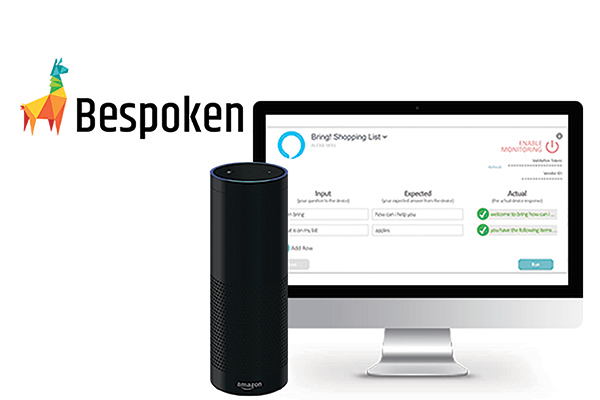
These jobs verify the entire system using voice as input thanks to Bespoken. See the full explanation here.
Validation Tests
These jobs will validate the Alexa Skill before submitting it for certification. See the full explanation here.
Store-artifacts
The store-artifacts job will perform the following tasks:
- Download the code.
- Store the code of our Alexa Skill as an artifact. It will be accessible on GitHub Actions whenever we want to see it.
x
store-artifacts
runs-onubuntu-latest
nameSubmit
needssubmit
steps
# To use this repository's private action,
# you must check out the repository
nameCheckout
usesactions/checkout@v2
nameUpload code
usesactions/upload-artifact@v2
with
namecode
path$ github.workspace
Submit
These jobs will send the Alexa Skill for certification. See the full explanation here.
Workflow
At the end of the GitHub Actions configuration file, we will define our pipeline as a GitHub Actions workflow that will execute the jobs explained above:
x
onpush
jobs
checkout
runs-onubuntu-latest
nameCheckout
steps
# To use this repository's private action,
# you must check out the repository
nameCheckout
usesactions/checkout@v2
run
chmod +x -R ./test;
ls -la
build
runs-onubuntu-latest
nameBuild
needscheckout
steps
# To use this repository's private action,
# you must check out the repository
nameCheckout
usesactions/checkout@v2
run
cd lambda;
npm install
pretest
runs-onubuntu-latest
namePre-test
needsbuild
steps
# To use this repository's private action,
# you must check out the repository
# To use this repository's private action,
# you must check out the repository
nameCheckout
usesactions/checkout@v2
run
cd lambda;
npm install;
npm run lint;
npm run lint-html
nameUpload results
usesactions/upload-artifact@v2
with
nameeslint-report
pathlambda/reports/eslint/
test
runs-onubuntu-latest
nameTest
needspretest
steps
# To use this repository's private action,
# you must check out the repository
nameCheckout
usesactions/checkout@v2
run
cd lambda;
npm install;
npm run test
nameUpload results
usesactions/upload-artifact@v2
with
nameunit-tests-report-html
pathlambda/mochawesome-report/
nameUpload results
usesactions/upload-artifact@v2
with
nameunit-tests-report-xml
pathlambda/reports/mocha/
codecov
runs-onubuntu-latest
nameCode Coverage
needstest
steps
# To use this repository's private action,
# you must check out the repository
nameCheckout
usesactions/checkout@v2
run
cd lambda;
npm install;
npm run codecov
env: # Or as an environment variable
CODECOV_TOKEN: ${{ secrets.CODECOV_TOKEN }}
deploy
runs-onubuntu-latest
nameDeploy
needscodecov
steps
# To use this repository's private action,
# you must check out the repository
nameCheckout
usesactions/checkout@v2
run
sudo npm install -g ask-cli;
sudo apt-get install -y jq
cd lambda;
npm install;
npm run copy-package;
cd src;
npm run build-production
runls -la && ask deploy --ignore-hash
env# Or as an environment variable
CODECOV_TOKEN$ secrets.CODECOV_TOKEN
ASK_ACCESS_TOKEN$ secrets.ASK_ACCESS_TOKEN
ASK_REFRESH_TOKEN$ secrets.ASK_REFRESH_TOKEN
ASK_VENDOR_ID$ secrets.ASK_VENDOR_ID
AWS_ACCESS_KEY_ID$ secrets.AWS_ACCESS_KEY_ID
AWS_SECRET_ACCESS_KEY$ secrets.AWS_SECRET_ACCESS_KEY
SKILL_ID$ secrets.SKILL_ID
check-utterance-conflicts
runs-onubuntu-latest
nameCheck Utterance Conflicts
needsdeploy
steps
# To use this repository's private action,
# you must check out the repository
nameCheckout
usesactions/checkout@v2
run
sudo npm install -g ask-cli;
chmod +x -R ./test;
cd test/vui-test/;
./interaction_model_checker.sh $SKILL_ID v2
env: # Or as an environment variable
CODECOV_TOKEN: ${{ secrets.CODECOV_TOKEN }}
ASK_ACCESS_TOKEN: ${{ secrets.ASK_ACCESS_TOKEN }}
ASK_REFRESH_TOKEN: ${{ secrets.ASK_REFRESH_TOKEN }}
ASK_VENDOR_ID: ${{ secrets.ASK_VENDOR_ID }}
AWS_ACCESS_KEY_ID: ${{ secrets.AWS_ACCESS_KEY_ID }}
AWS_SECRET_ACCESS_KEY: ${{ secrets.AWS_SECRET_ACCESS_KEY }}
SKILL_ID: ${{ secrets.SKILL_ID }}
check-utterance-resolution
runs-onubuntu-latest
nameCheck Utterance Resolution
needsdeploy
steps
# To use this repository's private action,
# you must check out the repository
nameCheckout
usesactions/checkout@v2
run
sudo npm install -g ask-cli;
chmod +x -R ./test;
cd test/vui-test/;
./utterance_resolution_checker.sh $SKILL_ID v2
env: # Or as an environment variable
CODECOV_TOKEN: ${{ secrets.CODECOV_TOKEN }}
ASK_ACCESS_TOKEN: ${{ secrets.ASK_ACCESS_TOKEN }}
ASK_REFRESH_TOKEN: ${{ secrets.ASK_REFRESH_TOKEN }}
ASK_VENDOR_ID: ${{ secrets.ASK_VENDOR_ID }}
AWS_ACCESS_KEY_ID: ${{ secrets.AWS_ACCESS_KEY_ID }}
AWS_SECRET_ACCESS_KEY: ${{ secrets.AWS_SECRET_ACCESS_KEY }}
SKILL_ID: ${{ secrets.SKILL_ID }}
check-utterance-evaluation
runs-onubuntu-latest
nameCheck Utterance Evaluation
needsdeploy
steps
# To use this repository's private action,
# you must check out the repository
nameCheckout
usesactions/checkout@v2
run
sudo npm install -g ask-cli;
chmod +x -R ./test;
cd test/vui-test/;
./utterance_evaluation_checker.sh $SKILL_ID v2
env: # Or as an environment variable
CODECOV_TOKEN: ${{ secrets.CODECOV_TOKEN }}
ASK_ACCESS_TOKEN: ${{ secrets.ASK_ACCESS_TOKEN }}
ASK_REFRESH_TOKEN: ${{ secrets.ASK_REFRESH_TOKEN }}
ASK_VENDOR_ID: ${{ secrets.ASK_VENDOR_ID }}
AWS_ACCESS_KEY_ID: ${{ secrets.AWS_ACCESS_KEY_ID }}
AWS_SECRET_ACCESS_KEY: ${{ secrets.AWS_SECRET_ACCESS_KEY }}
SKILL_ID: ${{ secrets.SKILL_ID }}
integration-test
runs-onubuntu-latest
nameIntegration test
needscheck-utterance-evaluation
steps
# To use this repository's private action,
# you must check out the repository
nameCheckout
usesactions/checkout@v2
run
sudo npm install -g ask-cli;
chmod +x -R ./test;
sudo apt-get install -y expect
cd test/integration-test/;
./simple-dialog-checker.sh $SKILL_ID
env: # Or as an environment variable
CODECOV_TOKEN: ${{ secrets.CODECOV_TOKEN }}
ASK_ACCESS_TOKEN: ${{ secrets.ASK_ACCESS_TOKEN }}
ASK_REFRESH_TOKEN: ${{ secrets.ASK_REFRESH_TOKEN }}
ASK_VENDOR_ID: ${{ secrets.ASK_VENDOR_ID }}
AWS_ACCESS_KEY_ID: ${{ secrets.AWS_ACCESS_KEY_ID }}
AWS_SECRET_ACCESS_KEY: ${{ secrets.AWS_SECRET_ACCESS_KEY }}
SKILL_ID: ${{ secrets.SKILL_ID }}
end-to-test
runs-onubuntu-latest
nameEnd-to-end test
needsintegration-test
steps
# To use this repository's private action,
# you must check out the repository
nameCheckout
usesactions/checkout@v2
run
sudo npm install -g ask-cli;
sudo npm install -g bespoken-tools;
chmod +x -R ./test;
bst test --config test/e2e-bespoken-test/testing.json
env: # Or as an environment variable
CODECOV_TOKEN: ${{ secrets.CODECOV_TOKEN }}
ASK_ACCESS_TOKEN: ${{ secrets.ASK_ACCESS_TOKEN }}
ASK_REFRESH_TOKEN: ${{ secrets.ASK_REFRESH_TOKEN }}
ASK_VENDOR_ID: ${{ secrets.ASK_VENDOR_ID }}
AWS_ACCESS_KEY_ID: ${{ secrets.AWS_ACCESS_KEY_ID }}
AWS_SECRET_ACCESS_KEY: ${{ secrets.AWS_SECRET_ACCESS_KEY }}
SKILL_ID: ${{ secrets.SKILL_ID }}
nameUpload code
usesactions/upload-artifact@v2
with
namebespoken-report
pathtest_output/
validation-test
runs-onubuntu-latest
nameValidation test
needsend-to-test
steps
# To use this repository's private action,
# you must check out the repository
nameCheckout
usesactions/checkout@v2
run
sudo npm install -g ask-cli;
chmod +x -R ./test;
cd test/validation-test/;
./skill_validation_checker.sh $SKILL_ID v2
env: # Or as an environment variable
CODECOV_TOKEN: ${{ secrets.CODECOV_TOKEN }}
ASK_ACCESS_TOKEN: ${{ secrets.ASK_ACCESS_TOKEN }}
ASK_REFRESH_TOKEN: ${{ secrets.ASK_REFRESH_TOKEN }}
ASK_VENDOR_ID: ${{ secrets.ASK_VENDOR_ID }}
AWS_ACCESS_KEY_ID: ${{ secrets.AWS_ACCESS_KEY_ID }}
AWS_SECRET_ACCESS_KEY: ${{ secrets.AWS_SECRET_ACCESS_KEY }}
SKILL_ID: ${{ secrets.SKILL_ID }}
submit
runs-onubuntu-latest
nameSubmit
needsvalidation-test
steps
# To use this repository's private action,
# you must check out the repository
nameCheckout
usesactions/checkout@v2
run
sudo npm install -g ask-cli;
chmod +x -R ./test;
cd test/submit/;
./submit.sh $SKILL_ID v2
env: # Or as an environment variable
CODECOV_TOKEN: ${{ secrets.CODECOV_TOKEN }}
ASK_ACCESS_TOKEN: ${{ secrets.ASK_ACCESS_TOKEN }}
ASK_REFRESH_TOKEN: ${{ secrets.ASK_REFRESH_TOKEN }}
ASK_VENDOR_ID: ${{ secrets.ASK_VENDOR_ID }}
AWS_ACCESS_KEY_ID: ${{ secrets.AWS_ACCESS_KEY_ID }}
AWS_SECRET_ACCESS_KEY: ${{ secrets.AWS_SECRET_ACCESS_KEY }}
SKILL_ID: ${{ secrets.SKILL_ID }}
store-artifacts
runs-onubuntu-latest
nameStore Artifacts
needssubmit
steps
# To use this repository's private action,
# you must check out the repository
nameCheckout
usesactions/checkout@v2
nameUpload code
usesactions/upload-artifact@v2
with
namecode
path$ github.workspace
The GitHub Actions configuration file is located at .github/workflows/main.yml.
Resources
- DevOps Wikipedia - Wikipedia
- Node.js SDK Official Documentation - Node.js SDK Official Documentation
- Official documentation of the Alexa Skills Kit - Official documentation of the Alexa Skills Kit
- Official GitHub Actions documentation - Official GitHub Actions documentation
Conclusion
Having developed the same pipeline in CircleCI as you can read in this post, we can write down the following conclusions based on the problems we have encountered during the development of this project:
- GitHub Actions is a very young platform (it is barely a year and a half old).
- We can find basic functionality for any DevOps pipeline (control flows, manual approval steps, etc.) that is not yet available in GitHub Actions.
- Executing commands in a specific Docker container is only possible through the Actions available in its [marketplace] (https://github.com/marketplace). Because of this, it somewhat complicates working with Docker executors on this platform.
You can find the code on my GitHub.
That’s it!
I hope you find it useful! If you have any doubts or questions, feel free to contact me or post a comment below.
Happy coding!
Feel free to join to the Voice Devs Community by clicking here.
Opinions expressed by DZone contributors are their own.
Comments