

DZone
Thanks for visiting DZone today,
Edit Profile
  • Manage Email Subscriptions
  • How to Post to DZone
  • Article Submission Guidelines
Sign Out View Profile
  • Post an Article
  • Manage My Drafts
Over 2 million developers have joined DZone.
Log In / Join
Refcards Trend Reports
Events Video Library
Refcards
Trend Reports

Events

View Events Video Library

Related

  • Hey Developers: Diagrams Don’t Need to Be So Complex

Trending

  • Zero-Downtime Deployments for Java Apps on Kubernetes
  • Run Gemma 4 on Your Laptop: A Hands-On Guide to Google's Latest Open Multimodal LLM
  • A Hands-On ABAP RESTful Programming Model Guide
  • How to Format Articles for DZone
  1. DZone
  2. Coding
  3. Languages
  4. Plant UML Pleasantness: Change Line Style and Color

Plant UML Pleasantness: Change Line Style and Color

PlantUML is a great Java design tool for working on your classes using standard UML. It's an open-source tool that allows for great customization.

By 
Hubert Klein Ikkink user avatar
Hubert Klein Ikkink
·
Dec. 17, 16 · Opinion
Likes (5)
Comment
Save
Tweet
Share
11.4K Views

Join the DZone community and get the full member experience.

Join For Free

We can change the line style and color when we "draw" the line in our PlantUML definition. We must set the line style and color between square brackets ([]). We can choose the following line styles: bold, plain, dotted, and dashed. The color is either a color name or a hexadecimal RGB code prefixed with a hash (#).

In the following example activity diagram we apply different styles and colors to the lines:

@startuml

' Make a dashed line, alternative syntax for ..>
(*) -[dashed]-> "Write outline"

' Make line bold and use color name
"Write outline" -[bold,#green]-> "Find example"

' Only change the color with hexadecimal RGB code
"Find example" -[#ff00ff]-> "Write blog"

' Order of line style and color can be reversed
"Write blog" -[#6666ff,dashed]-> "Publish"

' Use dotted line style
"Publish" -[dotted]-> (*)

@enduml

When we generate the activity diagram we see the different line styles and colors:
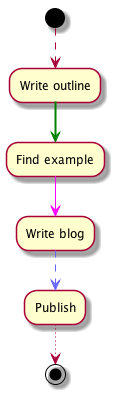
Written with PlantUML 8051.

UML

Opinions expressed by DZone contributors are their own.

Related

  • Hey Developers: Diagrams Don’t Need to Be So Complex

Partner Resources

×

Comments

The likes didn't load as expected. Please refresh the page and try again.

  • RSS
  • X
  • Facebook

ABOUT US

  • About DZone
  • Support and feedback
  • Community research

ADVERTISE

  • Advertise with DZone

CONTRIBUTE ON DZONE

  • Article Submission Guidelines
  • Become a Contributor
  • Core Program
  • Visit the Writers' Zone

LEGAL

  • Terms of Service
  • Privacy Policy

CONTACT US

  • 3343 Perimeter Hill Drive
  • Suite 215
  • Nashville, TN 37211
  • [email protected]

Let's be friends:

  • RSS
  • X
  • Facebook