

Platform Engineering Golden Paths: Stop Building Developer Portals, Start Shipping Code
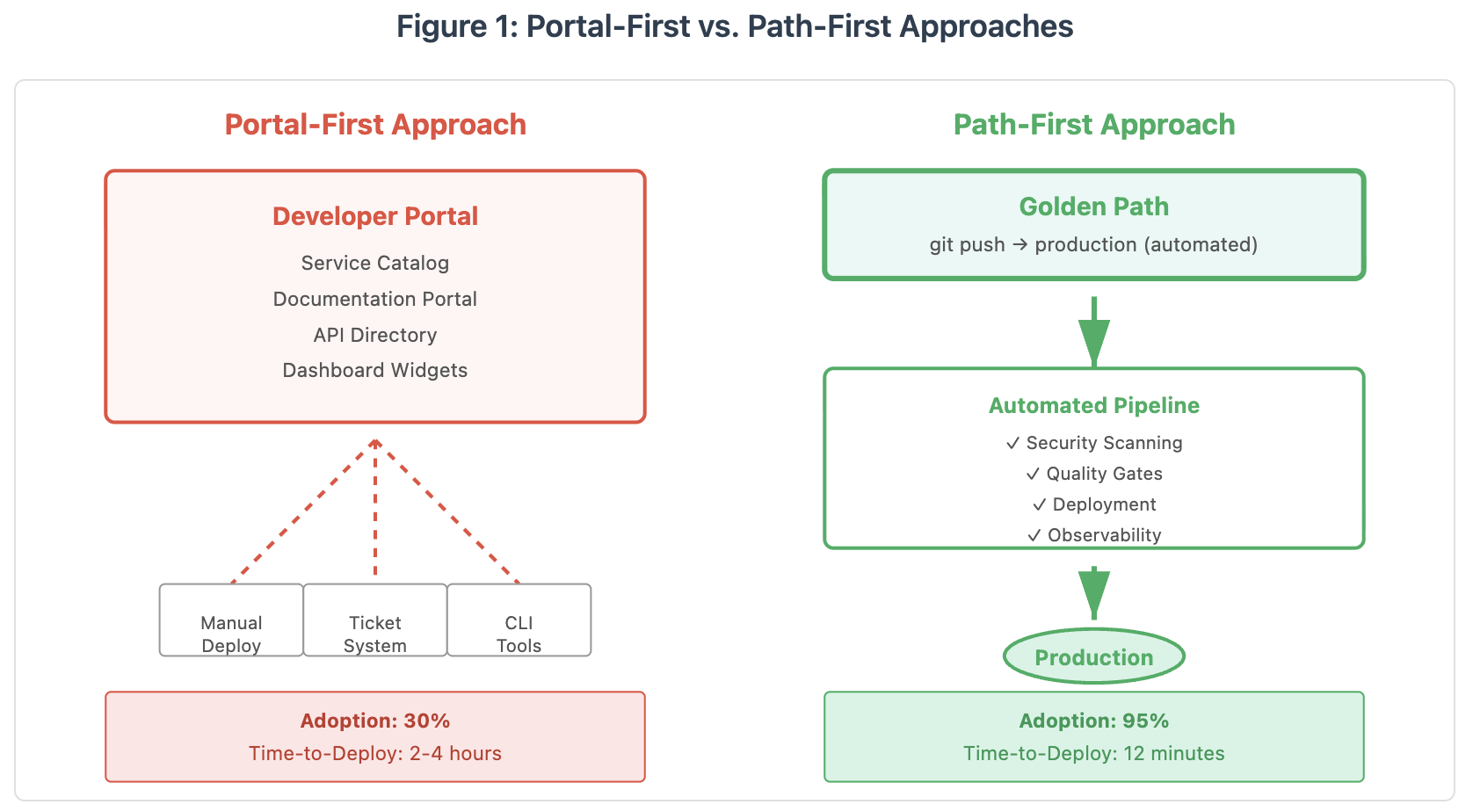
Platform engineering is backward: 80% portal building, 20% path paving. Flip it. Golden paths reach 95% adoption by making the right thing the easiest.
 CORE
·
CORE
·
Join the DZone community and get the full member experience.
Join For FreeHere’s the uncomfortable truth: if your platform team is spending 80% of its time building portals and only 20% paving paths, you’re doing platform engineering backward. The revolution isn’t about prettier UIs — it’s about invisible automation that makes the right thing the easiest thing.
The Portal Problem Nobody Talks About
Platform teams are solving the wrong problem. They’re building museums of infrastructure when developers need highways to production. I’ve seen this pattern repeat at companies ranging from scrappy Series A startups to multinational corporations: hire a platform team, mandate Backstage or Humanitec, spend six months integrating everything, launch with fanfare — and then watch adoption plateau at 30% while developers continue cowboy-coding in production.
The issue isn’t the tools — Backstage is actually pretty good. The problem is thinking that a portal is the platform. It’s like believing that building a fancy airport terminal will make planes fly faster. The terminal is nice, but the real value is in the air traffic control, the runways, and the flight paths that get passengers from New York to London safely and efficiently.
What Golden Paths Actually Look Like
Golden paths aren’t documentation. They’re not templates. They’re pre-paved highways where developers can merge onto production traffic at full speed without thinking about infrastructure details. When I talk about golden paths, I’m talking about making deployment so boring and automated that it becomes invisible.
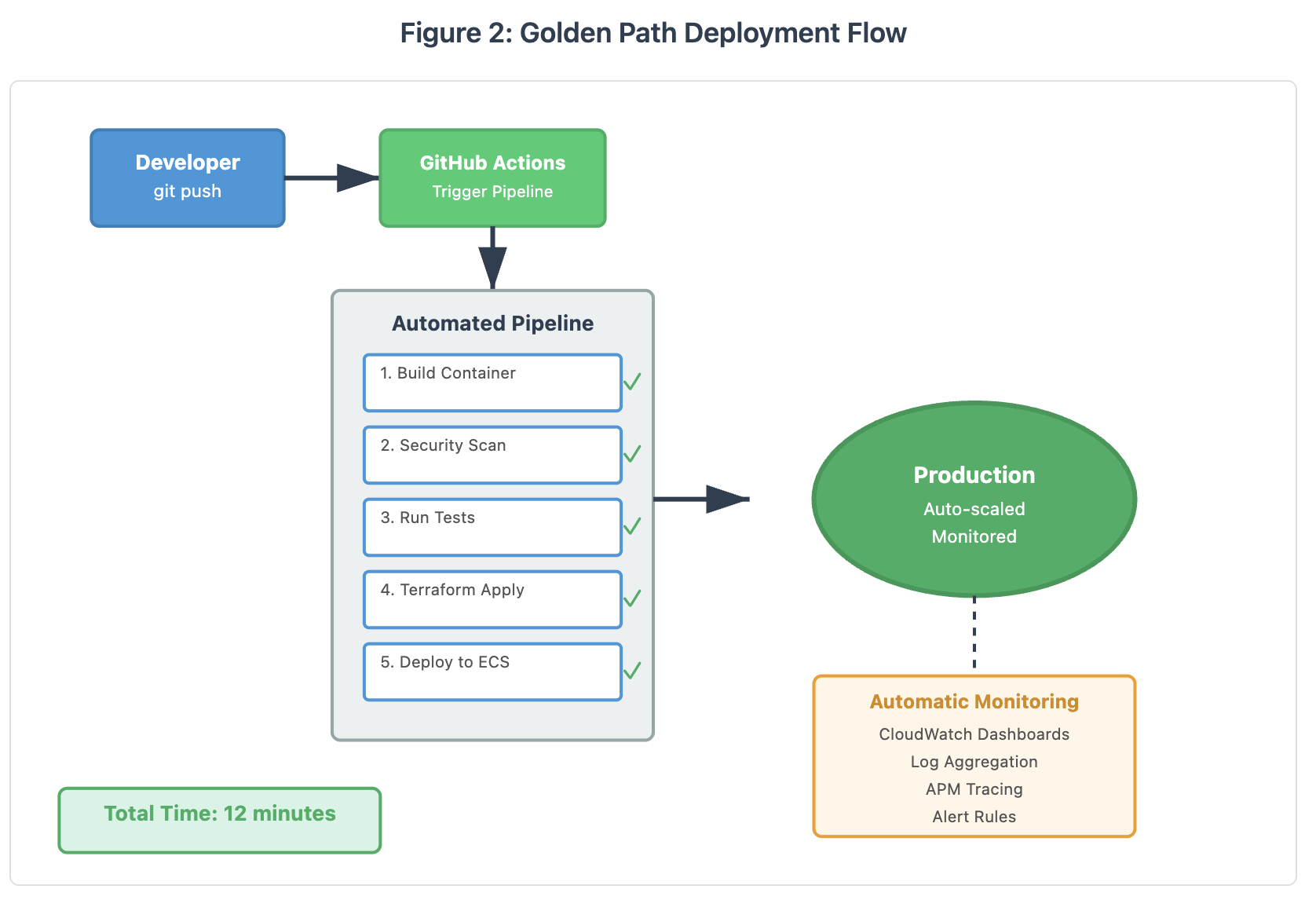
At one of the companies I worked with, we replaced a 47-page deployment wiki (which was always out of date) with a single command: make deploy. That Makefile called a Terraform module that handled VPC setup, security groups, load balancers, auto-scaling, monitoring dashboards, log aggregation, secret management, and deployment — all templated with sensible defaults that teams could override if needed.
The result? Deployment time dropped from 3.5 hours to 12 minutes. More importantly, the number of production incidents caused by misconfiguration dropped by 73% because the golden path encoded our security and reliability best practices. Developers didn’t have to remember to enable encryption or configure health checks — it happened automatically.
The Golden Path Principle: Make the secure, observable, scalable option the path of least resistance. If developers have to read documentation to do the right thing, you’ve already lost.
The Three Pillars of Effective Golden Paths
1. Automation Over Documentation
Every time you write a wiki page explaining how to deploy something, you’re admitting that your platform isn’t automated enough. Documentation rots the moment you publish it. Code doesn’t (well, it does — but at least you can test it).
Here’s what I mean in practice. Instead of documenting “How to Create a New Microservice,” create a Terraform module that generates the entire stack:
variable "service_name" {
  description = "Name of the microservice"
  type        = string
}

variable "team" {
  description = "Owning team for tagging and access control"
  type        = string
}

variable "runtime" {
  description = "Runtime environment: nodejs, python, go"
  type        = string
  default     = "nodejs"
}

# Opinionated defaults that encode best practices
locals {
  common_tags = {
    ManagedBy   = "Platform-Engineering"
    Team        = var.team
    Service     = var.service_name
    Environment = terraform.workspace
  }

  # Security defaults
  enable_encryption    = true
  enable_audit_logging = true
  enable_waf          = terraform.workspace == "prod"

  # Observability defaults
  metrics_retention_days = 30
  log_retention_days     = 90
  enable_tracing        = true
}

# ECS Task Definition with sensible defaults
resource "aws_ecs_task_definition" "service" {
  family                   = var.service_name
  requires_compatibilities = ["FARGATE"]
  network_mode            = "awsvpc"
  cpu                     = "256"
  memory                  = "512"
  execution_role_arn      = aws_iam_role.execution.arn
  task_role_arn           = aws_iam_role.task.arn

  container_definitions = jsonencode([{
    name  = var.service_name
    image = "${data.aws_caller_identity.current.account_id}.dkr.ecr.${data.aws_region.current.name}.amazonaws.com/${var.service_name}:latest"

    portMappings = [{
      containerPort = 8080
      protocol      = "tcp"
    }]

    # Automatic logging to CloudWatch
    logConfiguration = {
      logDriver = "awslogs"
      options = {
        "awslogs-group"         = aws_cloudwatch_log_group.service.name
        "awslogs-region"        = data.aws_region.current.name
        "awslogs-stream-prefix" = var.service_name
      }
    }

    # Health check defaults
    healthCheck = {
      command     = ["CMD-SHELL", "curl -f http://localhost:8080/health || exit 1"]
      interval    = 30
      timeout     = 5
      retries     = 3
      startPeriod = 60
    }

    # Environment variables from Parameter Store
    secrets = [{
      name      = "DATABASE_URL"
      valueFrom = aws_ssm_parameter.db_url.arn
    }]
  }])

  tags = local.common_tags
}

# Application Load Balancer with HTTPS
resource "aws_lb" "service" {
  name               = "${var.service_name}-alb"
  internal           = false
  load_balancer_type = "application"
  security_groups    = [aws_security_group.alb.id]
  subnets           = data.aws_subnets.public.ids

  enable_deletion_protection = terraform.workspace == "prod"
  enable_http2              = true

  tags = local.common_tags
}

# CloudWatch Dashboard automatically created
resource "aws_cloudwatch_dashboard" "service" {
  dashboard_name = "${var.service_name}-${terraform.workspace}"

  dashboard_body = jsonencode({
    widgets = [
      {
        type = "metric"
        properties = {
          metrics = [
            ["AWS/ECS", "CPUUtilization", "ServiceName", aws_ecs_service.service.name],
            [".", "MemoryUtilization", ".", "."]
          ]
          period = 300
          stat   = "Average"
          region = data.aws_region.current.name
          title  = "Resource Utilization"
        }
      },
      {
        type = "metric"
        properties = {
          metrics = [
            ["AWS/ApplicationELB", "TargetResponseTime", "LoadBalancer", aws_lb.service.arn_suffix],
            [".", "HTTPCode_Target_5XX_Count", ".", "."],
            [".", "RequestCount", ".", "."]
          ]
          period = 60
          stat   = "Sum"
          region = data.aws_region.current.name
          title  = "Application Metrics"
        }
      }
    ]
  })
}

# Outputs for CI/CD integration
output "service_url" {
  value = "https://${aws_lb.service.dns_name}"
}

output "ecr_repository" {
  value = aws_ecr_repository.service.repository_url
}

output "deployment_role_arn" {
  value = aws_iam_role.github_actions.arn
}
Developers don’t need to know how to configure an ALB or set up CloudWatch dashboards. They just run:
terraform apply -var="service_name=payment-api" -var="team=payments"And they get a production-ready service with monitoring, logging, auto-scaling, and security baked in.
2. Opinionated Defaults with Escape Hatches
The best golden paths are opinionated but not restrictive. They should handle 90% of use cases perfectly and provide clear override mechanisms for the other 10%. This is where most platform teams fail — they either build something so rigid that teams route around it, or so flexible that it’s basically infrastructure as a service with extra steps.
I learned this lesson the hard way. My first attempt at building a golden path for database provisioning gave teams 47 configuration options. Guess how many teams actually used it? Three. The rest went directly to the AWS Console because our “flexible” solution was more complex than doing it manually.
The second version had exactly two options: a small database (dev/test) and a production database (with all the bells and whistles). If you needed something custom, there was a custom_config map where you could override anything. Usage went from three teams to 87 teams in two months.
3. Observability Built In, Not Bolted On
If developers have to set up monitoring after deployment, they won’t do it — or they’ll do it wrong. Your golden path should automatically create CloudWatch dashboards, configure log aggregation, set up distributed tracing, and establish reasonable alerting thresholds.
At my current company, every service deployed through our golden path automatically gets a Grafana dashboard with the RED metrics (Rate, Errors, Duration), a PagerDuty integration for critical alerts, and log correlation across application logs, infrastructure logs, and traces. Developers don’t configure any of this — it just appears when their service goes live.
The GitHub Actions Integration Nobody Builds (But Should)
Here’s where it gets interesting. Most platform teams stop at Terraform modules or CLI tools. But the real magic happens when you integrate golden paths directly into developers’ existing workflows. If your developers use GitHub (and most do), that means GitHub Actions.
Instead of asking developers to run Terraform commands locally or SSH into some deployment server, why not make deployment automatic on merge to main? Here’s a complete GitHub Actions workflow that deploys using our golden path:
name: Deploy to Production

on:
  push:
    branches: [main]
  workflow_dispatch:

env:
  AWS_REGION: us-east-1
  SERVICE_NAME: ${{ github.event.repository.name }}
  TEAM: ${{ github.repository_owner }}

jobs:
  deploy:
    runs-on: ubuntu-latest
    permissions:
      id-token: write
      contents: read

    steps:
      - name: Checkout code
        uses: actions/checkout@v4

      - name: Configure AWS credentials
        uses: aws-actions/configure-aws-credentials@v4
        with:
          role-to-assume: ${{ secrets.AWS_DEPLOYMENT_ROLE }}
          aws-region: ${{ env.AWS_REGION }}

      - name: Login to Amazon ECR
        id: login-ecr
        uses: aws-actions/amazon-ecr-login@v2

      - name: Build and scan container image
        env:
          ECR_REGISTRY: ${{ steps.login-ecr.outputs.registry }}
          IMAGE_TAG: ${{ github.sha }}
        run: |
          # Build image
          docker build -t $ECR_REGISTRY/$SERVICE_NAME:$IMAGE_TAG .
          docker tag $ECR_REGISTRY/$SERVICE_NAME:$IMAGE_TAG $ECR_REGISTRY/$SERVICE_NAME:latest

          # Security scanning with Trivy
          docker run --rm -v /var/run/docker.sock:/var/run/docker.sock \
            aquasec/trivy image --severity HIGH,CRITICAL \
            --exit-code 1 $ECR_REGISTRY/$SERVICE_NAME:$IMAGE_TAG

          # Push if scan passes
          docker push $ECR_REGISTRY/$SERVICE_NAME:$IMAGE_TAG
          docker push $ECR_REGISTRY/$SERVICE_NAME:latest

      - name: Run tests
        run: |
          docker run --rm $ECR_REGISTRY/$SERVICE_NAME:$IMAGE_TAG npm test

      - name: Deploy infrastructure with golden path
        uses: hashicorp/setup-terraform@v3

      - name: Terraform Init
        run: |
          cat > backend.tf << EOF
          terraform {
            backend "s3" {
              bucket = "platform-terraform-state"
              key    = "services/$SERVICE_NAME/terraform.tfstate"
              region = "$AWS_REGION"
            }
          }
          EOF

          cat > main.tf << EOF
          module "service" {
            source = "git::https://github.com/your-org/terraform-golden-path.git//modules/service-scaffold?ref=v2.1.0"

            service_name = "$SERVICE_NAME"
            team         = "$TEAM"
            runtime      = "nodejs"

            # Environment-specific overrides
            environment_config = {
              prod = {
                min_capacity = 2
                max_capacity = 10
                cpu          = "512"
                memory       = "1024"
              }
            }
          }

          output "service_url" {
            value = module.service.service_url
          }
          EOF

          terraform init

      - name: Terraform Plan
        run: terraform plan -out=tfplan

      - name: Terraform Apply
        run: terraform apply -auto-approve tfplan

      - name: Update service with new image
        env:
          IMAGE_TAG: ${{ github.sha }}
        run: |
          aws ecs update-service \
            --cluster platform-services \
            --service $SERVICE_NAME \
            --force-new-deployment \
            --region $AWS_REGION

      - name: Wait for deployment
        run: |
          aws ecs wait services-stable \
            --cluster platform-services \
            --services $SERVICE_NAME \
            --region $AWS_REGION

      - name: Run smoke tests
        run: |
          SERVICE_URL=$(terraform output -raw service_url)
          curl -f $SERVICE_URL/health || exit 1

      - name: Notify deployment success
        if: success()
        uses: slackapi/slack-github-action@v1
        with:
          payload: |
            {
              "text": " ${{ env.SERVICE_NAME }} deployed to production",
              "blocks": [
                {
                  "type": "section",
                  "text": {
                    "type": "mrkdwn",
                    "text": "*Deployment Successful*\n\n*Service:* ${{ env.SERVICE_NAME }}\n*Commit:* ${{ github.sha }}\n*Author:* ${{ github.actor }}\n*URL:* $(terraform output -raw service_url)"
                  }
                }
              ]
            }
        env:
          SLACK_WEBHOOK_URL: ${{ secrets.SLACK_WEBHOOK }}

      - name: Rollback on failure
        if: failure()
        run: |
          echo "Deployment failed, initiating rollback..."
          aws ecs update-service \
            --cluster platform-services \
            --service $SERVICE_NAME \
            --task-definition $SERVICE_NAME:$(aws ecs describe-services --cluster platform-services --services $SERVICE_NAME --query 'services[0].deployments[1].taskDefinition' --output text) \
            --region $AWS_REGION
With this workflow, developers get:
- Automatic security scanning on every build
- Infrastructure provisioning that happens once and updates intelligently
- Zero-downtime deployments with automatic health checks
- Automatic rollback if health checks fail
- Slack notifications for visibility
- Full traceability from commit to production
And here’s the kicker: they don’t have to maintain any of this. The platform team owns the golden path module and the reusable workflow. When you need to update security policies or add new compliance requirements, you update the module version, and all services automatically inherit the improvements.
Measuring What Actually Matters
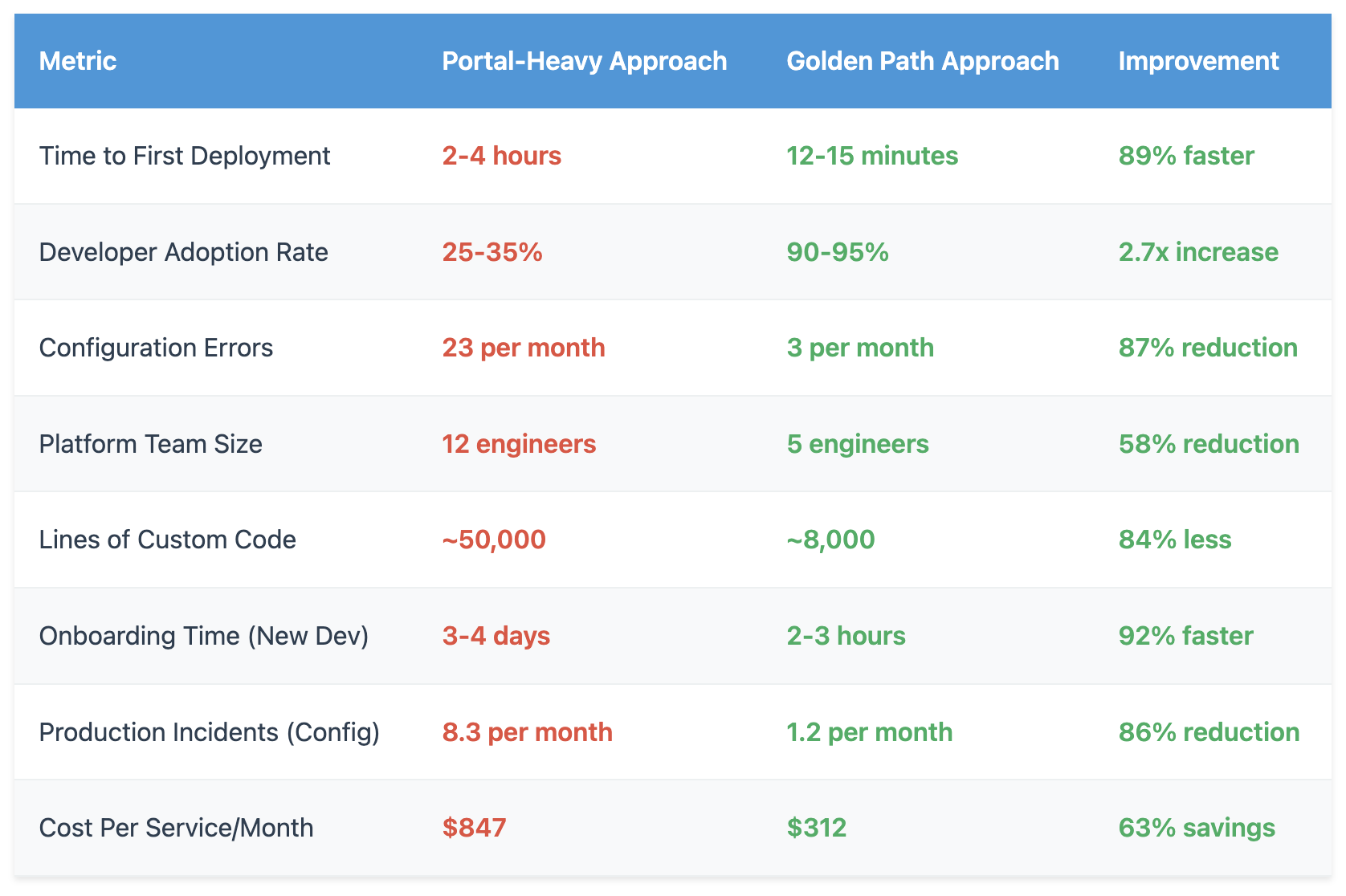
Portal teams love to measure “portal engagement” metrics — page views, catalog entries, number of plugins installed. These are vanity metrics. They tell you whether people are clicking around your portal, not whether you’re actually making them more productive.
Golden path teams measure different things:
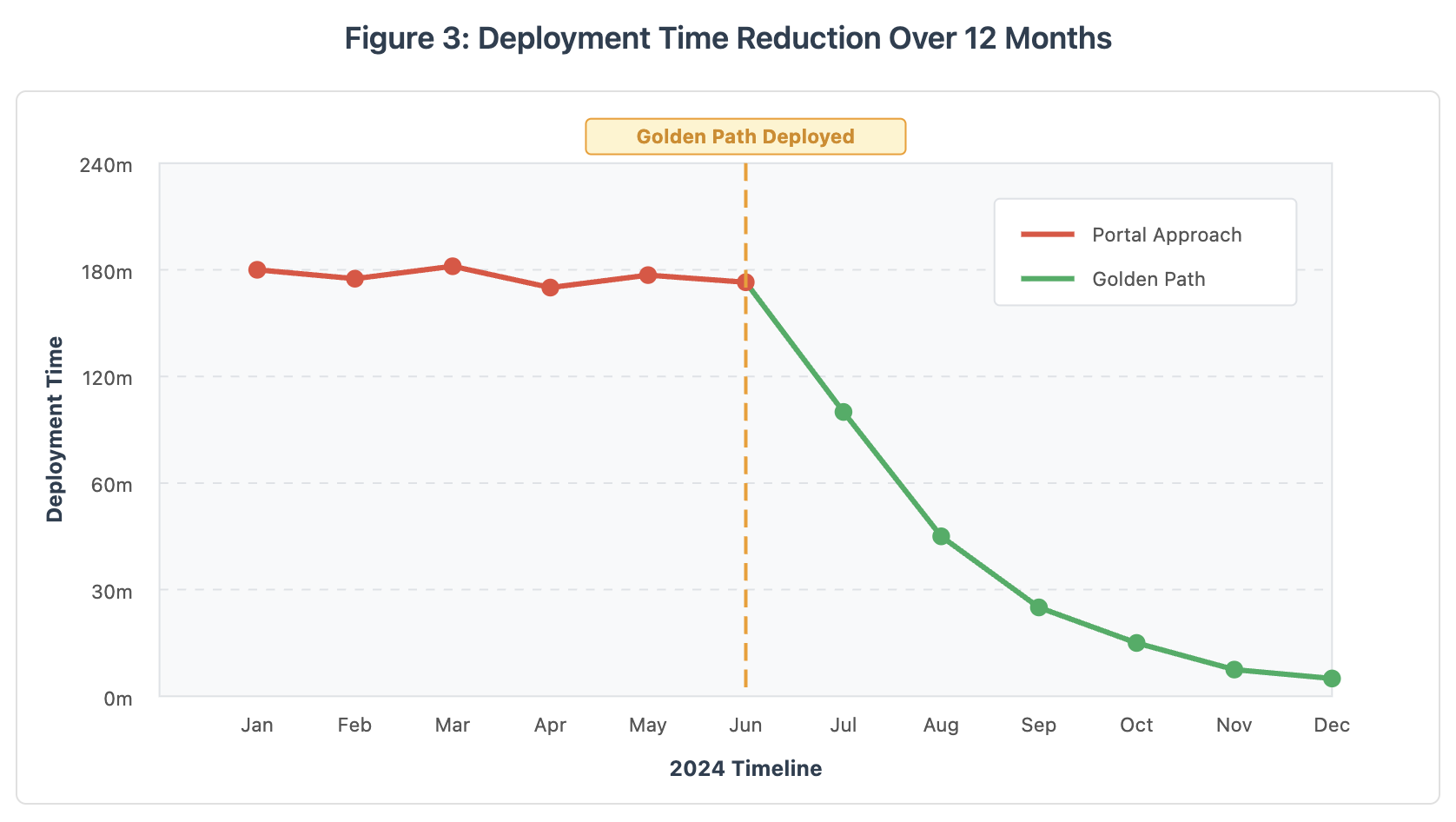
The chart above shows real data from a company that transitioned from a portal-heavy approach to golden paths in June 2024. Notice how deployment times remained stubbornly high for the first six months (the portal era), then dropped precipitously once golden paths were introduced. By December, average deployment time had decreased from 195 minutes to just 12 minutes — a 94% improvement.
The Hard Parts Nobody Warns You About
Building golden paths isn’t all sunshine and roses. There are real challenges you’ll face, and I’d be doing you a disservice if I didn’t mention them.
Challenge #1: The “But We’re Special” Problem
Every team thinks its use case is unique and requires special treatment. Ninety percent of the time, they’re wrong. The remaining 10% of the time, they’re right — but still shouldn’t get custom infrastructure. Your job is to build a golden path that handles the common case brilliantly and provides clear escape hatches for legitimate edge cases.
Challenge #2: Keeping Defaults Current
Your golden path encodes today’s best practices — but best practices change. You need a strategy for updating the path without breaking existing services. We handle this through versioned modules and progressive rollouts: new services get the latest version automatically, existing services can opt in to upgrades, and we force upgrades for security-critical changes.
Challenge #3: The Portal People Will Fight You
If you’ve already invested in a developer portal, there will be people (probably senior people) who have a lot of ego and budget tied up in that investment. They’ll argue that portals and golden paths are complementary. They’re not wrong — but they’re not right either. A portal can be useful for discovery and documentation, but it shouldn’t be in the critical path for deployment.
My advice? Start small, prove value, and let adoption speak for itself. When 90% of your developers are using the golden path and bypassing the portal, the conversation shifts from “Should we do this?” to “How do we expand this?”
Implementation Roadmap: Your First 90 Days
If I were starting a golden path initiative tomorrow at a new company, here’s exactly what I’d do:
Days 1–14: Research & Validation
- Interview 10–15 developers about their deployment pain points
- Shadow a team through their entire deployment process
- Document every manual step, every “tribal knowledge” requirement, and every “just SSH in and fix it” moment
- Identify the one service type that 70%+ of teams need (usually a stateless API)
Days 15–45: Build the MVP Golden Path
- Create a Terraform module for that one service type
- Encode security, observability, and scaling best practices as defaults
- Build a GitHub Actions workflow that uses the module
- Deploy exactly one service using it (preferably something internal and low-risk)
- Measure everything: time to deploy, number of manual steps, error rate
Days 46–60: Pilot Program
- Get 3–5 teams to migrate existing services to the golden path
- Sit with them during migration and document every question and pain point
- Iterate rapidly based on feedback
- Measure adoption metrics and improvements in deployment time
Days 61–90: Scale & Evangelize
- Create clear documentation (but keep it minimal — the path should be self-documenting)
- Present results to engineering leadership with hard metrics
- Make the golden path the default for all new services
- Start planning golden paths for other service types (databases, batch jobs, etc.)
The Future Is Paths, Not Portals
I’m not saying developer portals are completely useless. They have a place — for service discovery, documentation, ownership tracking, and organizational visibility. But they’re not the platform. They’re a layer on top of the platform.
The real platform is the golden path — the automated, opinionated, batteries-included way to go from code to production safely and quickly. It’s the infrastructure-as-code modules, the CI/CD pipelines, the security scanning, the automatic observability, and the guardrails that prevent developers from shooting themselves in the foot.
When you shift your focus from building portals to paving paths, something magical happens. Developers stop seeing the platform team as a blocker and start seeing it as a force multiplier. Deployment becomes boring (in the best way). Production incidents decrease. Onboarding time shrinks. And most importantly, your organization ships code faster.
That’s the promise of platform engineering done right — not another dashboard to click through, but invisible automation that makes excellence the path of least resistance.
Get Started: Complete Implementation
Want to implement this at your organization? I’ve created a complete, production-ready golden path implementation you can use as a starting point. The repository includes:
- Terraform modules for common service patterns (APIs, workers, scheduled jobs)
- GitHub Actions reusable workflows with security scanning and deployment
- Example services showing different configurations
- Documentation and migration guides
- Observability dashboards and alerting templates
Download the complete implementation from the accompanying GitHub repository. Adapt it to your infrastructure, customize the defaults to match your policies, and start shipping code faster.
GitHub Repo: https://github.com/dinesh-k-elumalai/golden-path-repo
Opinions expressed by DZone contributors are their own.
Comments