

Platform Setup: How to Structure Your Infrastructure Repository
Let's kick-start our journey with an exploration of the infrastructure repository, shedding some light on how they are structures.
 ·
·
Join the DZone community and get the full member experience.
Join For FreeWelcome to the Platform Setup series, a collection of blog posts where I'll be sharing my insights and experiences from deploying applications in enterprises. With a particular focus on Banking and Insurance companies.
I've been part of dynamic teams ranging in size from 20 to 40 talented individuals, each one contributing to the grand mosaic of software development. We've journeyed from traditional software development methodologies to the cutting-edge vistas of DevOps, Kubernetes, and beyond, fostering an environment of continuous learning and growth.
However, with new methodologies come new challenges. This transition isn't always a smooth sail, and in this series, we'll delve deep into the unique struggles faced by teams as they migrate towards more modern, streamlined ways of operation.
This immersive series will touch on an array of topics. We'll dive into the nuts and bolts of secrets management, demystify config management, discuss governance and policy enforcement, and explore the crucial areas of observability and developer enablement.
Keeping all these engaging discussions on the horizon, let's kick-start our journey with an exploration of the infrastructure repository. This initial piece, a relatively short yet informative post, will shed light on how we've structured our infra repositories.
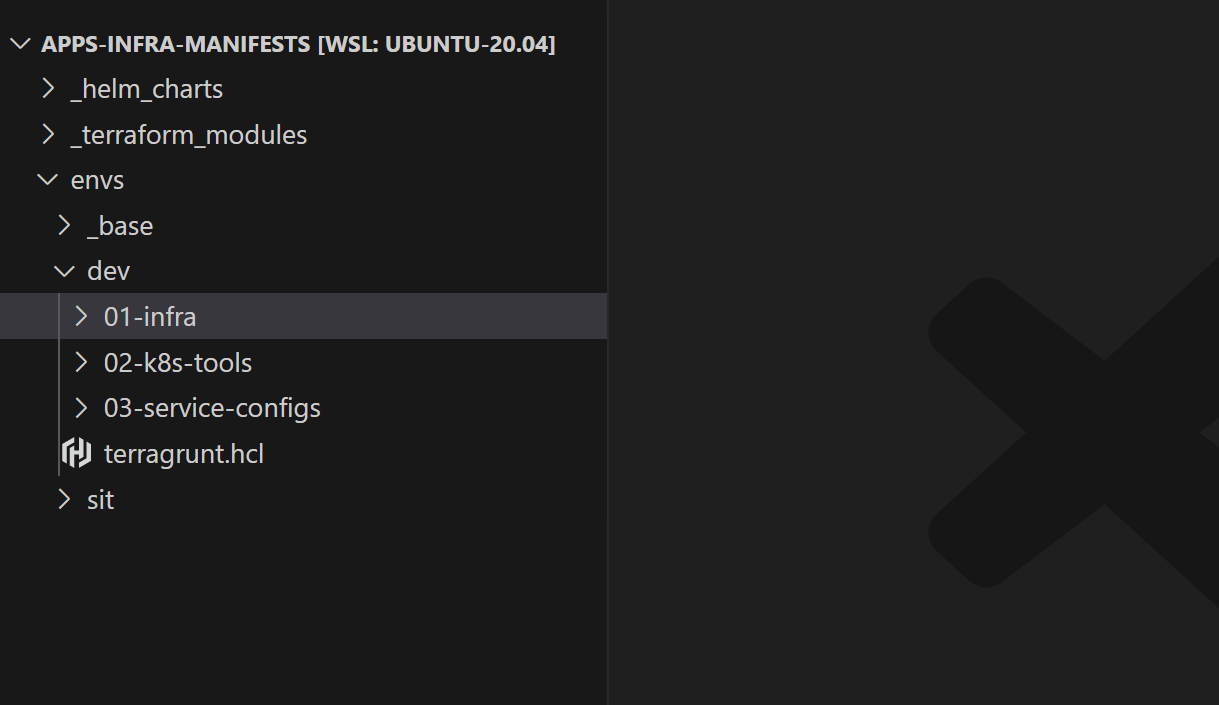
Here is a glimpse of what the repo structure looks like:
In the vast expanse of our technology-driven operations, a typical service project employs four distinct repositories to house our source code.
- Mobile App: This repository is home to our React Native application. The code here is the heart of our mobile app, powering our operations on handheld devices.
- Web App: Next up, we have the Web App repository. This is where we host our ReactJS application.
- Microservices: This is where we host our microservices—small, autonomous services that work together. Each microservice encapsulates a specific business capability, and collectively they bring our applications to life.
- Infrastructure: Herein resides our Infrastructure as Code (IaC). By treating our infrastructure as code, we maintain consistency, enable version control, and reduce manual error, all while streamlining our IT infrastructure processes.
Environments In IAC
A software application goes through various stages of development before reaching the end users. Each stage is accompanied by an environment where different sets of users approve the progression to a higher environment.
In our repo structure, we represent an environment as a directory inside the envs folder, the contents of each folder represent the current state of that environment.
envs/
 |
 |-- dev/
 |
 |-- uat/
 |
 |-- prod/
Let’s now see what goes into these directories.
Infrastructure and Applications
An environment consists of base infrastructure (like VMs, DBs, and other cloud services) on top of which our application runs.
In our repository, infrastructure resides in the 01-infra directory and is defined using IAC tools (like Terraform). As we use Kubernetes as the defacto base infra layer for orchestrating containerized applications.
All our software applications reside in these three folders and are installed using Helm:
- 02-k8s-tools: Contains a set of cloud-native tools like Istio, Prometheus, OPA, etc.…which helps us manage the Kubernetes clusters
- 03-dev-tools: Contains a set of dev tools like PGAdmin, and Keycloack, which helps developers in their development activity. Note: The segregation between
02-k8s-tools&03-dev-toolsis totally optional. - 04-services: Contains all the services required to run the application.
The diagram below shows how we segregate infrastructure and applications.
envs/
 |
 |-- dev/
    |
    |-- 01-infra/
    |   |-- 01-networking/
    |   |-- 02-rds/
    |   |-- 03-eks/
    |
    |-- 02-k8s-tools/
    |   |-- 01-opa-gatekeeper/
    |   |-- 02-istio/
    |   |-- 03-fluent-bit/
    |
    |-- 03-dev-tools/
    |   |-- 01-keycloak/
    |   |-- 02-pg-admin/
    |
    |-- 04-services/
        |-- 01-serviceA/
        |-- 02-serviceB/
Why Prefix Numbers?
In our repository structure, directories are prefixed with numbers. This is optional, but it provides a visual hierarchy and a logical order for the creation and deletion of environment components.
Keeping Your Code DRY (Don't Repeat Yourself)
Up until now, we have seen how environments and applications are organized using directories, but what goes inside each application/infra directory? Where is the actual IAAC code written?
In order to maintain a DRY codebase and avoid code duplication, the code is organized into modules or packages that can be reused.
In the 01-infra directory, the concept of terraform modules is used to encapsulate infrastructure code that can be reused across different environments. Terraform modules are stored under the top-level directory called terraform-modules.
Similarly, for applications directories. Helm charts are used, and these charts are stored in the helm-charts directory.
An organization can create its own terraform modules or helm charts by building on top of existing open-source modules and charts to suit its specific needs.
The diagram below shows how we use Terraform modules and Helm charts.
helm-charts/
 |
 |-- service-chart/
 |
 |-- opa-gatekeeper-chart/
 |
 |-- keycloak-chart/
 |
 |-- nginx-ingress-controller-chart/
 |
 terraform-modules/
 |
 |-- networking/
 |
 |-- redis/
 |
 envs/
 |
 |-- dev/
    |
    |-- 01-infra/
    |   |-- 01-networking/
    |   |   |-- terragrunt.hcl # Refers to ../../../../terraform-modules/networking
    |   |-- 02-rds/
    |
    |-- 02-k8s-tools/
    |   |-- 01-opa-gatekeeper/
    |   |   |-- values.yaml # Refers to ../../../../helm-charts/opa-gatekeeper-chart
    |   |-- 02-istio/
    |
    |-- 03-dev-tools/
    |   |-- 01-keycloak/
    |   |   |-- values.yaml # Refers to ../../../../helm-charts/keycloak-chart
    |   |-- 02-pg-admin/
    |
    |-- 04-services/
        |-- 01-serviceA/
        |   |-- values.yaml # Refers to ../../../../helm-charts/service-chart
        |-- 02-serviceB/
            |-- values.yaml # Refers to ../../../../helm-charts/service-chart
Within each application or infrastructure directory, there are just configuration and CI/CD files. No IAC code is present in this directory.
These config files are used with the terraform module or Helm charts to create the actual infrastructure. This can be compared to calling a function with parameters, where the function to be called is defined inside helm-charts or terraform-modules directory, and the actual call to the function exists in the infra/application directory.
Let’s now see how we manage common configuration.
Managing Common Configuration
In complex systems, it's quite common to have configurations that are shared across different components of the infrastructure and applications. Organizing these configurations efficiently can be challenging but crucial for maintainability and understanding the system's behavior.
In our repository structure, these shared configurations are identified and stored in dedicated _base directories. This helps in reducing redundancy and maintaining consistency across the components or applications.
Let's dive into this in more detail:
- Common configuration per environment: If there is a configuration common across an environment (like a cloud region or an AWS role), it is stored in the
_basedirectory under an environment directory likedev. This makes it accessible to all components and applications in that environment. - Common configuration across individual infrastructure components or applications: If there's a configuration common to individual infrastructure components or applications (like a Kubernetes namespace or cloud credentials), it is stored in the
_basedirectory, which is present for every application and infrastructure directory. This makes the shared configuration easily accessible to all services.
envs/
 |
 |-- dev/
    |-- _base/
    |
    |-- 01-infra/
    |   |-- _base/
    |   |-- 01-networking/
    |   |-- 02-rds/
    |   |-- 03-eks/
    |
    |-- 02-k8s-tools/
    |   |-- _base/
    |   |-- 01-opa-gatekeeper/
    |   |-- 02-istio/
    |   |-- 03-fluent-bit/
    |
    |-- 03-dev-tools/
    |   |-- _base/
    |   |-- 01-keycloak/
    |   |-- 02-pg-admin/
    |
    |-- 04-services/
        |-- _base/
        |-- 01-serviceA/
        |-- 02-serviceB/
It's also important to note the precedence of the configurations. Any configuration defined in the component or application directory itself has the highest priority and will override what is defined in the respective _base directory. This allows for more specific configurations when needed without disturbing the shared configuration's general consistency.
This approach ensures a balance between avoiding redundancy and allowing customizations where necessary, making the system robust and adaptable.
Conclusion
In conclusion, we've explored how to effectively structure our infrastructure repositories to manage complex environments and application deployments. We've examined the purpose of different directories and how shared configurations are organized for maintainability and adaptability.
Join me in the next blog post, where we'll delve deeper into Infrastructure as Code, specifically focusing on using Terraform and Terragrunt for infrastructure management. We'll discuss how these powerful tools can automate and simplify the provisioning of cloud resources and explore how they fit into the repository structure we've outlined in this post.
Stay tuned for more insights and practical tips on optimizing your platform setup. See you in the next post!
Published at DZone with permission of Sharad Regoti. See the original article here.
Opinions expressed by DZone contributors are their own.
Comments