

Print Even and Odd Numbers Using (Two Threads) Completable Future and Executor Service
A code snippet to print Even and Odd numbers using multi-threading.
By
 ·
·
Code Snippet
·
·
Code Snippet
Likes
(4)
Likes
There are no likes...yet! 👀
Be the first to like this post!
It looks like you're not logged in.
Sign in to see who liked this post!
Comment
Save
9.4K Views
Join the DZone community and get the full member experience.
Join For FreeYou might have seen this question being asked in so many interviews.
We are going to achieve this using Java 8 completable future and executor service.
- We have created two single-thread executors and assigned a name to them.
- Using IntStream we are iterating from 1 to 101.
- Using two completable futures to check odd or even and calling join after the call so that the completable future will finish its execution.
- Shutting down the executor services in the end.
Java
import java.util.concurrent.CompletableFuture;
import java.util.concurrent.ExecutorService;
import java.util.concurrent.Executors;
import java.util.stream.IntStream;

public class Solution{

	public static void main(String[] args) {
		ExecutorService firstExecutorService = Executors.newSingleThreadExecutor(r -> {
			Thread t = new Thread(r);
			t.setName("first");
			return t;
		});
		ExecutorService secondExecutorService = Executors.newSingleThreadExecutor(r -> {
			Thread t = new Thread(r);
			t.setName("second");
			return t;
		});
		IntStream.range(1, 101).forEach(num -> {
			CompletableFuture<Integer> thenApplyAsync = CompletableFuture.completedFuture(num).thenApplyAsync(x -> {

				if (x % 2 == 1) {
					System.out.println(x + " " + Thread.currentThread().getName());
				}
				return num;
			}, firstExecutorService);
			thenApplyAsync.join();

			CompletableFuture<Integer> thenApplyAsync2 = CompletableFuture.completedFuture(num).thenApplyAsync(x -> {
				if (x % 2 == 0) {
					System.out.println(x + " " + Thread.currentThread().getName());
				}
				return num;
			}, secondExecutorService);
			thenApplyAsync2.join();
		});

		firstExecutorService.shutdown();
		secondExecutorService.shutdown();
	}

}
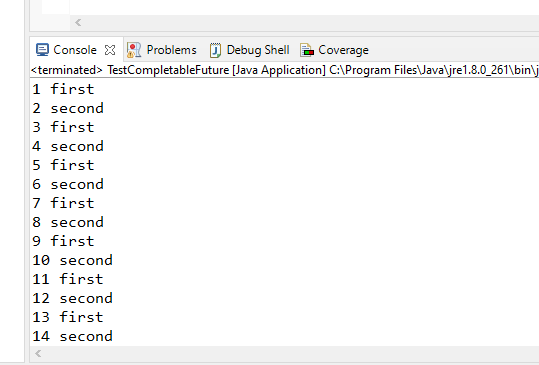
If you run the above code you will see the following logs in the console.
Executor (software)
Opinions expressed by DZone contributors are their own.
Comments