

Privacy-Conscious AI Development: How to Ship Faster Without Leaking Your Crown Jewels
AI speeds up development can leak secrets when use third-party tools. Layer GHAS with Grype for local/offline vulnerability scanning.
 ·
·
Join the DZone community and get the full member experience.
Join For FreeAI-assisted development is accelerating software delivery — but it also amplifies a question many teams still ignore: what happens to your sensitive data when you use AI tools?
API keys, customer PII, internal business logic, production logs — once shared with third-party AI services, you may lose control over where that data is stored, who can access it, and how it’s used. Even with reputable providers, data may be logged or cached outside your visibility; support teams may access snippets; and content may be used to improve models unless you explicitly opt out. The result is elevated compliance risk (e.g., GDPR/CCPA) and potential competitive exposure if proprietary logic becomes training data.
Three Critical Data Risks
API Keys & Credentials
Sharing secrets can lead to loss of control if they are logged, cached, or exposed to unauthorized access.
User Data & Personal Information (PII)
Sending PII through AI tools can trigger compliance violations and increase the risk that sensitive data is retained or reused in unintended ways.
Business Logic & Proprietary Code
Confidential code and internal processes can leak intellectual property or create downstream confidentiality risks if retained by third parties.
This article outlines a practical approach to privacy-conscious AI development, compares web-based assistants with CLI assistants, and explains how to combine GitHub Advanced Security (GHAS) with local tools like Grype for a layered, developer-friendly defense. It is intended for engineering leaders and hands-on developers, including React/TypeScript teams.
What “Privacy-Conscious Development” Really Means
Privacy-conscious development is the practice of designing workflows, tools, and code to minimize exposure of sensitive information across the full lifecycle — from local IDE to CI/CD to production runtime. It is grounded in several non-negotiables:
- Data minimization: Share the least amount of data necessary, only when necessary.
- Explicit boundaries: Define what must never leave your environment (e.g., secrets, PII, cryptographic keys, proprietary algorithms).
- Defense in depth: Use layered controls across people, process, and tooling — no single silver bullet.
- Continuous verification: Treat privacy like security: measure, alert, and continuously improve.
Why It Matters Now
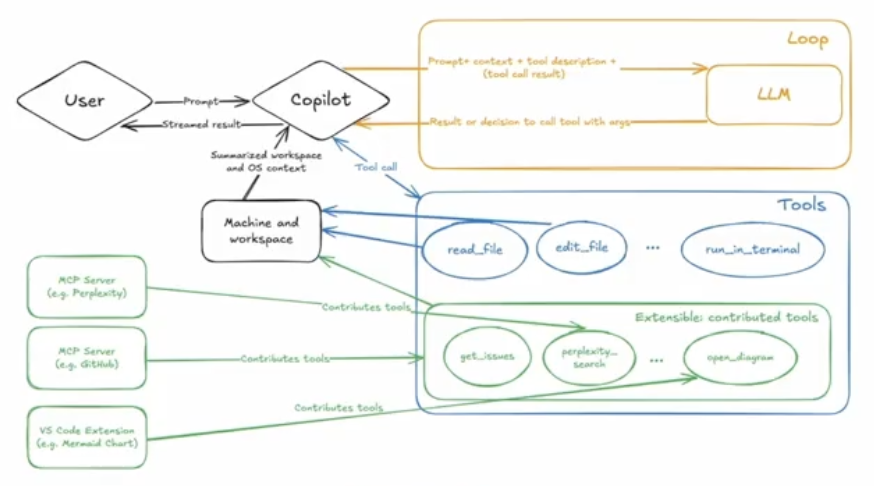
Recent incidents show why privacy must be engineered into AI-enabled development. For example, GitHub disclosed issues involving Copilot Chat where content retrieved into prompts (such as GitHub issues) could be abused via prompt injection. Maliciously crafted issue content included hidden instructions designed to trick models into performing risky actions.
The lesson is not “don’t use AI.” It is this: assume creative adversaries will try to turn your tools against you — and build guardrails accordingly.
Web vs. CLI Assistants (Through a Privacy Lens)
Web Chat Assistants (Browser-Based)
Many teams still follow an ad hoc workflow: copy from IDE → paste into web chat → copy the result back.
Trade-offs and risks:
- Manual context sharing: Developers decide — often under time pressure — what is safe to paste.
- Accidental oversharing: Endpoint URLs, stack traces, config fragments, tokens, and internal identifiers can slip in easily.
- No systematic exclusions: There is typically no enforceable mechanism to prevent sensitive files or patterns from being shared.
CLI Assistants (Local, File-System-Aware)
CLI assistants (tools that operate against your local repository context) can be configured once and applied consistently.
Advantages:
- Configure once: Privacy boundaries are enforced automatically.
- Systematic exclusions: Files matching exclusion patterns can be blocked by default.
- Better context with guardrails: The tool understands project structure without requiring developers to paste large blocks of code into a browser.
A Pragmatic Hybrid Model
- Use web chat for general Q&A and design discussions.
- Use a CLI assistant for code-aware tasks with strict exclusions for secrets and sensitive artifacts.
- Formalize boundaries in repository-level configuration so rules apply to every engineer.
GitHub Advanced Security (GHAS): Shift Left Without Giving Up Privacy
GHAS helps teams catch issues earlier within their normal GitHub workflow.
Core Capabilities
- Code scanning (CodeQL and supported third-party tools): Detects injection risks (SQLi/XSS), insecure patterns, and vulnerable flows.
- Secret scanning + push protection: Detects leaked tokens and can block commits before secrets enter the repository.
- Dependency review / Dependabot: Highlights vulnerable dependency changes and manages update workflows.
- Security overview & campaigns: Help leaders prioritize and reduce security debt across repositories.
- Actionability: Alerts include guided remediation; Copilot Autofix can suggest patches for developer review.
Privacy angle: GHAS complements privacy-conscious development because analysis occurs within your repositories and CI/CD workflow — without requiring developers to paste sensitive context into third-party web tools.
Grype: Local-First, Offline-Capable Vulnerability Scanning
Some environments require scanning that never leaves your control — especially regulated or restricted networks.
What Grype Scans
- Container images, directories, and archives
- OS packages and application dependencies
Scoring and Prioritization
- Uses vulnerability data sources such as NVD and GitHub Advisories
- Can incorporate EPSS to prioritize by likelihood of exploitation
Developer Experience and CI Usage
- Simple CLI; supports machine-readable output (JSON/XML)
- Can fail builds based on severity thresholds (e.g., block Critical/High)
- Supports exclusions to reduce noise and manage false positives
Privacy Posture
- Runs locally; vulnerability database is cached locally
- Can operate offline with manual database updates
A Layered Model That Works
A strong baseline approach:
- GHAS in PRs and CI (policy, governance, early feedback), plus
- Grype locally (and optionally in CI) for local-first scanning and restricted workloads
This provides breadth, depth, and improved privacy outcomes without relying on copy-paste workflows.
Secure-by-Default Guardrails for Web Apps and APIs
Privacy is not only about tooling — it is also about what you ship.
Security Headers and Configuration
- Disable verbose errors/debug output in production
- Set headers such as CSP, HSTS, and X-Content-Type-Options
Authentication and Session Hygiene
- Rotate session IDs on login
- Set cookies with HttpOnly, Secure, and SameSite=Strict
- Rate-limit authentication and recovery flows; lock out after repeated failures
Injection Defenses
- Use parameterized queries (never build SQL with string concatenation)
- Sanitize user-controlled HTML; prefer
textContentoverinnerHTML
Secret Management
- Never hardcode secrets
- Use environment variables or a managed secret store
- Protect secrets in CI with scanning and push protection
Outbound Call Hygiene
- Allowlist external hosts to reduce SSRF risk
- Require HTTPS by default
Handling Ambiguous Cases Safely
Ambiguity is where leaks happen — so define safe defaults.
“Paste your kubeconfig so I can help.”
Safer: decline. Provide local validation steps. Share only a redacted template if necessary.
“Can you analyze this production log?”
Safer: require local redaction first. Share aggregates or synthetic samples externally.
“Give the model repo access for better context.”
Safer: use a minimal sandbox repository, read-only access, strict exclusions, time-bound tokens, and audit/revocation controls.
Guidance by Role
For Developers
- Configure CLI exclusions once; never paste secrets
- Run local scans (Grype) before PRs
- Treat outbound URLs as untrusted inputs
For Tech Leads / Principal Engineers
- Standardize repository templates with GHAS defaults, secret scanning, and privacy-aware ignore patterns
- Add PR gates for Critical/High issues
- Establish allowlists for outbound calls
For Security and Compliance Leaders
- Put vendor agreements in place (no training on your data; clear retention/deletion terms)
- Monitor organization-level risk through GHAS
- Document data flows for audits
Putting It All Together: A Pragmatic Rollout Plan
1. Start with Guardrails You Control
- Standardize repository templates with GHAS (CodeQL, dependency scanning, secret scanning, push protection)
- Add privacy-aware ignore/exclude patterns for AI CLI tools
2. Move High-Risk Work Local
- Use Grype locally and in CI where appropriate
- Keep sensitive artifacts inside your environment
- Prefer CLI assistants for code-aware tasks; reserve web chat for general Q&A
3. Teach the “Why,” Not Just the “What”
- Document ambiguous-case examples and approved safe defaults
- Run short sessions on getting high-quality AI help without sharing secrets
4. Measure Outcomes
- Target: zero secrets committed (via push protection)
- Track MTTR for GHAS findings; enforce remediation windows for Critical/High issues
- Verify security posture improvements for AI-suggested changes
Conclusion
You do not need to choose between speed and safety. With a privacy-first mindset, a hybrid web/CLI model, GHAS embedded in your PR workflow, and local-first scanning via Grype, you can confidently use AI to accelerate delivery — without risking your competitive edge or customer trust.
The best time to put these guardrails in place was yesterday. The second-best time is now.
Opinions expressed by DZone contributors are their own.
Comments